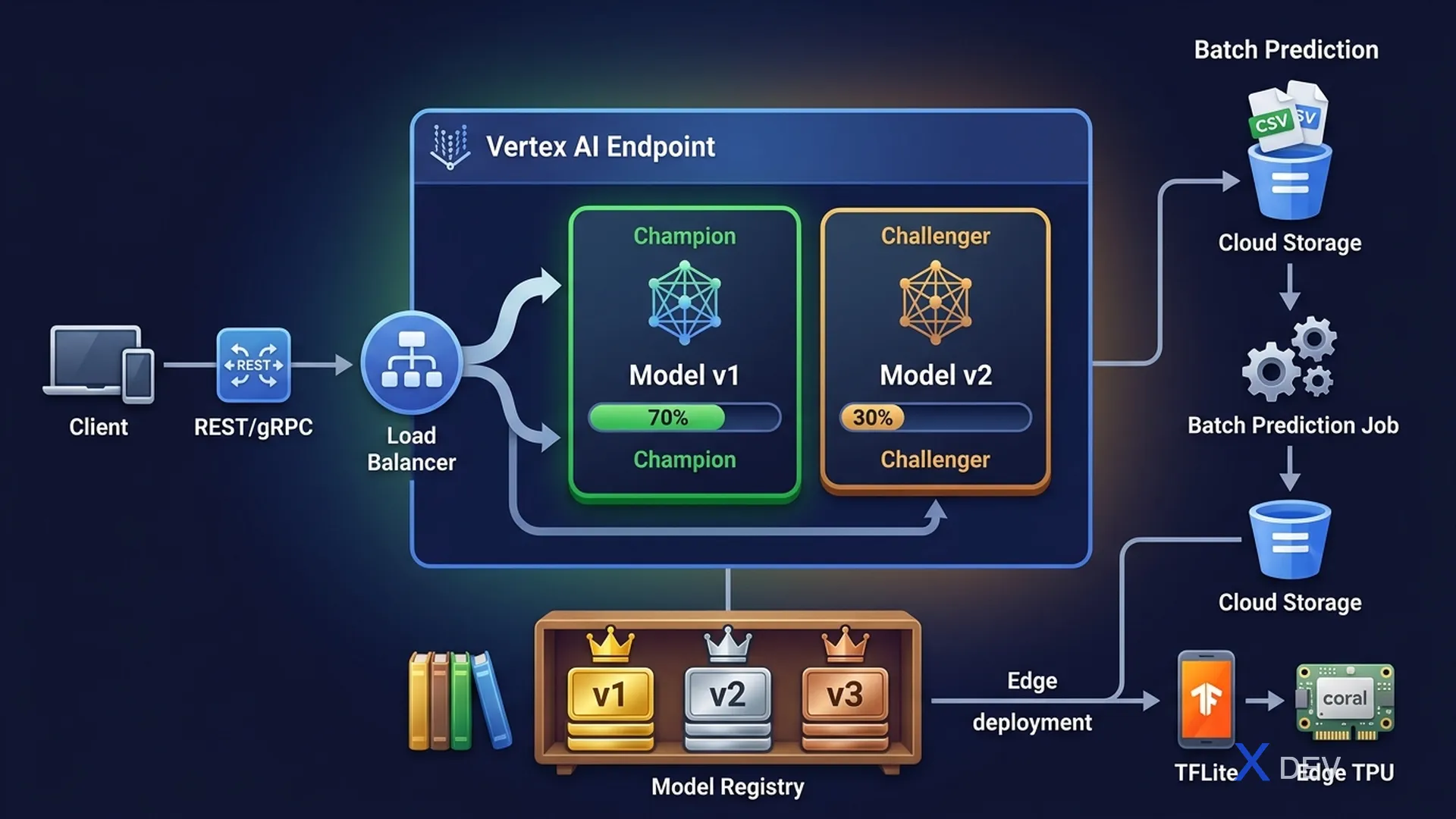
Vertex AI Deployment: Online Prediction, Batch Prediction, traffic splitting, and edge deployment
1. Prediction Types on Vertex AI
| Type | Latency | When to Use |
|---|---|---|
| Online Prediction | Milliseconds (sync) | Real-time apps, user-facing APIs |
| Batch Prediction | Minutes/Hours (async) | Large datasets, scheduled scoring |
| Streaming Prediction | Near real-time | Pub/Sub events + Dataflow + Vertex AI |
2. Vertex AI Endpoints
Vertex AI Endpoint Architecture:

Client Request
    ↓
Vertex AI Endpoint (load balancer)
    ├── Model Version A (70% traffic)
    │       └── Deployed Model (e.g., v1.0)
    └── Model Version B (30% traffic)  ← Canary/A-B test
            └── Deployed Model (e.g., v1.1)
Each Endpoint can have multiple model versions with traffic splitting — used for A/B testing and canary deployments.
| Feature | Details |
|---|---|
| Dedicated Endpoint | Dedicated resources, lowest latency, higher cost |
| Shared Endpoint | Multi-tenant, lower cost, potential cold start |
| Explanation | Enable Vertex Explainability per deployed model |
| Min/Max Replicas | Autoscaling based on request rate |
| GPU allocation | Specify GPU type (NVIDIA T4, A100) per deployment |
Exam tip: Traffic splitting in Vertex AI Endpoints is how you implement Canary deployment or A/B testing. For questions about "roll out new model version safely" → Traffic splitting (e.g., 90% old, 10% new).
3. Batch Prediction
| Property | Value |
|---|---|
| Input | Cloud Storage (CSV, JSON, JSONL, TFRecords, Avro) |
| Output | Cloud Storage (predictions as JSON/CSV) |
| No Endpoint needed | Runs directly from Model Registry, no persistent endpoint |
| Auto-scaling | Scales to zero when done (cost-efficient) |
| Accelerators | Supports GPU/TPU for batch inference |
4. Model Versioning & Registry
Vertex AI Model Registry:

Model: churn-predictor
├── v1 (Logistic Regression)  ← Champion in production
│   - Accuracy: 0.87
│   - Deployed to: endpoint/prod (70% traffic)
│
└── v2 (XGBoost)              ← Challenger
    - Accuracy: 0.91
    - Deployed to: endpoint/prod (30% traffic)

After validation: promote v2 to Champion
5. Edge Deployment
| Platform | Solution |
|---|---|
| Mobile (Android/iOS) | TFLite + Vertex AI model export |
| Edge devices (IoT) | TFLite Micro / Edge TPU (Coral) |
| On-premise servers | TF Serving in Docker container |
| Kubernetes | KServe (formerly KFServing) on GKE |
6. Practice Questions
Q1: A company needs to score 50 million customer records for churn risk. Results are needed within 2 hours but not in real time. Which Vertex AI prediction option is MOST cost-effective?
- A) Online Prediction with high replica count
- B) Batch Prediction ✓
- C) Streaming prediction via Dataflow
- D) Deploy on dedicated GPU endpoint
Explanation: Batch Prediction is designed for large-scale asynchronous scoring. It scales compute resources up during the job and back to zero when done, with no persistent endpoint cost. Online Prediction would be wasteful since real-time response isn't needed for batch scoring.
Q2: A team is deploying a new model version. They want to gradually route 10% of production traffic to the new version while the old version handles 90%, allowing comparison of performance metrics before full rollout. Which Vertex AI feature enables this?
- A) Model Registry versioning
- B) Traffic splitting on Vertex AI Endpoints ✓
- C) Batch Prediction comparison
- D) Vertex AI Experiments
Explanation: Vertex AI Endpoints support deploying multiple model versions simultaneously with configurable traffic splits (e.g., 90%/10%). This enables canary deployments and A/B testing to compare live performance before committing to a full rollout.
Q3: A retail company wants to detect product defects on a factory floor without network connectivity to cloud. Which deployment approach should they use?
- A) Vertex AI Online Prediction Endpoint
- B) AutoML Edge Model deployed to device using TFLite ✓
- C) BigQuery ML batch prediction
- D) TF Serving on Cloud Run
Explanation: Edge deployment with TFLite (or AutoML Edge Model) runs inference locally on the device without network connectivity. TFLite supports on-device inference for computer vision models, suitable for factory floor equipment with no internet access.