1. Healthcare Microservices Architecture Overview
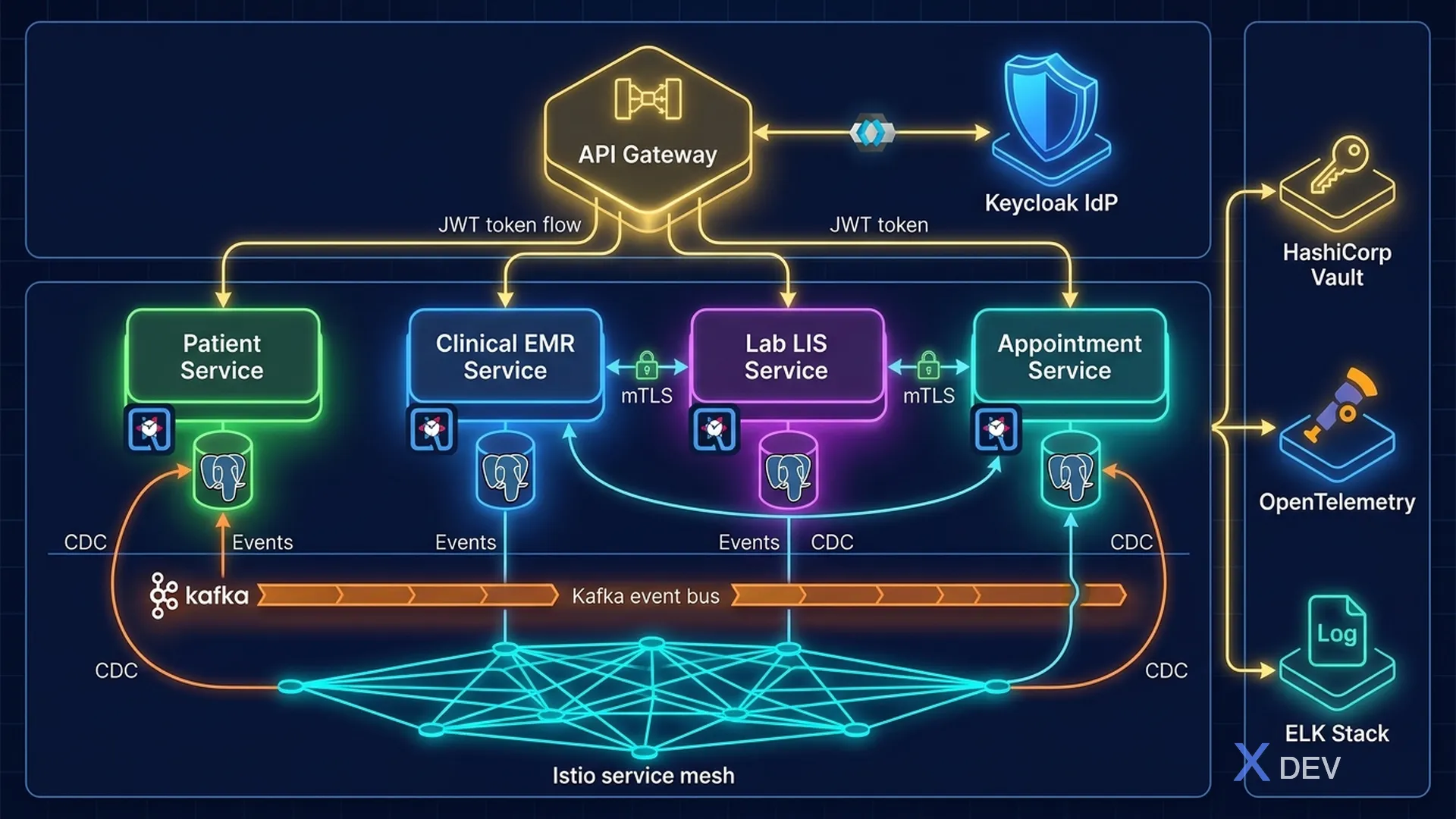
1.1. Why Microservices for Healthcare?
The traditional (monolithic) health system faces many challenges:
- Downtime affects the whole: Error of one module (lab) affects the entire HIS
- Difficult to scale: Cannot scale a module with high load (EMR) alone without scaling the whole system
- Security blast radius is large: A vulnerability that can compromise all data
- Difficult to update: Security patch requires complete redeploy
Microservices solve it by:
- Isolation: Each service has its own database, breaching one service does not affect another service
- Independent deployment: Patch security for each service without affecting the system
- Selective scaling: Scale service with high demand (appointment booking during peak hours)
- Technology diversity: Each service chooses the most suitable tech stack
1.2. Healthcare Domain Services
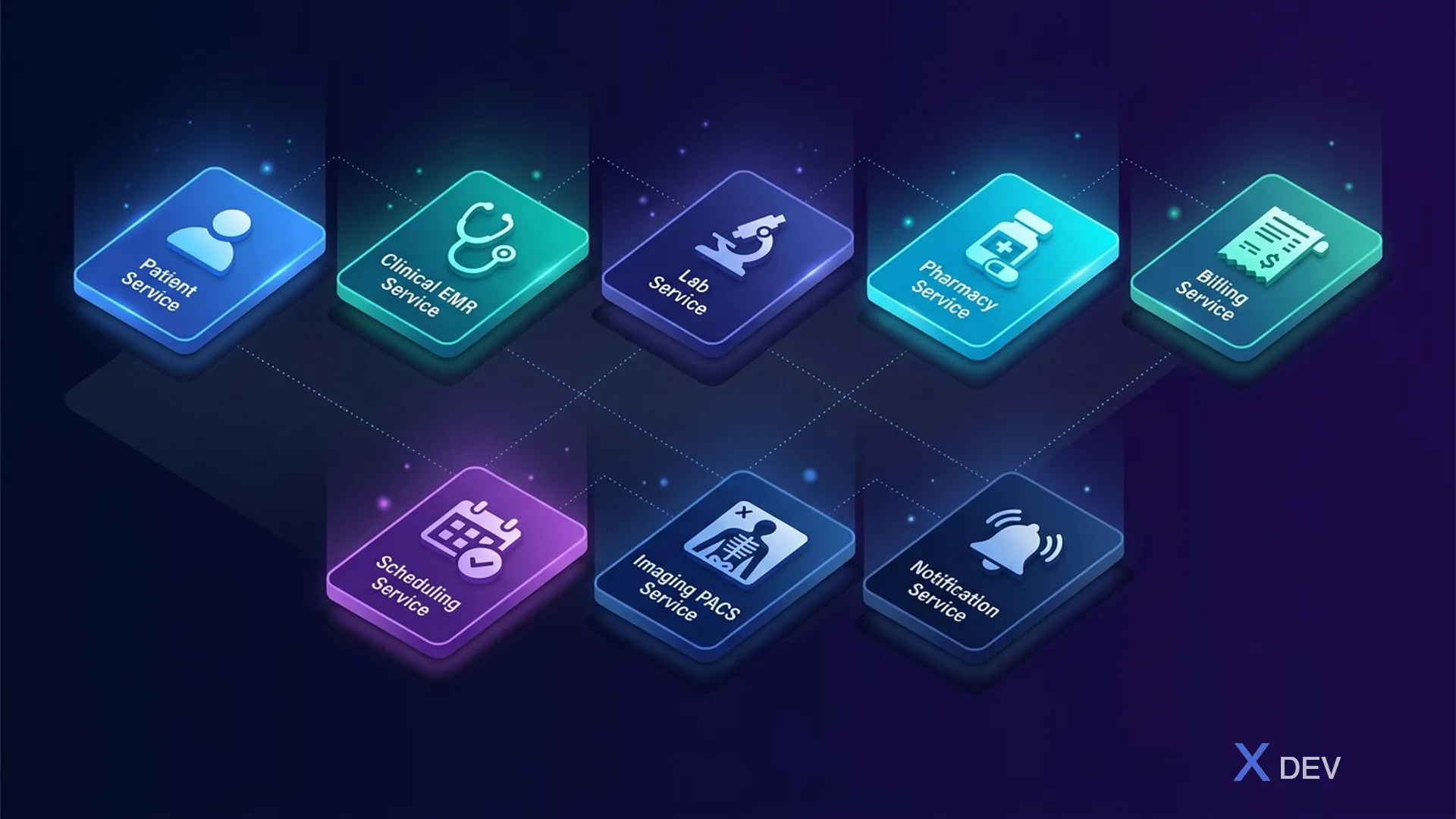
Core Services:
| Service | Main function |
|---|---|
| Patient Service | Patient Registry, Demographics |
| Clinical Service (EMR) | Encounters, Diagnosis, Notes, Vitals |
| Lab Service (LIS) | Orders, Results, Specimens, Reports |
| Pharmacy Service | Prescriptions, Dispensing, Drug DB |
| Billing Service | Invoices, Insurance, Claims, Payments |
| Scheduling Service | Appointments, Calendar, Waitlist |
| Imaging Service (RIS/PACS) | Studies, Reports |
| Notification Service | SMS/Email, Push, Alerts |
2. Reference Architecture: Secure Healthcare Platform
2.1. High-Level Architecture
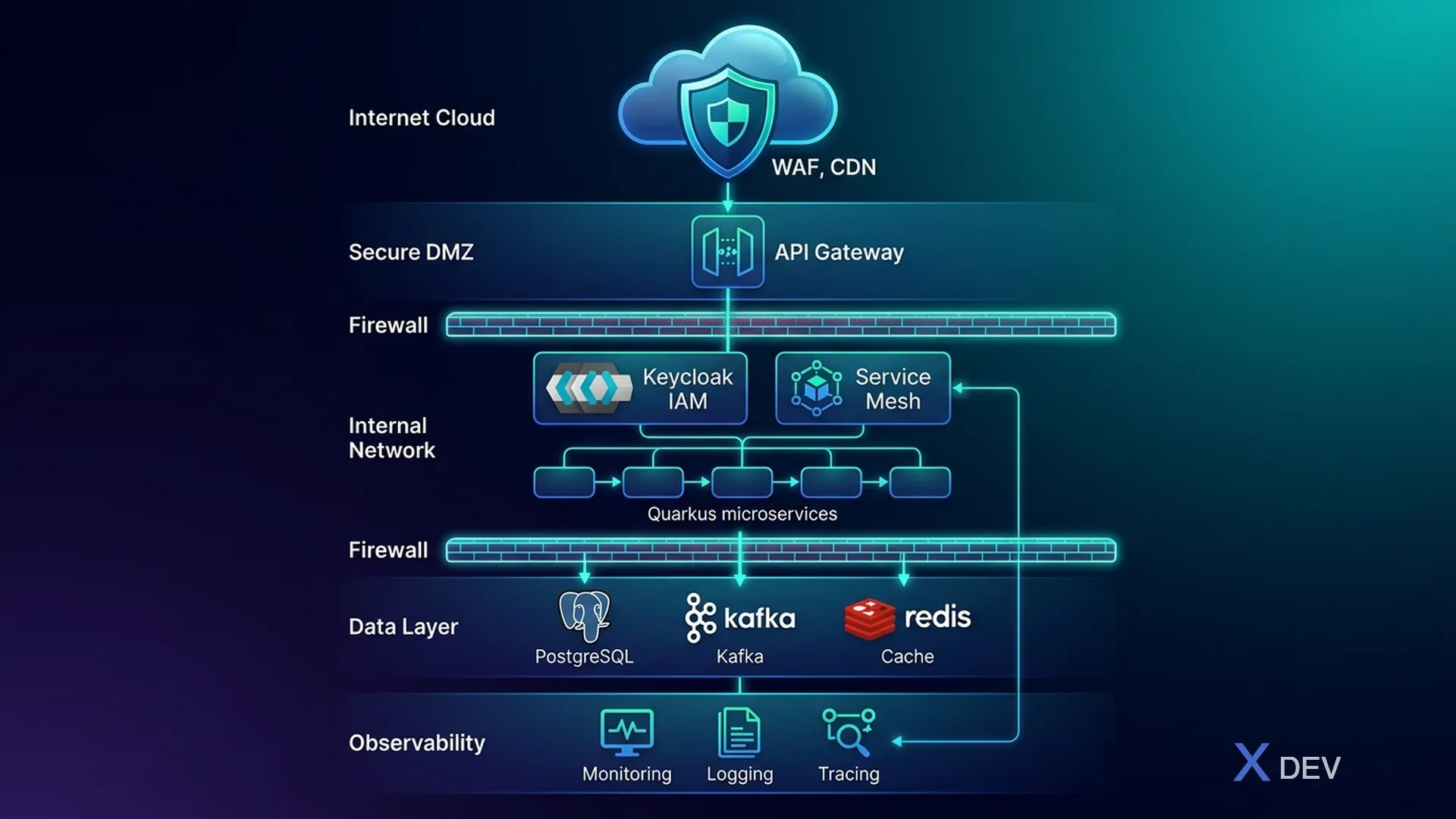
2.2. Network Segmentation (Defense-in-Depth)
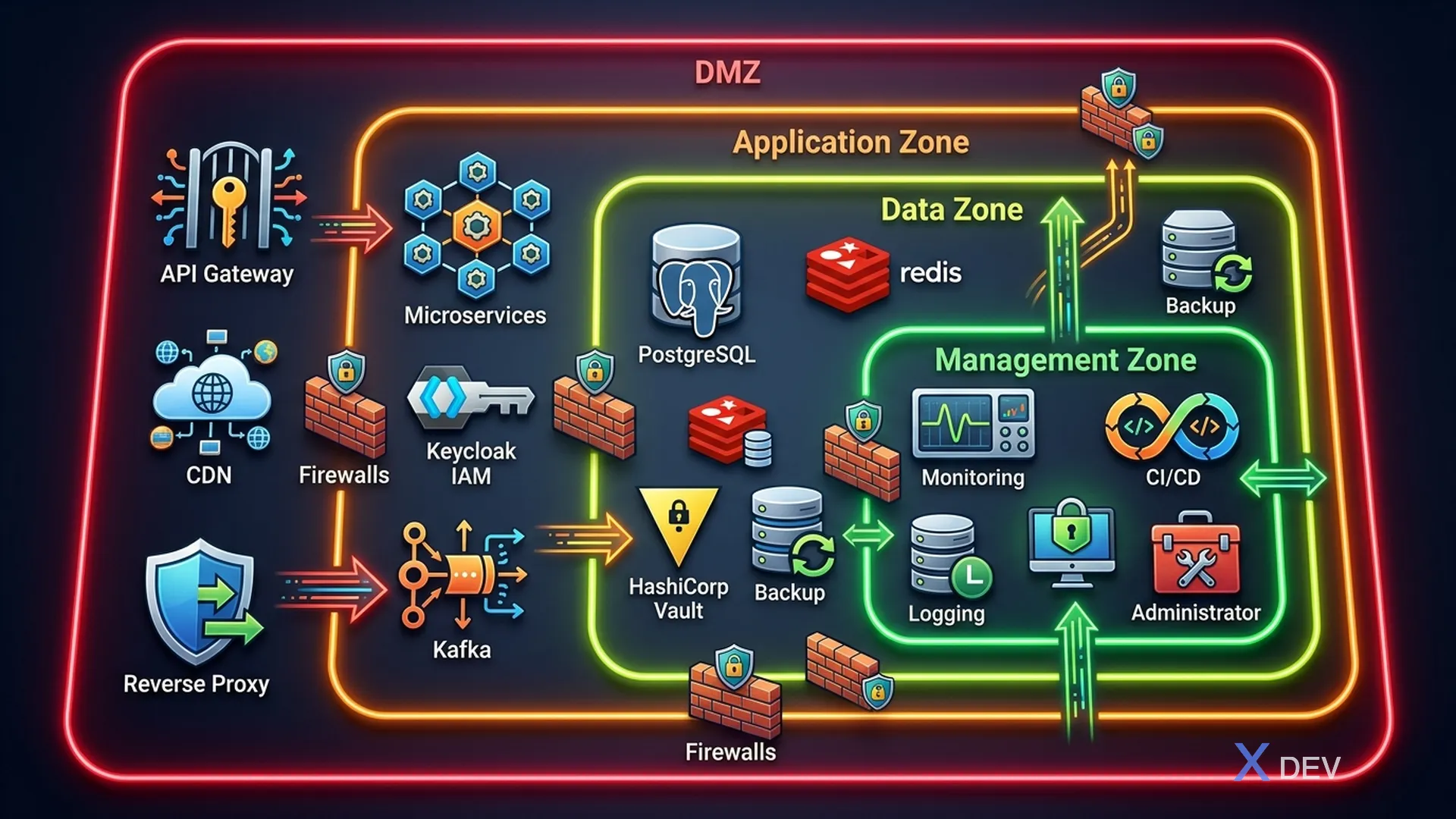
| Zone | Ingredients |
|---|---|
| Zone 1: DMZ | API Gateway, Static content / CDN origin, Reverse Proxy |
| Zone 2: Application | Quarkus Microservices, Keycloak, Message Queue (Kafka) |
| Zone 3: Data (Most restricted) | PostgreSQL Clusters, Redis Cache, Backup Storage, Key Management (Vault) |
| Zone 4: Management | Monitoring (Prometheus, Grafana), Logging (ELK Stack), CI/CD Pipeline, Admin Access |
Firewall Rules between zones:
- DMZ → Application: Only specific ports (443, 8080)
- Application → Data: Only database ports (5432, 6379, 9092)
- Data → Anywhere: Outbound is not allowed
- Management → All: Read-only monitoring access
3. Quarkus Microservices Security Architecture
3.1. Quarkus Security Stack
<!-- pom.xml - Security dependencies -->
<dependencies>
    <!-- OIDC Authentication with Keycloak -->
    <dependency>
        <groupId>io.quarkus</groupId>
        <artifactId>quarkus-oidc</artifactId>
    </dependency>

    <!-- JWT Token Processing -->
    <dependency>
        <groupId>io.quarkus</groupId>
        <artifactId>quarkus-smallrye-jwt</artifactId>
    </dependency>

    <!-- Reactive PostgreSQL with encryption support -->
    <dependency>
        <groupId>io.quarkus</groupId>
        <artifactId>quarkus-reactive-pg-client</artifactId>
    </dependency>

    <!-- Hibernate ORM with Panache -->
    <dependency>
        <groupId>io.quarkus</groupId>
        <artifactId>quarkus-hibernate-orm-panache</artifactId>
    </dependency>

    <!-- OpenTelemetry for distributed tracing -->
    <dependency>
        <groupId>io.quarkus</groupId>
        <artifactId>quarkus-opentelemetry</artifactId>
    </dependency>

    <!-- Health checks -->
    <dependency>
        <groupId>io.quarkus</groupId>
        <artifactId>quarkus-smallrye-health</artifactId>
    </dependency>

    <!-- Kafka for event streaming -->
    <dependency>
        <groupId>io.quarkus</groupId>
        <artifactId>quarkus-smallrye-reactive-messaging-kafka</artifactId>
    </dependency>
</dependencies>
3.2. Application Configuration
# application.properties - Security Configuration

# === OIDC/Keycloak Configuration ===
quarkus.oidc.auth-server-url=https://keycloak.hospital.internal/realms/healthcare
quarkus.oidc.client-id=patient-service
quarkus.oidc.credentials.secret=${OIDC_CLIENT_SECRET}
quarkus.oidc.tls.verification=required

# === Database Security ===
quarkus.datasource.db-kind=postgresql
quarkus.datasource.jdbc.url=jdbc:postgresql://pg-primary.data-zone:5432/patient_db?ssl=true&sslmode=verify-full
quarkus.datasource.username=${DB_USERNAME}
quarkus.datasource.password=${DB_PASSWORD}
quarkus.datasource.jdbc.min-size=5
quarkus.datasource.jdbc.max-size=20

# === TLS Configuration ===
quarkus.http.ssl.certificate.files=/certs/tls.crt
quarkus.http.ssl.certificate.key-files=/certs/tls.key
quarkus.http.ssl-port=8443
quarkus.http.insecure-requests=disabled

# === Security Headers ===
quarkus.http.header."Strict-Transport-Security".value=max-age=31536000; includeSubDomains
quarkus.http.header."X-Content-Type-Options".value=nosniff
quarkus.http.header."X-Frame-Options".value=DENY
quarkus.http.header."Content-Security-Policy".value=default-src 'self'

# === CORS (restricted) ===
quarkus.http.cors=true
quarkus.http.cors.origins=https://portal.hospital.vn,https://admin.hospital.vn
quarkus.http.cors.methods=GET,POST,PUT,DELETE
quarkus.http.cors.headers=Authorization,Content-Type

# === OpenTelemetry ===
quarkus.otel.exporter.otlp.endpoint=https://otel-collector.management-zone:4317
quarkus.otel.resource.attributes=service.name=patient-service,deployment.environment=production
3.3. Service-to-Service Communication Pattern
// Secure service-to-service communication với token propagation
@Path("/api/v1/patients")
@Authenticated
@RolesAllowed({"doctor", "nurse", "admin"})
public class PatientResource {

    @Inject
    @RestClient
    LabServiceClient labClient;

    @Inject
    SecurityIdentity securityIdentity;

    @Inject
    AuditService auditService;

    @GET
    @Path("/{patientId}/lab-results")
    @RolesAllowed({"doctor"})
    public Response getPatientLabResults(
            @PathParam("patientId") UUID patientId) {

        // Audit log: WHO accessed WHAT
        auditService.log(AuditEvent.builder()
            .action("READ")
            .resource("PatientLabResults")
            .resourceId(patientId.toString())
            .actor(securityIdentity.getPrincipal().getName())
            .actorRoles(securityIdentity.getRoles())
            .build());

        // Token propagation - forward JWT to downstream service
        List<LabResult> results = labClient.getResultsByPatient(patientId);

        return Response.ok(results).build();
    }
}
4. Database-per-Service Pattern for Healthcare
4.1. Data Isolation Strategy
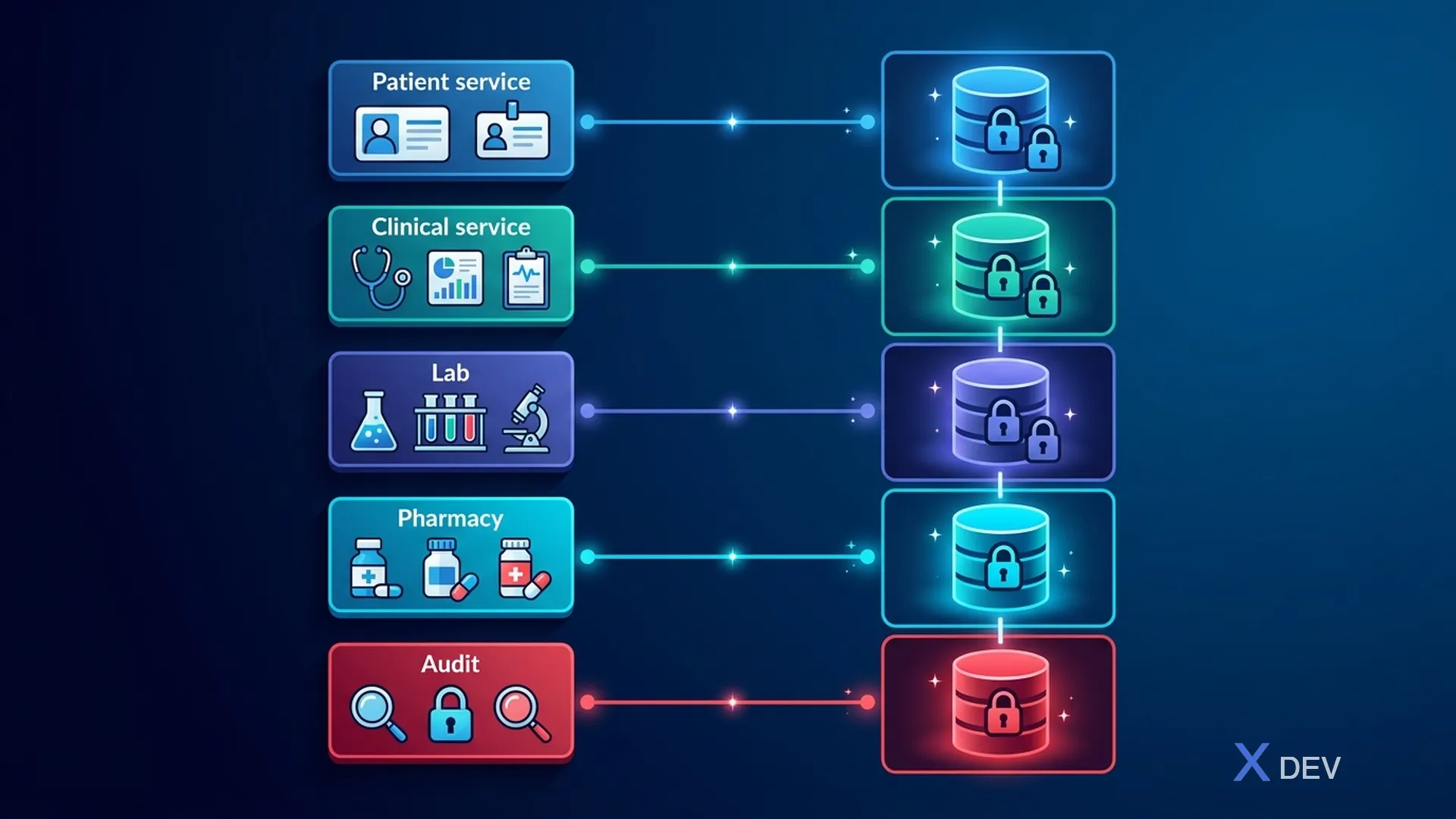
| Service | Database | Tables |
|---|---|---|
| Patient Service | patient_db | patients (demographics, contacts), patient_consents, patient_identifiers |
| Clinical Service | clinical_db | encounters, diagnoses, clinical_notes (encrypted), vital_signs |
| Lab Service | lab_db | lab_orders, lab_results (encrypted), samples, reference_ranges |
| Pharmacy Service | pharmacy_db | prescriptions, dispensing_records, drug_interactions |
| Audit Service | audit_db (append-only) | audit_events (immutable), access_logs, security_incidents |
4.2. Shared Data via Events (Event Sourcing)
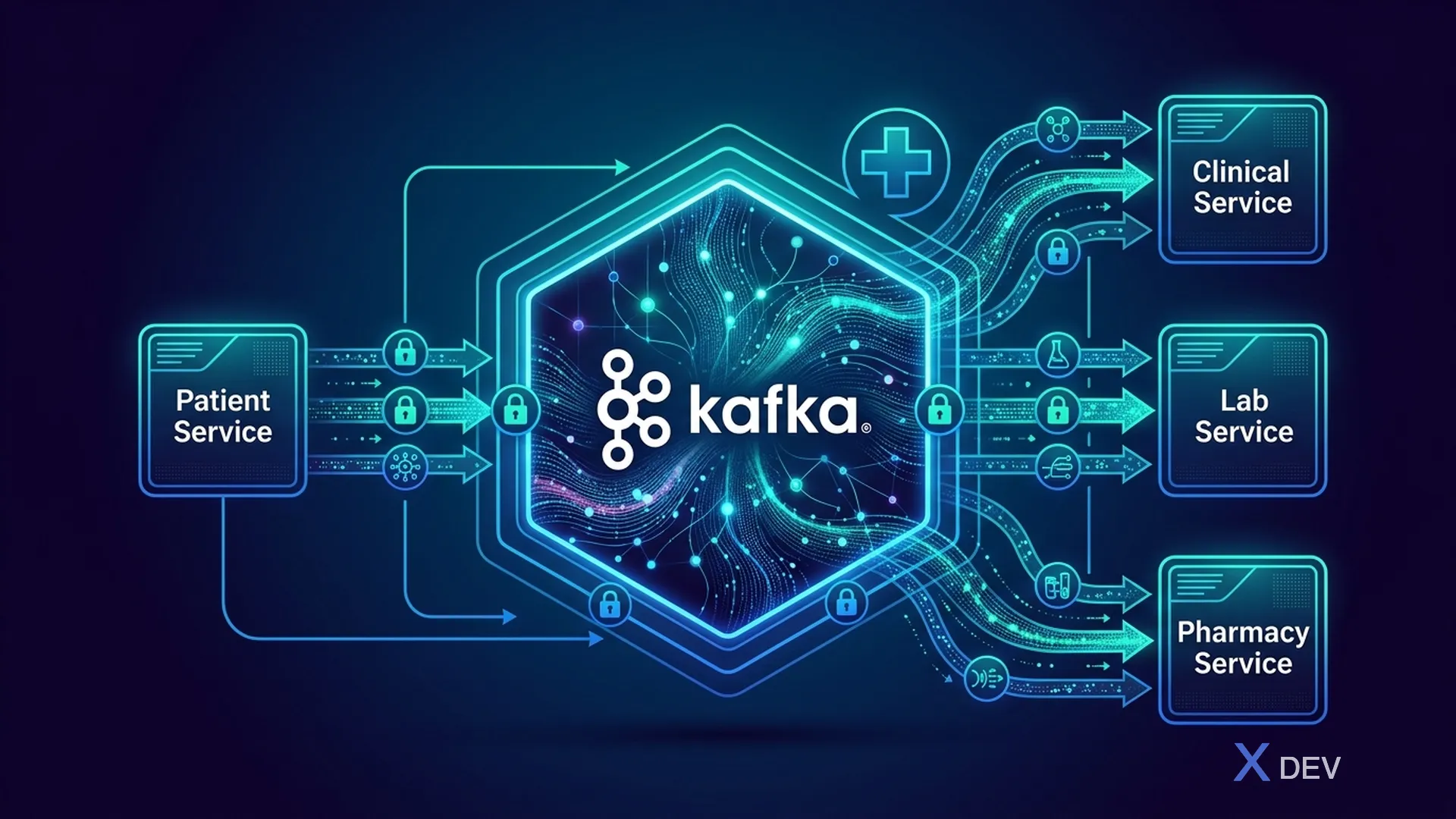
Important: Kafka messages containing PHI must be encrypted. Use Kafka encryption at-rest and application-level encryption for sensitive fields.
5. API Gateway Security
5.1. Kong Gateway Configuration for Healthcare
# kong.yml - Healthcare API Gateway Configuration
_format_version: "3.0"

services:
  - name: patient-service
    url: https://patient-service.app-zone:8443
    routes:
      - name: patient-api
        paths:
          - /api/v1/patients
        protocols:
          - https
    plugins:
      # Rate limiting per consumer
      - name: rate-limiting
        config:
          minute: 100
          hour: 1000
          policy: redis
          redis_host: redis.data-zone
          redis_port: 6379
          redis_ssl: true

      # JWT validation (delegated to Keycloak)
      - name: openid-connect
        config:
          issuer: https://keycloak.hospital.internal/realms/healthcare
          client_id: kong-gateway
          client_secret: ${KONG_OIDC_SECRET}
          bearer_only: "yes"
          ssl_verify: true

      # Request size limiting (prevent oversized payloads)
      - name: request-size-limiting
        config:
          allowed_payload_size: 10  # MB
          size_unit: megabytes

      # IP restriction for admin endpoints
      - name: ip-restriction
        config:
          allow:
            - 10.0.0.0/8      # Internal network
            - 172.16.0.0/12   # Docker networks

      # Request/Response transformation (strip sensitive headers)
      - name: response-transformer
        config:
          remove:
            headers:
              - X-Powered-By
              - Server

      # Correlation ID for audit trail
      - name: correlation-id
        config:
          header_name: X-Correlation-ID
          generator: uuid
          echo_downstream: true
6. Event-Driven Security Architecture
6.1. Security Events Flow
// Security event schema cho Kafka
public record SecurityEvent(
    String eventId,
    Instant timestamp,
    String eventType,        // ACCESS, MODIFY, DELETE, EXPORT, PRINT
    String actor,            // User ID from Keycloak
    String actorRole,        // doctor, nurse, admin
    String actorDepartment,  // Khoa Nội, Khoa Ngoại
    String resource,         // PatientRecord, LabResult
    String resourceId,       // Patient ID, Record ID
    String action,           // READ, WRITE, DELETE
    String outcome,          // SUCCESS, FAILURE, DENIED
    String sourceIp,
    String sourceDevice,
    Map<String, String> additionalContext
) {}
6.2. Kafka Topic Design for Healthcare
healthcare.audit.access          # All PHI access events
healthcare.audit.modifications   # Data changes
healthcare.audit.authentication  # Login/logout events
healthcare.audit.authorization   # Permission denied events
healthcare.security.incidents    # Security incidents
healthcare.consent.changes       # Patient consent updates
healthcare.patient.events        # Patient lifecycle events (encrypted)
healthcare.clinical.events       # Clinical data changes (encrypted)
7. Infrastructure as Code - Secure Deployment
7.1. Docker Compose for Development
# docker-compose.yml - Secure Healthcare Dev Environment
version: '3.8'

services:
  keycloak:
    image: quay.io/keycloak/keycloak:26.0
    command: start-dev --import-realm
    environment:
      KC_DB: postgres
      KC_DB_URL: jdbc:postgresql://keycloak-db:5432/keycloak
      KC_DB_USERNAME: keycloak
      KC_DB_PASSWORD: ${KC_DB_PASSWORD}
      KC_HOSTNAME: localhost
      KC_HTTPS_CERTIFICATE_FILE: /opt/keycloak/certs/tls.crt
      KC_HTTPS_CERTIFICATE_KEY_FILE: /opt/keycloak/certs/tls.key
    volumes:
      - ./keycloak/realm-healthcare.json:/opt/keycloak/data/import/realm.json
      - ./certs:/opt/keycloak/certs:ro
    ports:
      - "8443:8443"
    networks:
      - app-network

  postgres-patient:
    image: postgres:16-alpine
    environment:
      POSTGRES_DB: patient_db
      POSTGRES_USER: patient_svc
      POSTGRES_PASSWORD: ${PG_PATIENT_PASSWORD}
      POSTGRES_INITDB_ARGS: "--auth-host=scram-sha-256 --data-checksums"
    volumes:
      - ./sql/init-patient.sql:/docker-entrypoint-initdb.d/01-init.sql
      - ./sql/rls-policies.sql:/docker-entrypoint-initdb.d/02-rls.sql
      - patient-data:/var/lib/postgresql/data
    command: >
      postgres
        -c ssl=on
        -c ssl_cert_file=/certs/server.crt
        -c ssl_key_file=/certs/server.key
        -c shared_preload_libraries='pgaudit,pgcrypto'
        -c pgaudit.log='read,write,ddl'
        -c log_connections=on
        -c log_disconnections=on
        -c password_encryption=scram-sha-256
    networks:
      - data-network

  kafka:
    image: confluentinc/cp-kafka:7.6.0
    environment:
      KAFKA_BROKER_ID: 1
      KAFKA_LISTENER_SECURITY_PROTOCOL_MAP: INTERNAL:SSL
      KAFKA_SSL_KEYSTORE_LOCATION: /certs/kafka.keystore.jks
      KAFKA_SSL_KEYSTORE_PASSWORD: ${KAFKA_KEYSTORE_PASSWORD}
      KAFKA_SSL_TRUSTSTORE_LOCATION: /certs/kafka.truststore.jks
    networks:
      - app-network
      - data-network

networks:
  app-network:
    driver: bridge
  data-network:
    driver: bridge
    internal: true  # No external access to data network

volumes:
  patient-data:
    driver: local
8. Security Checklist for Healthcare Architecture
| Layers | Control | Status |
|---|---|---|
| Network | TLS 1.3 everywhere | ☐ |
| Network | Network segmentation (DMZ, App, Data zones) | ☐ |
| Network | WAF enabled | ☐ |
| Gateway | Rate limiting | ☐ |
| Gateway | Input validation | ☐ |
| Gateway | CORS restrictions | ☐ |
| Identity | Keycloak SSO | ☐ |
| Identity | MFA for clinical users | ☐ |
| Identity | Session timeout < 15 min | ☐ |
| Service | OIDC token validation | ☐ |
| Service | RBAC/ABAC enforcement | ☐ |
| Service | Input sanitization | ☐ |
| Database | SSL connections | ☐ |
| Database | Row-Level Security | ☐ |
| Database | Column encryption for PHI | ☐ |
| Database | pgAudit enabled | ☐ |
| Messaging | Kafka SSL + message encryption | ☐ |
| Logging | Centralized audit trail | ☐ |
| Logging | No PHI in logs | ☐ |
| Backup | Encrypted backups | ☐ |
| Backup | Tested DR procedure | ☐ |
9. Summary
In this lesson, we designed:
- Healthcare microservices architecture with appropriate domain services
- Network segmentation theo Defense-in-Depth (DMZ, App, Data, Management zones)
- Quarkus security stack with OIDC, TLS, security headers
- Database-per-Service pattern with event-driven communication via Kafka
- API Gateway security configuration
- Infrastructure as Code cho secure deployment
Exercise
- Draw your healthcare system architecture according to the Defense-in-Depth model
- Determine the data flow of PHI across microservices and network zones
- Setup Docker Compose environment with TLS enabled for all services
| ◀ Previous article | Next article ▶ |
|---|---|
| Lesson 1: Overview of Medical Data Security - HIPAA, HL7 FHIR & Vietnamese Law | Lesson 3: Classification of Health Data (PHI/ePHI) and Risk Assessment |