1. 醫療保健微服務架構概述
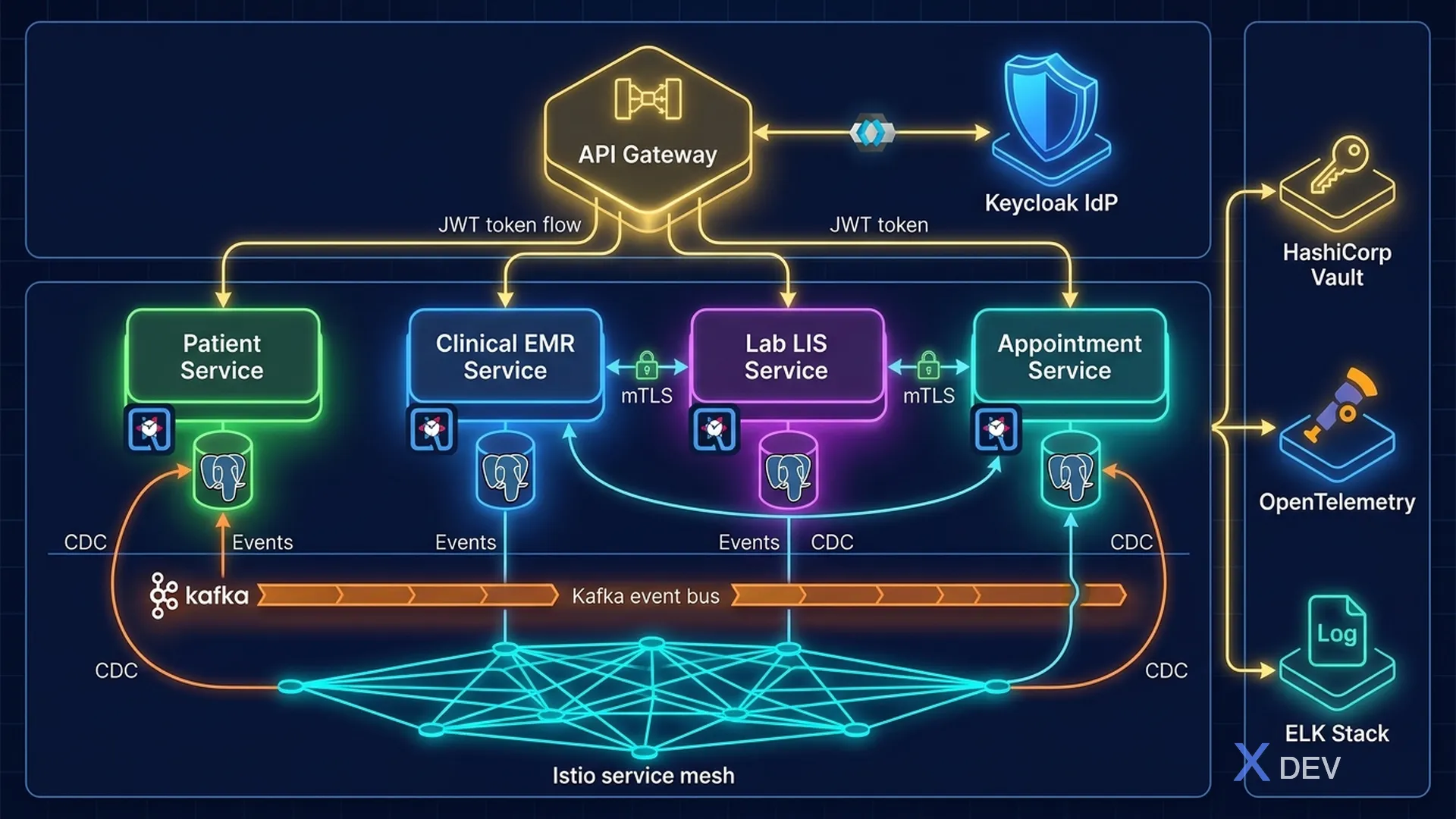
1.1。為什麼選擇醫療保健微服務?
傳統(單一)衛生系統面臨許多挑戰:
- 停機影響整體:一個模組(實驗室)的錯誤影響整個HIS
- 難以擴展:如果不擴展整個系統,則無法單獨擴展高負載 (EMR) 的模組
- 安全影響範圍大:可能危及所有資料的漏洞
- 難以更新:安全性修補程式需要完全重新部署
微服務透過以下方式解決這個問題:
- 隔離:每個服務都有自己的資料庫,破壞一個服務不會影響另一個服務
- 獨立部署:為每個服務打安全補丁,不影響系統
- 選擇性擴展:根據高需求擴展服務(高峰時段預約)
- 技術多樣性:每個服務選擇最適合的技術堆疊
1.2。醫療保健領域服務
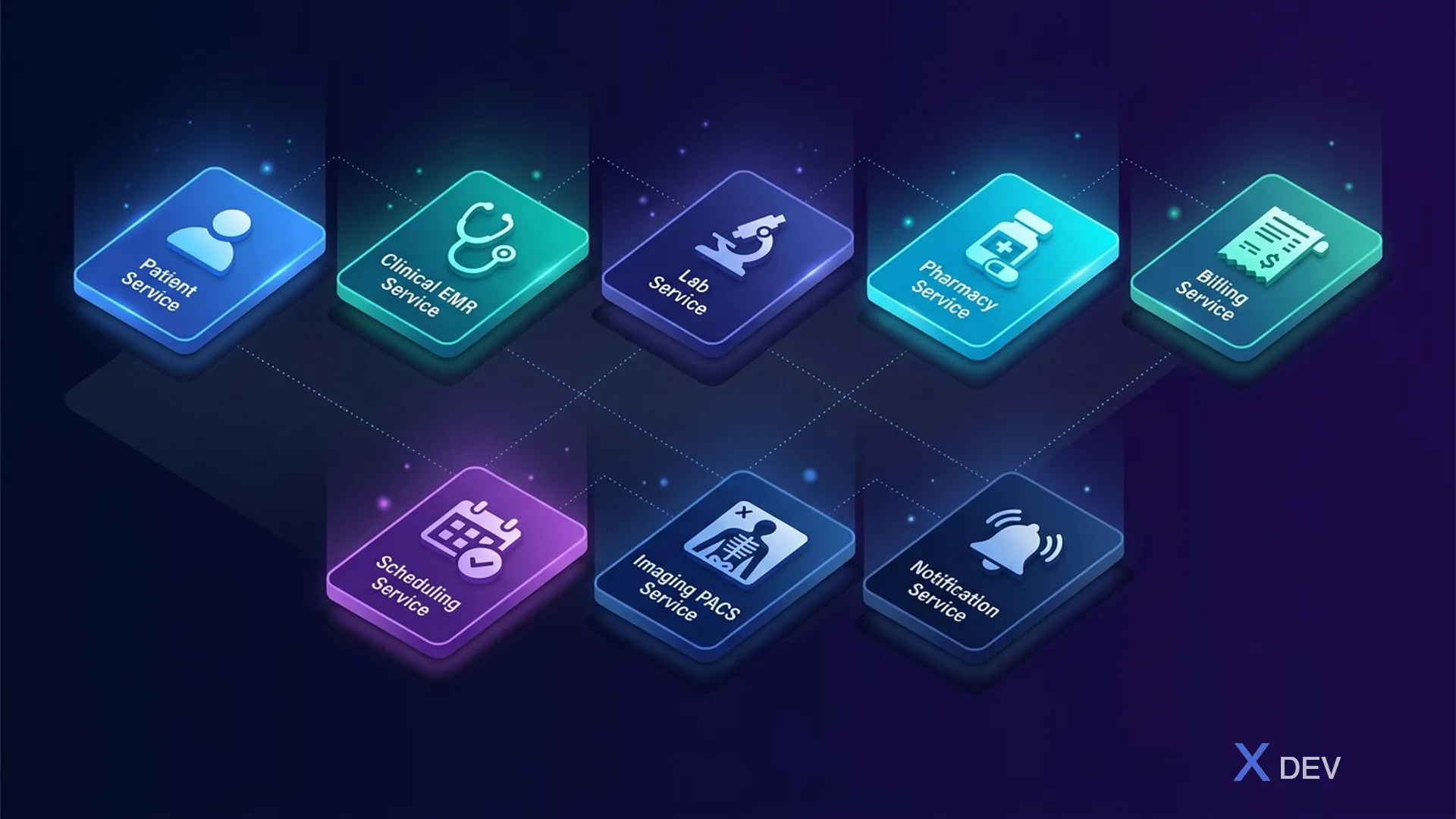
核心服務:
| 服務 | 主要功能 |
|---|---|
| 病人服務 | 病人登記、人口統計 |
| 臨床服務(EMR) | 遭遇、診斷、筆記、生命徵象 |
| 實驗室服務(LIS) | 訂單、結果、樣本、報告 |
| 藥局服務 | 處方、配藥、藥物資料庫 |
| 計費服務 | 發票、保險、索賠、付款 |
| 排程服務 | 預約、行事曆、候補名單 |
| 影像服務 (RIS/PACS) | 研究、報告 |
| 通知服務 | 簡訊/電子郵件、推播、警報 |
2. 參考架構:安全醫療平台
2.1。高層架構
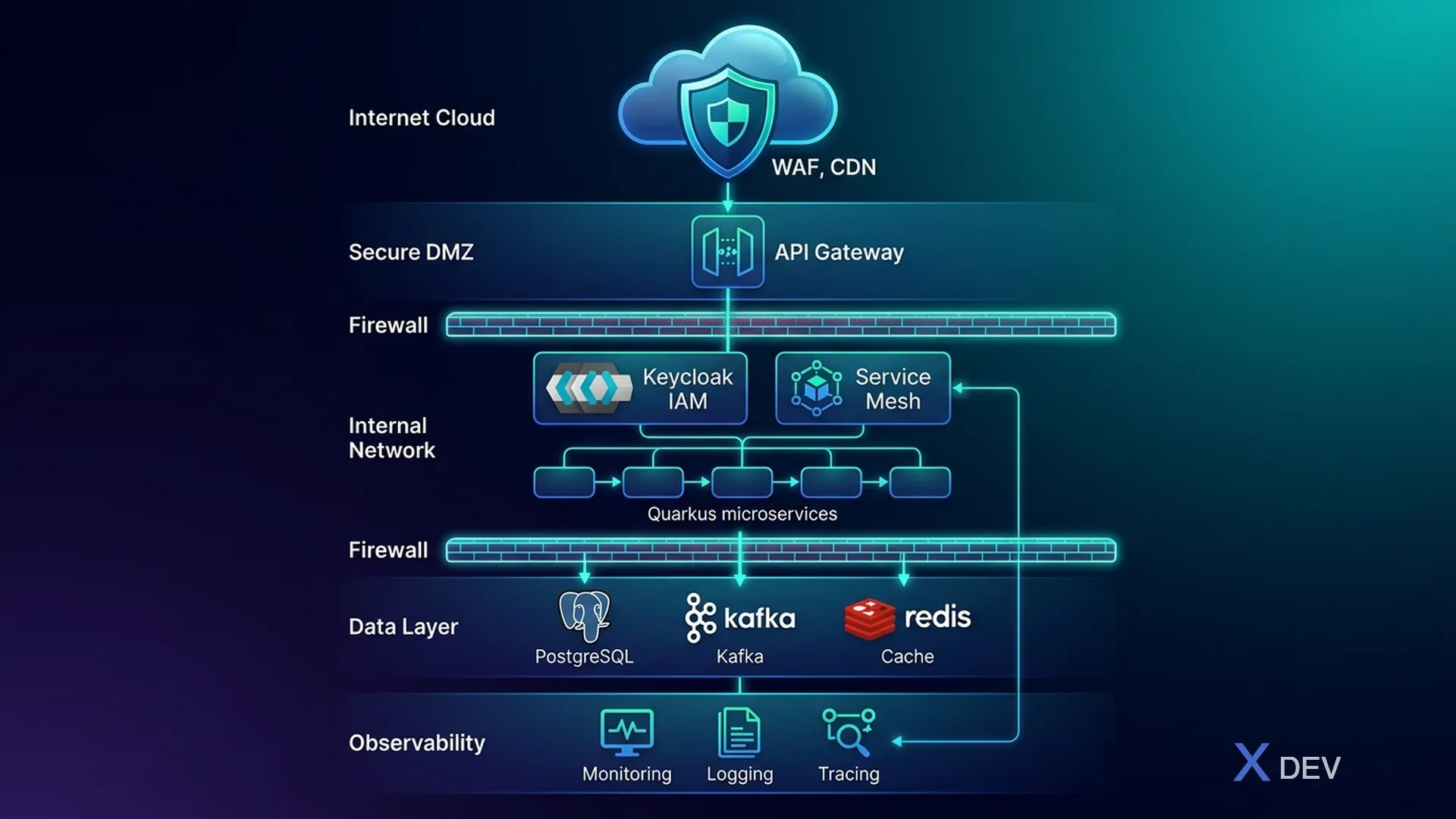
2.2。網路分段(縱深防禦)
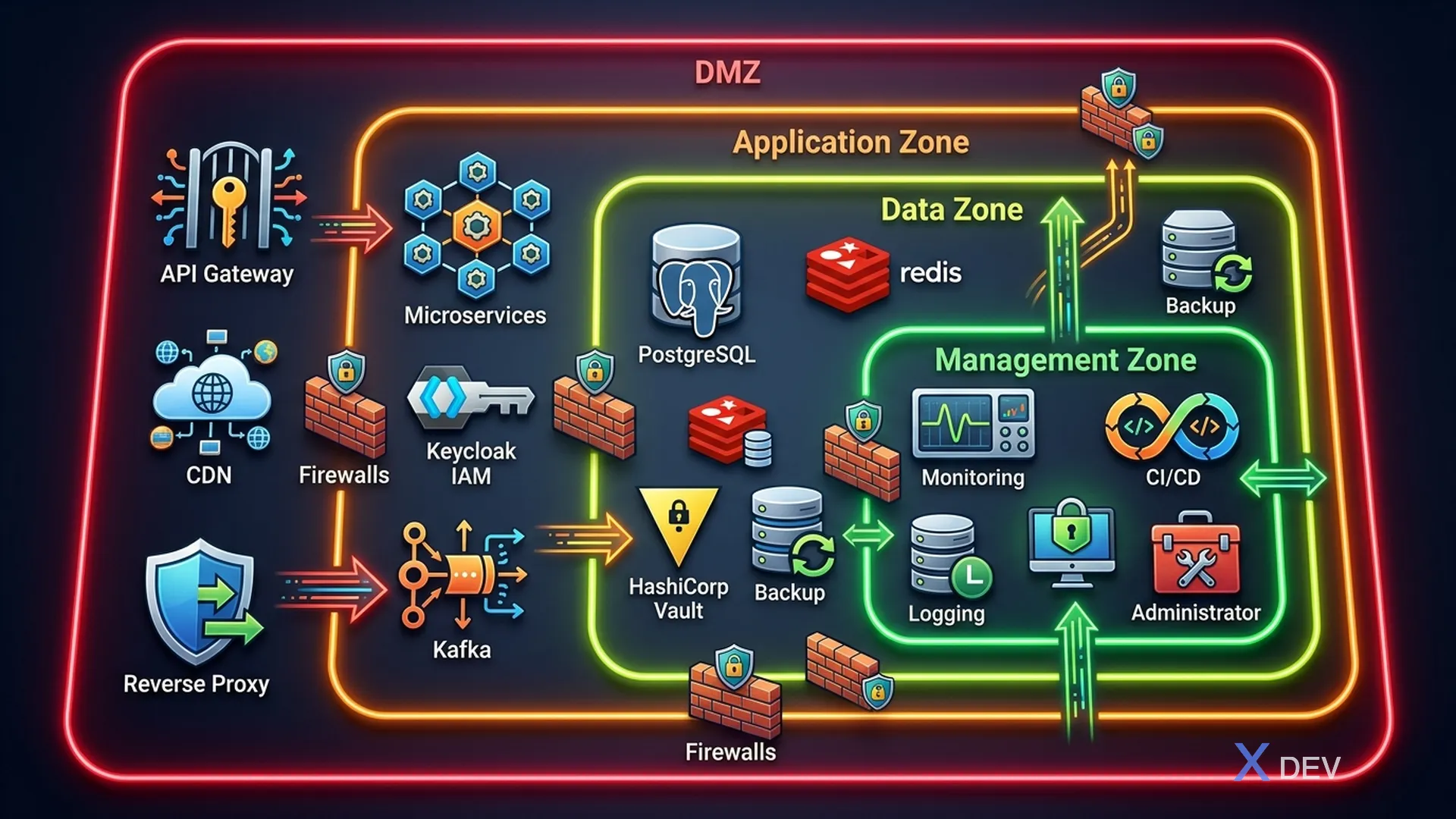
| 專區 | 成分 |
|---|---|
| 區域 1:DMZ | API 閘道、靜態內容/CDN 來源、反向代理 |
| 第二區:應用 | Quarkus 微服務、Keycloak、訊息佇列 (Kafka) |
| 區域 3:資料(最受限制) | PostgreSQL 叢集、Redis 快取、備份儲存、金鑰管理(Vault) |
| 第四區:管理 | 監控(Prometheus、Grafana)、日誌記錄(ELK Stack)、CI/CD 管道、管理員存取 |
區域之間的防火牆規則:
- DMZ → 應用程式:僅特定連接埠(443、8080)
- 應用程式→資料:僅資料庫連接埠(5432、6379、9092)
- 資料 → 任何地方:不允許出站
- 管理→全部:唯讀監控訪問
3. Quarkus 微服務安全架構
3.1。 Quarkus 安全堆疊
<!-- pom.xml - Security dependencies -->
<dependencies>
    <!-- OIDC Authentication with Keycloak -->
    <dependency>
        <groupId>io.quarkus</groupId>
        <artifactId>quarkus-oidc</artifactId>
    </dependency>

    <!-- JWT Token Processing -->
    <dependency>
        <groupId>io.quarkus</groupId>
        <artifactId>quarkus-smallrye-jwt</artifactId>
    </dependency>

    <!-- Reactive PostgreSQL with encryption support -->
    <dependency>
        <groupId>io.quarkus</groupId>
        <artifactId>quarkus-reactive-pg-client</artifactId>
    </dependency>

    <!-- Hibernate ORM with Panache -->
    <dependency>
        <groupId>io.quarkus</groupId>
        <artifactId>quarkus-hibernate-orm-panache</artifactId>
    </dependency>

    <!-- OpenTelemetry for distributed tracing -->
    <dependency>
        <groupId>io.quarkus</groupId>
        <artifactId>quarkus-opentelemetry</artifactId>
    </dependency>

    <!-- Health checks -->
    <dependency>
        <groupId>io.quarkus</groupId>
        <artifactId>quarkus-smallrye-health</artifactId>
    </dependency>

    <!-- Kafka for event streaming -->
    <dependency>
        <groupId>io.quarkus</groupId>
        <artifactId>quarkus-smallrye-reactive-messaging-kafka</artifactId>
    </dependency>
</dependencies>
3.2。應用程式配置
# application.properties - Security Configuration

# === OIDC/Keycloak Configuration ===
quarkus.oidc.auth-server-url=https://keycloak.hospital.internal/realms/healthcare
quarkus.oidc.client-id=patient-service
quarkus.oidc.credentials.secret=${OIDC_CLIENT_SECRET}
quarkus.oidc.tls.verification=required

# === Database Security ===
quarkus.datasource.db-kind=postgresql
quarkus.datasource.jdbc.url=jdbc:postgresql://pg-primary.data-zone:5432/patient_db?ssl=true&sslmode=verify-full
quarkus.datasource.username=${DB_USERNAME}
quarkus.datasource.password=${DB_PASSWORD}
quarkus.datasource.jdbc.min-size=5
quarkus.datasource.jdbc.max-size=20

# === TLS Configuration ===
quarkus.http.ssl.certificate.files=/certs/tls.crt
quarkus.http.ssl.certificate.key-files=/certs/tls.key
quarkus.http.ssl-port=8443
quarkus.http.insecure-requests=disabled

# === Security Headers ===
quarkus.http.header."Strict-Transport-Security".value=max-age=31536000; includeSubDomains
quarkus.http.header."X-Content-Type-Options".value=nosniff
quarkus.http.header."X-Frame-Options".value=DENY
quarkus.http.header."Content-Security-Policy".value=default-src 'self'

# === CORS (restricted) ===
quarkus.http.cors=true
quarkus.http.cors.origins=https://portal.hospital.vn,https://admin.hospital.vn
quarkus.http.cors.methods=GET,POST,PUT,DELETE
quarkus.http.cors.headers=Authorization,Content-Type

# === OpenTelemetry ===
quarkus.otel.exporter.otlp.endpoint=https://otel-collector.management-zone:4317
quarkus.otel.resource.attributes=service.name=patient-service,deployment.environment=production
3.3。服務到服務的通訊模式
// Secure service-to-service communication với token propagation
@Path("/api/v1/patients")
@Authenticated
@RolesAllowed({"doctor", "nurse", "admin"})
public class PatientResource {

    @Inject
    @RestClient
    LabServiceClient labClient;

    @Inject
    SecurityIdentity securityIdentity;

    @Inject
    AuditService auditService;

    @GET
    @Path("/{patientId}/lab-results")
    @RolesAllowed({"doctor"})
    public Response getPatientLabResults(
            @PathParam("patientId") UUID patientId) {

        // Audit log: WHO accessed WHAT
        auditService.log(AuditEvent.builder()
            .action("READ")
            .resource("PatientLabResults")
            .resourceId(patientId.toString())
            .actor(securityIdentity.getPrincipal().getName())
            .actorRoles(securityIdentity.getRoles())
            .build());

        // Token propagation - forward JWT to downstream service
        List<LabResult> results = labClient.getResultsByPatient(patientId);

        return Response.ok(results).build();
    }
}
4. 醫療保健每個服務資料庫模式
4.1。資料隔離策略
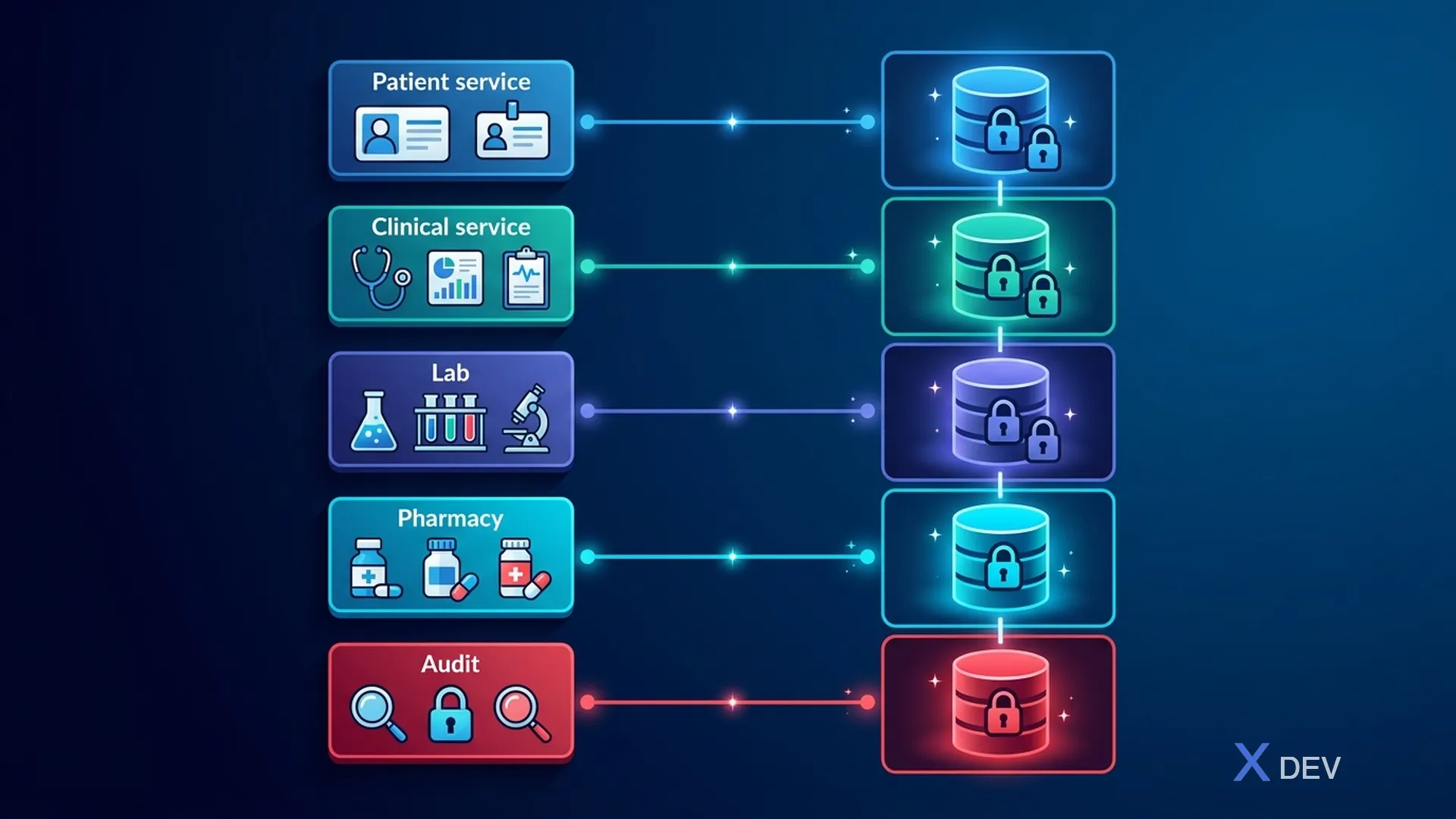
| 服務 | 資料庫 | 桌子 |
|---|---|---|
| 病人服務 | 病人資料庫 | 病人(人口統計、聯絡人)、病人同意、病人識別碼 |
| 臨床服務 | 臨床資料庫 | 遭遇、診斷、臨床筆記(加密)、生命徵象 |
| 實驗室服務 | 實驗室資料庫 | lab_orders、lab_results(加密)、樣本、reference_ranges |
| 藥房服務 | 藥房資料庫 | 處方、配藥記錄、藥物交互作用 |
| 審計服務 | audit_db(僅附加) | 審核事件(不可變)、存取日誌、安全性事件 |
4.2。透過事件共享資料(事件溯源)
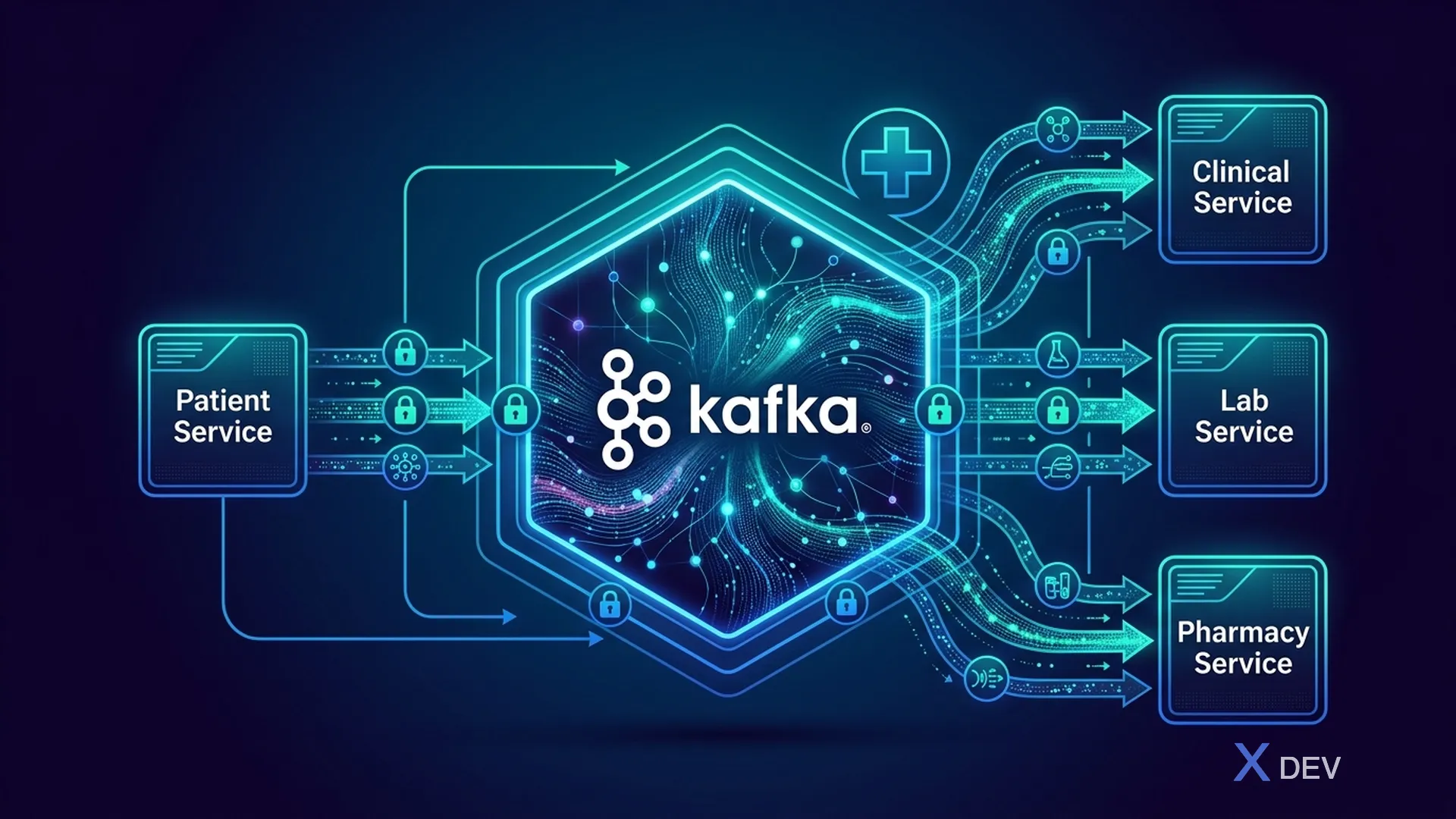
重要:包含 PHI 的 Kafka 訊息必須加密。對敏感欄位使用 Kafka 靜態加密和應用程式層級加密。
5.API網關安全
5.1。用於醫療保健的 Kong 網關配置
# kong.yml - Healthcare API Gateway Configuration
_format_version: "3.0"

services:
  - name: patient-service
    url: https://patient-service.app-zone:8443
    routes:
      - name: patient-api
        paths:
          - /api/v1/patients
        protocols:
          - https
    plugins:
      # Rate limiting per consumer
      - name: rate-limiting
        config:
          minute: 100
          hour: 1000
          policy: redis
          redis_host: redis.data-zone
          redis_port: 6379
          redis_ssl: true

      # JWT validation (delegated to Keycloak)
      - name: openid-connect
        config:
          issuer: https://keycloak.hospital.internal/realms/healthcare
          client_id: kong-gateway
          client_secret: ${KONG_OIDC_SECRET}
          bearer_only: "yes"
          ssl_verify: true

      # Request size limiting (prevent oversized payloads)
      - name: request-size-limiting
        config:
          allowed_payload_size: 10  # MB
          size_unit: megabytes

      # IP restriction for admin endpoints
      - name: ip-restriction
        config:
          allow:
            - 10.0.0.0/8      # Internal network
            - 172.16.0.0/12   # Docker networks

      # Request/Response transformation (strip sensitive headers)
      - name: response-transformer
        config:
          remove:
            headers:
              - X-Powered-By
              - Server

      # Correlation ID for audit trail
      - name: correlation-id
        config:
          header_name: X-Correlation-ID
          generator: uuid
          echo_downstream: true
6. 事件驅動的安全架構
6.1。安全事件流程
// Security event schema cho Kafka
public record SecurityEvent(
    String eventId,
    Instant timestamp,
    String eventType,        // ACCESS, MODIFY, DELETE, EXPORT, PRINT
    String actor,            // User ID from Keycloak
    String actorRole,        // doctor, nurse, admin
    String actorDepartment,  // Khoa Nội, Khoa Ngoại
    String resource,         // PatientRecord, LabResult
    String resourceId,       // Patient ID, Record ID
    String action,           // READ, WRITE, DELETE
    String outcome,          // SUCCESS, FAILURE, DENIED
    String sourceIp,
    String sourceDevice,
    Map<String, String> additionalContext
) {}
6.2。醫療保健 Kafka 主題設計
healthcare.audit.access          # All PHI access events
healthcare.audit.modifications   # Data changes
healthcare.audit.authentication  # Login/logout events
healthcare.audit.authorization   # Permission denied events
healthcare.security.incidents    # Security incidents
healthcare.consent.changes       # Patient consent updates
healthcare.patient.events        # Patient lifecycle events (encrypted)
healthcare.clinical.events       # Clinical data changes (encrypted)
7.基礎架構即程式碼 - 安全部署
7.1。 Docker Compose 開發
# docker-compose.yml - Secure Healthcare Dev Environment
version: '3.8'

services:
  keycloak:
    image: quay.io/keycloak/keycloak:26.0
    command: start-dev --import-realm
    environment:
      KC_DB: postgres
      KC_DB_URL: jdbc:postgresql://keycloak-db:5432/keycloak
      KC_DB_USERNAME: keycloak
      KC_DB_PASSWORD: ${KC_DB_PASSWORD}
      KC_HOSTNAME: localhost
      KC_HTTPS_CERTIFICATE_FILE: /opt/keycloak/certs/tls.crt
      KC_HTTPS_CERTIFICATE_KEY_FILE: /opt/keycloak/certs/tls.key
    volumes:
      - ./keycloak/realm-healthcare.json:/opt/keycloak/data/import/realm.json
      - ./certs:/opt/keycloak/certs:ro
    ports:
      - "8443:8443"
    networks:
      - app-network

  postgres-patient:
    image: postgres:16-alpine
    environment:
      POSTGRES_DB: patient_db
      POSTGRES_USER: patient_svc
      POSTGRES_PASSWORD: ${PG_PATIENT_PASSWORD}
      POSTGRES_INITDB_ARGS: "--auth-host=scram-sha-256 --data-checksums"
    volumes:
      - ./sql/init-patient.sql:/docker-entrypoint-initdb.d/01-init.sql
      - ./sql/rls-policies.sql:/docker-entrypoint-initdb.d/02-rls.sql
      - patient-data:/var/lib/postgresql/data
    command: >
      postgres
        -c ssl=on
        -c ssl_cert_file=/certs/server.crt
        -c ssl_key_file=/certs/server.key
        -c shared_preload_libraries='pgaudit,pgcrypto'
        -c pgaudit.log='read,write,ddl'
        -c log_connections=on
        -c log_disconnections=on
        -c password_encryption=scram-sha-256
    networks:
      - data-network

  kafka:
    image: confluentinc/cp-kafka:7.6.0
    environment:
      KAFKA_BROKER_ID: 1
      KAFKA_LISTENER_SECURITY_PROTOCOL_MAP: INTERNAL:SSL
      KAFKA_SSL_KEYSTORE_LOCATION: /certs/kafka.keystore.jks
      KAFKA_SSL_KEYSTORE_PASSWORD: ${KAFKA_KEYSTORE_PASSWORD}
      KAFKA_SSL_TRUSTSTORE_LOCATION: /certs/kafka.truststore.jks
    networks:
      - app-network
      - data-network

networks:
  app-network:
    driver: bridge
  data-network:
    driver: bridge
    internal: true  # No external access to data network

volumes:
  patient-data:
    driver: local
8. 醫療保健架構的安全檢查表
| 層 | 控制 | 狀態 |
|---|---|---|
| 網路 | TLS 1.3 無所不在 | ○ |
| 網路 | 網路分段(DMZ、應用程式、資料區域) | ○ |
| 網路 | 已啟用 WAF | ○ |
| 網關 | 速率限制 | ○ |
| 網關 | 輸入驗證 | ○ |
| 網關 | CORS 限制 | ○ |
| 身分 | 鑰匙斗篷單一登入 | ○ |
| 身分 | 臨床使用者的 MFA | ○ |
| 身分 | 會話逾時 < 15 min | ☐ |
| Service | OIDC token validation | ☐ |
| Service | RBAC/ABAC enforcement | ☐ |
| Service | Input sanitization | ☐ |
| Database | SSL connections | ☐ |
| Database | Row-Level Security | ☐ |
| Database | Column encryption for PHI | ☐ |
| Database | pgAudit enabled | ☐ |
| Messaging | Kafka SSL + message encryption | ☐ |
| Logging | Centralized audit trail | ☐ |
| Logging | No PHI in logs | ☐ |
| Backup | Encrypted backups | ☐ |
| Backup | Tested DR procedure | ☐ |
9. 總結
在本課中,我們設計了:
- 醫療保健微服務架構以及適當的領域服務
- Network segmentation theo Defense-in-Depth (DMZ, App, Data, Management zones)
- Quarkus 安全堆疊,帶有 OIDC、TLS、安全標頭
- 每服務資料庫模式,透過 Kafka 進行事件驅動通信
- API Gateway security configuration
- Infrastructure as Code cho secure deployment
## 鍛煉
- 根據縱深防禦模型繪製您的醫療保健系統架構
- 確定跨微服務和網路區域的 PHI 資料流
- 設定 Docker Compose 環境,並為所有服務啟用 TLS
| ◀ 上一篇 | 下一篇文章 ▶ |
|---|---|
| 第 1 課:醫療資料安全概述 - HIPAA、HL7 FHIR 和越南法律 | 第 3 課:健康資料分類 (PHI/ePHI) 與風險評估 |