1. ゼロトラストアーキテクチャの概要
###1.1.なぜ医療にゼロトラストが必要なのでしょうか?
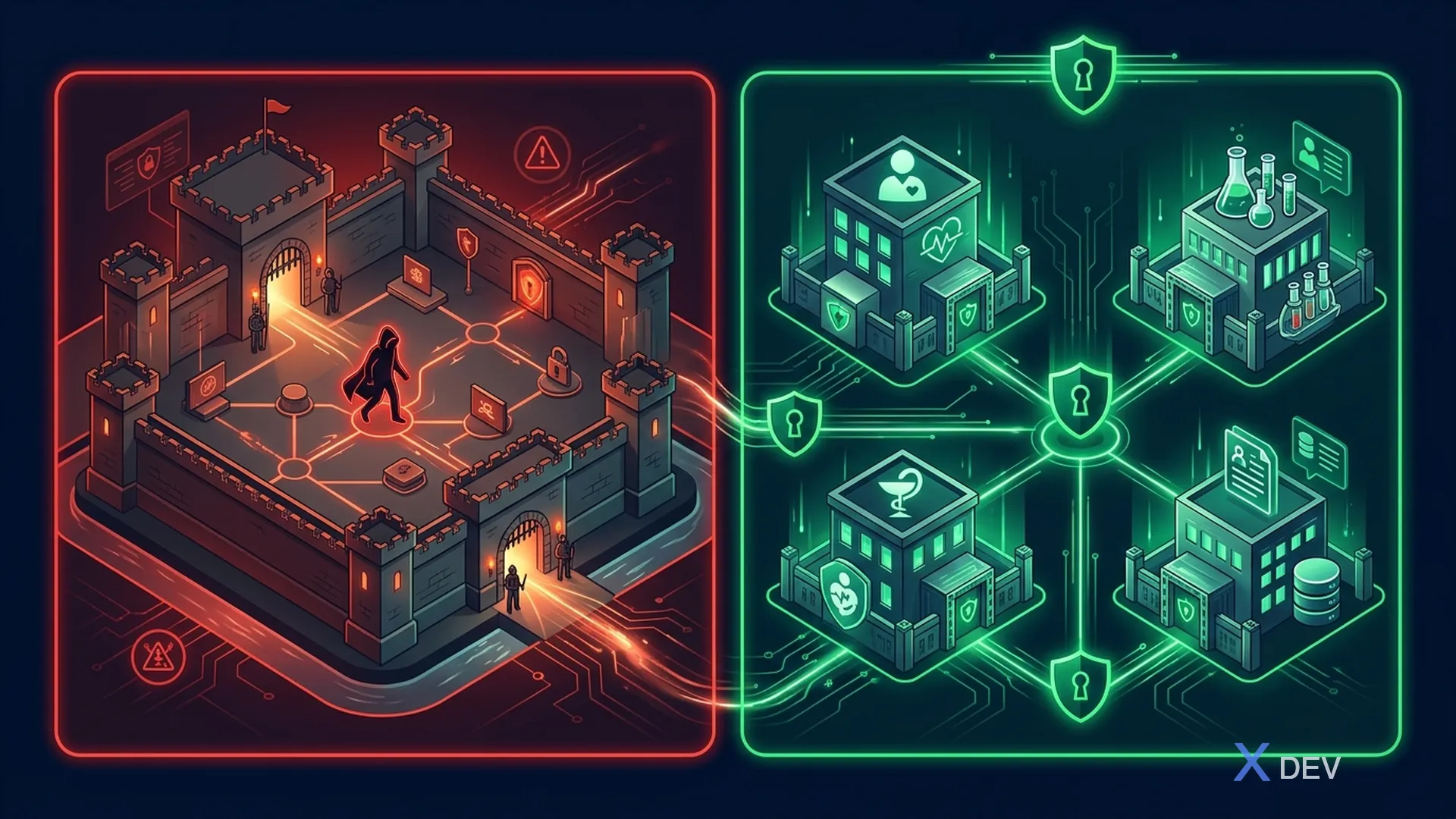
境界セキュリティに基づく従来のセキュリティ モデル、つまり「ファイアウォールの内側のすべてを信頼する」は、現代の医療システムにはもはや適していません。遠隔医療、IoT 医療機器、クラウドの導入、医師のリモート アクセスの台頭により、境界はもはや明確に存在しません。
境界セキュリティの問題:
- ランサムウェアは信頼できるゾーンで横方向に拡散します
- 内部関係者の脅威が制御されていない
- IoTデバイスのセキュリティが弱い → エントリポイント
- Remote doctors bypass perimeter
- クラウド サービスは境界の外側にあります
憂慮すべき統計:
- 医療機関の 89% がデータ侵害を経験しています (Ponemon 2024)
- 医療データ侵害の平均コスト: 1,093 万ドル (あらゆる業界で最高)
- 医療に対するランサムウェア攻撃の 60% は、内部ネットワーク内の横方向の動きから発生しています。
###1.2. NIST SP 800-207 フレームワーク
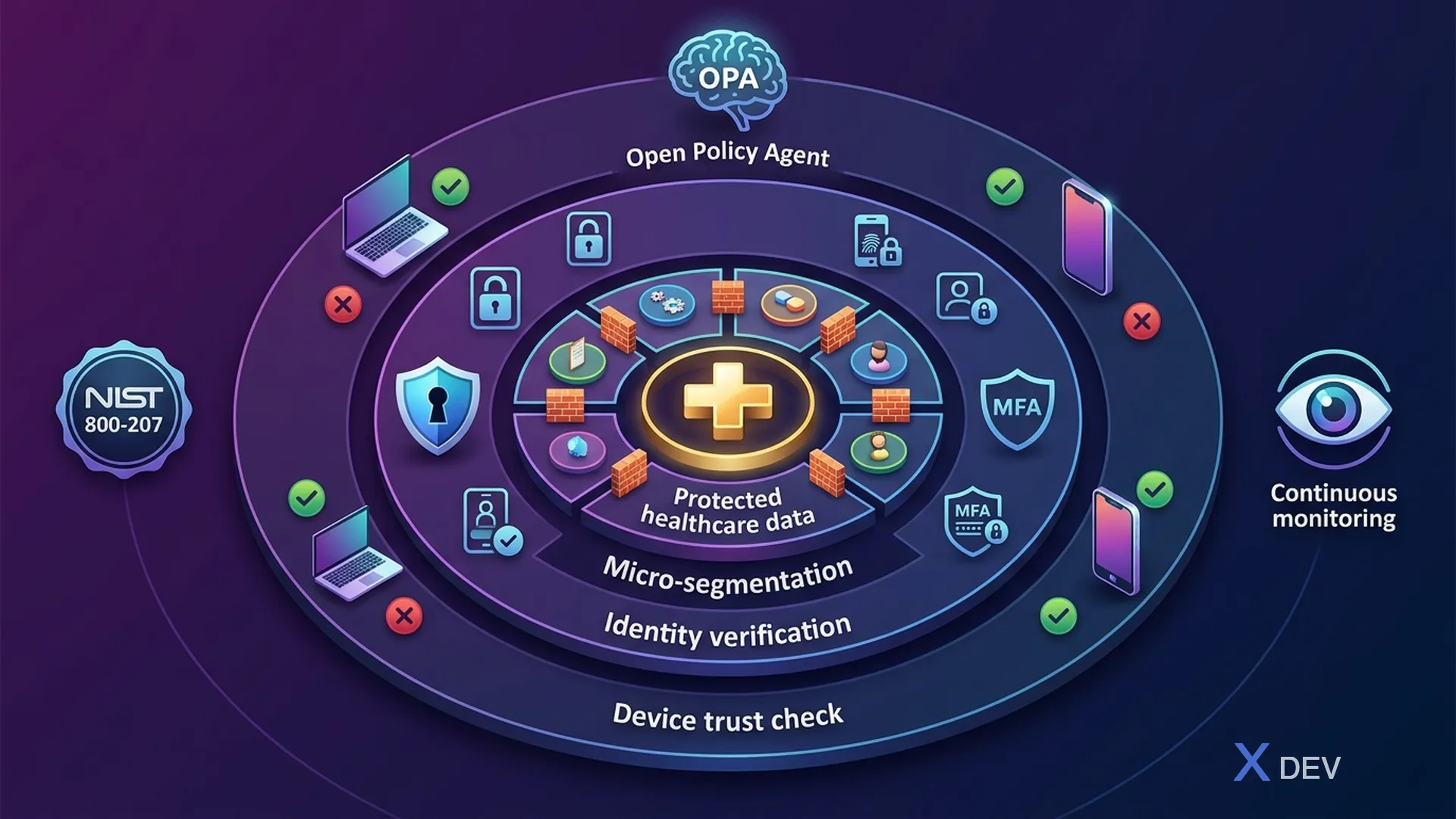
NIST 特別出版物 800-207 では、ゼロ トラスト アーキテクチャ (ZTA) を、次の原則に基づいたセキュリティ モデルとして定義しています。資産、ユーザー、またはネットワーク セグメントには暗黙の信頼は存在しない**。
NIST SP 800-207 — ゼロトラスト アーキテクチャ:
コアコンポーネント:
- ポリシー エンジン (PE) — データ ソースに基づいてアクセスを決定します
- ポリシー管理者 (PA) — PE からの決定を実装します。
- ポリシー施行ポイント (PEP) — アクセス コントロール ポイント
データ ソース: CDM、脅威インテル、アクティビティ ログ、PKI
エンタープライズ リソース: EHR、ラボ API、データベース、FHIR、PACS
7 つの原則:
- すべてのデータソースとコンピューティングサービスはリソースです
- 場所に関係なくすべての通信が保護されます
- 個々のリソースへのアクセスはセッションごとに許可されます
- アクセスは動的ポリシーによって決定されます
- 企業はセキュリティ体制を監視および測定します
- 認証と認可は動的です
- 企業は資産の現在の状態に関する情報を収集します
###1.3.医療のゼロトラスト原則
| 原則 | 説明 | ヘルスケアアプリケーション |
|---|---|---|
| 決して信頼せず、常に確認してください | すべてのリクエストは認証され、許可される必要があります。医師は医療記録にアクセスするたびに認証する必要があります。 | |
| 最低特権 | 必要な最小限の権限のみを付与します。看護師は自分の患者しか見ることができません | |
| 侵害を想定 | システム設計が侵害されたと考えられます | ePHI を保存中および転送中、内部であっても暗号化する |
| 明示的に確認してください | 利用可能なすべてのデータ ポイントを使用して検証します。デバイス + 場所 + 時間 + 役割 + コンテキスト | |
| マイクロセグメンテーション | ネットワークを分離されたセグメントに分割する | 各部門は個別のセグメントです |
| 継続的なモニタリング | 継続的に評価および監視する | ePHI アクセスのリアルタイム異常検出 |
2. 病院向けのゼロトラスト リファレンス アーキテクチャ
###2.1.ヘルスケア ZTA の概要
レイヤー:
- ユーザー: 医師 (モバイル)、看護師 (ワークステーション)、IoT 医療機器
- PEP: Istio Ingress Gateway + Envoy プロキシ (mTLS、JWT 検証、レート制限 + WAF)
- ポリシー エンジン: Keycloak (AuthN) + OPA (AuthZ) + リスク エンジン (スコアリング)
- データ ソース: デバイスの状態 (MDM)、ユーザー行動分析、脅威インテリジェンス、GeoIP + 時刻
- マイクロセグメント化されたサービス: 患者/検査室/予約サービス (mTLS) → 暗号化データベース層 (RLS + TDE)
###2.2.境界セキュリティとゼロトラストの比較
| 側面 | 境界セキュリティ | ゼロトラスト |
|---|---|---|
| 信頼モデル | ファイアウォール内の信頼 | 何も信頼しない |
| ネットワークアクセス | フラットな内部ネットワーク | マイクロセグメント化 |
| 認証 | 境界に一度 | リクエストごとに継続 |
| 認可 | ネットワークベース (IP) | アイデンティティ + コンテキストベース |
| 暗号化 | 境界のみ (TLS 終端) | エンドツーエンド (どこでも mTLS) |
| 横方向の動き | 侵害後も簡単 | マイクロセグメンテーションによってブロックされる |
| モニタリング | 境界ログのみ | 交通状況を完全に可視化 |
| IoTデバイス | オンラインになれば信頼される | 隔離され、継続的に検証される |
| ヘルスケアフィット | 悪い(アクセスポイントが多すぎる) | 優れた (粒度の高い制御) |
3. Keycloakによるアイデンティティ中心のセキュリティ
ゼロトラストでは、アイデンティティが新しい境界線になります。すべてのアクセス決定は、ネットワークの場所ではなく ID 検証に基づいて行われます。
###3.1.継続的なトークン検証
package vn.hospital.zerotrust.identity;

import io.quarkus.oidc.TokenIntrospection;
import io.quarkus.security.identity.SecurityIdentity;
import jakarta.enterprise.context.ApplicationScoped;
import jakarta.inject.Inject;
import jakarta.ws.rs.container.ContainerRequestContext;
import jakarta.ws.rs.container.ContainerRequestFilter;
import jakarta.ws.rs.core.Response;
import jakarta.ws.rs.ext.Provider;
import org.eclipse.microprofile.jwt.JsonWebToken;
import org.jboss.logging.Logger;

import java.time.Instant;
import java.util.Set;

/**
 * Zero Trust: Continuous verification filter.
 * Validates token + context on EVERY request, not just at login.
 */
@Provider
@ApplicationScoped
public class ZeroTrustVerificationFilter implements ContainerRequestFilter {

    private static final Logger LOG = Logger.getLogger(ZeroTrustVerificationFilter.class);

    @Inject
    JsonWebToken jwt;

    @Inject
    SecurityIdentity identity;

    @Inject
    DeviceTrustService deviceTrustService;

    @Inject
    RiskScoringService riskScoringService;

    @Override
    public void filter(ContainerRequestContext requestContext) {
        // 1. Verify token is not expired (Quarkus OIDC handles this)
        // 2. Additional Zero Trust checks:

        String userId = jwt.getSubject();
        String sessionId = jwt.getClaim("sid");
        String clientIp = requestContext.getHeaderString("X-Forwarded-For");
        String userAgent = requestContext.getHeaderString("User-Agent");
        String deviceId = requestContext.getHeaderString("X-Device-ID");

        // Check: Token freshness — require recent authentication
        long authTime = jwt.getClaim("auth_time");
        long maxAuthAge = 3600; // 1 hour for standard access
        if (Instant.now().getEpochSecond() - authTime > maxAuthAge) {
            LOG.warnf("ZT-DENY: Token auth_time too old for user=%s", userId);
            requestContext.abortWith(
                Response.status(Response.Status.UNAUTHORIZED)
                    .entity("{\"error\":\"re-authentication_required\","
                            + "\"message\":\"Session expired, please re-authenticate\"}")
                    .build()
            );
            return;
        }

        // Check: Device trust assessment
        if (deviceId != null && !deviceTrustService.isDeviceTrusted(deviceId, userId)) {
            LOG.warnf("ZT-DENY: Untrusted device=%s for user=%s", deviceId, userId);
            requestContext.abortWith(
                Response.status(Response.Status.FORBIDDEN)
                    .entity("{\"error\":\"device_not_trusted\","
                            + "\"message\":\"Device is not registered or compliant\"}")
                    .build()
            );
            return;
        }

        // Check: Risk score — dynamic authorization
        RiskScore risk = riskScoringService.calculateRisk(
            userId, clientIp, userAgent, deviceId, requestContext.getUriInfo().getPath()
        );

        if (risk.score() > 80) {
            LOG.warnf("ZT-DENY: High risk score=%d for user=%s, path=%s",
                risk.score(), userId, requestContext.getUriInfo().getPath());
            requestContext.abortWith(
                Response.status(Response.Status.FORBIDDEN)
                    .entity("{\"error\":\"high_risk_detected\","
                            + "\"message\":\"Access denied due to risk assessment\"}")
                    .build()
            );
            return;
        }

        if (risk.score() > 50) {
            // Medium risk — require step-up authentication
            requestContext.getHeaders().putSingle("X-Require-StepUp", "true");
        }

        LOG.debugf("ZT-ALLOW: user=%s, device=%s, risk=%d, path=%s",
            userId, deviceId, risk.score(), requestContext.getUriInfo().getPath());
    }
}
###3.2.機密性の高い操作のためのステップアップ認証
package vn.hospital.zerotrust.identity;

import jakarta.enterprise.context.ApplicationScoped;
import jakarta.inject.Inject;
import jakarta.ws.rs.core.Response;
import org.eclipse.microprofile.jwt.JsonWebToken;

import java.time.Instant;
import java.util.Set;

/**
 * Step-Up Authentication: Yêu cầu xác thực bổ sung cho operations nhạy cảm.
 * VD: Xem lab results → chỉ cần password
 *     Export patient records → cần password + MFA
 *     Override medication alert → cần password + MFA + supervisor approval
 */
@ApplicationScoped
public class StepUpAuthenticationService {

    private static final Set<String> LEVEL2_OPERATIONS = Set.of(
        "patient.record.view_full",
        "lab.result.view_sensitive",
        "prescription.create"
    );

    private static final Set<String> LEVEL3_OPERATIONS = Set.of(
        "patient.record.export",
        "patient.record.bulk_access",
        "audit.log.modify",
        "system.config.change"
    );

    private static final Set<String> LEVEL4_OPERATIONS = Set.of(
        "patient.record.delete",
        "medication.alert.override",
        "emergency.break_glass"
    );

    @Inject
    JsonWebToken jwt;

    public AuthLevel getRequiredLevel(String operation) {
        if (LEVEL4_OPERATIONS.contains(operation)) return AuthLevel.LEVEL4_SUPERVISOR;
        if (LEVEL3_OPERATIONS.contains(operation)) return AuthLevel.LEVEL3_MFA;
        if (LEVEL2_OPERATIONS.contains(operation)) return AuthLevel.LEVEL2_RECENT;
        return AuthLevel.LEVEL1_STANDARD;
    }

    public StepUpResult verifyStepUp(String operation) {
        AuthLevel required = getRequiredLevel(operation);
        AuthLevel current = getCurrentAuthLevel();

        if (current.ordinal() >= required.ordinal()) {
            return StepUpResult.allowed();
        }

        // Generate step-up challenge
        String authEndpoint = buildStepUpEndpoint(required);
        return StepUpResult.stepUpRequired(required, authEndpoint);
    }

    private AuthLevel getCurrentAuthLevel() {
        // Check Authentication Context Class Reference (ACR)
        String acr = jwt.getClaim("acr");
        long authTime = jwt.getClaim("auth_time");
        long secondsSinceAuth = Instant.now().getEpochSecond() - authTime;

        if ("urn:healthcare:supervisor-approval".equals(acr)) {
            return AuthLevel.LEVEL4_SUPERVISOR;
        }
        if ("urn:oasis:names:tc:SAML:2.0:ac:classes:MobileTwoFactorContract".equals(acr)
            && secondsSinceAuth < 300) {
            return AuthLevel.LEVEL3_MFA;
        }
        if (secondsSinceAuth < 900) { // Less than 15 minutes
            return AuthLevel.LEVEL2_RECENT;
        }
        return AuthLevel.LEVEL1_STANDARD;
    }

    private String buildStepUpEndpoint(AuthLevel level) {
        String baseUrl = "/realms/healthcare/protocol/openid-connect/auth";
        return switch (level) {
            case LEVEL2_RECENT -> baseUrl + "?prompt=login&max_age=0";
            case LEVEL3_MFA -> baseUrl + "?acr_values=urn:oasis:names:tc:SAML:2.0:ac:classes:MobileTwoFactorContract";
            case LEVEL4_SUPERVISOR -> baseUrl + "?acr_values=urn:healthcare:supervisor-approval";
            default -> baseUrl;
        };
    }

    public enum AuthLevel {
        LEVEL1_STANDARD,     // Basic JWT token valid
        LEVEL2_RECENT,       // Re-authenticated within 15 min
        LEVEL3_MFA,          // MFA completed recently
        LEVEL4_SUPERVISOR    // MFA + Supervisor co-sign
    }

    public record StepUpResult(boolean allowed, AuthLevel requiredLevel, String authEndpoint) {
        static StepUpResult allowed() { return new StepUpResult(true, null, null); }
        static StepUpResult stepUpRequired(AuthLevel level, String endpoint) {
            return new StepUpResult(false, level, endpoint);
        }
    }
}
###3.3.ゼロトラストのためのKeycloakレルム構成
{
  "realm": "healthcare",
  "enabled": true,
  "sslRequired": "all",
  "bruteForceProtected": true,
  "maxFailureWaitSeconds": 900,
  "failureFactor": 5,
  "passwordPolicy": "length(12) and digits(1) and upperCase(1) and specialChars(1) and notUsername and passwordHistory(5)",
  "otpPolicyType": "totp",
  "otpPolicyAlgorithm": "HmacSHA256",
  "otpPolicyDigits": 6,
  "otpPolicyPeriod": 30,
  "accessTokenLifespan": 300,
  "ssoSessionMaxLifespan": 28800,
  "offlineSessionMaxLifespan": 0,
  "accessCodeLifespan": 60,
  "attributes": {
    "zero-trust-enabled": "true",
    "continuous-auth-required": "true",
    "device-trust-enforcement": "strict"
  },
  "requiredActions": [
    "CONFIGURE_TOTP",
    "VERIFY_EMAIL",
    "UPDATE_PASSWORD"
  ],
  "authenticationFlows": [
    {
      "alias": "zero-trust-browser",
      "description": "Zero Trust browser authentication with device check",
      "providerId": "basic-flow",
      "topLevel": true,
      "builtIn": false,
      "authenticationExecutions": [
        {
          "authenticator": "auth-cookie",
          "requirement": "ALTERNATIVE",
          "priority": 10
        },
        {
          "authenticator": "auth-username-password-form",
          "requirement": "REQUIRED",
          "priority": 20
        },
        {
          "authenticator": "auth-otp-form",
          "requirement": "REQUIRED",
          "priority": 30
        },
        {
          "authenticator": "auth-device-trust-check",
          "requirement": "REQUIRED",
          "priority": 40
        }
      ]
    }
  ]
}
4. Kubernetes NetworkPolicies によるマイクロセグメンテーション
###4.1.ヘルスケア向けのネットワーク アーキテクチャ
マイクロセグメント化されたヘルスケア Kubernetes クラスター:
- 名前空間:
healthcare-frontend- 患者ポータル / API ゲートウェイ → ポート 443 のみ
- ── ネットワークポリシー ──
- 名前空間:
healthcare-services- 患者サービス (ポート: 8080)、検査サービス (ポート: 8080)、予約サービス (ポート: 8080)
- ── ネットワークポリシー ──
- 名前空間:
healthcare-data- PostgreSQL (ポート:5432)、Redis キャッシュ (ポート:6379)
- 名前空間:
healthcare-monitoring(読み取り専用)- Prometheus (スクレイピングのみ)、Falco (eBPF フック)
###4.2. Kubernetes ネットワークポリシー
# networkpolicy-default-deny.yaml
# Zero Trust: deny all traffic by default in healthcare namespaces
apiVersion: networking.k8s.io/v1
kind: NetworkPolicy
metadata:
  name: default-deny-all
  namespace: healthcare-services
spec:
  podSelector: {}     # Applies to ALL pods in namespace
  policyTypes:
    - Ingress
    - Egress
  # No ingress/egress rules = deny all

---
# networkpolicy-patient-service.yaml
# Allow specific traffic to Patient Service only
apiVersion: networking.k8s.io/v1
kind: NetworkPolicy
metadata:
  name: allow-patient-service
  namespace: healthcare-services
  labels:
    app.kubernetes.io/part-of: healthcare-platform
    security.hospital.vn/policy: zero-trust
spec:
  podSelector:
    matchLabels:
      app: patient-service
  policyTypes:
    - Ingress
    - Egress
  ingress:
    # Allow from API gateway only
    - from:
        - namespaceSelector:
            matchLabels:
              name: healthcare-frontend
          podSelector:
            matchLabels:
              app: api-gateway
      ports:
        - protocol: TCP
          port: 8080
    # Allow from Istio sidecar (envoy-to-envoy mTLS)
    - from:
        - namespaceSelector:
            matchLabels:
              name: healthcare-services
          podSelector:
            matchLabels:
              app: appointment-service
      ports:
        - protocol: TCP
          port: 8080
    # Allow Prometheus scraping
    - from:
        - namespaceSelector:
            matchLabels:
              name: healthcare-monitoring
          podSelector:
            matchLabels:
              app: prometheus
      ports:
        - protocol: TCP
          port: 9090  # metrics endpoint
  egress:
    # Allow to PostgreSQL only
    - to:
        - namespaceSelector:
            matchLabels:
              name: healthcare-data
          podSelector:
            matchLabels:
              app: postgresql
      ports:
        - protocol: TCP
          port: 5432
    # Allow to Keycloak for token validation
    - to:
        - namespaceSelector:
            matchLabels:
              name: healthcare-auth
          podSelector:
            matchLabels:
              app: keycloak
      ports:
        - protocol: TCP
          port: 8443
    # Allow DNS resolution
    - to:
        - namespaceSelector: {}
          podSelector:
            matchLabels:
              k8s-app: kube-dns
      ports:
        - protocol: UDP
          port: 53
        - protocol: TCP
          port: 53

---
# networkpolicy-database.yaml
# Database: only accessible from service namespace
apiVersion: networking.k8s.io/v1
kind: NetworkPolicy
metadata:
  name: allow-database-access
  namespace: healthcare-data
spec:
  podSelector:
    matchLabels:
      app: postgresql
  policyTypes:
    - Ingress
  ingress:
    # Only from healthcare services
    - from:
        - namespaceSelector:
            matchLabels:
              name: healthcare-services
          podSelector:
            matchExpressions:
              - key: app
                operator: In
                values:
                  - patient-service
                  - lab-service
                  - appointment-service
      ports:
        - protocol: TCP
          port: 5432
###4.3.どこでも mTLS を実現する Istio サービス メッシュ
# istio-peer-authentication.yaml
# Enforce STRICT mTLS cho toàn bộ healthcare mesh
apiVersion: security.istio.io/v1beta1
kind: PeerAuthentication
metadata:
  name: healthcare-strict-mtls
  namespace: healthcare-services
spec:
  mtls:
    mode: STRICT  # All traffic MUST be mTLS

---
# istio-authorization-policy.yaml
# Fine-grained authorization: chỉ cho phép specific service-to-service calls
apiVersion: security.istio.io/v1beta1
kind: AuthorizationPolicy
metadata:
  name: patient-service-authz
  namespace: healthcare-services
spec:
  selector:
    matchLabels:
      app: patient-service
  action: ALLOW
  rules:
    # Rule 1: API Gateway có thể gọi all patient endpoints
    - from:
        - source:
            principals:
              - "cluster.local/ns/healthcare-frontend/sa/api-gateway"
      to:
        - operation:
            methods: ["GET", "POST", "PUT"]
            paths: ["/api/v1/patients/*"]
      when:
        - key: request.auth.claims[realm_access][roles]
          values: ["doctor", "nurse", "admin"]
    # Rule 2: Appointment service chỉ GET patient demographics
    - from:
        - source:
            principals:
              - "cluster.local/ns/healthcare-services/sa/appointment-service"
      to:
        - operation:
            methods: ["GET"]
            paths: ["/api/v1/patients/*/demographics"]
    # Rule 3: Lab service chỉ GET patient identifiers
    - from:
        - source:
            principals:
              - "cluster.local/ns/healthcare-services/sa/lab-service"
      to:
        - operation:
            methods: ["GET"]
            paths: ["/api/v1/patients/*/identifier"]

---
# istio-request-authentication.yaml
# JWT validation at mesh level
apiVersion: security.istio.io/v1beta1
kind: RequestAuthentication
metadata:
  name: healthcare-jwt-auth
  namespace: healthcare-services
spec:
  jwtRules:
    - issuer: "https://keycloak.hospital.vn/realms/healthcare"
      jwksUri: "https://keycloak.hospital.vn/realms/healthcare/protocol/openid-connect/certs"
      audiences:
        - "healthcare-api"
      forwardOriginalToken: true
      outputClaimToHeaders:
        - header: "x-user-id"
          claim: "sub"
        - header: "x-user-roles"
          claim: "realm_access.roles"
        - header: "x-auth-time"
          claim: "auth_time"
5. デバイスの信頼性評価
###5.1.デバイスの姿勢チェック
ゼロトラストでは、ユーザーだけでなくデバイスも検証する必要があります。パッチが更新されていない個人のラップトップからログインする医師のアクセスは制限されます。
package vn.hospital.zerotrust.device;

import jakarta.enterprise.context.ApplicationScoped;
import jakarta.inject.Inject;
import org.jboss.logging.Logger;

import java.time.Instant;
import java.time.temporal.ChronoUnit;
import java.util.Map;

/**
 * Device Trust Assessment — Đánh giá mức tin cậy của thiết bị.
 * Tích hợp với MDM (Mobile Device Management) để verify device compliance.
 */
@ApplicationScoped
public class DeviceTrustService {

    private static final Logger LOG = Logger.getLogger(DeviceTrustService.class);

    @Inject
    MdmIntegrationClient mdmClient;

    @Inject
    DeviceRegistryService deviceRegistry;

    public boolean isDeviceTrusted(String deviceId, String userId) {
        DeviceInfo device = deviceRegistry.getDevice(deviceId);
        if (device == null) {
            LOG.warnf("Unknown device: %s for user: %s", deviceId, userId);
            return false;
        }

        // Check device is registered to this user
        if (!device.registeredUserId().equals(userId)) {
            LOG.warnf("Device %s not registered to user %s", deviceId, userId);
            return false;
        }

        // Get MDM compliance status
        DevicePosture posture = mdmClient.getDevicePosture(deviceId);
        return evaluatePosture(posture);
    }

    public DeviceTrustLevel assessTrustLevel(String deviceId) {
        DevicePosture posture = mdmClient.getDevicePosture(deviceId);

        int score = 100;

        // OS up to date?
        if (!posture.osUpToDate()) score -= 20;

        // Disk encryption enabled?
        if (!posture.diskEncrypted()) score -= 30;

        // Screen lock enabled?
        if (!posture.screenLockEnabled()) score -= 15;

        // MDM managed?
        if (!posture.mdmManaged()) score -= 20;

        // Firewall enabled?
        if (!posture.firewallEnabled()) score -= 10;

        // Antivirus running?
        if (!posture.antivirusActive()) score -= 15;

        // Jailbroken/Rooted?
        if (posture.jailbroken()) score = 0;

        // Last compliance check > 24h?
        if (posture.lastComplianceCheck().isBefore(
                Instant.now().minus(24, ChronoUnit.HOURS))) {
            score -= 10;
        }

        if (score >= 80) return DeviceTrustLevel.FULL_ACCESS;
        if (score >= 50) return DeviceTrustLevel.LIMITED_ACCESS;
        if (score >= 20) return DeviceTrustLevel.READ_ONLY;
        return DeviceTrustLevel.BLOCKED;
    }

    private boolean evaluatePosture(DevicePosture posture) {
        // Minimum requirements for healthcare access
        return posture.diskEncrypted()
            && posture.screenLockEnabled()
            && !posture.jailbroken()
            && posture.osUpToDate();
    }

    public enum DeviceTrustLevel {
        FULL_ACCESS,     // Trusted corp device, full ePHI access
        LIMITED_ACCESS,  // Partially compliant, no bulk export
        READ_ONLY,       // Non-compliant device, view only
        BLOCKED          // Jailbroken/compromised, no access
    }

    public record DeviceInfo(
        String deviceId,
        String registeredUserId,
        String deviceType,
        String os,
        Instant registeredAt
    ) {}

    public record DevicePosture(
        boolean osUpToDate,
        boolean diskEncrypted,
        boolean screenLockEnabled,
        boolean mdmManaged,
        boolean firewallEnabled,
        boolean antivirusActive,
        boolean jailbroken,
        Instant lastComplianceCheck
    ) {}
}
###5.2.デバイス信頼マトリックス
| デバイスの種類 | 信頼レベル | ePHIアクセス | 必要なコントロール |
|---|---|---|---|
| 病院ワークステーション (MDM) | フル | すべての ePHI | MDM、暗号化、自動ロック |
| Doctor's corp ラップトップ (MDM) | フル | すべての ePHI | MDM、暗号化、VPN は不要 |
| 医師の個人用電話 | 限定 | 表示のみ、エクスポートなし | Intune 登録済み、生体認証ロック |
| 看護師の共有タブレット | 限定 | 割り当てられた患者のみ | キオスク モード、自動ログアウト 5 分 |
| IoT医療機器 | 制限付き | 独自のデータのみ | 証明書ベース、ネットワーク分離 |
| 不明/BYOD | ブロックされました | ePHI なし | 登録が必要です |
6. 集中ポリシーのための OPA (オープン ポリシー エージェント)
###6.1.ヘルスケア ZTA の OPA アーキテクチャ

Components:
- ポリシー バンドル サーバー: Git リポジトリ → OPA バンドル → 配布
- OPA サーバー (サイドカー/セントラル):
- Rego ポリシー: 患者アクセス、デバイス信頼、データ分類、緊急アクセス
- **データ:**roles_permissions.json、Department_assignments.json、data_classification_rules.json
- クライアント (クエリ): 患者サービス、検査サービス、アプト。サービス、API ゲートウェイ
###6.2.医療に関する OPA Rego ポリシー
# healthcare/patient_access.rego
# Zero Trust policy: who can access which patient data

package healthcare.patient_access

import future.keywords.if
import future.keywords.in

default allow := false

# Data: loaded from external JSON
roles_permissions := data.healthcare.roles_permissions
department_map := data.healthcare.department_assignments

# Rule 1: Doctor can access patients in their department
allow if {
    input.user.role == "doctor"
    input.action in ["read", "write"]
    patient_department := input.resource.department
    user_departments := department_map[input.user.id]
    patient_department in user_departments
}

# Rule 2: Doctor can access patient they are treating (care team)
allow if {
    input.user.role == "doctor"
    input.action in ["read", "write"]
    input.user.id in input.resource.care_team
}

# Rule 3: Nurse read-only for assigned patients
allow if {
    input.user.role == "nurse"
    input.action == "read"
    input.user.id in input.resource.assigned_nurses
}

# Rule 4: Lab technician can only see lab-related fields
allow if {
    input.user.role == "lab_tech"
    input.action == "read"
    input.resource.type == "lab_result"
    input.resource.fields_requested == allowed_lab_fields
}

# Rule 5: Emergency access (break glass)
allow if {
    input.emergency == true
    input.user.role in ["doctor", "nurse"]
    valid_emergency_justification(input.emergency_reason)
}

# Rule 6: Block access from untrusted devices
deny if {
    input.device.trust_level == "blocked"
}

# Rule 7: Block bulk access without approval
deny if {
    input.action == "bulk_export"
    not input.approval.bulk_export_approved
}

# Final decision
decision := {
    "allowed": allow,
    "denied": deny,
    "reasons": reasons,
    "required_audit": audit_required,
}

# Always audit ePHI access
audit_required := true if {
    input.resource.contains_phi == true
}

reasons[msg] if {
    deny
    input.device.trust_level == "blocked"
    msg := "Device not trusted"
}

reasons[msg] if {
    not allow
    msg := "No matching access policy"
}

allowed_lab_fields := {
    "patient_id",
    "test_name",
    "test_date",
    "result_value",
    "reference_range",
    "ordering_doctor_id"
}

valid_emergency_justification(reason) if {
    reason in [
        "life_threatening",
        "emergency_department",
        "code_blue",
        "disaster_response"
    ]
}
###6.3. OPA と Quarkus の統合
package vn.hospital.zerotrust.policy;

import io.quarkus.rest.client.reactive.QuarkusRestClientBuilder;
import jakarta.enterprise.context.ApplicationScoped;
import jakarta.inject.Inject;
import jakarta.ws.rs.*;
import jakarta.ws.rs.core.MediaType;
import org.eclipse.microprofile.config.inject.ConfigProperty;
import org.eclipse.microprofile.rest.client.inject.RegisterRestClient;
import org.jboss.logging.Logger;

import java.net.URI;
import java.util.Map;

@ApplicationScoped
public class OpaAuthorizationService {

    private static final Logger LOG = Logger.getLogger(OpaAuthorizationService.class);

    @ConfigProperty(name = "opa.url", defaultValue = "http://localhost:8181")
    String opaUrl;

    private OpaClient getClient() {
        return QuarkusRestClientBuilder.newBuilder()
            .baseUri(URI.create(opaUrl))
            .build(OpaClient.class);
    }

    public PolicyDecision evaluate(AccessRequest request) {
        Map<String, Object> input = Map.of(
            "user", Map.of(
                "id", request.userId(),
                "role", request.userRole(),
                "department", request.userDepartment()
            ),
            "resource", Map.of(
                "type", request.resourceType(),
                "id", request.resourceId(),
                "department", request.resourceDepartment(),
                "contains_phi", request.containsPhi(),
                "care_team", request.careTeam(),
                "assigned_nurses", request.assignedNurses()
            ),
            "action", request.action(),
            "device", Map.of(
                "trust_level", request.deviceTrustLevel()
            ),
            "emergency", request.isEmergency(),
            "emergency_reason", request.emergencyReason() != null
                ? request.emergencyReason() : ""
        );

        OpaRequest opaRequest = new OpaRequest(input);
        OpaResponse response = getClient().query(opaRequest);

        LOG.infof("OPA decision: user=%s, resource=%s, action=%s, allowed=%s",
            request.userId(), request.resourceId(),
            request.action(), response.result().allowed());

        return new PolicyDecision(
            response.result().allowed(),
            response.result().denied(),
            response.result().reasons(),
            response.result().requiredAudit()
        );
    }

    @RegisterRestClient
    @Path("/v1/data/healthcare/patient_access")
    public interface OpaClient {
        @POST
        @Consumes(MediaType.APPLICATION_JSON)
        @Produces(MediaType.APPLICATION_JSON)
        OpaResponse query(OpaRequest request);
    }

    public record OpaRequest(Map<String, Object> input) {}
    public record OpaResponse(OpaResult result) {}
    public record OpaResult(
        boolean allowed, boolean denied,
        java.util.List<String> reasons, boolean requiredAudit
    ) {}
    public record PolicyDecision(
        boolean allowed, boolean denied,
        java.util.List<String> reasons, boolean auditRequired
    ) {}
    public record AccessRequest(
        String userId, String userRole, String userDepartment,
        String resourceType, String resourceId, String resourceDepartment,
        boolean containsPhi, java.util.List<String> careTeam,
        java.util.List<String> assignedNurses, String action,
        String deviceTrustLevel, boolean isEmergency, String emergencyReason
    ) {}
}
7. リスクスコアリングエンジン
###7.1.適応型リスクベース認証
package vn.hospital.zerotrust.risk;

import jakarta.enterprise.context.ApplicationScoped;
import jakarta.inject.Inject;
import org.jboss.logging.Logger;

import java.time.LocalTime;
import java.util.Map;

/**
 * Risk Scoring Engine — tính điểm risk cho mỗi access request.
 * Score 0-100: 0 = no risk, 100 = maximum risk.
 *
 * Factors:
 * - Location (known IP vs unknown)
 * - Time (business hours vs off-hours)
 * - Device trust level
 * - User behavior (anomaly detection)
 * - Resource sensitivity
 * - Request pattern (frequency, volume)
 */
@ApplicationScoped
public class RiskScoringService {

    private static final Logger LOG = Logger.getLogger(RiskScoringService.class);

    @Inject
    GeoIpService geoIpService;

    @Inject
    UserBehaviorAnalytics ubaService;

    public RiskScore calculateRisk(
        String userId, String clientIp, String userAgent,
        String deviceId, String requestPath
    ) {
        int score = 0;
        Map<String, Integer> factors = new java.util.HashMap<>();

        // Factor 1: Location risk
        int locationRisk = assessLocationRisk(clientIp, userId);
        factors.put("location", locationRisk);
        score += locationRisk;

        // Factor 2: Time-based risk
        int timeRisk = assessTimeRisk();
        factors.put("time", timeRisk);
        score += timeRisk;

        // Factor 3: Resource sensitivity
        int sensitivityRisk = assessResourceSensitivity(requestPath);
        factors.put("sensitivity", sensitivityRisk);
        score += sensitivityRisk;

        // Factor 4: User behavior anomaly
        int behaviorRisk = assessBehaviorRisk(userId, requestPath);
        factors.put("behavior", behaviorRisk);
        score += behaviorRisk;

        // Factor 5: Request velocity
        int velocityRisk = assessVelocityRisk(userId);
        factors.put("velocity", velocityRisk);
        score += velocityRisk;

        // Normalize 0-100
        score = Math.min(score, 100);

        RiskScore result = new RiskScore(score, factors, determineAction(score));

        LOG.infof("Risk score: user=%s, score=%d, action=%s, factors=%s",
            userId, score, result.action(), factors);

        return result;
    }

    private int assessLocationRisk(String clientIp, String userId) {
        GeoIpService.GeoInfo geo = geoIpService.lookup(clientIp);
        // Hospital network = 0 risk
        if (geo.isHospitalNetwork()) return 0;
        // Known home IP of user = 5 risk
        if (geoIpService.isKnownUserLocation(clientIp, userId)) return 5;
        // Same country = 15 risk
        if ("VN".equals(geo.countryCode())) return 15;
        // Foreign IP = 30 risk
        return 30;
    }

    private int assessTimeRisk() {
        LocalTime now = LocalTime.now();
        // Business hours (7:00 - 19:00) = 0 risk
        if (now.isAfter(LocalTime.of(7, 0)) && now.isBefore(LocalTime.of(19, 0))) return 0;
        // After hours (19:00 - 23:00) = 10 risk
        if (now.isBefore(LocalTime.of(23, 0))) return 10;
        // Late night (23:00 - 7:00) = 20 risk
        return 20;
    }

    private int assessResourceSensitivity(String path) {
        if (path.contains("/export") || path.contains("/bulk")) return 25;
        if (path.contains("/patients") && path.contains("/records")) return 15;
        if (path.contains("/lab-results")) return 10;
        if (path.contains("/appointments")) return 5;
        return 0;
    }

    private int assessBehaviorRisk(String userId, String path) {
        return ubaService.getAnomalyScore(userId, path);
    }

    private int assessVelocityRisk(String userId) {
        long requestsLastMinute = ubaService.getRequestCount(userId, 60);
        if (requestsLastMinute > 100) return 25;
        if (requestsLastMinute > 50) return 15;
        if (requestsLastMinute > 20) return 5;
        return 0;
    }

    private String determineAction(int score) {
        if (score >= 80) return "BLOCK";
        if (score >= 50) return "STEP_UP_AUTH";
        if (score >= 30) return "ENHANCED_LOGGING";
        return "ALLOW";
    }

    public record RiskScore(int score, Map<String, Integer> factors, String action) {}
}
8. ゼロトラスト ネットワーク アクセス (ZTNA) の実装
8.1。 ZTNA と従来の VPN
| 特長 | 従来の VPN | ZTNA |
|---|---|---|
| アクセス範囲 | フルネットワークアクセス | アプリケーションごとのアクセス |
| 信頼モデル | 接続後の信頼 | 継続的な検証 |
| ユーザーエクスペリエンス | VPN クライアント、遅い | 透明性、高速性 |
| 横方向の動き | 可能 | 不可能 |
| スケーラビリティ | VPN コンセントレーターのボトルネック | クラウドネイティブ、スケーラブル |
| IoTサポート | 難しい | ネイティブサポート |
| 可視性 | 限定 | 完全なトラフィック分析 |
8.2。 ZTNA構成
# ztna-gateway-config.yaml
apiVersion: v1
kind: ConfigMap
metadata:
  name: ztna-gateway-config
  namespace: healthcare-frontend
data:
  ztna-policy.yaml: |
    ztna:
      applications:
        - name: "patient-portal"
          upstream: "https://patient-service.healthcare-services.svc:8443"
          authentication:
            provider: "keycloak"
            realm: "healthcare"
            required_roles: ["patient", "doctor", "nurse"]
          device_trust:
            minimum_level: "limited"
          access_policy:
            allowed_hours: "00:00-23:59"
            allowed_geolocations: ["VN"]
            max_session_duration: "8h"
            idle_timeout: "30m"

        - name: "ehr-admin"
          upstream: "https://ehr-admin.healthcare-services.svc:8443"
          authentication:
            provider: "keycloak"
            realm: "healthcare"
            required_roles: ["admin"]
            require_mfa: true
          device_trust:
            minimum_level: "full"
            require_mdm: true
          access_policy:
            allowed_hours: "07:00-19:00"
            allowed_geolocations: ["VN"]
            allowed_ips:
              - "10.0.0.0/8"        # Hospital network
              - "172.16.0.0/12"     # VPN range
            max_session_duration: "4h"

        - name: "lab-system"
          upstream: "https://lab-service.healthcare-services.svc:8443"
          authentication:
            provider: "keycloak"
            realm: "healthcare"
            required_roles: ["lab_tech", "doctor"]
          device_trust:
            minimum_level: "limited"
          data_loss_prevention:
            block_download: true
            block_copy_paste: true
            watermark: true
9. レガシー病院システムの実装ロードマップ
###9.1.段階的なゼロトラスト移行
ゼロトラスト移行ロードマップ — ヘルスケア:
フェーズ 1: 基礎 (1 ~ 3 か月目)
- Keycloak (一元化された ID) をデプロイする
- すべてのスタッフに対して MFA を有効にする
- すべての資産とデータ フローのインベントリを作成する
- データの分類 (PHI vs 非 PHI)
- 基本的な監査ログを実装する
フェーズ 2: ID 中心のセキュリティ (月 4 ~ 6)
- すべてのアプリケーションの SSO (Keycloak OIDC)
- RBAC の強制 (ロール → 権限)
- デバイス登録プログラム
- サービスの証明書ベースの認証
- 共有アカウントの廃止
フェーズ 3: マイクロセグメンテーション (月 7 ~ 9)
- ネットワークのセグメント化 (部門ごとの VLAN)
- Kubernetes ネットワークポリシー
- Istio サービス メッシュ (どこでも mTLS)
- データベース: ユーザー コンテキストごとの RLS
- 横方向の移動経路をブロックする
フェーズ 4: 継続的検証 (月 10 ~ 12)
- OPAポリシーエンジンの展開
- リスクスコアリングエンジン
- デバイスの姿勢チェック(MDM統合)
- 機密性の高い操作のステップアップ認証
- 行動分析 (UBA)
フェーズ 5: 高度化と最適化 (月 13 ~ 18)
- VPN を ZTNA に置き換える
- 完全な DLP 統合
- IoT医療機器の隔離
- 自動化されたインシデント対応
- 継続的なコンプライアンス監視
継続中: レッドチームの四半期ごとの演習、ポリシーのレビュー、新たな脅威の評価、スタッフのトレーニング
###9.2.移行チェックリスト
| フェーズ | タスク | 優先事項 | 複雑さ | HIPAA マッピング |
|---|---|---|---|---|
| 1 | 集中型 IdP (Keycloak) のデプロイ | クリティカル | 高 | §164.312(d) |
| 1 | すべてのユーザーに対して MFA を有効にする | クリティカル | 中 | §164.312(d) |
| 1 | 資産目録 | クリティカル | 中 | §164.308(a)(1) |
| 1 | データ分類 | クリティカル | 高 | §164.312(a) |
| 2 | SSO 統合 | 高 | 高 | §164.312(a)(2)(i) |
| 2 | RBAC の施行 | クリティカル | 高 | §164.312(a)(1) |
| 2 | デバイスの登録 | 高 | 中 | §164.310(d) |
| 3 | ネットワークのセグメンテーション | 高 | 高 | §164.312(e)(1) |
| 3 | すべてのサービスの mTLS | 高 | 中 | §164.312(e)(2)(ii) |
| 3 | データベース RLS | クリティカル | 高 | §164.312(a)(1) |
| 4 | ポリシー エンジン (OPA) | 中 | 高 | §164.312(a)(1) |
| 4 | リスクスコア | 中 | 高 | §164.308(a)(1) |
| 4 | デバイスの姿勢チェック | 中 | 中 | §164.310(d) |
| 5 | ZTNAの展開 | 中 | 高 | §164.312(e)(1) |
| 5 | DLP の統合 | 中 | 中 | §164.312(c)(1) |
10. ゼロトラスト データ アクセス
10.1。データ中心のゼロトラスト

レイヤー 1: すべてを分類
- PHI: 患者名、SSN、診断、検査機関
- PII: 電子メール、電話番号、住所
- 機密情報: 請求、保険
- 内部: スケジュール、在庫
- 公開: 病院情報、一般的な健康に関するヒント
レイヤー 2: すべてを暗号化
| 休息中 | 輸送中 | 使用中 | |
|---|---|---|---|
| ファイ | AES-256 | TLS1.3 | 飛び地 |
| 個人情報 | AES-256 | TLS1.3 | マスキング |
| 敏感 | AES-256 | TLS1.3 | — |
| 内部 | TDE | TLS 1.2+ | — |
レイヤー 3: すべてを制御 — RLS、列レベルの暗号化、動的マスキング、DLP、ウォーターマーク
レイヤー 4: すべてを監視 — 完全な監査証跡、リアルタイムの異常検出、データ系統追跡、コンプライアンス ダッシュボード
10.2。ゼロトラストのアプリケーションプロパティ
# application.properties — Zero Trust configuration

# === Keycloak OIDC (Short-lived tokens) ===
quarkus.oidc.auth-server-url=https://keycloak.hospital.vn/realms/healthcare
quarkus.oidc.client-id=patient-service
quarkus.oidc.credentials.secret=${OIDC_CLIENT_SECRET}
quarkus.oidc.token.lifespan-grace=10
quarkus.oidc.token.age=300
quarkus.oidc.authentication.verify-access-token-with-user-info.enabled=true

# === mTLS for service-to-service ===
quarkus.http.ssl.certificate.files=/etc/certs/tls.crt
quarkus.http.ssl.certificate.key-files=/etc/certs/tls.key
quarkus.http.ssl.certificate.trust-store-file=/etc/certs/ca-bundle.crt
quarkus.http.ssl.client-auth=required

# === OPA Policy Engine ===
opa.url=http://opa.healthcare-policy.svc:8181
opa.policy.path=/v1/data/healthcare/patient_access
opa.decision.cache.ttl=30s

# === Risk Scoring ===
zerotrust.risk.max-score-allow=30
zerotrust.risk.max-score-stepup=50
zerotrust.risk.block-threshold=80
zerotrust.risk.velocity.window=60s
zerotrust.risk.velocity.max-requests=100

# === Device Trust ===
zerotrust.device.enforcement=strict
zerotrust.device.mdm.url=https://mdm.hospital.vn/api/v1
zerotrust.device.minimum-trust-level=limited

# === Database Zero Trust ===
quarkus.datasource.jdbc.url=jdbc:postgresql://pg.healthcare-data.svc:5432/healthcare?ssl=true&sslmode=verify-full
quarkus.datasource.jdbc.additional-jdbc-properties.sslcert=/etc/certs/db-client.crt
quarkus.datasource.jdbc.additional-jdbc-properties.sslkey=/etc/certs/db-client.key
quarkus.datasource.jdbc.additional-jdbc-properties.sslrootcert=/etc/certs/db-ca.crt
概要
このレッスンでは、医療システムに完全な ゼロトラスト アーキテクチャを実装しました。
- NIST SP 800-207 フレームワーク: ポリシー エンジン、ポリシー管理者、およびポリシー施行ポイントを使用したゼロトラスト アーキテクチャの理解 — ZTA Healthcare の理論的基盤
- ゼロトラスト原則: 決して信頼しない/常に検証する、最小限の権限、侵害を想定する、マイクロセグメンテーション - 特に病院に適用可能
- アイデンティティ中心のセキュリティ: 継続的なトークン検証を備えた Keycloak、ステップアップ認証 4 レベル (標準 → MFA → スーパーバイザ)、有効期間の短いトークン (5 分)
- マイクロセグメンテーション: Kubernetes NetworkPolicies のデフォルトのすべて拒否、サービスごとのきめ細かいルール、機能ごとの名前空間分離
- Istio サービス メッシュ: すべてのサービス間での STRICT mTLS、エンドポイントごとの AuthorizationPolicy、RequestAuthentication JWT 検証
- デバイスの信頼: MDM 統合、デバイス状態チェック (暗号化、OS アップデート、ジェイルブレイク)、信頼レベル マトリクス (フル → 制限付き → 読み取り専用 → ブロック)
- OPA ポリシー エンジン: 患者のアクセス制御、緊急時の侵入防止、データ分類の適用のための一元的な Rego ポリシー
- リスク スコアリング エンジン: 多要素リスク評価 (場所、時間、行動、速度、感度)、リスク スコアに基づく適応型認証
- ZTNA: VPN をアプリケーションごとのアクセス、継続的検証、ネイティブ IoT サポートに置き換えます。
- 実装ロードマップ: 基礎から高度なゼロトラストまでのレガシー病院システムの 5 段階の移行計画 (18 か月)
演習
-
ネットワークポリシー ラボ: 3 つの名前空間 (フロントエンド、サービス、データ) を持つ Kubernetes クラスター (minikube/kind) をデプロイします。名前空間ごとにデフォルト拒否の NetworkPolicy を作成します。 nginx ポッドのデプロイは、患者サービス、検査サービス、postgresql を表します。フロントエンド → サービス (ポート 8080)、サービス → データ (ポート 5432)、ブロック サービス → サービス (営業予約 → 患者を除く) を許可するネットワーク ポリシーを作成します。等しいことを検証する
kubectl execサヤの間でカールします。 -
OPA ポリシー エンジン: OPA サーバー (Docker) をインストールします。医療シナリオ用の Rego ポリシーを作成します。循環器科の医師は心臓病の患者のみを診察し、看護師は割り当てられた患者のみを診察し、緊急ブレークガラスでは、Emergency=true の場合、どの医師もどの患者でも診察できます。すべてのシナリオをテストします
opa eval。次を使用してポリシーの単体テストを作成します。opa test。 -
リスクスコアリングプロトタイプ: Java クラスの実装
RiskScoringService5 つの要素 (場所、時間、デバイス、動作、速度) を使用します。対象となる単体テストの作成: 営業時間 + 病院の IP = スコア < 10, midnight + foreign IP + unknown device = score > 70、一括エクスポート リクエストでは常に 25 ポイントが追加されます。 Quarkus エンドポイントとの統合: GET /api/risk-score は、認証されたユーザーの現在のリスクを返します。 -
Istio mTLS セットアップ: Istio を Kubernetes クラスターにデプロイします (istioctl インストール)。ヘルスケア名前空間のサイドカー インジェクションを有効にします。 2 つのサービス (患者サービス、検査サービス) を展開します。 PeerAuthentication STRICT モードを適用します。 mTLS が等しいことを確認する
istioctl proxy-configそしてキアリのダッシュボード。 AuthorizationPolicy を適用すると、ラボサービスの GET /api/patients/{id}/identifier のみが許可されます。
| ◀ 前の記事 | 次の記事 ▶ |
|---|---|
| レッスン 20: 医療データのバックアップ、災害復旧、ビジネス継続性 | レッスン 22: 医療ワークロードのためのコンテナと Kubernetes のセキュリティ |