1. 零信任架構概述
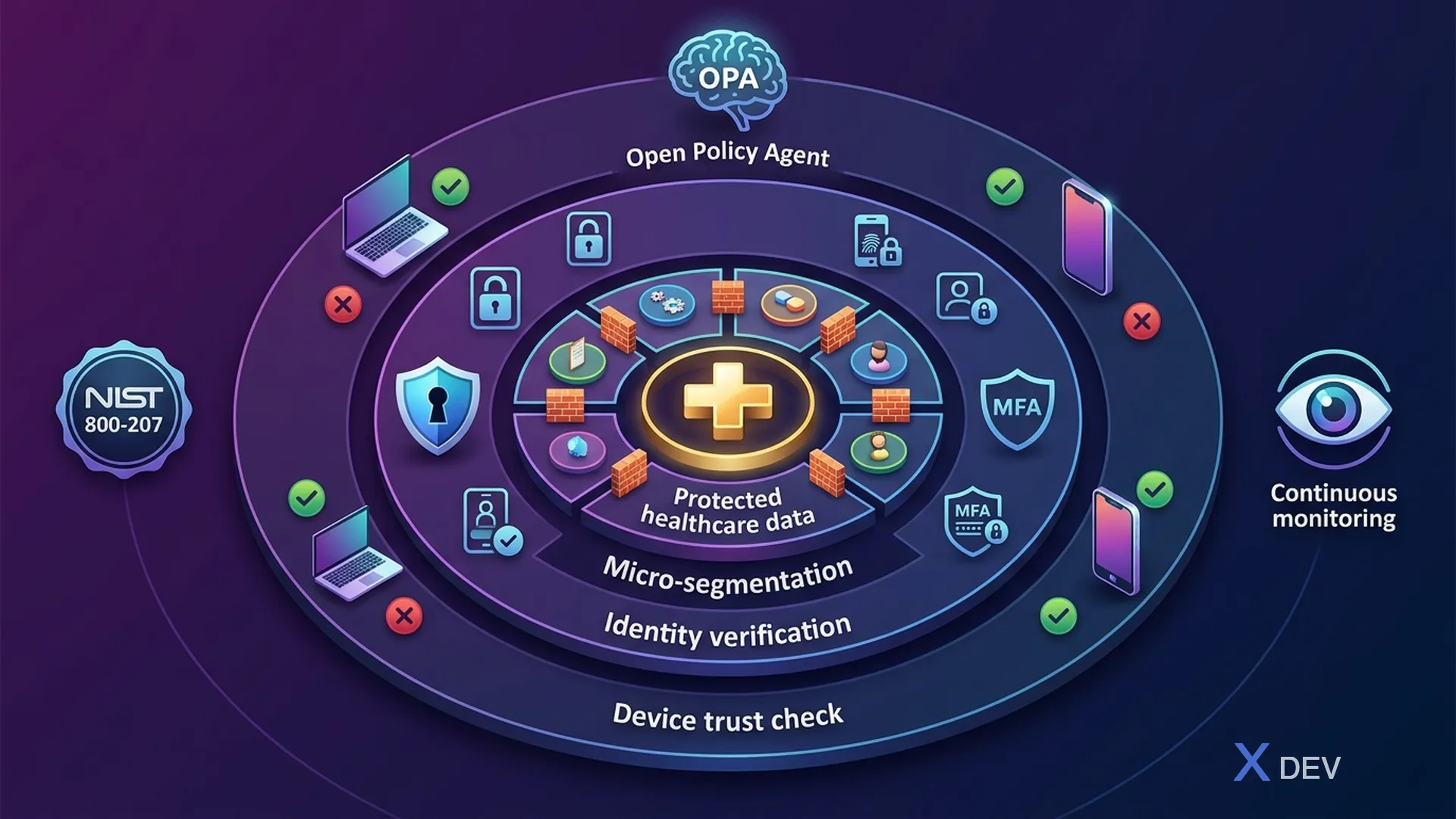
1.1。為什麼醫療保健需要零信任?
基於外圍安全的傳統安全模型—「信任防火牆內的一切」—不再適合現代醫療保健系統。隨著遠距醫療、物聯網醫療設備、雲端採用和醫生遠端存取的興起,邊界不再明顯存在。
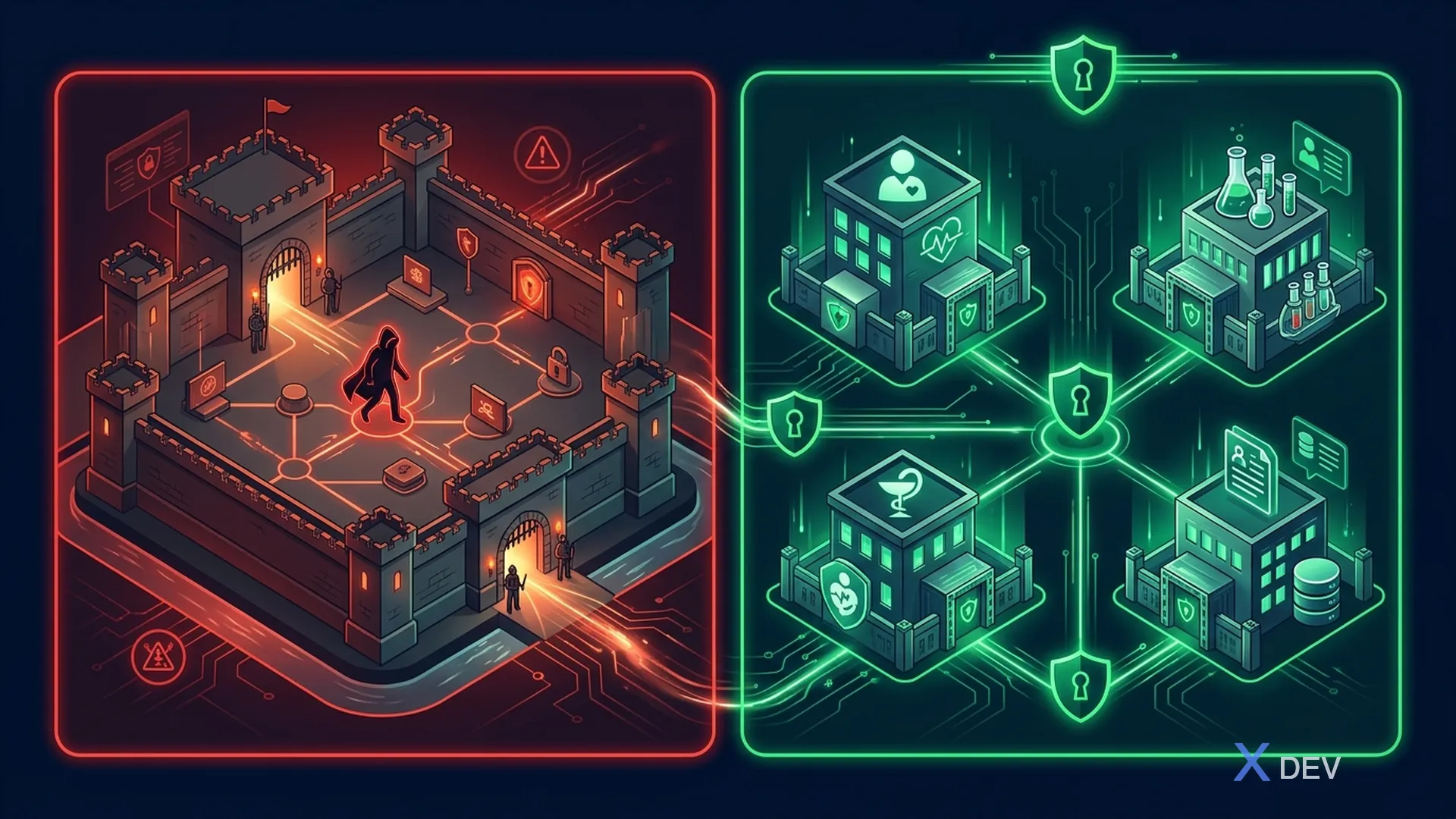
週邊安全問題:
- 勒索軟體在受信任區域橫向傳播
- 內部威脅不受控制
- IoT設備安全性較弱→入口點
- 遠端醫師繞過週邊
- 雲端服務位於邊界之外
令人不安的統計數據:
- 89% 的醫療保健組織經歷過資料外洩(Ponemon 2024)
- 醫療保健資料外洩的平均成本:1,093 萬美元(所有行業中最高)
- 60% 的醫療勒索軟體攻擊源自於內部網路內的橫向移動
1.2。 NIST SP 800-207 框架
NIST 特別出版物 800-207 將零信任架構 (ZTA) 定義為基於以下原則的安全模型:任何資產、使用者或網段都沒有隱式信任。
NIST SP 800-207 — 零信任架構:
核心組件:
- 策略引擎(PE) — 根據資料來源決定訪問
- 政策管理員 (PA) — 實施 PE 的決策
- 策略執行點 (PEP) — 存取控制點
資料來源: CDM、威脅情報、活動日誌、PKI
企業資源: EHR、實驗室 API、資料庫、FHIR、PACS
7 原則:
1.所有資料來源和運算服務都是資源 2. 無論位置如何,所有通訊都是安全的 3. 每個會話都授予單一資源的存取權限 4. 訪問由動態策略決定 5. 企業監控與測量安全狀況 6. 認證和授權是動態的 7. 企業收集資產現狀資訊
1.3。醫療保健零信任原則
| 原理 | 描述 | 醫療保健應用 |
|---|---|---|
| 永不信任,始終驗證 | 每個請求都必須經過身份驗證和授權 | 醫生每次訪問醫療記錄時都必須進行身份驗證 |
| 最低權限 | 僅授予最低限度的必要權限 | 護士只能看自己的病人 |
| 假設違規 | 假定係統設計已被破壞 | 加密靜態和傳輸中的 ePHI,甚至是內部的 |
| 明確驗證 | 使用所有可用的數據點來驗證 | 設備+位置+時間+角色+上下文 |
| 微細分 | 將網路分割成獨立的網段 | 每個部門都是一個單獨的部門 |
| 持續監控 | 持續評估與監控 | ePHI 存取的即時異常檢測 |
2. 醫院零信任參考架構
2.1。醫療保健 ZTA 概述
層數:
- **使用者:**醫生(行動裝置)、護士(工作站)、物聯網醫療設備
- PEP: Istio Ingress Gateway + Envoy 代理程式(mTLS、JWT 驗證、速率限制 + WAF)
- 策略引擎: Keycloak (AuthN) + OPA (AuthZ) + 風險引擎(評分)
- 資料來源: 裝置狀態 (MDM)、使用者行為分析、威脅情報、GeoIP + 時間
- 微分段服務: 病患/實驗室/預約服務 (mTLS) → 加密資料庫層 (RLS + TDE)
2.2。比較外圍安全與零信任
| 方面 | 週邊安全 | 零信任 |
|---|---|---|
| 信任模式 | 防火牆內部的信任 | 不相信任何事 |
| 網路存取 | 扁平化內部網路 | 微細分 |
| 認證 | 一旦到達外圍 | 連續每個請求 |
| 授權 | 基於網路(IP) | 身分+基於情境 |
| 加密 | 僅在外圍(TLS 終止) | 端對端(mTLS 無所不在) |
| 橫向移動 | 突破後輕鬆 | 被微分段阻止 |
| 監控 | 僅週邊日誌 | 全面的交通可視性 |
| 物聯網設備 | 上線後值得信賴 | 隔離、持續驗證 |
| 醫療健康 | 差(接入點太多) | 優(粒度控制) |
3. 使用 Keycloak 以身分為中心的安全性
在零信任中,身分是新的邊界。所有存取決策均基於身份驗證,而不是網路位置。
3.1。持續令牌驗證
package vn.hospital.zerotrust.identity;

import io.quarkus.oidc.TokenIntrospection;
import io.quarkus.security.identity.SecurityIdentity;
import jakarta.enterprise.context.ApplicationScoped;
import jakarta.inject.Inject;
import jakarta.ws.rs.container.ContainerRequestContext;
import jakarta.ws.rs.container.ContainerRequestFilter;
import jakarta.ws.rs.core.Response;
import jakarta.ws.rs.ext.Provider;
import org.eclipse.microprofile.jwt.JsonWebToken;
import org.jboss.logging.Logger;

import java.time.Instant;
import java.util.Set;

/**
 * Zero Trust: Continuous verification filter.
 * Validates token + context on EVERY request, not just at login.
 */
@Provider
@ApplicationScoped
public class ZeroTrustVerificationFilter implements ContainerRequestFilter {

    private static final Logger LOG = Logger.getLogger(ZeroTrustVerificationFilter.class);

    @Inject
    JsonWebToken jwt;

    @Inject
    SecurityIdentity identity;

    @Inject
    DeviceTrustService deviceTrustService;

    @Inject
    RiskScoringService riskScoringService;

    @Override
    public void filter(ContainerRequestContext requestContext) {
        // 1. Verify token is not expired (Quarkus OIDC handles this)
        // 2. Additional Zero Trust checks:

        String userId = jwt.getSubject();
        String sessionId = jwt.getClaim("sid");
        String clientIp = requestContext.getHeaderString("X-Forwarded-For");
        String userAgent = requestContext.getHeaderString("User-Agent");
        String deviceId = requestContext.getHeaderString("X-Device-ID");

        // Check: Token freshness — require recent authentication
        long authTime = jwt.getClaim("auth_time");
        long maxAuthAge = 3600; // 1 hour for standard access
        if (Instant.now().getEpochSecond() - authTime > maxAuthAge) {
            LOG.warnf("ZT-DENY: Token auth_time too old for user=%s", userId);
            requestContext.abortWith(
                Response.status(Response.Status.UNAUTHORIZED)
                    .entity("{\"error\":\"re-authentication_required\","
                            + "\"message\":\"Session expired, please re-authenticate\"}")
                    .build()
            );
            return;
        }

        // Check: Device trust assessment
        if (deviceId != null && !deviceTrustService.isDeviceTrusted(deviceId, userId)) {
            LOG.warnf("ZT-DENY: Untrusted device=%s for user=%s", deviceId, userId);
            requestContext.abortWith(
                Response.status(Response.Status.FORBIDDEN)
                    .entity("{\"error\":\"device_not_trusted\","
                            + "\"message\":\"Device is not registered or compliant\"}")
                    .build()
            );
            return;
        }

        // Check: Risk score — dynamic authorization
        RiskScore risk = riskScoringService.calculateRisk(
            userId, clientIp, userAgent, deviceId, requestContext.getUriInfo().getPath()
        );

        if (risk.score() > 80) {
            LOG.warnf("ZT-DENY: High risk score=%d for user=%s, path=%s",
                risk.score(), userId, requestContext.getUriInfo().getPath());
            requestContext.abortWith(
                Response.status(Response.Status.FORBIDDEN)
                    .entity("{\"error\":\"high_risk_detected\","
                            + "\"message\":\"Access denied due to risk assessment\"}")
                    .build()
            );
            return;
        }

        if (risk.score() > 50) {
            // Medium risk — require step-up authentication
            requestContext.getHeaders().putSingle("X-Require-StepUp", "true");
        }

        LOG.debugf("ZT-ALLOW: user=%s, device=%s, risk=%d, path=%s",
            userId, deviceId, risk.score(), requestContext.getUriInfo().getPath());
    }
}
3.2。敏感操作的升級身份驗證
package vn.hospital.zerotrust.identity;

import jakarta.enterprise.context.ApplicationScoped;
import jakarta.inject.Inject;
import jakarta.ws.rs.core.Response;
import org.eclipse.microprofile.jwt.JsonWebToken;

import java.time.Instant;
import java.util.Set;

/**
 * Step-Up Authentication: Yêu cầu xác thực bổ sung cho operations nhạy cảm.
 * VD: Xem lab results → chỉ cần password
 *     Export patient records → cần password + MFA
 *     Override medication alert → cần password + MFA + supervisor approval
 */
@ApplicationScoped
public class StepUpAuthenticationService {

    private static final Set<String> LEVEL2_OPERATIONS = Set.of(
        "patient.record.view_full",
        "lab.result.view_sensitive",
        "prescription.create"
    );

    private static final Set<String> LEVEL3_OPERATIONS = Set.of(
        "patient.record.export",
        "patient.record.bulk_access",
        "audit.log.modify",
        "system.config.change"
    );

    private static final Set<String> LEVEL4_OPERATIONS = Set.of(
        "patient.record.delete",
        "medication.alert.override",
        "emergency.break_glass"
    );

    @Inject
    JsonWebToken jwt;

    public AuthLevel getRequiredLevel(String operation) {
        if (LEVEL4_OPERATIONS.contains(operation)) return AuthLevel.LEVEL4_SUPERVISOR;
        if (LEVEL3_OPERATIONS.contains(operation)) return AuthLevel.LEVEL3_MFA;
        if (LEVEL2_OPERATIONS.contains(operation)) return AuthLevel.LEVEL2_RECENT;
        return AuthLevel.LEVEL1_STANDARD;
    }

    public StepUpResult verifyStepUp(String operation) {
        AuthLevel required = getRequiredLevel(operation);
        AuthLevel current = getCurrentAuthLevel();

        if (current.ordinal() >= required.ordinal()) {
            return StepUpResult.allowed();
        }

        // Generate step-up challenge
        String authEndpoint = buildStepUpEndpoint(required);
        return StepUpResult.stepUpRequired(required, authEndpoint);
    }

    private AuthLevel getCurrentAuthLevel() {
        // Check Authentication Context Class Reference (ACR)
        String acr = jwt.getClaim("acr");
        long authTime = jwt.getClaim("auth_time");
        long secondsSinceAuth = Instant.now().getEpochSecond() - authTime;

        if ("urn:healthcare:supervisor-approval".equals(acr)) {
            return AuthLevel.LEVEL4_SUPERVISOR;
        }
        if ("urn:oasis:names:tc:SAML:2.0:ac:classes:MobileTwoFactorContract".equals(acr)
            && secondsSinceAuth < 300) {
            return AuthLevel.LEVEL3_MFA;
        }
        if (secondsSinceAuth < 900) { // Less than 15 minutes
            return AuthLevel.LEVEL2_RECENT;
        }
        return AuthLevel.LEVEL1_STANDARD;
    }

    private String buildStepUpEndpoint(AuthLevel level) {
        String baseUrl = "/realms/healthcare/protocol/openid-connect/auth";
        return switch (level) {
            case LEVEL2_RECENT -> baseUrl + "?prompt=login&max_age=0";
            case LEVEL3_MFA -> baseUrl + "?acr_values=urn:oasis:names:tc:SAML:2.0:ac:classes:MobileTwoFactorContract";
            case LEVEL4_SUPERVISOR -> baseUrl + "?acr_values=urn:healthcare:supervisor-approval";
            default -> baseUrl;
        };
    }

    public enum AuthLevel {
        LEVEL1_STANDARD,     // Basic JWT token valid
        LEVEL2_RECENT,       // Re-authenticated within 15 min
        LEVEL3_MFA,          // MFA completed recently
        LEVEL4_SUPERVISOR    // MFA + Supervisor co-sign
    }

    public record StepUpResult(boolean allowed, AuthLevel requiredLevel, String authEndpoint) {
        static StepUpResult allowed() { return new StepUpResult(true, null, null); }
        static StepUpResult stepUpRequired(AuthLevel level, String endpoint) {
            return new StepUpResult(false, level, endpoint);
        }
    }
}
3.3。零信任的 Keycloak 領域配置
{
  "realm": "healthcare",
  "enabled": true,
  "sslRequired": "all",
  "bruteForceProtected": true,
  "maxFailureWaitSeconds": 900,
  "failureFactor": 5,
  "passwordPolicy": "length(12) and digits(1) and upperCase(1) and specialChars(1) and notUsername and passwordHistory(5)",
  "otpPolicyType": "totp",
  "otpPolicyAlgorithm": "HmacSHA256",
  "otpPolicyDigits": 6,
  "otpPolicyPeriod": 30,
  "accessTokenLifespan": 300,
  "ssoSessionMaxLifespan": 28800,
  "offlineSessionMaxLifespan": 0,
  "accessCodeLifespan": 60,
  "attributes": {
    "zero-trust-enabled": "true",
    "continuous-auth-required": "true",
    "device-trust-enforcement": "strict"
  },
  "requiredActions": [
    "CONFIGURE_TOTP",
    "VERIFY_EMAIL",
    "UPDATE_PASSWORD"
  ],
  "authenticationFlows": [
    {
      "alias": "zero-trust-browser",
      "description": "Zero Trust browser authentication with device check",
      "providerId": "basic-flow",
      "topLevel": true,
      "builtIn": false,
      "authenticationExecutions": [
        {
          "authenticator": "auth-cookie",
          "requirement": "ALTERNATIVE",
          "priority": 10
        },
        {
          "authenticator": "auth-username-password-form",
          "requirement": "REQUIRED",
          "priority": 20
        },
        {
          "authenticator": "auth-otp-form",
          "requirement": "REQUIRED",
          "priority": 30
        },
        {
          "authenticator": "auth-device-trust-check",
          "requirement": "REQUIRED",
          "priority": 40
        }
      ]
    }
  ]
}
4. 使用 Kubernetes NetworkPolicies 進行微分段
4.1。醫療保健網路架構
微分段醫療保健 Kubernetes 叢集:
- 命名空間:
healthcare-frontend- 病患入口網站/API 閘道 → 僅連接埠 443
- ── 網路政策 ──
- 命名空間:
healthcare-services- 病患服務(連接埠:8080)、實驗室服務(連接埠:8080)、預約服務(連接埠:8080)
- ── 網路政策 ──
- 命名空間:
healthcare-data- PostgreSQL(連接埠:5432),Redis快取(連接埠:6379)
- 命名空間:
healthcare-monitoring(唯讀)- Prometheus(僅刮擦),Falco(eBPF hooks)
4.2。 Kubernetes 網路策略
# networkpolicy-default-deny.yaml
# Zero Trust: deny all traffic by default in healthcare namespaces
apiVersion: networking.k8s.io/v1
kind: NetworkPolicy
metadata:
  name: default-deny-all
  namespace: healthcare-services
spec:
  podSelector: {}     # Applies to ALL pods in namespace
  policyTypes:
    - Ingress
    - Egress
  # No ingress/egress rules = deny all

---
# networkpolicy-patient-service.yaml
# Allow specific traffic to Patient Service only
apiVersion: networking.k8s.io/v1
kind: NetworkPolicy
metadata:
  name: allow-patient-service
  namespace: healthcare-services
  labels:
    app.kubernetes.io/part-of: healthcare-platform
    security.hospital.vn/policy: zero-trust
spec:
  podSelector:
    matchLabels:
      app: patient-service
  policyTypes:
    - Ingress
    - Egress
  ingress:
    # Allow from API gateway only
    - from:
        - namespaceSelector:
            matchLabels:
              name: healthcare-frontend
          podSelector:
            matchLabels:
              app: api-gateway
      ports:
        - protocol: TCP
          port: 8080
    # Allow from Istio sidecar (envoy-to-envoy mTLS)
    - from:
        - namespaceSelector:
            matchLabels:
              name: healthcare-services
          podSelector:
            matchLabels:
              app: appointment-service
      ports:
        - protocol: TCP
          port: 8080
    # Allow Prometheus scraping
    - from:
        - namespaceSelector:
            matchLabels:
              name: healthcare-monitoring
          podSelector:
            matchLabels:
              app: prometheus
      ports:
        - protocol: TCP
          port: 9090  # metrics endpoint
  egress:
    # Allow to PostgreSQL only
    - to:
        - namespaceSelector:
            matchLabels:
              name: healthcare-data
          podSelector:
            matchLabels:
              app: postgresql
      ports:
        - protocol: TCP
          port: 5432
    # Allow to Keycloak for token validation
    - to:
        - namespaceSelector:
            matchLabels:
              name: healthcare-auth
          podSelector:
            matchLabels:
              app: keycloak
      ports:
        - protocol: TCP
          port: 8443
    # Allow DNS resolution
    - to:
        - namespaceSelector: {}
          podSelector:
            matchLabels:
              k8s-app: kube-dns
      ports:
        - protocol: UDP
          port: 53
        - protocol: TCP
          port: 53

---
# networkpolicy-database.yaml
# Database: only accessible from service namespace
apiVersion: networking.k8s.io/v1
kind: NetworkPolicy
metadata:
  name: allow-database-access
  namespace: healthcare-data
spec:
  podSelector:
    matchLabels:
      app: postgresql
  policyTypes:
    - Ingress
  ingress:
    # Only from healthcare services
    - from:
        - namespaceSelector:
            matchLabels:
              name: healthcare-services
          podSelector:
            matchExpressions:
              - key: app
                operator: In
                values:
                  - patient-service
                  - lab-service
                  - appointment-service
      ports:
        - protocol: TCP
          port: 5432
4.3。無所不在的 mTLS 的 Istio 服務網格
# istio-peer-authentication.yaml
# Enforce STRICT mTLS cho toàn bộ healthcare mesh
apiVersion: security.istio.io/v1beta1
kind: PeerAuthentication
metadata:
  name: healthcare-strict-mtls
  namespace: healthcare-services
spec:
  mtls:
    mode: STRICT  # All traffic MUST be mTLS

---
# istio-authorization-policy.yaml
# Fine-grained authorization: chỉ cho phép specific service-to-service calls
apiVersion: security.istio.io/v1beta1
kind: AuthorizationPolicy
metadata:
  name: patient-service-authz
  namespace: healthcare-services
spec:
  selector:
    matchLabels:
      app: patient-service
  action: ALLOW
  rules:
    # Rule 1: API Gateway có thể gọi all patient endpoints
    - from:
        - source:
            principals:
              - "cluster.local/ns/healthcare-frontend/sa/api-gateway"
      to:
        - operation:
            methods: ["GET", "POST", "PUT"]
            paths: ["/api/v1/patients/*"]
      when:
        - key: request.auth.claims[realm_access][roles]
          values: ["doctor", "nurse", "admin"]
    # Rule 2: Appointment service chỉ GET patient demographics
    - from:
        - source:
            principals:
              - "cluster.local/ns/healthcare-services/sa/appointment-service"
      to:
        - operation:
            methods: ["GET"]
            paths: ["/api/v1/patients/*/demographics"]
    # Rule 3: Lab service chỉ GET patient identifiers
    - from:
        - source:
            principals:
              - "cluster.local/ns/healthcare-services/sa/lab-service"
      to:
        - operation:
            methods: ["GET"]
            paths: ["/api/v1/patients/*/identifier"]

---
# istio-request-authentication.yaml
# JWT validation at mesh level
apiVersion: security.istio.io/v1beta1
kind: RequestAuthentication
metadata:
  name: healthcare-jwt-auth
  namespace: healthcare-services
spec:
  jwtRules:
    - issuer: "https://keycloak.hospital.vn/realms/healthcare"
      jwksUri: "https://keycloak.hospital.vn/realms/healthcare/protocol/openid-connect/certs"
      audiences:
        - "healthcare-api"
      forwardOriginalToken: true
      outputClaimToHeaders:
        - header: "x-user-id"
          claim: "sub"
        - header: "x-user-roles"
          claim: "realm_access.roles"
        - header: "x-auth-time"
          claim: "auth_time"
5. 設備信任評估
5.1。設備姿態檢查
在零信任中,設備也必須經過驗證,而不僅僅是使用者。從未更新補丁的個人筆記型電腦登入的醫生的存取權限將受到限制。
package vn.hospital.zerotrust.device;

import jakarta.enterprise.context.ApplicationScoped;
import jakarta.inject.Inject;
import org.jboss.logging.Logger;

import java.time.Instant;
import java.time.temporal.ChronoUnit;
import java.util.Map;

/**
 * Device Trust Assessment — Đánh giá mức tin cậy của thiết bị.
 * Tích hợp với MDM (Mobile Device Management) để verify device compliance.
 */
@ApplicationScoped
public class DeviceTrustService {

    private static final Logger LOG = Logger.getLogger(DeviceTrustService.class);

    @Inject
    MdmIntegrationClient mdmClient;

    @Inject
    DeviceRegistryService deviceRegistry;

    public boolean isDeviceTrusted(String deviceId, String userId) {
        DeviceInfo device = deviceRegistry.getDevice(deviceId);
        if (device == null) {
            LOG.warnf("Unknown device: %s for user: %s", deviceId, userId);
            return false;
        }

        // Check device is registered to this user
        if (!device.registeredUserId().equals(userId)) {
            LOG.warnf("Device %s not registered to user %s", deviceId, userId);
            return false;
        }

        // Get MDM compliance status
        DevicePosture posture = mdmClient.getDevicePosture(deviceId);
        return evaluatePosture(posture);
    }

    public DeviceTrustLevel assessTrustLevel(String deviceId) {
        DevicePosture posture = mdmClient.getDevicePosture(deviceId);

        int score = 100;

        // OS up to date?
        if (!posture.osUpToDate()) score -= 20;

        // Disk encryption enabled?
        if (!posture.diskEncrypted()) score -= 30;

        // Screen lock enabled?
        if (!posture.screenLockEnabled()) score -= 15;

        // MDM managed?
        if (!posture.mdmManaged()) score -= 20;

        // Firewall enabled?
        if (!posture.firewallEnabled()) score -= 10;

        // Antivirus running?
        if (!posture.antivirusActive()) score -= 15;

        // Jailbroken/Rooted?
        if (posture.jailbroken()) score = 0;

        // Last compliance check > 24h?
        if (posture.lastComplianceCheck().isBefore(
                Instant.now().minus(24, ChronoUnit.HOURS))) {
            score -= 10;
        }

        if (score >= 80) return DeviceTrustLevel.FULL_ACCESS;
        if (score >= 50) return DeviceTrustLevel.LIMITED_ACCESS;
        if (score >= 20) return DeviceTrustLevel.READ_ONLY;
        return DeviceTrustLevel.BLOCKED;
    }

    private boolean evaluatePosture(DevicePosture posture) {
        // Minimum requirements for healthcare access
        return posture.diskEncrypted()
            && posture.screenLockEnabled()
            && !posture.jailbroken()
            && posture.osUpToDate();
    }

    public enum DeviceTrustLevel {
        FULL_ACCESS,     // Trusted corp device, full ePHI access
        LIMITED_ACCESS,  // Partially compliant, no bulk export
        READ_ONLY,       // Non-compliant device, view only
        BLOCKED          // Jailbroken/compromised, no access
    }

    public record DeviceInfo(
        String deviceId,
        String registeredUserId,
        String deviceType,
        String os,
        Instant registeredAt
    ) {}

    public record DevicePosture(
        boolean osUpToDate,
        boolean diskEncrypted,
        boolean screenLockEnabled,
        boolean mdmManaged,
        boolean firewallEnabled,
        boolean antivirusActive,
        boolean jailbroken,
        Instant lastComplianceCheck
    ) {}
}
5.2。設備信任矩陣
| 設備類型 | 信任等級 | ePHI 存取 | 所需的控制 |
|---|---|---|---|
| 醫院工作站(MDM) | 完整 | 所有 ePHI | MDM、加密、自動鎖定 |
| 醫生公司筆記型電腦 (MDM) | 完整 | 所有 ePHI | 不需要 MDM、加密、VPN |
| 醫生私人電話 | 有限公司 | 僅供查看,不可匯出 | Intune 註冊、生物識別鎖 |
| 護理師共享平板電腦 | 有限公司 | 僅限指定病患 | Kiosk 模式,自動登出 5 分鐘 |
| 物聯網醫療設備 | 受限 | 僅限自己的資料 | 基於證書,網路隔離 |
| 未知/BYOD | 已封鎖 | 沒有 ePHI | 需要註冊 |
6. 用於集中策略的 OPA(開放策略代理)
6.1。醫療保健中的 OPA 架構 ZTA

組件:
- 策略性捆綁伺服器: Git 儲存庫 → OPA 捆綁 → 分發
- OPA 伺服器(Sidecar/Central):
- **Rego 策略:**患者_訪問、設備_信任、資料_分類、緊急_訪問
- 資料: Roles_permissions.json、department_assignments.json、data_classification_rules.json
- 客戶(查詢): 病患服務、實驗室服務、預約。服務、API網關
6.2。 OPA Rego 醫療保健政策
# healthcare/patient_access.rego
# Zero Trust policy: who can access which patient data

package healthcare.patient_access

import future.keywords.if
import future.keywords.in

default allow := false

# Data: loaded from external JSON
roles_permissions := data.healthcare.roles_permissions
department_map := data.healthcare.department_assignments

# Rule 1: Doctor can access patients in their department
allow if {
    input.user.role == "doctor"
    input.action in ["read", "write"]
    patient_department := input.resource.department
    user_departments := department_map[input.user.id]
    patient_department in user_departments
}

# Rule 2: Doctor can access patient they are treating (care team)
allow if {
    input.user.role == "doctor"
    input.action in ["read", "write"]
    input.user.id in input.resource.care_team
}

# Rule 3: Nurse read-only for assigned patients
allow if {
    input.user.role == "nurse"
    input.action == "read"
    input.user.id in input.resource.assigned_nurses
}

# Rule 4: Lab technician can only see lab-related fields
allow if {
    input.user.role == "lab_tech"
    input.action == "read"
    input.resource.type == "lab_result"
    input.resource.fields_requested == allowed_lab_fields
}

# Rule 5: Emergency access (break glass)
allow if {
    input.emergency == true
    input.user.role in ["doctor", "nurse"]
    valid_emergency_justification(input.emergency_reason)
}

# Rule 6: Block access from untrusted devices
deny if {
    input.device.trust_level == "blocked"
}

# Rule 7: Block bulk access without approval
deny if {
    input.action == "bulk_export"
    not input.approval.bulk_export_approved
}

# Final decision
decision := {
    "allowed": allow,
    "denied": deny,
    "reasons": reasons,
    "required_audit": audit_required,
}

# Always audit ePHI access
audit_required := true if {
    input.resource.contains_phi == true
}

reasons[msg] if {
    deny
    input.device.trust_level == "blocked"
    msg := "Device not trusted"
}

reasons[msg] if {
    not allow
    msg := "No matching access policy"
}

allowed_lab_fields := {
    "patient_id",
    "test_name",
    "test_date",
    "result_value",
    "reference_range",
    "ordering_doctor_id"
}

valid_emergency_justification(reason) if {
    reason in [
        "life_threatening",
        "emergency_department",
        "code_blue",
        "disaster_response"
    ]
}
6.3。 OPA 與 Quarkus 集成
package vn.hospital.zerotrust.policy;

import io.quarkus.rest.client.reactive.QuarkusRestClientBuilder;
import jakarta.enterprise.context.ApplicationScoped;
import jakarta.inject.Inject;
import jakarta.ws.rs.*;
import jakarta.ws.rs.core.MediaType;
import org.eclipse.microprofile.config.inject.ConfigProperty;
import org.eclipse.microprofile.rest.client.inject.RegisterRestClient;
import org.jboss.logging.Logger;

import java.net.URI;
import java.util.Map;

@ApplicationScoped
public class OpaAuthorizationService {

    private static final Logger LOG = Logger.getLogger(OpaAuthorizationService.class);

    @ConfigProperty(name = "opa.url", defaultValue = "http://localhost:8181")
    String opaUrl;

    private OpaClient getClient() {
        return QuarkusRestClientBuilder.newBuilder()
            .baseUri(URI.create(opaUrl))
            .build(OpaClient.class);
    }

    public PolicyDecision evaluate(AccessRequest request) {
        Map<String, Object> input = Map.of(
            "user", Map.of(
                "id", request.userId(),
                "role", request.userRole(),
                "department", request.userDepartment()
            ),
            "resource", Map.of(
                "type", request.resourceType(),
                "id", request.resourceId(),
                "department", request.resourceDepartment(),
                "contains_phi", request.containsPhi(),
                "care_team", request.careTeam(),
                "assigned_nurses", request.assignedNurses()
            ),
            "action", request.action(),
            "device", Map.of(
                "trust_level", request.deviceTrustLevel()
            ),
            "emergency", request.isEmergency(),
            "emergency_reason", request.emergencyReason() != null
                ? request.emergencyReason() : ""
        );

        OpaRequest opaRequest = new OpaRequest(input);
        OpaResponse response = getClient().query(opaRequest);

        LOG.infof("OPA decision: user=%s, resource=%s, action=%s, allowed=%s",
            request.userId(), request.resourceId(),
            request.action(), response.result().allowed());

        return new PolicyDecision(
            response.result().allowed(),
            response.result().denied(),
            response.result().reasons(),
            response.result().requiredAudit()
        );
    }

    @RegisterRestClient
    @Path("/v1/data/healthcare/patient_access")
    public interface OpaClient {
        @POST
        @Consumes(MediaType.APPLICATION_JSON)
        @Produces(MediaType.APPLICATION_JSON)
        OpaResponse query(OpaRequest request);
    }

    public record OpaRequest(Map<String, Object> input) {}
    public record OpaResponse(OpaResult result) {}
    public record OpaResult(
        boolean allowed, boolean denied,
        java.util.List<String> reasons, boolean requiredAudit
    ) {}
    public record PolicyDecision(
        boolean allowed, boolean denied,
        java.util.List<String> reasons, boolean auditRequired
    ) {}
    public record AccessRequest(
        String userId, String userRole, String userDepartment,
        String resourceType, String resourceId, String resourceDepartment,
        boolean containsPhi, java.util.List<String> careTeam,
        java.util.List<String> assignedNurses, String action,
        String deviceTrustLevel, boolean isEmergency, String emergencyReason
    ) {}
}
7. 風險評分引擎
7.1。基於風險的自適應身份驗證
package vn.hospital.zerotrust.risk;

import jakarta.enterprise.context.ApplicationScoped;
import jakarta.inject.Inject;
import org.jboss.logging.Logger;

import java.time.LocalTime;
import java.util.Map;

/**
 * Risk Scoring Engine — tính điểm risk cho mỗi access request.
 * Score 0-100: 0 = no risk, 100 = maximum risk.
 *
 * Factors:
 * - Location (known IP vs unknown)
 * - Time (business hours vs off-hours)
 * - Device trust level
 * - User behavior (anomaly detection)
 * - Resource sensitivity
 * - Request pattern (frequency, volume)
 */
@ApplicationScoped
public class RiskScoringService {

    private static final Logger LOG = Logger.getLogger(RiskScoringService.class);

    @Inject
    GeoIpService geoIpService;

    @Inject
    UserBehaviorAnalytics ubaService;

    public RiskScore calculateRisk(
        String userId, String clientIp, String userAgent,
        String deviceId, String requestPath
    ) {
        int score = 0;
        Map<String, Integer> factors = new java.util.HashMap<>();

        // Factor 1: Location risk
        int locationRisk = assessLocationRisk(clientIp, userId);
        factors.put("location", locationRisk);
        score += locationRisk;

        // Factor 2: Time-based risk
        int timeRisk = assessTimeRisk();
        factors.put("time", timeRisk);
        score += timeRisk;

        // Factor 3: Resource sensitivity
        int sensitivityRisk = assessResourceSensitivity(requestPath);
        factors.put("sensitivity", sensitivityRisk);
        score += sensitivityRisk;

        // Factor 4: User behavior anomaly
        int behaviorRisk = assessBehaviorRisk(userId, requestPath);
        factors.put("behavior", behaviorRisk);
        score += behaviorRisk;

        // Factor 5: Request velocity
        int velocityRisk = assessVelocityRisk(userId);
        factors.put("velocity", velocityRisk);
        score += velocityRisk;

        // Normalize 0-100
        score = Math.min(score, 100);

        RiskScore result = new RiskScore(score, factors, determineAction(score));

        LOG.infof("Risk score: user=%s, score=%d, action=%s, factors=%s",
            userId, score, result.action(), factors);

        return result;
    }

    private int assessLocationRisk(String clientIp, String userId) {
        GeoIpService.GeoInfo geo = geoIpService.lookup(clientIp);
        // Hospital network = 0 risk
        if (geo.isHospitalNetwork()) return 0;
        // Known home IP of user = 5 risk
        if (geoIpService.isKnownUserLocation(clientIp, userId)) return 5;
        // Same country = 15 risk
        if ("VN".equals(geo.countryCode())) return 15;
        // Foreign IP = 30 risk
        return 30;
    }

    private int assessTimeRisk() {
        LocalTime now = LocalTime.now();
        // Business hours (7:00 - 19:00) = 0 risk
        if (now.isAfter(LocalTime.of(7, 0)) && now.isBefore(LocalTime.of(19, 0))) return 0;
        // After hours (19:00 - 23:00) = 10 risk
        if (now.isBefore(LocalTime.of(23, 0))) return 10;
        // Late night (23:00 - 7:00) = 20 risk
        return 20;
    }

    private int assessResourceSensitivity(String path) {
        if (path.contains("/export") || path.contains("/bulk")) return 25;
        if (path.contains("/patients") && path.contains("/records")) return 15;
        if (path.contains("/lab-results")) return 10;
        if (path.contains("/appointments")) return 5;
        return 0;
    }

    private int assessBehaviorRisk(String userId, String path) {
        return ubaService.getAnomalyScore(userId, path);
    }

    private int assessVelocityRisk(String userId) {
        long requestsLastMinute = ubaService.getRequestCount(userId, 60);
        if (requestsLastMinute > 100) return 25;
        if (requestsLastMinute > 50) return 15;
        if (requestsLastMinute > 20) return 5;
        return 0;
    }

    private String determineAction(int score) {
        if (score >= 80) return "BLOCK";
        if (score >= 50) return "STEP_UP_AUTH";
        if (score >= 30) return "ENHANCED_LOGGING";
        return "ALLOW";
    }

    public record RiskScore(int score, Map<String, Integer> factors, String action) {}
}
8. 零信任網路存取 (ZTNA) 實施
8.1。 ZTNA 與傳統 VPN
| 特點 | 傳統VPN | 中天通訊社 |
|---|---|---|
| 存取範圍 | 全面網路存取 | 按應用程式存取 |
| 信任模型 | 連結後信任 | 持續驗證 |
| 使用者體驗 | VPN 用戶端,速度慢 | 透明、快速 |
| 橫向移動 | 可能 | 不可能 |
| 可擴充性 | VPN 集中器瓶頸 | 雲端原生、可擴充 |
| 物聯網支援 | 困難 | 原生支援 |
| 能見度 | 有限公司 | 全程流量分析 |
8.2。 ZTNA 配置
# ztna-gateway-config.yaml
apiVersion: v1
kind: ConfigMap
metadata:
  name: ztna-gateway-config
  namespace: healthcare-frontend
data:
  ztna-policy.yaml: |
    ztna:
      applications:
        - name: "patient-portal"
          upstream: "https://patient-service.healthcare-services.svc:8443"
          authentication:
            provider: "keycloak"
            realm: "healthcare"
            required_roles: ["patient", "doctor", "nurse"]
          device_trust:
            minimum_level: "limited"
          access_policy:
            allowed_hours: "00:00-23:59"
            allowed_geolocations: ["VN"]
            max_session_duration: "8h"
            idle_timeout: "30m"

        - name: "ehr-admin"
          upstream: "https://ehr-admin.healthcare-services.svc:8443"
          authentication:
            provider: "keycloak"
            realm: "healthcare"
            required_roles: ["admin"]
            require_mfa: true
          device_trust:
            minimum_level: "full"
            require_mdm: true
          access_policy:
            allowed_hours: "07:00-19:00"
            allowed_geolocations: ["VN"]
            allowed_ips:
              - "10.0.0.0/8"        # Hospital network
              - "172.16.0.0/12"     # VPN range
            max_session_duration: "4h"

        - name: "lab-system"
          upstream: "https://lab-service.healthcare-services.svc:8443"
          authentication:
            provider: "keycloak"
            realm: "healthcare"
            required_roles: ["lab_tech", "doctor"]
          device_trust:
            minimum_level: "limited"
          data_loss_prevention:
            block_download: true
            block_copy_paste: true
            watermark: true
9. 傳統醫院系統的實施路線圖
9.1。分階段零信任遷移
零信任遷移路線圖 — 醫療保健:
第 1 階段:基礎(第 1-3 個月)
- 部署Keycloak(集中身分)
- 為所有員工啟用 MFA
- 盤點所有資產和資料流
- 將資料分類(PHI 與非 PHI)
- 實施基本稽核日誌記錄
第 2 階段:以身分為中心的安全性(第 4-6 個月)
- 適用於所有應用程式的 SSO (Keycloak OIDC)
- RBAC 強制執行(角色 → 權限)
- 設備註冊程序
- 基於憑證的服務驗證
- 停用共享帳戶
第 3 階段:微細分(第 7-9 個月)
- 網路分段(每個部門的 VLAN)
- Kubernetes 網路策略
- Istio 服務網格(mTLS 無所不在)
- 資料庫:每個使用者上下文的 RLS
- 阻止橫向移動路徑
第 4 階段:持續驗證(第 10-12 個月)
- OPA策略引擎部署
- 風險評分引擎
- 設備狀態檢查(MDM 整合)
- 敏感操作的升級身份驗證
- 行為分析(UBA)
第 5 階段:進階與最佳化(13-18 月)
- 用 ZTNA 取代 VPN
- 完整的 DLP 集成
- 物聯網醫療設備隔離
- 自動事件回應
- 持續合規監控
正在進行: 紅隊季度演習、政策審查、新威脅評估、員工培訓
9.2。遷移清單
| 相 | 任務 | 優先事項 | 複雜性 | HIPAA 映射 |
|---|---|---|---|---|
| 1 | 部署集中式 IdP (Keycloak) | 關鍵 | 高 | §164.312(d) |
| 1 | 為所有使用者啟用 MFA | 關鍵 | 中 | §164.312(d) |
| 1 | 資產盤點 | 關鍵 | 中 | §164.308(a)(1) |
| 1 | 資料分類 | 關鍵 | 高 | §164.312(a) |
| 2 | 單一登入整合 | 高 | 高 | §164.312(a)(2)(i) |
| 2 | RBAC 實作 | 關鍵 | 高 | §164.312(a)(1) |
| 2 | 設備註冊 | 高 | 中 | §164.310(d) |
| 3 | 網路分段 | 高 | 高 | §164.312(e)(1) |
| 3 | 適用於所有服務的 mTLS | 高 | 中 | §164.312(e)(2)(ii) |
| 3 | 資料庫 RLS | 關鍵 | 高 | §164.312(a)(1) |
| 4 | 策略引擎(OPA) | 中 | 高 | §164.312(a)(1) |
| 4 | 風險評分 | 中 | 高 | §164.308(a)(1) |
| 4 | 設備姿態檢查 | 中 | 中 | §164.310(d) |
| 5 | ZTNA部署 | 中 | 高 | §164.312(e)(1) |
| 5 | DLP 整合 | 中 | 中 | §164.312(c)(1) |
10. 零信任資料訪問
10.1。以資料為中心的零信任

第 1 層:將所有內容分類
- PHI:病患姓名、SSN、診斷、實驗室
- PII:電子郵件、電話、地址
- 敏感:帳單、保險
- 內部:時間表、庫存
- 公共:醫院資訊、一般健康提示
第 2 層:加密所有內容
| 休息時 | 運送途中 | 使用中 | |
|---|---|---|---|
| PHI | AES-256 | TLS 1.3 | 飛地 |
| 個人識別資訊 | AES-256 | TLS 1.3 | 掩蔽 |
| 敏感 | AES-256 | TLS 1.3 | — |
| 內部 | 時差 | TLS 1.2+ | — |
第 3 層:控制一切 — RLS、列級加密、動態屏蔽、DLP、浮水印
第 4 層:監控一切 — 完整的稽核追蹤、即時異常偵測、資料沿襲追蹤、合規性儀表板
10.2。零信任的應用程式屬性
# application.properties — Zero Trust configuration

# === Keycloak OIDC (Short-lived tokens) ===
quarkus.oidc.auth-server-url=https://keycloak.hospital.vn/realms/healthcare
quarkus.oidc.client-id=patient-service
quarkus.oidc.credentials.secret=${OIDC_CLIENT_SECRET}
quarkus.oidc.token.lifespan-grace=10
quarkus.oidc.token.age=300
quarkus.oidc.authentication.verify-access-token-with-user-info.enabled=true

# === mTLS for service-to-service ===
quarkus.http.ssl.certificate.files=/etc/certs/tls.crt
quarkus.http.ssl.certificate.key-files=/etc/certs/tls.key
quarkus.http.ssl.certificate.trust-store-file=/etc/certs/ca-bundle.crt
quarkus.http.ssl.client-auth=required

# === OPA Policy Engine ===
opa.url=http://opa.healthcare-policy.svc:8181
opa.policy.path=/v1/data/healthcare/patient_access
opa.decision.cache.ttl=30s

# === Risk Scoring ===
zerotrust.risk.max-score-allow=30
zerotrust.risk.max-score-stepup=50
zerotrust.risk.block-threshold=80
zerotrust.risk.velocity.window=60s
zerotrust.risk.velocity.max-requests=100

# === Device Trust ===
zerotrust.device.enforcement=strict
zerotrust.device.mdm.url=https://mdm.hospital.vn/api/v1
zerotrust.device.minimum-trust-level=limited

# === Database Zero Trust ===
quarkus.datasource.jdbc.url=jdbc:postgresql://pg.healthcare-data.svc:5432/healthcare?ssl=true&sslmode=verify-full
quarkus.datasource.jdbc.additional-jdbc-properties.sslcert=/etc/certs/db-client.crt
quarkus.datasource.jdbc.additional-jdbc-properties.sslkey=/etc/certs/db-client.key
quarkus.datasource.jdbc.additional-jdbc-properties.sslrootcert=/etc/certs/db-ca.crt
總結
在本課程中,我們為醫療保健系統實施了完整的零信任架構:
- NIST SP 800-207 架構:了解具有策略引擎、策略管理者和策略執行點的零信任架構 — ZTA Healthcare 的理論基礎
- 零信任原則:從不信任/始終驗證、最小特權、假設違規、微分段-特別適用於醫院
- 以身分為中心的安全性:具有持續令牌驗證的Keycloak,4級逐步認證(標準→MFA→主管),短期令牌(5分鐘)
- 微分段:Kubernetes NetworkPolicies 拒絕所有預設、細粒度的每服務規則、每個功能的命名空間隔離
- Istio 服務網格:所有服務到服務的 STRICT mTLS、每個端點的 AuthorizationPolicy、RequestAuthentication JWT 驗證
- 裝置信任:MDM 整合、裝置狀態檢查(加密、作業系統更新、越獄)、信任等級矩陣(完全 → 有限 → 唯讀 → 封鎖)
- OPA 策略引擎:用於病患存取控制、緊急打破玻璃、資料分類執行的集中式 Rego 策略
- 風險評分引擎:多因素風險評估(位置、時間、行為、速度、敏感度),基於風險評分的自適應認證
- ZTNA:以按應用程式存取、持續驗證、本機物聯網支援取代 VPN
- 實施路線圖:遺留醫院系統的5階段遷移計畫(18個月),從基礎到高階零信任
練習
-
NetworkPolicy Lab:部署具有 3 個命名空間(前端、服務、資料)的 Kubernetes 叢集(minikube/kind)。為每個命名空間建立預設拒絕網路策略。部署 nginx pod 代表病人服務、實驗室服務、postgresql。建立網路策略允許:前端 → 服務(連接埠 8080)、服務 → 資料(連接埠 5432)、區塊服務 → 服務(銷售預約 → 病患除外)。驗證相等
kubectl exec捲曲在豆莢之間。 -
OPA 策略引擎:安裝 OPA 伺服器(Docker)。為醫療保健場景編寫 Rego 策略:心臟病醫生僅查看心臟病患者,護士僅查看指定患者,緊急碎玻璃允許任何醫生在緊急情況=true 時查看任何患者。測試所有場景
opa eval。使用以下命令為策略編寫單元測試opa test。 -
風險評分原型:實作Java類
RiskScoringService有 5 個因素(位置、時間、設備、行為、速度)。編寫單元測驗覆蓋:營業時間+醫院IP=分數 < 10, midnight + foreign IP + unknown device = score > 70.批次匯出請求總是加25分。與 Quarkus 端點整合:GET /api/risk-score 傳回經過驗證的使用者的目前風險。 -
Istio mTLS 設定:在 Kubernetes 叢集上部署 Istio(istioctl install)。為醫療保健命名空間啟用 sidecar 注入。部署 2 項服務(病患服務、實驗室服務)。應用 PeerAuthentication STRICT 模式。驗證 mTLS 等於
istioctl proxy-config和 Kiali 儀表板。應用授權策略僅允許 lab-service GET /api/病患/{id}/identifier。
| ◀ 上一篇 | 下一篇文章 ▶ |
|---|---|
| 第 20 課:醫療資料的備份、災難復原和業務連續性 | 第 22 課:醫療保健工作負載的容器和 Kubernetes 安全性 |