1. 医療におけるコンテナセキュリティの基礎
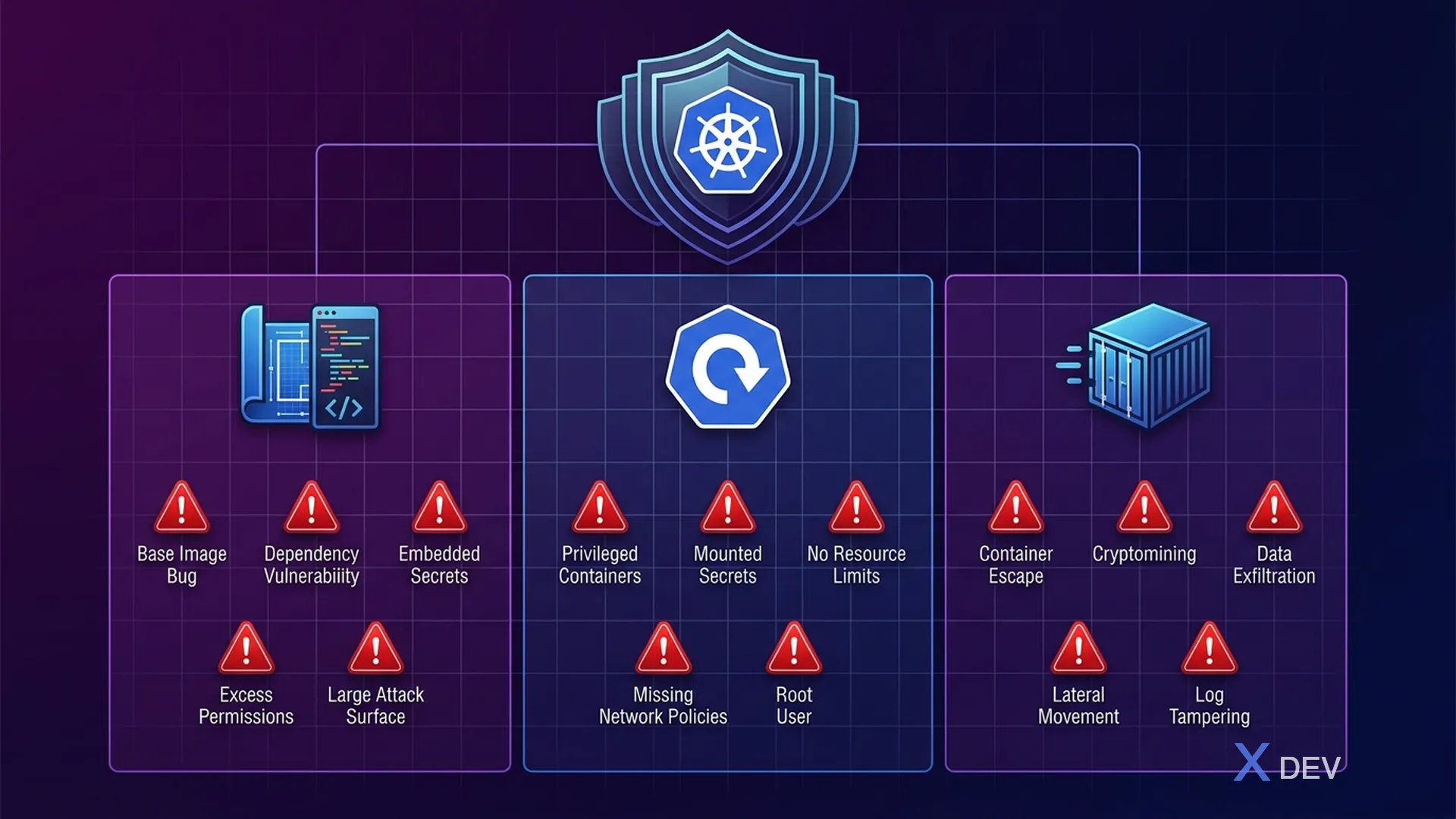
###1.1.コンテナの攻撃対象領域
コンテナーは、ヘルスケア マイクロサービスの主要な展開単位です。各コンテナにはアプリケーション コード、依存関係、ランタイムが含まれており、これらはすべて潜在的な攻撃対象領域となります。医療分野では、コンテナの侵害により、数百万人の患者の ePHI 漏洩が発生する可能性があります。
┌─────────────────────────────────────────────────────────────┐
│           Container Attack Surface — Healthcare              │
│                                                              │
│  ┌─────────── Build Time ───────────┐                        │
│  │                                   │                        │
│  │  1. Base Image Vulnerabilities    │  CVE trong OS packages │
│  │  2. Application Dependencies      │  Vulnerable libraries  │
│  │  3. Secrets in Image Layers       │  Passwords, API keys   │
│  │  4. Excessive Permissions         │  Running as root       │
│  │  5. Unnecessary Packages          │  Increased attack sfc  │
│  └───────────────────────────────────┘                        │
│                                                              │
│  ┌─────────── Deploy Time ──────────┐                        │
│  │                                   │                        │
│  │  6. Privileged Containers         │  Host access           │
│  │  7. Writable Root Filesystem      │  Malware persistence   │
│  │  8. Unencrypted Secrets           │  K8s Secrets base64    │
│  │  9. No Resource Limits            │  DoS attacks           │
│  │  10. Missing Network Policies     │  Lateral movement      │
│  └───────────────────────────────────┘                        │
│                                                              │
│  ┌─────────── Runtime ──────────────┐                        │
│  │                                   │                        │
│  │  11. Container Escape             │  Kernel exploits       │
│  │  12. Cryptomining                 │  Resource hijacking    │
│  │  13. Data Exfiltration            │  ePHI theft            │
│  │  14. Process Injection            │  In-memory attacks     │
│  │  15. Reverse Shells               │  Remote access         │
│  └───────────────────────────────────┘                        │
└─────────────────────────────────────────────────────────────┘
###1.2.コンテナセキュリティのライフサイクル
| フェーズ | ツール | アクション | ヘルスケア フォーカス |
|---|---|---|---|
| ビルド | Dockerfile のベスト プラクティス | マルチステージ、非ルート、ディストロレス | PHI 処理サービスにおける CVE を最小限に抑える |
| スキャン | トリビー、グライプ、スニック | 画像スキャンの脆弱性 | クリティカル/高 CVE をブロック |
| ストア | ハーバー、ECR | レジストリのスキャン、署名 | 画像の出所の検証 |
| 展開 | Kyverno、OPA ゲートキーパー | 入場管理 | ポッドのセキュリティ標準を強制する |
| ランタイム | ファルコ、シスディグ | 行動監視 | PHI アクセス異常を検出 |
| 応答 | Kubernetes、SIEM | インシデント対応 | 侵害されたポッドを隔離する |
2. Quarkus Healthcare サービス用の安全な Dockerfile
###2.1.多段階ビルド - JVM モード
# Dockerfile.jvm — Secure multi-stage build for Quarkus JVM
# Healthcare Patient Service

# === Stage 1: Build ===
FROM registry.access.redhat.com/ubi8/openjdk-21:1.20 AS builder

# Don't run as root during build
USER 1001

WORKDIR /build

# Copy dependency files first (layer caching)
COPY --chown=1001:1001 pom.xml .
COPY --chown=1001:1001 mvnw .
COPY --chown=1001:1001 .mvn .mvn

# Download dependencies (cached layer)
RUN ./mvnw dependency:go-offline -B

# Copy source code
COPY --chown=1001:1001 src src

# Build application
RUN ./mvnw package -DskipTests -B \
    && mv target/quarkus-app /build/app

# === Stage 2: Runtime ===
# Use distroless-like UBI minimal for smallest attack surface
FROM registry.access.redhat.com/ubi8/openjdk-21-runtime:1.20

# Labels for traceability
LABEL maintainer="[email protected]" \
      org.opencontainers.image.title="patient-service" \
      org.opencontainers.image.description="Healthcare Patient Service" \
      org.opencontainers.image.version="1.0.0" \
      org.opencontainers.image.vendor="Hospital VN" \
      security.hospital.vn/data-classification="PHI" \
      security.hospital.vn/compliance="HIPAA"

# Environment
ENV LANGUAGE='en_US:en' \
    JAVA_OPTS_APPEND="-Djava.security.egd=file:/dev/urandom \
                      -Dquarkus.http.host=0.0.0.0 \
                      -XX:+UseZGC \
                      -XX:MaxRAMPercentage=75.0 \
                      -Djava.net.preferIPv4Stack=true"

# Non-root user (UID 1001 from base image)
USER 1001

WORKDIR /deployments

# Copy only the built application
COPY --from=builder --chown=1001:1001 /build/app/ ./

# Health check
HEALTHCHECK --interval=30s --timeout=5s --start-period=30s --retries=3 \
    CMD curl -f http://localhost:8080/q/health/ready || exit 1

# Expose only application port
EXPOSE 8080

# Read-only: application doesn't need to write to filesystem
# (enforced by SecurityContext in K8s, but good practice in Dockerfile too)

ENTRYPOINT ["java", "-jar", "quarkus-run.jar"]
###2.2.ネイティブ イメージ ビルド — Distroless
# Dockerfile.native — Quarkus native image with distroless base
# Smallest possible attack surface for PHI-handling services

# === Stage 1: Build native image ===
FROM quay.io/quarkus/ubi-quarkus-mandrel-builder-image:jdk-21 AS builder

USER 1001
WORKDIR /build

COPY --chown=1001:1001 pom.xml .
COPY --chown=1001:1001 mvnw .
COPY --chown=1001:1001 .mvn .mvn

RUN ./mvnw dependency:go-offline -B

COPY --chown=1001:1001 src src

# Build native executable
RUN ./mvnw package -Dnative -DskipTests -B \
    -Dquarkus.native.additional-build-args="--no-fallback"

# === Stage 2: Minimal runtime ===
# Distroless: NO shell, NO package manager, NO utilities
# Attacker cannot exec into container or install tools
FROM quay.io/quarkus/quarkus-distroless-image:2.0

LABEL security.hospital.vn/data-classification="PHI" \
      security.hospital.vn/image-type="native-distroless"

# Non-root
USER 1001

WORKDIR /deployments

# Copy native executable only (single binary, ~50MB)
COPY --from=builder --chown=1001:1001 \
    /build/target/*-runner /deployments/application

EXPOSE 8080

ENTRYPOINT ["./application", "-Dquarkus.http.host=0.0.0.0"]
###2.3.画像タイプの比較
| メトリクス | JVM (UBI) | ネイティブ (UBI ミニマル) | ネイティブ (ディストロレス) |
|---|---|---|---|
| 画像サイズ | ~450MB | ~120MB | ~70MB |
| 起動時間 | 2~5秒 | 0.02~0.05秒 | 0.02~0.05秒 |
| メモリ (RSS) | ~200MB | ~30MB | ~30MB |
| パッケージ数 | ~200 | ~80 | ~5 |
| CVE サーフェス | 高 | 中 | 最小限 |
| シェルアクセス | はい | はい | いいえ |
| デバッグツール | 利用可能 | 限定 | なし |
| こんな方におすすめ | 開発/ステージング | 制作 | PHI サービス |
3. 画像スキャン パイプライン
###3.1. CI/CD での Trivy スキャン
# .github/workflows/container-security.yml
name: Container Security Pipeline

on:
  push:
    branches: [main, develop]
  pull_request:
    branches: [main]

env:
  REGISTRY: ghcr.io
  IMAGE_NAME: hospital-vn/patient-service

jobs:
  build-and-scan:
    runs-on: ubuntu-latest
    permissions:
      contents: read
      packages: write
      security-events: write

    steps:
      - name: Checkout code
        uses: actions/checkout@v4

      - name: Set up Docker Buildx
        uses: docker/setup-buildx-action@v3

      - name: Build image (no push yet)
        uses: docker/build-push-action@v5
        with:
          context: .
          file: ./Dockerfile.jvm
          push: false
          load: true
          tags: ${{ env.IMAGE_NAME }}:${{ github.sha }}
          cache-from: type=gha
          cache-to: type=gha,mode=max

      # === Trivy: Filesystem scan (dependencies) ===
      - name: Trivy filesystem scan
        uses: aquasecurity/trivy-action@master
        with:
          scan-type: 'fs'
          scan-ref: '.'
          format: 'sarif'
          output: 'trivy-fs-results.sarif'
          severity: 'CRITICAL,HIGH'
          exit-code: '1'  # Fail on CRITICAL/HIGH

      # === Trivy: Image scan ===
      - name: Trivy image scan
        uses: aquasecurity/trivy-action@master
        with:
          image-ref: ${{ env.IMAGE_NAME }}:${{ github.sha }}
          format: 'sarif'
          output: 'trivy-image-results.sarif'
          severity: 'CRITICAL,HIGH'
          exit-code: '1'
          vuln-type: 'os,library'
          ignore-unfixed: true

      # === Trivy: Config scan (Dockerfile best practices) ===
      - name: Trivy config scan
        uses: aquasecurity/trivy-action@master
        with:
          scan-type: 'config'
          scan-ref: '.'
          format: 'table'
          exit-code: '1'
          severity: 'CRITICAL,HIGH'
          trivyignores: '.trivyignore'

      # Upload results to GitHub Security tab
      - name: Upload Trivy results to GitHub Security
        uses: github/codeql-action/upload-sarif@v3
        if: always()
        with:
          sarif_file: 'trivy-image-results.sarif'

      # === Grype: Second opinion scan ===
      - name: Grype image scan
        uses: anchore/scan-action@v3
        with:
          image: ${{ env.IMAGE_NAME }}:${{ github.sha }}
          severity-cutoff: high
          fail-build: true
          output-format: sarif

      # === Sign and push if all scans pass ===
      - name: Login to registry
        if: github.event_name == 'push' && github.ref == 'refs/heads/main'
        uses: docker/login-action@v3
        with:
          registry: ${{ env.REGISTRY }}
          username: ${{ github.actor }}
          password: ${{ secrets.GITHUB_TOKEN }}

      - name: Push image
        if: github.event_name == 'push' && github.ref == 'refs/heads/main'
        run: |
          docker tag ${{ env.IMAGE_NAME }}:${{ github.sha }} \
            ${{ env.REGISTRY }}/${{ env.IMAGE_NAME }}:${{ github.sha }}
          docker push ${{ env.REGISTRY }}/${{ env.IMAGE_NAME }}:${{ github.sha }}

      # === Cosign: Sign the image ===
      - name: Install Cosign
        if: github.event_name == 'push' && github.ref == 'refs/heads/main'
        uses: sigstore/cosign-installer@v3

      - name: Sign image with Cosign
        if: github.event_name == 'push' && github.ref == 'refs/heads/main'
        env:
          COSIGN_PRIVATE_KEY: ${{ secrets.COSIGN_PRIVATE_KEY }}
          COSIGN_PASSWORD: ${{ secrets.COSIGN_PASSWORD }}
        run: |
          cosign sign --key env://COSIGN_PRIVATE_KEY \
            ${{ env.REGISTRY }}/${{ env.IMAGE_NAME }}:${{ github.sha }}
###3.2.医療用 Trivy Ignore ファイル
# .trivyignore — Known accepted vulnerabilities
# Each entry MUST be reviewed and approved by security team

# CVE-2024-XXXXX: Low-risk vulnerability in logging library
# Approved by: Dr. Tran (CISO), Date: 2024-06-15
# Reason: Not exploitable in our configuration, fix ETA Q3 2024
# CVE-2024-XXXXX

# NEVER ignore CVEs related to:
# - Cryptographic libraries (PHI encryption at risk)
# - Authentication/authorization libraries
# - Network/TLS libraries
# - Database drivers
4. コンテナレジストリのセキュリティ
###4.1.ハーバーレジストリの設定
# harbor-values.yaml — Harbor registry with security features
expose:
  type: ingress
  tls:
    enabled: true
    certSource: secret
    secret:
      secretName: harbor-tls
  ingress:
    hosts:
      core: registry.hospital.vn

# Automatic vulnerability scanning on push
trivy:
  enabled: true
  skipUpdate: false
  gitHubToken: ""

# Prevent pulling vulnerable images
# Block images with CRITICAL vulnerabilities
vulnerabilitySeverity: "critical"
autoScanOnPush: true

# Content Trust (Notary) — verify image signatures
notary:
  enabled: true

# Immutable tags — prevent tag overwriting
# Once patient-service:v1.0.0 is pushed, it cannot be overwritten
###4.2.ヘルスケアのための港湾プロジェクトの方針
#!/bin/bash
# setup-harbor-project.sh — Configure Harbor project for healthcare

HARBOR_URL="https://registry.hospital.vn"
HARBOR_USER="admin"
HARBOR_PASS="${HARBOR_ADMIN_PASSWORD}"

# Create healthcare project with strict policies
curl -X POST "${HARBOR_URL}/api/v2.0/projects" \
  -u "${HARBOR_USER}:${HARBOR_PASS}" \
  -H "Content-Type: application/json" \
  -d '{
    "project_name": "healthcare",
    "metadata": {
      "public": "false",
      "enable_content_trust": "true",
      "auto_scan": "true",
      "severity": "critical",
      "prevent_vul": "true",
      "reuse_sys_cve_allowlist": "false"
    },
    "storage_limit": 53687091200
  }'

# Set immutable tag rule: release tags cannot be overwritten
curl -X POST "${HARBOR_URL}/api/v2.0/projects/healthcare/immutabletagrules" \
  -u "${HARBOR_USER}:${HARBOR_PASS}" \
  -H "Content-Type: application/json" \
  -d '{
    "tag_selectors": [
      {
        "kind": "doublestar",
        "decoration": "matches",
        "pattern": "v*"
      }
    ],
    "scope_selectors": {
      "repository": [
        {
          "kind": "doublestar",
          "decoration": "repoMatches",
          "pattern": "**"
        }
      ]
    }
  }'

# Retention policy: keep last 10 tagged versions, clean untagged after 7 days
curl -X POST "${HARBOR_URL}/api/v2.0/retentions" \
  -u "${HARBOR_USER}:${HARBOR_PASS}" \
  -H "Content-Type: application/json" \
  -d '{
    "algorithm": "or",
    "rules": [
      {
        "action": "retain",
        "template": "latestPushedK",
        "params": {"latestPushedK": 10},
        "tag_selectors": [{"kind": "doublestar", "decoration": "matches", "pattern": "v*"}],
        "scope_selectors": {"repository": [{"kind": "doublestar", "decoration": "repoMatches", "pattern": "**"}]}
      }
    ],
    "trigger": {"kind": "Schedule", "settings": {"cron": "0 0 0 * * *"}}
  }'

echo "Harbor healthcare project configured with:"
echo "  - Auto vulnerability scanning on push"
echo "  - Content trust (image signing required)"
echo "  - Block pulling images with CRITICAL CVEs"
echo "  - Immutable release tags (v*)"
echo "  - Retention: keep last 10 releases"
5. Kubernetes ポッドのセキュリティ標準
###5.1.ポッドのセキュリティ標準の概要
Kubernetes は、次の 3 レベルのポッド セキュリティ標準 (PSS) を定義しています。
Kubernetes ポッド セキュリティ標準 (PSS) — 3 レベル:
| レベル | 説明 | ヘルスケアでの使用 |
|---|---|---|
| 特権 | 制限なし、完全なホスト アクセス | ⚠️ 医療ワークロードには決して使用しない |
| ベースライン | 既知の権限昇格を防止します (ホストネットワーク/PID/IPC なし、特権コンテナなし)。サイドカーのモニタリング、ログ記録にOK | |
| 制限 ◄ 必須 | Baseline + のすべては非 root として実行する必要があり、すべての機能を削除し、読み取り専用のルート ファイルシステム、Seccomp プロファイルが必要、権限昇格は不要です。 医療に必須 |
###5.2.ポッドのセキュリティ標準の適用
# namespace-pss.yaml — Enforce Restricted PSS on healthcare namespace
apiVersion: v1
kind: Namespace
metadata:
  name: healthcare-services
  labels:
    # Enforce Restricted level — reject non-compliant pods
    pod-security.kubernetes.io/enforce: restricted
    pod-security.kubernetes.io/enforce-version: latest
    # Warn on Restricted level — show warnings
    pod-security.kubernetes.io/warn: restricted
    pod-security.kubernetes.io/warn-version: latest
    # Audit on Restricted level — log violations
    pod-security.kubernetes.io/audit: restricted
    pod-security.kubernetes.io/audit-version: latest
###5.3.ヘルスケア サービス向けのセキュア ポッド仕様
# patient-service-deployment.yaml
apiVersion: apps/v1
kind: Deployment
metadata:
  name: patient-service
  namespace: healthcare-services
  labels:
    app: patient-service
    security.hospital.vn/data-classification: phi
    security.hospital.vn/compliance: hipaa
spec:
  replicas: 3
  selector:
    matchLabels:
      app: patient-service
  template:
    metadata:
      labels:
        app: patient-service
        sidecar.istio.io/inject: "true"
    spec:
      # Service account with minimal permissions
      serviceAccountName: patient-service-sa
      automountServiceAccountToken: false  # Don't mount SA token unless needed

      # Security context for the entire Pod
      securityContext:
        runAsNonRoot: true           # Pod MUST run as non-root
        runAsUser: 1001              # Specific non-root UID
        runAsGroup: 1001
        fsGroup: 1001
        seccompProfile:
          type: RuntimeDefault       # Enable seccomp
        supplementalGroups: []

      containers:
        - name: patient-service
          image: registry.hospital.vn/healthcare/patient-service:v1.0.0@sha256:abc123...
          # Pin to digest, not just tag, for supply chain security

          ports:
            - containerPort: 8080
              name: http
              protocol: TCP

          # Container-level security context
          securityContext:
            allowPrivilegeEscalation: false  # Cannot escalate to root
            readOnlyRootFilesystem: true     # Filesystem is read-only
            runAsNonRoot: true
            runAsUser: 1001
            capabilities:
              drop:
                - ALL                        # Drop ALL Linux capabilities
            seccompProfile:
              type: RuntimeDefault

          # Resource limits — prevent DoS
          resources:
            requests:
              cpu: 250m
              memory: 256Mi
            limits:
              cpu: "1"
              memory: 512Mi

          # Health probes
          livenessProbe:
            httpGet:
              path: /q/health/live
              port: 8080
            initialDelaySeconds: 10
            periodSeconds: 30
          readinessProbe:
            httpGet:
              path: /q/health/ready
              port: 8080
            initialDelaySeconds: 5
            periodSeconds: 10

          # Environment from secrets (never hardcode)
          envFrom:
            - secretRef:
                name: patient-service-secrets

          # Volume mounts for writable directories
          volumeMounts:
            - name: tmp
              mountPath: /tmp
            - name: tls-certs
              mountPath: /etc/certs
              readOnly: true

      # Volumes
      volumes:
        - name: tmp
          emptyDir:
            sizeLimit: 100Mi     # Limit tmp size
        - name: tls-certs
          secret:
            secretName: patient-service-tls
            defaultMode: 0400    # Read-only for owner

      # Topology spread for high availability
      topologySpreadConstraints:
        - maxSkew: 1
          topologyKey: kubernetes.io/hostname
          whenUnsatisfiable: DoNotSchedule
          labelSelector:
            matchLabels:
              app: patient-service
6. Kubernetes 管理の秘密
###6.1.デフォルトの Kubernetes シークレットの問題
デフォルトの Kubernetes シークレットは base64 エンコードのみであり、暗号化されません。これは、ePHI に関連する秘密に関する HIPAA を満たしていません。
# Kubernetes Secret mặc định — KHÔNG AN TOÀN cho healthcare
# Secret value chỉ base64 encoded, ai có RBAC read secrets đều xem được

kubectl get secret patient-service-secrets -o jsonpath='{.data.DB_PASSWORD}' | base64 -d
# Output: MyP@ssw0rd  ← Bất kỳ ai có quyền get secrets đều thấy!
###6.2.外部シークレット オペレーター + ボールト
# external-secrets-operator.yaml
# Sync secrets from HashiCorp Vault → Kubernetes Secrets (encrypted)

# Step 1: SecretStore (connection to Vault)
apiVersion: external-secrets.io/v1beta1
kind: ClusterSecretStore
metadata:
  name: vault-healthcare
spec:
  provider:
    vault:
      server: "https://vault.hospital.vn"
      path: "healthcare"
      version: "v2"
      auth:
        kubernetes:
          mountPath: "kubernetes"
          role: "healthcare-services"
          serviceAccountRef:
            name: external-secrets-sa
            namespace: healthcare-services

---
# Step 2: ExternalSecret (what to sync)
apiVersion: external-secrets.io/v1beta1
kind: ExternalSecret
metadata:
  name: patient-service-secrets
  namespace: healthcare-services
  labels:
    app: patient-service
spec:
  refreshInterval: 1h
  secretStoreRef:
    name: vault-healthcare
    kind: ClusterSecretStore
  target:
    name: patient-service-secrets
    creationPolicy: Owner
    template:
      type: Opaque
      engineVersion: v2
      data:
        # Template to construct JDBC URL from Vault secrets
        QUARKUS_DATASOURCE_JDBC_URL: |
          jdbc:postgresql://{{ .db_host }}:5432/{{ .db_name }}?ssl=true&sslmode=verify-full
        QUARKUS_DATASOURCE_USERNAME: "{{ .db_username }}"
        QUARKUS_DATASOURCE_PASSWORD: "{{ .db_password }}"
        QUARKUS_OIDC_CREDENTIALS_SECRET: "{{ .oidc_secret }}"
        ENCRYPTION_MASTER_KEY: "{{ .phi_encryption_key }}"
  data:
    - secretKey: db_host
      remoteRef:
        key: healthcare/patient-service/database
        property: host
    - secretKey: db_name
      remoteRef:
        key: healthcare/patient-service/database
        property: name
    - secretKey: db_username
      remoteRef:
        key: healthcare/patient-service/database
        property: username
    - secretKey: db_password
      remoteRef:
        key: healthcare/patient-service/database
        property: password
    - secretKey: oidc_secret
      remoteRef:
        key: healthcare/patient-service/keycloak
        property: client_secret
    - secretKey: phi_encryption_key
      remoteRef:
        key: healthcare/patient-service/encryption
        property: master_key
###6.3.ヘルスケア向けの Vault セットアップ
#!/bin/bash
# vault-healthcare-setup.sh — Configure Vault for healthcare secrets

set -euo pipefail

VAULT_ADDR="https://vault.hospital.vn"
export VAULT_ADDR

# Enable KV v2 secrets engine for healthcare
vault secrets enable -path=healthcare kv-v2

# Create policy for patient-service
vault policy write patient-service-policy - <<EOF
# Patient service can read its own secrets only
path "healthcare/data/patient-service/*" {
  capabilities = ["read"]
}

# Cannot list other services' secrets
path "healthcare/data/*" {
  capabilities = ["deny"]
}

# Allow reading own metadata
path "healthcare/metadata/patient-service/*" {
  capabilities = ["read", "list"]
}
EOF

# Create policy for lab-service
vault policy write lab-service-policy - <<EOF
path "healthcare/data/lab-service/*" {
  capabilities = ["read"]
}
path "healthcare/data/*" {
  capabilities = ["deny"]
}
EOF

# Enable Kubernetes auth
vault auth enable kubernetes
vault write auth/kubernetes/config \
    kubernetes_host="https://kubernetes.default.svc" \
    kubernetes_ca_cert=@/var/run/secrets/kubernetes.io/serviceaccount/ca.crt

# Bind Kubernetes service accounts to Vault policies
vault write auth/kubernetes/role/healthcare-services \
    bound_service_account_names=external-secrets-sa \
    bound_service_account_namespaces=healthcare-services \
    policies=patient-service-policy,lab-service-policy \
    ttl=1h

# Store secrets
vault kv put healthcare/patient-service/database \
    host="pg-primary.healthcare-data.svc" \
    name="healthcare" \
    username="patient_svc" \
    password="$(openssl rand -base64 32)"

vault kv put healthcare/patient-service/encryption \
    master_key="$(openssl rand -hex 32)"

vault kv put healthcare/patient-service/keycloak \
    client_secret="$(openssl rand -base64 32)"

echo "Vault healthcare setup complete"
echo "  - KV v2 engine at 'healthcare/'"
echo "  - Per-service policies (least privilege)"
echo "  - Kubernetes auth configured"
7. 医療向け Kubernetes RBAC
###7.1.病院/部門ごとの名前空間の分離
# rbac-healthcare.yaml
# Kubernetes RBAC: namespace isolation per department

# === Namespace per department ===
apiVersion: v1
kind: Namespace
metadata:
  name: healthcare-cardiology
  labels:
    department: cardiology
    pod-security.kubernetes.io/enforce: restricted

---
apiVersion: v1
kind: Namespace
metadata:
  name: healthcare-oncology
  labels:
    department: oncology
    pod-security.kubernetes.io/enforce: restricted

---
# === Service accounts per service ===
apiVersion: v1
kind: ServiceAccount
metadata:
  name: patient-service-sa
  namespace: healthcare-services
  labels:
    app: patient-service
automountServiceAccountToken: false

---
# === Role: minimal permissions for deployment management ===
apiVersion: rbac.authorization.k8s.io/v1
kind: Role
metadata:
  name: healthcare-deployer
  namespace: healthcare-services
rules:
  - apiGroups: ["apps"]
    resources: ["deployments"]
    verbs: ["get", "list", "watch", "update", "patch"]
  - apiGroups: [""]
    resources: ["pods", "pods/log"]
    verbs: ["get", "list", "watch"]
  - apiGroups: [""]
    resources: ["configmaps"]
    verbs: ["get", "list"]
  # NO access to secrets — handled by External Secrets Operator
  # NO access to exec into pods — prevents direct container access

---
# === ClusterRole: read-only for monitoring team ===
apiVersion: rbac.authorization.k8s.io/v1
kind: ClusterRole
metadata:
  name: healthcare-monitor
rules:
  - apiGroups: [""]
    resources: ["pods", "services", "endpoints", "nodes"]
    verbs: ["get", "list", "watch"]
  - apiGroups: ["apps"]
    resources: ["deployments", "replicasets", "statefulsets"]
    verbs: ["get", "list", "watch"]
  # NO exec, NO secrets, NO delete

---
# === RoleBinding: DevOps team can deploy ===
apiVersion: rbac.authorization.k8s.io/v1
kind: RoleBinding
metadata:
  name: healthcare-deployer-binding
  namespace: healthcare-services
subjects:
  - kind: Group
    name: "devops-team"
    apiGroup: rbac.authorization.k8s.io
roleRef:
  kind: Role
  name: healthcare-deployer
  apiGroup: rbac.authorization.k8s.io

---
# === Deny exec — prevent shell access to PHI containers ===
apiVersion: rbac.authorization.k8s.io/v1
kind: ClusterRole
metadata:
  name: deny-pod-exec
rules:
  - apiGroups: [""]
    resources: ["pods/exec"]
    verbs: []
    # Empty verbs = no permissions for exec
8. 入場管理者: Kyverno
8.1。カイベルノの建築
Kyverno アドミッション コントローラー フロー:
kubectl apply → API サーバー → Kyverno Webhook → ポリシー エンジン (検証 → ✓/✗、変更 → パッチ、生成 → 新規) → 承認 / 拒否
8.2。 Kyverno の医療政策
# kyverno-require-labels.yaml
# Validate: All healthcare resources MUST have compliance labels
apiVersion: kyverno.io/v1
kind: ClusterPolicy
metadata:
  name: require-healthcare-labels
  annotations:
    policies.kyverno.io/title: Require Healthcare Labels
    policies.kyverno.io/description: >-
      All resources in healthcare namespaces must have data-classification
      and compliance labels for HIPAA audit trail.
spec:
  validationFailureAction: Enforce
  background: true
  rules:
    - name: require-labels
      match:
        any:
          - resources:
              kinds:
                - Deployment
                - StatefulSet
                - DaemonSet
              namespaces:
                - "healthcare-*"
      validate:
        message: >-
          Healthcare resources must have labels:
          'security.hospital.vn/data-classification' and
          'security.hospital.vn/compliance'.
        pattern:
          metadata:
            labels:
              security.hospital.vn/data-classification: "phi | pii | sensitive | internal"
              security.hospital.vn/compliance: "hipaa | hipaa-vietnam"

---
# kyverno-disallow-privileged.yaml
# Validate: NO privileged containers in healthcare
apiVersion: kyverno.io/v1
kind: ClusterPolicy
metadata:
  name: disallow-privileged-healthcare
spec:
  validationFailureAction: Enforce
  rules:
    - name: no-privileged
      match:
        any:
          - resources:
              kinds:
                - Pod
              namespaces:
                - "healthcare-*"
      validate:
        message: "Privileged containers are NOT allowed in healthcare namespaces."
        pattern:
          spec:
            containers:
              - securityContext:
                  privileged: "false"
                  allowPrivilegeEscalation: "false"
            initContainers:
              - securityContext:
                  privileged: "false"
                  allowPrivilegeEscalation: "false"

---
# kyverno-image-whitelist.yaml
# Validate: Only allow images from trusted registry
apiVersion: kyverno.io/v1
kind: ClusterPolicy
metadata:
  name: restrict-image-registry
spec:
  validationFailureAction: Enforce
  rules:
    - name: validate-image-registry
      match:
        any:
          - resources:
              kinds:
                - Pod
              namespaces:
                - "healthcare-*"
      validate:
        message: >-
          Images must come from approved registries:
          registry.hospital.vn or quay.io/quarkus.
        pattern:
          spec:
            containers:
              - image: "registry.hospital.vn/* | quay.io/quarkus/*"
            initContainers:
              - image: "registry.hospital.vn/* | quay.io/quarkus/*"

---
# kyverno-require-image-digest.yaml
# Validate: Images must use digest, not just tag
apiVersion: kyverno.io/v1
kind: ClusterPolicy
metadata:
  name: require-image-digest
spec:
  validationFailureAction: Enforce
  rules:
    - name: check-digest
      match:
        any:
          - resources:
              kinds:
                - Pod
              namespaces:
                - "healthcare-*"
      validate:
        message: "Healthcare images must reference by digest (@sha256:...) for supply chain security."
        pattern:
          spec:
            containers:
              - image: "*@sha256:*"

---
# kyverno-require-readonly-rootfs.yaml
# Validate: Root filesystem must be read-only
apiVersion: kyverno.io/v1
kind: ClusterPolicy
metadata:
  name: require-readonly-rootfs
spec:
  validationFailureAction: Enforce
  rules:
    - name: readonly-rootfs
      match:
        any:
          - resources:
              kinds:
                - Pod
              namespaces:
                - "healthcare-*"
      validate:
        message: "Containers must have readOnlyRootFilesystem=true for security."
        pattern:
          spec:
            containers:
              - securityContext:
                  readOnlyRootFilesystem: true

---
# kyverno-mutate-defaults.yaml
# Mutate: Automatically add security defaults to pods
apiVersion: kyverno.io/v1
kind: ClusterPolicy
metadata:
  name: add-security-defaults
spec:
  rules:
    - name: add-seccomp-profile
      match:
        any:
          - resources:
              kinds:
                - Pod
              namespaces:
                - "healthcare-*"
      mutate:
        patchStrategicMerge:
          spec:
            securityContext:
              seccompProfile:
                type: RuntimeDefault
              runAsNonRoot: true
9. Falco を使用したランタイム セキュリティ
###9.1.ファルコ・フォー・ヘルスケア
Falco は、eBPF (またはカーネル モジュール) を使用してコンテナ内のシステム コールを監視するランタイム セキュリティ ツールです。実行時に異常な動作を検出します。これは、ビルド時およびデプロイ時のセキュリティがバイパスされるときの保護の最後の層です。
┌─────────────────────────────────────────────────────────────┐
│              Falco Runtime Security Architecture             │
│                                                              │
│  Container ──► Kernel System Calls ──► eBPF Probe           │
│                                           │                  │
│                                           ▼                  │
│                                    ┌──────────────┐         │
│                                    │  Falco Engine │         │
│                                    │               │         │
│                                    │  Rules YAML   │         │
│                                    │  ┌──────────┐ │         │
│                                    │  │ Syscall  │ │         │
│                                    │  │ Filter   │ │         │
│                                    │  └──────────┘ │         │
│                                    └──────┬───────┘         │
│                                           │                  │
│                                           ▼                  │
│                              ┌──────────────────────┐       │
│                              │   Alert Outputs       │       │
│                              │  • Slack              │       │
│                              │  • PagerDuty          │       │
│                              │  • SIEM (ELK)         │       │
│                              │  • Kubernetes response│       │
│                              └──────────────────────┘       │
└─────────────────────────────────────────────────────────────┘
###9.2.ヘルスケアのための Falco ルール
# falco-healthcare-rules.yaml
# Custom Falco rules for healthcare container monitoring

# Rule 1: Detect shell execution in healthcare containers
- rule: Shell in Healthcare Container
  desc: A shell was spawned in a healthcare container (potential breach)
  condition: >
    spawned_process and
    container and
    shell_procs and
    k8s.ns.name startswith "healthcare"
  output: >
    CRITICAL: Shell spawned in healthcare container
    (user=%user.name command=%proc.cmdline container=%container.name
    namespace=%k8s.ns.name pod=%k8s.pod.name image=%container.image.repository)
  priority: CRITICAL
  tags: [healthcare, hipaa, container, shell]

# Rule 2: Detect reading sensitive files (potential ePHI exfiltration)
- rule: Sensitive File Read in Healthcare
  desc: Sensitive configuration or data files read in healthcare container
  condition: >
    open_read and
    container and
    k8s.ns.name startswith "healthcare" and
    (fd.name contains "/etc/certs/" or
     fd.name contains "/etc/secrets/" or
     fd.name contains "password" or
     fd.name contains "private-key")
  output: >
    WARNING: Sensitive file read in healthcare container
    (file=%fd.name user=%user.name command=%proc.cmdline
    container=%container.name pod=%k8s.pod.name)
  priority: WARNING
  tags: [healthcare, hipaa, sensitive-file]

# Rule 3: Detect unexpected outbound connections (data exfiltration)
- rule: Unexpected Outbound Connection from Healthcare
  desc: Healthcare container connecting to unexpected external IP
  condition: >
    outbound and
    container and
    k8s.ns.name startswith "healthcare" and
    not (fd.sip in (
      "10.0.0.0/8",
      "172.16.0.0/12",
      "192.168.0.0/16"
    ))
  output: >
    ALERT: Unexpected outbound connection from healthcare container
    (command=%proc.cmdline connection=%fd.name
    container=%container.name pod=%k8s.pod.name
    dest_ip=%fd.sip dest_port=%fd.sport)
  priority: ALERT
  tags: [healthcare, hipaa, exfiltration, network]

# Rule 4: Detect package installation (compromised container)
- rule: Package Manager in Healthcare Container
  desc: Package manager executed in healthcare container (should be immutable)
  condition: >
    spawned_process and
    container and
    k8s.ns.name startswith "healthcare" and
    package_mgmt_procs
  output: >
    CRITICAL: Package manager executed in immutable healthcare container
    (user=%user.name command=%proc.cmdline container=%container.name
    pod=%k8s.pod.name image=%container.image.repository)
  priority: CRITICAL
  tags: [healthcare, container, immutable]

# Rule 5: Detect database credential access patterns
- rule: Database Credential Access Pattern
  desc: Unusual pattern of database credential file access
  condition: >
    open_read and
    container and
    k8s.ns.name startswith "healthcare" and
    fd.name contains "datasource" and
    proc.name != "java"
  output: >
    WARNING: Non-Java process accessing database credentials
    (process=%proc.name file=%fd.name user=%user.name
    container=%container.name pod=%k8s.pod.name)
  priority: WARNING
  tags: [healthcare, credentials, database]

# Rule 6: Detect privilege escalation attempts
- rule: Privilege Escalation in Healthcare
  desc: Process attempting to change UID/GID in healthcare container
  condition: >
    container and
    k8s.ns.name startswith "healthcare" and
    (evt.type in (setuid, setgid, setreuid, setregid))
  output: >
    CRITICAL: Privilege escalation attempt in healthcare container
    (user=%user.name command=%proc.cmdline evt.type=%evt.type
    container=%container.name pod=%k8s.pod.name)
  priority: CRITICAL
  tags: [healthcare, privilege-escalation]

# Rule 7: Bulk data access detection
- rule: Bulk Data Query in Healthcare
  desc: Potential bulk data exfiltration via large query result
  condition: >
    container and
    k8s.ns.name startswith "healthcare" and
    evt.type = write and
    fd.l4proto = tcp and
    evt.rawres > 1048576
  output: >
    WARNING: Large data transfer detected in healthcare container
    (size=%evt.rawres bytes command=%proc.cmdline
    container=%container.name pod=%k8s.pod.name)
  priority: WARNING
  tags: [healthcare, hipaa, bulk-access, exfiltration]
###9.3.ファルコレスポンスエンジン
# falco-response.yaml — Automated response to Falco alerts
apiVersion: v1
kind: ConfigMap
metadata:
  name: falco-response-config
  namespace: healthcare-monitoring
data:
  response-rules.yaml: |
    rules:
      # Auto-kill pods with shell execution
      - name: "kill-shell-pod"
        trigger:
          rule: "Shell in Healthcare Container"
          priority: CRITICAL
        action:
          type: "kubernetes"
          parameters:
            action: "delete"
            resource: "pod"
            namespace: "{{ .k8s.ns.name }}"
            name: "{{ .k8s.pod.name }}"

      # Isolate pods with unexpected outbound connections
      - name: "isolate-exfiltration-pod"
        trigger:
          rule: "Unexpected Outbound Connection from Healthcare"
        action:
          type: "kubernetes"
          parameters:
            action: "label"
            resource: "pod"
            namespace: "{{ .k8s.ns.name }}"
            name: "{{ .k8s.pod.name }}"
            labels:
              security.hospital.vn/quarantined: "true"

      # Network policy to isolate quarantined pods
      - name: "apply-quarantine-network-policy"
        trigger:
          rule: "Unexpected Outbound Connection from Healthcare"
        action:
          type: "kubernetes"
          parameters:
            action: "apply"
            manifest: |
              apiVersion: networking.k8s.io/v1
              kind: NetworkPolicy
              metadata:
                name: quarantine-{{ .k8s.pod.name }}
                namespace: {{ .k8s.ns.name }}
              spec:
                podSelector:
                  matchLabels:
                    security.hospital.vn/quarantined: "true"
                policyTypes:
                  - Ingress
                  - Egress
                # No rules = deny all traffic
10. サプライチェーンのセキュリティ
10.1。ヘルスケアのための SLSA フレームワーク
┌─────────────────────────────────────────────────────────────┐
│       SLSA (Supply-chain Levels for Software Artifacts)      │
│                                                              │
│  Level 0: No guarantees                                      │
│  Level 1: Documentation of build process                     │
│  Level 2: Tamper resistance of build service                 │
│  Level 3: Extra resistance to threats  ◄── Target            │
│  Level 4: Highest level of confidence                        │
│                                                              │
│  Healthcare Target: SLSA Level 3                             │
│  ├── Source: Version controlled, reviewed                    │
│  ├── Build: Isolated, reproducible, signed                   │
│  ├── Provenance: Non-falsifiable, available                  │
│  └── Dependencies: Complete, verified                        │
└─────────────────────────────────────────────────────────────┘
10.2。余署名を使用した画像署名
#!/bin/bash
# sign-and-verify.sh — Sign healthcare container images

set -euo pipefail

IMAGE="registry.hospital.vn/healthcare/patient-service"
TAG="v1.0.0"

# Generate signing key pair (one-time)
# cosign generate-key-pair

# Sign the image
cosign sign --key cosign.key "${IMAGE}:${TAG}"

# Verify the signature before deployment
cosign verify --key cosign.pub "${IMAGE}:${TAG}"

# Attach SBOM (Software Bill of Materials)
syft "${IMAGE}:${TAG}" -o spdx-json > sbom.json
cosign attach sbom --sbom sbom.json "${IMAGE}:${TAG}"

# Attach vulnerability scan results
trivy image "${IMAGE}:${TAG}" --format cosign-vuln > vuln.json
cosign attest --key cosign.key \
  --predicate vuln.json \
  --type vuln \
  "${IMAGE}:${TAG}"

echo "Image signed, SBOM attached, vulnerability attestation added"
10.3。 Kyverno ポリシーの署名の検証
# kyverno-verify-signature.yaml
# Only allow signed images from trusted registry
apiVersion: kyverno.io/v1
kind: ClusterPolicy
metadata:
  name: verify-image-signature
spec:
  validationFailureAction: Enforce
  webhookTimeoutSeconds: 30
  rules:
    - name: verify-cosign-signature
      match:
        any:
          - resources:
              kinds:
                - Pod
              namespaces:
                - "healthcare-*"
      verifyImages:
        - imageReferences:
            - "registry.hospital.vn/healthcare/*"
          attestors:
            - entries:
                - keys:
                    publicKeys: |-
                      -----BEGIN PUBLIC KEY-----
                      MFkwEwYHKoZIzj0CAQYIKoZIzj0DAQcDQgAE...
                      -----END PUBLIC KEY-----
          attestations:
            - type: https://cosign.sigstore.dev/attestation/vuln/v1
              conditions:
                - all:
                    - key: "{{ scanner }}"
                      operator: Equals
                      value: "trivy"
                    - key: "{{ count(vulnerabilities[?severity=='CRITICAL']) }}"
                      operator: Equals
                      value: "0"
11. ヘルスケア向けの CIS Kubernetes ベンチマーク
11.1。自動化された CIS ベンチマーク チェック
#!/bin/bash
# cis-benchmark-healthcare.sh — Run CIS Kubernetes Benchmark

set -euo pipefail

echo "=== CIS Kubernetes Benchmark for Healthcare ==="
echo "Date: $(date -u +%Y-%m-%dT%H:%M:%SZ)"
echo ""

# Run kube-bench for CIS checks
kubectl apply -f - <<EOF
apiVersion: batch/v1
kind: Job
metadata:
  name: kube-bench-$(date +%s)
  namespace: healthcare-monitoring
spec:
  template:
    spec:
      hostPID: true
      containers:
        - name: kube-bench
          image: aquasec/kube-bench:latest
          command: ["kube-bench", "run", "--targets", "node,policies", "--json"]
          volumeMounts:
            - name: var-lib-kubelet
              mountPath: /var/lib/kubelet
              readOnly: true
            - name: etc-kubernetes
              mountPath: /etc/kubernetes
              readOnly: true
      restartPolicy: Never
      volumes:
        - name: var-lib-kubelet
          hostPath:
            path: /var/lib/kubelet
        - name: etc-kubernetes
          hostPath:
            path: /etc/kubernetes
  backoffLimit: 0
EOF

echo "CIS Benchmark job submitted. Check results with:"
echo "  kubectl logs job/kube-bench-* -n healthcare-monitoring"
###11.2.医療固有の CIS チェック
| CISコントロール | 説明 | 医療要件 | ステータスチェック |
|---|---|---|---|
| 1.2.1 | 匿名認証が無効になっています | 必須 (HIPAA) | --anonymous-auth=false |
| 1.2.6 | RBAC が有効です | 必須 | --authorization-mode=RBAC |
| 1.2.16 | 監査ログが有効になっています | 必須 (HIPAA §164.312(b)) | --audit-log-path セット |
| 1.2.22 | 監査ログの最大数 ≥ 30 | 必須 (HIPAA 6 年間保持) | --audit-log-maxage=2190 |
| 4.2.1 | Kubelet 匿名認証が無効になっています | 必須 | --anonymous-auth=false |
| 4.2.6 | Kubelet の TLS | 必須 (HIPAA §164.312(e)) | TLS 証明書が構成されました |
| 5.1.1 | クラスター管理者の役割が制限されています | 必須 | 最小限の ClusterRoleBindings |
| 5.1.5 | サービス アカウント トークンの自動マウントが無効になっています | おすすめ | automountServiceAccountToken: false |
| 5.2.1 | ポッドのセキュリティ標準が施行される | PHI 名前空間に必須 | 名前空間の PSS ラベル |
| 5.4.1 | 分離に使用される名前空間 | 部門ごとに必須 | 部門ごとの名前空間 |
概要
このレッスンでは、医療向けの包括的な コンテナと Kubernetes セキュリティを構築しました。
- コンテナ攻撃対象領域: ビルド時、デプロイ時、実行時にわたる 15 の脅威ベクトル — ヘルスケア コンテナは、あらゆる段階で保護が必要な ePHI を処理します
- 安全な Dockerfile: マルチステージ ビルド、非 root ユーザー (UID 1001)、ディストリビューションなしのベース イメージ (450MB から 70MB へ、~200 パッケージから ~5 パッケージに削減)、シェル アクセスなし
- イメージ スキャン パイプライン: CI/CD での Trivy + Grype デュアル スキャン、CRITICAL/HIGH CVE でのビルドの失敗、SARIF の GitHub セキュリティへのアップロード
- コンテナ レジストリ: 自動スキャンを備えたハーバー、コンテンツ トラスト (Notary)、脆弱性ゲート、不変タグ、イメージ保持ポリシー
- ポッド セキュリティ標準: ヘルスケア名前空間に対する制限付き PSS の適用 — runAsNonRoot、dropAll 機能、readOnlyRootFilesystem、seccompProfile
- セキュアなポッド仕様: ダイジェストによるイメージ固定、リソース制限、権限昇格なし、tmp の emptyDir、TLS 証明書読み取り専用マウント
- シークレット管理: 外部シークレット Operator + Vault は、base64 Kubernetes Secrets、サービスごとの Vault ポリシー (最小権限)、自動ローテーションを置き換えます。
- Kubernetes RBAC: サービスごとのサービス アカウント、PHI コンテナへの実行の拒否、部門ごとの名前空間の分離、最小限の ClusterRoleBinding
- Kyverno Admission Controller: 6 つのポリシーによりヘルスケア要件が強制されます — ラベル、特権なし、レジストリ ホワイトリスト、イメージ ダイジェスト、読み取り専用 rootfs、セキュリティのデフォルト
- Falco Runtime Security: ヘルスケア用の 7 つのカスタム ルール - シェル検出、機密ファイル アクセス、アウトバウンド接続、パッケージ マネージャー、バルク データ アクセス、権限昇格。自動応答 (ポッドのキル、隔離)
- サプライ チェーン セキュリティ: SLSA レベル 3 ターゲット、Cosign イメージ署名、SBOM 添付ファイル、脆弱性証明書、Kyverno 署名検証
- CIS ベンチマーク: HIPAA 要件にマッピングされた自動化された CIS Kubernetes ベンチマーク チェック
演習
-
安全な Dockerfile: Quarkus ネイティブ イメージ用のマルチステージ Dockerfile を作成します。 (a) ビルドステージで root 以外の Mandrel ビルダーを使用していること、(b) ランタイムステージで distroless ベースを使用していること、(c) root 以外のユーザーであること、(d) 利用可能なシェルがないこと、(e) HEALTHCHECK が定義されていることを確認してください。イメージをビルドし、サイズを確認する < 100 MB, verify
docker exec失敗 (シェルなし)、Trivy でスキャン — ターゲット: 0 CRITICAL、0 HIGH。 -
Kyverno ポリシー: Kyverno をローカル クラスター (kind/minikube) にデプロイします。 3 つのクラスター ポリシーを作成します: (a) 特権コンテナーをブロック、(b) レジストリ ホワイトリストを強制 (許可のみ)
registry.hospital.vn/*), (c) requirereadOnlyRootFilesystem: true。各ポリシーをテストします。ポッドのデプロイが違反する → 拒否されたことを確認し、ポッドのデプロイが準拠する → 受け入れられたことを確認します。エクスポートポリシーレポート。 -
Falco ランタイム検出: Falco を Kubernetes にデプロイします (Helm チャート)。以下を検出するカスタム ルールを作成します: (a) シェルの実行、(b) 機密ファイルの読み取り (
/etc/shadow,/etc/certs/*)、(c) 非プライベート IP へのアウトバウンド接続。各ルールをテストします。kubectl execシェルルールをトリガーするには、cat /etc/shadowtrong container,curl external-ip。 Falco アラートが表示されることを確認します。 -
イメージ署名パイプライン: コサインキーペアを生成します。 Quarkus イメージをビルドし、ローカル レジストリ (Docker レジストリ) にプッシュします。画像にコサインで署名します。 Kyverno ポリシーの作成
verifyImages連署署名を要求します。署名のないイメージを使用してポッドをデプロイ → 拒否されたことを確認します。署名されたイメージを使用してポッドをデプロイ → 受け入れられたことを確認します。 Syft で SBOM をアタッチし、で検証しますcosign verify-attestation.
| ◀ 前の記事 | 次の記事 ▶ |
|---|---|
| レッスン 21: 医療システムのゼロトラスト アーキテクチャ | レッスン 23: 医療システムの侵入テストと脆弱性評価 |