1. Container Security Fundamentals cho Healthcare
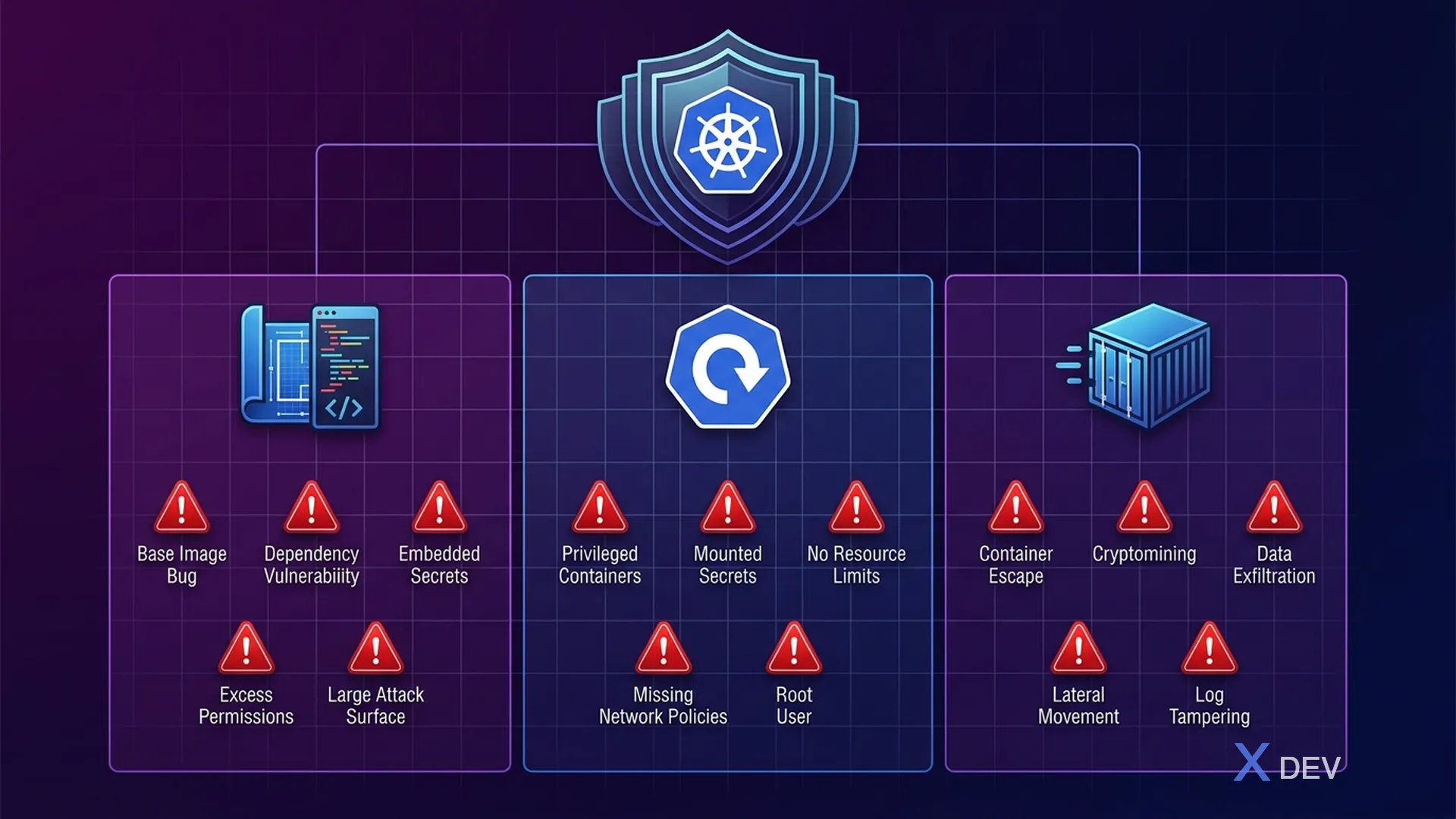
1.1. Container Attack Surface
Container là đơn vị triển khai chính trong microservices healthcare. Mỗi container chứa application code, dependencies, và runtime — tất cả đều là attack surface tiềm năng. Trong healthcare, một container bị compromise có thể dẫn đến rò rỉ ePHI của hàng triệu bệnh nhân.
┌─────────────────────────────────────────────────────────────┐
│           Container Attack Surface — Healthcare              │
│                                                              │
│  ┌─────────── Build Time ───────────┐                        │
│  │                                   │                        │
│  │  1. Base Image Vulnerabilities    │  CVE trong OS packages │
│  │  2. Application Dependencies      │  Vulnerable libraries  │
│  │  3. Secrets in Image Layers       │  Passwords, API keys   │
│  │  4. Excessive Permissions         │  Running as root       │
│  │  5. Unnecessary Packages          │  Increased attack sfc  │
│  └───────────────────────────────────┘                        │
│                                                              │
│  ┌─────────── Deploy Time ──────────┐                        │
│  │                                   │                        │
│  │  6. Privileged Containers         │  Host access           │
│  │  7. Writable Root Filesystem      │  Malware persistence   │
│  │  8. Unencrypted Secrets           │  K8s Secrets base64    │
│  │  9. No Resource Limits            │  DoS attacks           │
│  │  10. Missing Network Policies     │  Lateral movement      │
│  └───────────────────────────────────┘                        │
│                                                              │
│  ┌─────────── Runtime ──────────────┐                        │
│  │                                   │                        │
│  │  11. Container Escape             │  Kernel exploits       │
│  │  12. Cryptomining                 │  Resource hijacking    │
│  │  13. Data Exfiltration            │  ePHI theft            │
│  │  14. Process Injection            │  In-memory attacks     │
│  │  15. Reverse Shells               │  Remote access         │
│  └───────────────────────────────────┘                        │
└─────────────────────────────────────────────────────────────┘
1.2. Container Security Lifecycle
| Phase | Tools | Actions | Healthcare Focus |
|---|---|---|---|
| Build | Dockerfile best practices | Multi-stage, non-root, distroless | Minimize CVEs in PHI-handling services |
| Scan | Trivy, Grype, Snyk | Image vulnerability scanning | Block CRITICAL/HIGH CVEs |
| Store | Harbor, ECR | Registry scanning, signing | Image provenance verification |
| Deploy | Kyverno, OPA Gatekeeper | Admission control | Enforce Pod Security Standards |
| Runtime | Falco, Sysdig | Behavioral monitoring | Detect PHI access anomalies |
| Respond | Kubernetes, SIEM | Incident response | Isolate compromised pods |
2. Secure Dockerfile cho Quarkus Healthcare Service
2.1. Multi-stage Build — JVM Mode
# Dockerfile.jvm — Secure multi-stage build for Quarkus JVM
# Healthcare Patient Service

# === Stage 1: Build ===
FROM registry.access.redhat.com/ubi8/openjdk-21:1.20 AS builder

# Don't run as root during build
USER 1001

WORKDIR /build

# Copy dependency files first (layer caching)
COPY --chown=1001:1001 pom.xml .
COPY --chown=1001:1001 mvnw .
COPY --chown=1001:1001 .mvn .mvn

# Download dependencies (cached layer)
RUN ./mvnw dependency:go-offline -B

# Copy source code
COPY --chown=1001:1001 src src

# Build application
RUN ./mvnw package -DskipTests -B \
    && mv target/quarkus-app /build/app

# === Stage 2: Runtime ===
# Use distroless-like UBI minimal for smallest attack surface
FROM registry.access.redhat.com/ubi8/openjdk-21-runtime:1.20

# Labels for traceability
LABEL maintainer="[email protected]" \
      org.opencontainers.image.title="patient-service" \
      org.opencontainers.image.description="Healthcare Patient Service" \
      org.opencontainers.image.version="1.0.0" \
      org.opencontainers.image.vendor="Hospital VN" \
      security.hospital.vn/data-classification="PHI" \
      security.hospital.vn/compliance="HIPAA"

# Environment
ENV LANGUAGE='en_US:en' \
    JAVA_OPTS_APPEND="-Djava.security.egd=file:/dev/urandom \
                      -Dquarkus.http.host=0.0.0.0 \
                      -XX:+UseZGC \
                      -XX:MaxRAMPercentage=75.0 \
                      -Djava.net.preferIPv4Stack=true"

# Non-root user (UID 1001 from base image)
USER 1001

WORKDIR /deployments

# Copy only the built application
COPY --from=builder --chown=1001:1001 /build/app/ ./

# Health check
HEALTHCHECK --interval=30s --timeout=5s --start-period=30s --retries=3 \
    CMD curl -f http://localhost:8080/q/health/ready || exit 1

# Expose only application port
EXPOSE 8080

# Read-only: application doesn't need to write to filesystem
# (enforced by SecurityContext in K8s, but good practice in Dockerfile too)

ENTRYPOINT ["java", "-jar", "quarkus-run.jar"]
2.2. Native Image Build — Distroless
# Dockerfile.native — Quarkus native image with distroless base
# Smallest possible attack surface for PHI-handling services

# === Stage 1: Build native image ===
FROM quay.io/quarkus/ubi-quarkus-mandrel-builder-image:jdk-21 AS builder

USER 1001
WORKDIR /build

COPY --chown=1001:1001 pom.xml .
COPY --chown=1001:1001 mvnw .
COPY --chown=1001:1001 .mvn .mvn

RUN ./mvnw dependency:go-offline -B

COPY --chown=1001:1001 src src

# Build native executable
RUN ./mvnw package -Dnative -DskipTests -B \
    -Dquarkus.native.additional-build-args="--no-fallback"

# === Stage 2: Minimal runtime ===
# Distroless: NO shell, NO package manager, NO utilities
# Attacker cannot exec into container or install tools
FROM quay.io/quarkus/quarkus-distroless-image:2.0

LABEL security.hospital.vn/data-classification="PHI" \
      security.hospital.vn/image-type="native-distroless"

# Non-root
USER 1001

WORKDIR /deployments

# Copy native executable only (single binary, ~50MB)
COPY --from=builder --chown=1001:1001 \
    /build/target/*-runner /deployments/application

EXPOSE 8080

ENTRYPOINT ["./application", "-Dquarkus.http.host=0.0.0.0"]
2.3. So sánh Image Types
| Metric | JVM (UBI) | Native (UBI Minimal) | Native (Distroless) |
|---|---|---|---|
| Image size | ~450 MB | ~120 MB | ~70 MB |
| Startup time | 2-5 sec | 0.02-0.05 sec | 0.02-0.05 sec |
| Memory (RSS) | ~200 MB | ~30 MB | ~30 MB |
| Package count | ~200 | ~80 | ~5 |
| CVE surface | High | Medium | Minimal |
| Shell access | Yes | Yes | No |
| Debug tools | Available | Limited | None |
| Recommended for | Dev/staging | Production | PHI services |
3. Image Scanning Pipeline
3.1. Trivy Scanning trong CI/CD
# .github/workflows/container-security.yml
name: Container Security Pipeline

on:
  push:
    branches: [main, develop]
  pull_request:
    branches: [main]

env:
  REGISTRY: ghcr.io
  IMAGE_NAME: hospital-vn/patient-service

jobs:
  build-and-scan:
    runs-on: ubuntu-latest
    permissions:
      contents: read
      packages: write
      security-events: write

    steps:
      - name: Checkout code
        uses: actions/checkout@v4

      - name: Set up Docker Buildx
        uses: docker/setup-buildx-action@v3

      - name: Build image (no push yet)
        uses: docker/build-push-action@v5
        with:
          context: .
          file: ./Dockerfile.jvm
          push: false
          load: true
          tags: ${{ env.IMAGE_NAME }}:${{ github.sha }}
          cache-from: type=gha
          cache-to: type=gha,mode=max

      # === Trivy: Filesystem scan (dependencies) ===
      - name: Trivy filesystem scan
        uses: aquasecurity/trivy-action@master
        with:
          scan-type: 'fs'
          scan-ref: '.'
          format: 'sarif'
          output: 'trivy-fs-results.sarif'
          severity: 'CRITICAL,HIGH'
          exit-code: '1'  # Fail on CRITICAL/HIGH

      # === Trivy: Image scan ===
      - name: Trivy image scan
        uses: aquasecurity/trivy-action@master
        with:
          image-ref: ${{ env.IMAGE_NAME }}:${{ github.sha }}
          format: 'sarif'
          output: 'trivy-image-results.sarif'
          severity: 'CRITICAL,HIGH'
          exit-code: '1'
          vuln-type: 'os,library'
          ignore-unfixed: true

      # === Trivy: Config scan (Dockerfile best practices) ===
      - name: Trivy config scan
        uses: aquasecurity/trivy-action@master
        with:
          scan-type: 'config'
          scan-ref: '.'
          format: 'table'
          exit-code: '1'
          severity: 'CRITICAL,HIGH'
          trivyignores: '.trivyignore'

      # Upload results to GitHub Security tab
      - name: Upload Trivy results to GitHub Security
        uses: github/codeql-action/upload-sarif@v3
        if: always()
        with:
          sarif_file: 'trivy-image-results.sarif'

      # === Grype: Second opinion scan ===
      - name: Grype image scan
        uses: anchore/scan-action@v3
        with:
          image: ${{ env.IMAGE_NAME }}:${{ github.sha }}
          severity-cutoff: high
          fail-build: true
          output-format: sarif

      # === Sign and push if all scans pass ===
      - name: Login to registry
        if: github.event_name == 'push' && github.ref == 'refs/heads/main'
        uses: docker/login-action@v3
        with:
          registry: ${{ env.REGISTRY }}
          username: ${{ github.actor }}
          password: ${{ secrets.GITHUB_TOKEN }}

      - name: Push image
        if: github.event_name == 'push' && github.ref == 'refs/heads/main'
        run: |
          docker tag ${{ env.IMAGE_NAME }}:${{ github.sha }} \
            ${{ env.REGISTRY }}/${{ env.IMAGE_NAME }}:${{ github.sha }}
          docker push ${{ env.REGISTRY }}/${{ env.IMAGE_NAME }}:${{ github.sha }}

      # === Cosign: Sign the image ===
      - name: Install Cosign
        if: github.event_name == 'push' && github.ref == 'refs/heads/main'
        uses: sigstore/cosign-installer@v3

      - name: Sign image with Cosign
        if: github.event_name == 'push' && github.ref == 'refs/heads/main'
        env:
          COSIGN_PRIVATE_KEY: ${{ secrets.COSIGN_PRIVATE_KEY }}
          COSIGN_PASSWORD: ${{ secrets.COSIGN_PASSWORD }}
        run: |
          cosign sign --key env://COSIGN_PRIVATE_KEY \
            ${{ env.REGISTRY }}/${{ env.IMAGE_NAME }}:${{ github.sha }}
3.2. Trivy Ignore File cho Healthcare
# .trivyignore — Known accepted vulnerabilities
# Each entry MUST be reviewed and approved by security team

# CVE-2024-XXXXX: Low-risk vulnerability in logging library
# Approved by: Dr. Tran (CISO), Date: 2024-06-15
# Reason: Not exploitable in our configuration, fix ETA Q3 2024
# CVE-2024-XXXXX

# NEVER ignore CVEs related to:
# - Cryptographic libraries (PHI encryption at risk)
# - Authentication/authorization libraries
# - Network/TLS libraries
# - Database drivers
4. Container Registry Security
4.1. Harbor Registry Configuration
# harbor-values.yaml — Harbor registry with security features
expose:
  type: ingress
  tls:
    enabled: true
    certSource: secret
    secret:
      secretName: harbor-tls
  ingress:
    hosts:
      core: registry.hospital.vn

# Automatic vulnerability scanning on push
trivy:
  enabled: true
  skipUpdate: false
  gitHubToken: ""

# Prevent pulling vulnerable images
# Block images with CRITICAL vulnerabilities
vulnerabilitySeverity: "critical"
autoScanOnPush: true

# Content Trust (Notary) — verify image signatures
notary:
  enabled: true

# Immutable tags — prevent tag overwriting
# Once patient-service:v1.0.0 is pushed, it cannot be overwritten
4.2. Harbor Project Policy cho Healthcare
#!/bin/bash
# setup-harbor-project.sh — Configure Harbor project for healthcare

HARBOR_URL="https://registry.hospital.vn"
HARBOR_USER="admin"
HARBOR_PASS="${HARBOR_ADMIN_PASSWORD}"

# Create healthcare project with strict policies
curl -X POST "${HARBOR_URL}/api/v2.0/projects" \
  -u "${HARBOR_USER}:${HARBOR_PASS}" \
  -H "Content-Type: application/json" \
  -d '{
    "project_name": "healthcare",
    "metadata": {
      "public": "false",
      "enable_content_trust": "true",
      "auto_scan": "true",
      "severity": "critical",
      "prevent_vul": "true",
      "reuse_sys_cve_allowlist": "false"
    },
    "storage_limit": 53687091200
  }'

# Set immutable tag rule: release tags cannot be overwritten
curl -X POST "${HARBOR_URL}/api/v2.0/projects/healthcare/immutabletagrules" \
  -u "${HARBOR_USER}:${HARBOR_PASS}" \
  -H "Content-Type: application/json" \
  -d '{
    "tag_selectors": [
      {
        "kind": "doublestar",
        "decoration": "matches",
        "pattern": "v*"
      }
    ],
    "scope_selectors": {
      "repository": [
        {
          "kind": "doublestar",
          "decoration": "repoMatches",
          "pattern": "**"
        }
      ]
    }
  }'

# Retention policy: keep last 10 tagged versions, clean untagged after 7 days
curl -X POST "${HARBOR_URL}/api/v2.0/retentions" \
  -u "${HARBOR_USER}:${HARBOR_PASS}" \
  -H "Content-Type: application/json" \
  -d '{
    "algorithm": "or",
    "rules": [
      {
        "action": "retain",
        "template": "latestPushedK",
        "params": {"latestPushedK": 10},
        "tag_selectors": [{"kind": "doublestar", "decoration": "matches", "pattern": "v*"}],
        "scope_selectors": {"repository": [{"kind": "doublestar", "decoration": "repoMatches", "pattern": "**"}]}
      }
    ],
    "trigger": {"kind": "Schedule", "settings": {"cron": "0 0 0 * * *"}}
  }'

echo "Harbor healthcare project configured with:"
echo "  - Auto vulnerability scanning on push"
echo "  - Content trust (image signing required)"
echo "  - Block pulling images with CRITICAL CVEs"
echo "  - Immutable release tags (v*)"
echo "  - Retention: keep last 10 releases"
5. Kubernetes Pod Security Standards
5.1. Pod Security Standards Overview
Kubernetes định nghĩa 3 mức Pod Security Standards (PSS):
Kubernetes Pod Security Standards (PSS) — 3 levels:
| Level | Mô tả | Healthcare Use |
|---|---|---|
| PRIVILEGED | No restrictions, full host access | ⚠️ NEVER cho healthcare workloads |
| BASELINE | Prevents known privilege escalations (no hostNetwork/PID/IPC, no privileged containers) | OK cho monitoring, logging sidecars |
| RESTRICTED ◄ Required | Everything in Baseline + must run as non-root, drop ALL capabilities, read-only root filesystem, Seccomp profile required, no privilege escalation | Bắt buộc cho Healthcare |
5.2. Pod Security Standards Enforcement
# namespace-pss.yaml — Enforce Restricted PSS on healthcare namespace
apiVersion: v1
kind: Namespace
metadata:
  name: healthcare-services
  labels:
    # Enforce Restricted level — reject non-compliant pods
    pod-security.kubernetes.io/enforce: restricted
    pod-security.kubernetes.io/enforce-version: latest
    # Warn on Restricted level — show warnings
    pod-security.kubernetes.io/warn: restricted
    pod-security.kubernetes.io/warn-version: latest
    # Audit on Restricted level — log violations
    pod-security.kubernetes.io/audit: restricted
    pod-security.kubernetes.io/audit-version: latest
5.3. Secure Pod Spec cho Healthcare Service
# patient-service-deployment.yaml
apiVersion: apps/v1
kind: Deployment
metadata:
  name: patient-service
  namespace: healthcare-services
  labels:
    app: patient-service
    security.hospital.vn/data-classification: phi
    security.hospital.vn/compliance: hipaa
spec:
  replicas: 3
  selector:
    matchLabels:
      app: patient-service
  template:
    metadata:
      labels:
        app: patient-service
        sidecar.istio.io/inject: "true"
    spec:
      # Service account with minimal permissions
      serviceAccountName: patient-service-sa
      automountServiceAccountToken: false  # Don't mount SA token unless needed

      # Security context for the entire Pod
      securityContext:
        runAsNonRoot: true           # Pod MUST run as non-root
        runAsUser: 1001              # Specific non-root UID
        runAsGroup: 1001
        fsGroup: 1001
        seccompProfile:
          type: RuntimeDefault       # Enable seccomp
        supplementalGroups: []

      containers:
        - name: patient-service
          image: registry.hospital.vn/healthcare/patient-service:v1.0.0@sha256:abc123...
          # Pin to digest, not just tag, for supply chain security

          ports:
            - containerPort: 8080
              name: http
              protocol: TCP

          # Container-level security context
          securityContext:
            allowPrivilegeEscalation: false  # Cannot escalate to root
            readOnlyRootFilesystem: true     # Filesystem is read-only
            runAsNonRoot: true
            runAsUser: 1001
            capabilities:
              drop:
                - ALL                        # Drop ALL Linux capabilities
            seccompProfile:
              type: RuntimeDefault

          # Resource limits — prevent DoS
          resources:
            requests:
              cpu: 250m
              memory: 256Mi
            limits:
              cpu: "1"
              memory: 512Mi

          # Health probes
          livenessProbe:
            httpGet:
              path: /q/health/live
              port: 8080
            initialDelaySeconds: 10
            periodSeconds: 30
          readinessProbe:
            httpGet:
              path: /q/health/ready
              port: 8080
            initialDelaySeconds: 5
            periodSeconds: 10

          # Environment from secrets (never hardcode)
          envFrom:
            - secretRef:
                name: patient-service-secrets

          # Volume mounts for writable directories
          volumeMounts:
            - name: tmp
              mountPath: /tmp
            - name: tls-certs
              mountPath: /etc/certs
              readOnly: true

      # Volumes
      volumes:
        - name: tmp
          emptyDir:
            sizeLimit: 100Mi     # Limit tmp size
        - name: tls-certs
          secret:
            secretName: patient-service-tls
            defaultMode: 0400    # Read-only for owner

      # Topology spread for high availability
      topologySpreadConstraints:
        - maxSkew: 1
          topologyKey: kubernetes.io/hostname
          whenUnsatisfiable: DoNotSchedule
          labelSelector:
            matchLabels:
              app: patient-service
6. Kubernetes Secrets Management
6.1. Vấn đề với Kubernetes Secrets mặc định
Kubernetes Secrets mặc định chỉ base64-encoded, KHÔNG phải encrypted. Điều này không đáp ứng HIPAA cho secrets liên quan đến ePHI.
# Kubernetes Secret mặc định — KHÔNG AN TOÀN cho healthcare
# Secret value chỉ base64 encoded, ai có RBAC read secrets đều xem được

kubectl get secret patient-service-secrets -o jsonpath='{.data.DB_PASSWORD}' | base64 -d
# Output: MyP@ssw0rd  ← Bất kỳ ai có quyền get secrets đều thấy!
6.2. External Secrets Operator + Vault
# external-secrets-operator.yaml
# Sync secrets from HashiCorp Vault → Kubernetes Secrets (encrypted)

# Step 1: SecretStore (connection to Vault)
apiVersion: external-secrets.io/v1beta1
kind: ClusterSecretStore
metadata:
  name: vault-healthcare
spec:
  provider:
    vault:
      server: "https://vault.hospital.vn"
      path: "healthcare"
      version: "v2"
      auth:
        kubernetes:
          mountPath: "kubernetes"
          role: "healthcare-services"
          serviceAccountRef:
            name: external-secrets-sa
            namespace: healthcare-services

---
# Step 2: ExternalSecret (what to sync)
apiVersion: external-secrets.io/v1beta1
kind: ExternalSecret
metadata:
  name: patient-service-secrets
  namespace: healthcare-services
  labels:
    app: patient-service
spec:
  refreshInterval: 1h
  secretStoreRef:
    name: vault-healthcare
    kind: ClusterSecretStore
  target:
    name: patient-service-secrets
    creationPolicy: Owner
    template:
      type: Opaque
      engineVersion: v2
      data:
        # Template to construct JDBC URL from Vault secrets
        QUARKUS_DATASOURCE_JDBC_URL: |
          jdbc:postgresql://{{ .db_host }}:5432/{{ .db_name }}?ssl=true&sslmode=verify-full
        QUARKUS_DATASOURCE_USERNAME: "{{ .db_username }}"
        QUARKUS_DATASOURCE_PASSWORD: "{{ .db_password }}"
        QUARKUS_OIDC_CREDENTIALS_SECRET: "{{ .oidc_secret }}"
        ENCRYPTION_MASTER_KEY: "{{ .phi_encryption_key }}"
  data:
    - secretKey: db_host
      remoteRef:
        key: healthcare/patient-service/database
        property: host
    - secretKey: db_name
      remoteRef:
        key: healthcare/patient-service/database
        property: name
    - secretKey: db_username
      remoteRef:
        key: healthcare/patient-service/database
        property: username
    - secretKey: db_password
      remoteRef:
        key: healthcare/patient-service/database
        property: password
    - secretKey: oidc_secret
      remoteRef:
        key: healthcare/patient-service/keycloak
        property: client_secret
    - secretKey: phi_encryption_key
      remoteRef:
        key: healthcare/patient-service/encryption
        property: master_key
6.3. Vault Setup cho Healthcare
#!/bin/bash
# vault-healthcare-setup.sh — Configure Vault for healthcare secrets

set -euo pipefail

VAULT_ADDR="https://vault.hospital.vn"
export VAULT_ADDR

# Enable KV v2 secrets engine for healthcare
vault secrets enable -path=healthcare kv-v2

# Create policy for patient-service
vault policy write patient-service-policy - <<EOF
# Patient service can read its own secrets only
path "healthcare/data/patient-service/*" {
  capabilities = ["read"]
}

# Cannot list other services' secrets
path "healthcare/data/*" {
  capabilities = ["deny"]
}

# Allow reading own metadata
path "healthcare/metadata/patient-service/*" {
  capabilities = ["read", "list"]
}
EOF

# Create policy for lab-service
vault policy write lab-service-policy - <<EOF
path "healthcare/data/lab-service/*" {
  capabilities = ["read"]
}
path "healthcare/data/*" {
  capabilities = ["deny"]
}
EOF

# Enable Kubernetes auth
vault auth enable kubernetes
vault write auth/kubernetes/config \
    kubernetes_host="https://kubernetes.default.svc" \
    kubernetes_ca_cert=@/var/run/secrets/kubernetes.io/serviceaccount/ca.crt

# Bind Kubernetes service accounts to Vault policies
vault write auth/kubernetes/role/healthcare-services \
    bound_service_account_names=external-secrets-sa \
    bound_service_account_namespaces=healthcare-services \
    policies=patient-service-policy,lab-service-policy \
    ttl=1h

# Store secrets
vault kv put healthcare/patient-service/database \
    host="pg-primary.healthcare-data.svc" \
    name="healthcare" \
    username="patient_svc" \
    password="$(openssl rand -base64 32)"

vault kv put healthcare/patient-service/encryption \
    master_key="$(openssl rand -hex 32)"

vault kv put healthcare/patient-service/keycloak \
    client_secret="$(openssl rand -base64 32)"

echo "Vault healthcare setup complete"
echo "  - KV v2 engine at 'healthcare/'"
echo "  - Per-service policies (least privilege)"
echo "  - Kubernetes auth configured"
7. Kubernetes RBAC cho Healthcare
7.1. Namespace Isolation per Hospital/Department
# rbac-healthcare.yaml
# Kubernetes RBAC: namespace isolation per department

# === Namespace per department ===
apiVersion: v1
kind: Namespace
metadata:
  name: healthcare-cardiology
  labels:
    department: cardiology
    pod-security.kubernetes.io/enforce: restricted

---
apiVersion: v1
kind: Namespace
metadata:
  name: healthcare-oncology
  labels:
    department: oncology
    pod-security.kubernetes.io/enforce: restricted

---
# === Service accounts per service ===
apiVersion: v1
kind: ServiceAccount
metadata:
  name: patient-service-sa
  namespace: healthcare-services
  labels:
    app: patient-service
automountServiceAccountToken: false

---
# === Role: minimal permissions for deployment management ===
apiVersion: rbac.authorization.k8s.io/v1
kind: Role
metadata:
  name: healthcare-deployer
  namespace: healthcare-services
rules:
  - apiGroups: ["apps"]
    resources: ["deployments"]
    verbs: ["get", "list", "watch", "update", "patch"]
  - apiGroups: [""]
    resources: ["pods", "pods/log"]
    verbs: ["get", "list", "watch"]
  - apiGroups: [""]
    resources: ["configmaps"]
    verbs: ["get", "list"]
  # NO access to secrets — handled by External Secrets Operator
  # NO access to exec into pods — prevents direct container access

---
# === ClusterRole: read-only for monitoring team ===
apiVersion: rbac.authorization.k8s.io/v1
kind: ClusterRole
metadata:
  name: healthcare-monitor
rules:
  - apiGroups: [""]
    resources: ["pods", "services", "endpoints", "nodes"]
    verbs: ["get", "list", "watch"]
  - apiGroups: ["apps"]
    resources: ["deployments", "replicasets", "statefulsets"]
    verbs: ["get", "list", "watch"]
  # NO exec, NO secrets, NO delete

---
# === RoleBinding: DevOps team can deploy ===
apiVersion: rbac.authorization.k8s.io/v1
kind: RoleBinding
metadata:
  name: healthcare-deployer-binding
  namespace: healthcare-services
subjects:
  - kind: Group
    name: "devops-team"
    apiGroup: rbac.authorization.k8s.io
roleRef:
  kind: Role
  name: healthcare-deployer
  apiGroup: rbac.authorization.k8s.io

---
# === Deny exec — prevent shell access to PHI containers ===
apiVersion: rbac.authorization.k8s.io/v1
kind: ClusterRole
metadata:
  name: deny-pod-exec
rules:
  - apiGroups: [""]
    resources: ["pods/exec"]
    verbs: []
    # Empty verbs = no permissions for exec
8. Admission Controllers: Kyverno
8.1. Kyverno Architecture
Kyverno Admission Controller Flow:
kubectl apply → API Server → Kyverno Webhook → Policy Engine (Validate → ✓/✗, Mutate → Patch, Generate → New) → Admit / Reject
8.2. Kyverno Policies cho Healthcare
# kyverno-require-labels.yaml
# Validate: All healthcare resources MUST have compliance labels
apiVersion: kyverno.io/v1
kind: ClusterPolicy
metadata:
  name: require-healthcare-labels
  annotations:
    policies.kyverno.io/title: Require Healthcare Labels
    policies.kyverno.io/description: >-
      All resources in healthcare namespaces must have data-classification
      and compliance labels for HIPAA audit trail.
spec:
  validationFailureAction: Enforce
  background: true
  rules:
    - name: require-labels
      match:
        any:
          - resources:
              kinds:
                - Deployment
                - StatefulSet
                - DaemonSet
              namespaces:
                - "healthcare-*"
      validate:
        message: >-
          Healthcare resources must have labels:
          'security.hospital.vn/data-classification' and
          'security.hospital.vn/compliance'.
        pattern:
          metadata:
            labels:
              security.hospital.vn/data-classification: "phi | pii | sensitive | internal"
              security.hospital.vn/compliance: "hipaa | hipaa-vietnam"

---
# kyverno-disallow-privileged.yaml
# Validate: NO privileged containers in healthcare
apiVersion: kyverno.io/v1
kind: ClusterPolicy
metadata:
  name: disallow-privileged-healthcare
spec:
  validationFailureAction: Enforce
  rules:
    - name: no-privileged
      match:
        any:
          - resources:
              kinds:
                - Pod
              namespaces:
                - "healthcare-*"
      validate:
        message: "Privileged containers are NOT allowed in healthcare namespaces."
        pattern:
          spec:
            containers:
              - securityContext:
                  privileged: "false"
                  allowPrivilegeEscalation: "false"
            initContainers:
              - securityContext:
                  privileged: "false"
                  allowPrivilegeEscalation: "false"

---
# kyverno-image-whitelist.yaml
# Validate: Only allow images from trusted registry
apiVersion: kyverno.io/v1
kind: ClusterPolicy
metadata:
  name: restrict-image-registry
spec:
  validationFailureAction: Enforce
  rules:
    - name: validate-image-registry
      match:
        any:
          - resources:
              kinds:
                - Pod
              namespaces:
                - "healthcare-*"
      validate:
        message: >-
          Images must come from approved registries:
          registry.hospital.vn or quay.io/quarkus.
        pattern:
          spec:
            containers:
              - image: "registry.hospital.vn/* | quay.io/quarkus/*"
            initContainers:
              - image: "registry.hospital.vn/* | quay.io/quarkus/*"

---
# kyverno-require-image-digest.yaml
# Validate: Images must use digest, not just tag
apiVersion: kyverno.io/v1
kind: ClusterPolicy
metadata:
  name: require-image-digest
spec:
  validationFailureAction: Enforce
  rules:
    - name: check-digest
      match:
        any:
          - resources:
              kinds:
                - Pod
              namespaces:
                - "healthcare-*"
      validate:
        message: "Healthcare images must reference by digest (@sha256:...) for supply chain security."
        pattern:
          spec:
            containers:
              - image: "*@sha256:*"

---
# kyverno-require-readonly-rootfs.yaml
# Validate: Root filesystem must be read-only
apiVersion: kyverno.io/v1
kind: ClusterPolicy
metadata:
  name: require-readonly-rootfs
spec:
  validationFailureAction: Enforce
  rules:
    - name: readonly-rootfs
      match:
        any:
          - resources:
              kinds:
                - Pod
              namespaces:
                - "healthcare-*"
      validate:
        message: "Containers must have readOnlyRootFilesystem=true for security."
        pattern:
          spec:
            containers:
              - securityContext:
                  readOnlyRootFilesystem: true

---
# kyverno-mutate-defaults.yaml
# Mutate: Automatically add security defaults to pods
apiVersion: kyverno.io/v1
kind: ClusterPolicy
metadata:
  name: add-security-defaults
spec:
  rules:
    - name: add-seccomp-profile
      match:
        any:
          - resources:
              kinds:
                - Pod
              namespaces:
                - "healthcare-*"
      mutate:
        patchStrategicMerge:
          spec:
            securityContext:
              seccompProfile:
                type: RuntimeDefault
              runAsNonRoot: true
9. Runtime Security với Falco
9.1. Falco cho Healthcare
Falco là runtime security tool sử dụng eBPF (hoặc kernel module) để monitor system calls trong containers. Nó phát hiện hành vi bất thường tại runtime — lớp bảo vệ cuối cùng khi build-time và deploy-time security bị bypass.
┌─────────────────────────────────────────────────────────────┐
│              Falco Runtime Security Architecture             │
│                                                              │
│  Container ──► Kernel System Calls ──► eBPF Probe           │
│                                           │                  │
│                                           ▼                  │
│                                    ┌──────────────┐         │
│                                    │  Falco Engine │         │
│                                    │               │         │
│                                    │  Rules YAML   │         │
│                                    │  ┌──────────┐ │         │
│                                    │  │ Syscall  │ │         │
│                                    │  │ Filter   │ │         │
│                                    │  └──────────┘ │         │
│                                    └──────┬───────┘         │
│                                           │                  │
│                                           ▼                  │
│                              ┌──────────────────────┐       │
│                              │   Alert Outputs       │       │
│                              │  • Slack              │       │
│                              │  • PagerDuty          │       │
│                              │  • SIEM (ELK)         │       │
│                              │  • Kubernetes response│       │
│                              └──────────────────────┘       │
└─────────────────────────────────────────────────────────────┘
9.2. Falco Rules cho Healthcare
# falco-healthcare-rules.yaml
# Custom Falco rules for healthcare container monitoring

# Rule 1: Detect shell execution in healthcare containers
- rule: Shell in Healthcare Container
  desc: A shell was spawned in a healthcare container (potential breach)
  condition: >
    spawned_process and
    container and
    shell_procs and
    k8s.ns.name startswith "healthcare"
  output: >
    CRITICAL: Shell spawned in healthcare container
    (user=%user.name command=%proc.cmdline container=%container.name
    namespace=%k8s.ns.name pod=%k8s.pod.name image=%container.image.repository)
  priority: CRITICAL
  tags: [healthcare, hipaa, container, shell]

# Rule 2: Detect reading sensitive files (potential ePHI exfiltration)
- rule: Sensitive File Read in Healthcare
  desc: Sensitive configuration or data files read in healthcare container
  condition: >
    open_read and
    container and
    k8s.ns.name startswith "healthcare" and
    (fd.name contains "/etc/certs/" or
     fd.name contains "/etc/secrets/" or
     fd.name contains "password" or
     fd.name contains "private-key")
  output: >
    WARNING: Sensitive file read in healthcare container
    (file=%fd.name user=%user.name command=%proc.cmdline
    container=%container.name pod=%k8s.pod.name)
  priority: WARNING
  tags: [healthcare, hipaa, sensitive-file]

# Rule 3: Detect unexpected outbound connections (data exfiltration)
- rule: Unexpected Outbound Connection from Healthcare
  desc: Healthcare container connecting to unexpected external IP
  condition: >
    outbound and
    container and
    k8s.ns.name startswith "healthcare" and
    not (fd.sip in (
      "10.0.0.0/8",
      "172.16.0.0/12",
      "192.168.0.0/16"
    ))
  output: >
    ALERT: Unexpected outbound connection from healthcare container
    (command=%proc.cmdline connection=%fd.name
    container=%container.name pod=%k8s.pod.name
    dest_ip=%fd.sip dest_port=%fd.sport)
  priority: ALERT
  tags: [healthcare, hipaa, exfiltration, network]

# Rule 4: Detect package installation (compromised container)
- rule: Package Manager in Healthcare Container
  desc: Package manager executed in healthcare container (should be immutable)
  condition: >
    spawned_process and
    container and
    k8s.ns.name startswith "healthcare" and
    package_mgmt_procs
  output: >
    CRITICAL: Package manager executed in immutable healthcare container
    (user=%user.name command=%proc.cmdline container=%container.name
    pod=%k8s.pod.name image=%container.image.repository)
  priority: CRITICAL
  tags: [healthcare, container, immutable]

# Rule 5: Detect database credential access patterns
- rule: Database Credential Access Pattern
  desc: Unusual pattern of database credential file access
  condition: >
    open_read and
    container and
    k8s.ns.name startswith "healthcare" and
    fd.name contains "datasource" and
    proc.name != "java"
  output: >
    WARNING: Non-Java process accessing database credentials
    (process=%proc.name file=%fd.name user=%user.name
    container=%container.name pod=%k8s.pod.name)
  priority: WARNING
  tags: [healthcare, credentials, database]

# Rule 6: Detect privilege escalation attempts
- rule: Privilege Escalation in Healthcare
  desc: Process attempting to change UID/GID in healthcare container
  condition: >
    container and
    k8s.ns.name startswith "healthcare" and
    (evt.type in (setuid, setgid, setreuid, setregid))
  output: >
    CRITICAL: Privilege escalation attempt in healthcare container
    (user=%user.name command=%proc.cmdline evt.type=%evt.type
    container=%container.name pod=%k8s.pod.name)
  priority: CRITICAL
  tags: [healthcare, privilege-escalation]

# Rule 7: Bulk data access detection
- rule: Bulk Data Query in Healthcare
  desc: Potential bulk data exfiltration via large query result
  condition: >
    container and
    k8s.ns.name startswith "healthcare" and
    evt.type = write and
    fd.l4proto = tcp and
    evt.rawres > 1048576
  output: >
    WARNING: Large data transfer detected in healthcare container
    (size=%evt.rawres bytes command=%proc.cmdline
    container=%container.name pod=%k8s.pod.name)
  priority: WARNING
  tags: [healthcare, hipaa, bulk-access, exfiltration]
9.3. Falco Response Engine
# falco-response.yaml — Automated response to Falco alerts
apiVersion: v1
kind: ConfigMap
metadata:
  name: falco-response-config
  namespace: healthcare-monitoring
data:
  response-rules.yaml: |
    rules:
      # Auto-kill pods with shell execution
      - name: "kill-shell-pod"
        trigger:
          rule: "Shell in Healthcare Container"
          priority: CRITICAL
        action:
          type: "kubernetes"
          parameters:
            action: "delete"
            resource: "pod"
            namespace: "{{ .k8s.ns.name }}"
            name: "{{ .k8s.pod.name }}"

      # Isolate pods with unexpected outbound connections
      - name: "isolate-exfiltration-pod"
        trigger:
          rule: "Unexpected Outbound Connection from Healthcare"
        action:
          type: "kubernetes"
          parameters:
            action: "label"
            resource: "pod"
            namespace: "{{ .k8s.ns.name }}"
            name: "{{ .k8s.pod.name }}"
            labels:
              security.hospital.vn/quarantined: "true"

      # Network policy to isolate quarantined pods
      - name: "apply-quarantine-network-policy"
        trigger:
          rule: "Unexpected Outbound Connection from Healthcare"
        action:
          type: "kubernetes"
          parameters:
            action: "apply"
            manifest: |
              apiVersion: networking.k8s.io/v1
              kind: NetworkPolicy
              metadata:
                name: quarantine-{{ .k8s.pod.name }}
                namespace: {{ .k8s.ns.name }}
              spec:
                podSelector:
                  matchLabels:
                    security.hospital.vn/quarantined: "true"
                policyTypes:
                  - Ingress
                  - Egress
                # No rules = deny all traffic
10. Supply Chain Security
10.1. SLSA Framework cho Healthcare
┌─────────────────────────────────────────────────────────────┐
│       SLSA (Supply-chain Levels for Software Artifacts)      │
│                                                              │
│  Level 0: No guarantees                                      │
│  Level 1: Documentation of build process                     │
│  Level 2: Tamper resistance of build service                 │
│  Level 3: Extra resistance to threats  ◄── Target            │
│  Level 4: Highest level of confidence                        │
│                                                              │
│  Healthcare Target: SLSA Level 3                             │
│  ├── Source: Version controlled, reviewed                    │
│  ├── Build: Isolated, reproducible, signed                   │
│  ├── Provenance: Non-falsifiable, available                  │
│  └── Dependencies: Complete, verified                        │
└─────────────────────────────────────────────────────────────┘
10.2. Image Signing với Cosign
#!/bin/bash
# sign-and-verify.sh — Sign healthcare container images

set -euo pipefail

IMAGE="registry.hospital.vn/healthcare/patient-service"
TAG="v1.0.0"

# Generate signing key pair (one-time)
# cosign generate-key-pair

# Sign the image
cosign sign --key cosign.key "${IMAGE}:${TAG}"

# Verify the signature before deployment
cosign verify --key cosign.pub "${IMAGE}:${TAG}"

# Attach SBOM (Software Bill of Materials)
syft "${IMAGE}:${TAG}" -o spdx-json > sbom.json
cosign attach sbom --sbom sbom.json "${IMAGE}:${TAG}"

# Attach vulnerability scan results
trivy image "${IMAGE}:${TAG}" --format cosign-vuln > vuln.json
cosign attest --key cosign.key \
  --predicate vuln.json \
  --type vuln \
  "${IMAGE}:${TAG}"

echo "Image signed, SBOM attached, vulnerability attestation added"
10.3. Kyverno Policy Verify Signatures
# kyverno-verify-signature.yaml
# Only allow signed images from trusted registry
apiVersion: kyverno.io/v1
kind: ClusterPolicy
metadata:
  name: verify-image-signature
spec:
  validationFailureAction: Enforce
  webhookTimeoutSeconds: 30
  rules:
    - name: verify-cosign-signature
      match:
        any:
          - resources:
              kinds:
                - Pod
              namespaces:
                - "healthcare-*"
      verifyImages:
        - imageReferences:
            - "registry.hospital.vn/healthcare/*"
          attestors:
            - entries:
                - keys:
                    publicKeys: |-
                      -----BEGIN PUBLIC KEY-----
                      MFkwEwYHKoZIzj0CAQYIKoZIzj0DAQcDQgAE...
                      -----END PUBLIC KEY-----
          attestations:
            - type: https://cosign.sigstore.dev/attestation/vuln/v1
              conditions:
                - all:
                    - key: "{{ scanner }}"
                      operator: Equals
                      value: "trivy"
                    - key: "{{ count(vulnerabilities[?severity=='CRITICAL']) }}"
                      operator: Equals
                      value: "0"
11. CIS Kubernetes Benchmark cho Healthcare
11.1. Automated CIS Benchmark Check
#!/bin/bash
# cis-benchmark-healthcare.sh — Run CIS Kubernetes Benchmark

set -euo pipefail

echo "=== CIS Kubernetes Benchmark for Healthcare ==="
echo "Date: $(date -u +%Y-%m-%dT%H:%M:%SZ)"
echo ""

# Run kube-bench for CIS checks
kubectl apply -f - <<EOF
apiVersion: batch/v1
kind: Job
metadata:
  name: kube-bench-$(date +%s)
  namespace: healthcare-monitoring
spec:
  template:
    spec:
      hostPID: true
      containers:
        - name: kube-bench
          image: aquasec/kube-bench:latest
          command: ["kube-bench", "run", "--targets", "node,policies", "--json"]
          volumeMounts:
            - name: var-lib-kubelet
              mountPath: /var/lib/kubelet
              readOnly: true
            - name: etc-kubernetes
              mountPath: /etc/kubernetes
              readOnly: true
      restartPolicy: Never
      volumes:
        - name: var-lib-kubelet
          hostPath:
            path: /var/lib/kubelet
        - name: etc-kubernetes
          hostPath:
            path: /etc/kubernetes
  backoffLimit: 0
EOF

echo "CIS Benchmark job submitted. Check results with:"
echo "  kubectl logs job/kube-bench-* -n healthcare-monitoring"
11.2. Healthcare-specific CIS Checks
| CIS Control | Description | Healthcare Requirement | Status Check |
|---|---|---|---|
| 1.2.1 | Anonymous auth disabled | Required (HIPAA) | --anonymous-auth=false |
| 1.2.6 | RBAC enabled | Required | --authorization-mode=RBAC |
| 1.2.16 | Audit logging enabled | Required (HIPAA §164.312(b)) | --audit-log-path set |
| 1.2.22 | Audit log maxage ≥ 30 | Required (HIPAA 6-year retention) | --audit-log-maxage=2190 |
| 4.2.1 | Kubelet anonymous auth disabled | Required | --anonymous-auth=false |
| 4.2.6 | TLS for Kubelet | Required (HIPAA §164.312(e)) | TLS certificates configured |
| 5.1.1 | Cluster-admin role restricted | Required | Minimal ClusterRoleBindings |
| 5.1.5 | Service account tokens auto-mount disabled | Recommended | automountServiceAccountToken: false |
| 5.2.1 | Pod Security Standards enforced | Required for PHI namespaces | PSS labels on namespace |
| 5.4.1 | Namespace used for isolation | Required per department | Namespace per department |
Tổng kết
Trong bài học này, chúng ta đã xây dựng Container & Kubernetes Security toàn diện cho healthcare:
- Container Attack Surface: 15 threat vectors across build-time, deploy-time, và runtime — healthcare containers xử lý ePHI cần bảo vệ ở mọi phase
- Secure Dockerfile: Multi-stage builds, non-root user (UID 1001), distroless base image (giảm từ 450MB → 70MB, từ ~200 packages → ~5), no shell access
- Image Scanning Pipeline: Trivy + Grype dual scanning trong CI/CD, fail build on CRITICAL/HIGH CVEs, SARIF upload to GitHub Security
- Container Registry: Harbor với auto-scan, content trust (Notary), vulnerability gate, immutable tags, image retention policies
- Pod Security Standards: Restricted PSS enforce cho healthcare namespaces — runAsNonRoot, drop ALL capabilities, readOnlyRootFilesystem, seccompProfile
- Secure Pod Spec: Image pinned by digest, resource limits, no privilege escalation, emptyDir for tmp, TLS certs read-only mount
- Secrets Management: External Secrets Operator + Vault thay thế base64 Kubernetes Secrets, per-service Vault policies (least privilege), auto-rotation
- Kubernetes RBAC: Service accounts per service, deny exec to PHI containers, namespace isolation per department, minimal ClusterRoleBindings
- Kyverno Admission Controller: 6 policies enforce healthcare requirements — labels, no privileged, registry whitelist, image digest, readonly rootfs, security defaults
- Falco Runtime Security: 7 custom rules cho healthcare — shell detection, sensitive file access, outbound connection, package manager, bulk data access, privilege escalation; auto-response (kill pod, quarantine)
- Supply Chain Security: SLSA Level 3 target, Cosign image signing, SBOM attachment, vulnerability attestation, Kyverno signature verification
- CIS Benchmark: Automated CIS Kubernetes Benchmark checks mapped to HIPAA requirements
Bài tập
-
Secure Dockerfile: Viết Dockerfile multi-stage cho Quarkus native image. Đảm bảo: (a) build stage dùng Mandrel builder, non-root, (b) runtime stage dùng distroless base, (c) non-root user, (d) no shell available, (e) HEALTHCHECK defined. Build image, verify size < 100 MB, verify
docker execfails (no shell), scan bằng Trivy — target: 0 CRITICAL, 0 HIGH. -
Kyverno Policies: Deploy Kyverno trên local cluster (kind/minikube). Tạo 3 ClusterPolicies: (a) chặn privileged containers, (b) enforce registry whitelist (chỉ cho phép
registry.hospital.vn/*), (c) requirereadOnlyRootFilesystem: true. Test từng policy: deploy pod vi phạm → verify bị reject, deploy pod comply → verify accepted. Export PolicyReport. -
Falco Runtime Detection: Deploy Falco trên Kubernetes (Helm chart). Tạo custom rule phát hiện: (a) shell execution, (b) sensitive file read (
/etc/shadow,/etc/certs/*), (c) outbound connection tới non-private IP. Test từng rule:kubectl execđể trigger shell rule,cat /etc/shadowtrong container,curl external-ip. Verify Falco alerts xuất hiện. -
Image Signing Pipeline: Generate Cosign key pair. Build Quarkus image, push to local registry (Docker registry). Sign image bằng Cosign. Tạo Kyverno policy
verifyImagesyêu cầu Cosign signature. Deploy pod với unsigned image → verify rejected. Deploy pod với signed image → verify accepted. Attach SBOM bằng Syft, verify bằngcosign verify-attestation.
| ◀ Bài trước | Bài tiếp theo ▶ |
|---|---|
| Bài 21: Zero Trust Architecture cho Hệ thống Y Tế | Bài 23: Penetration Testing & Vulnerability Assessment cho Hệ thống Y Tế |