1. 醫療保健容器安全基礎知識
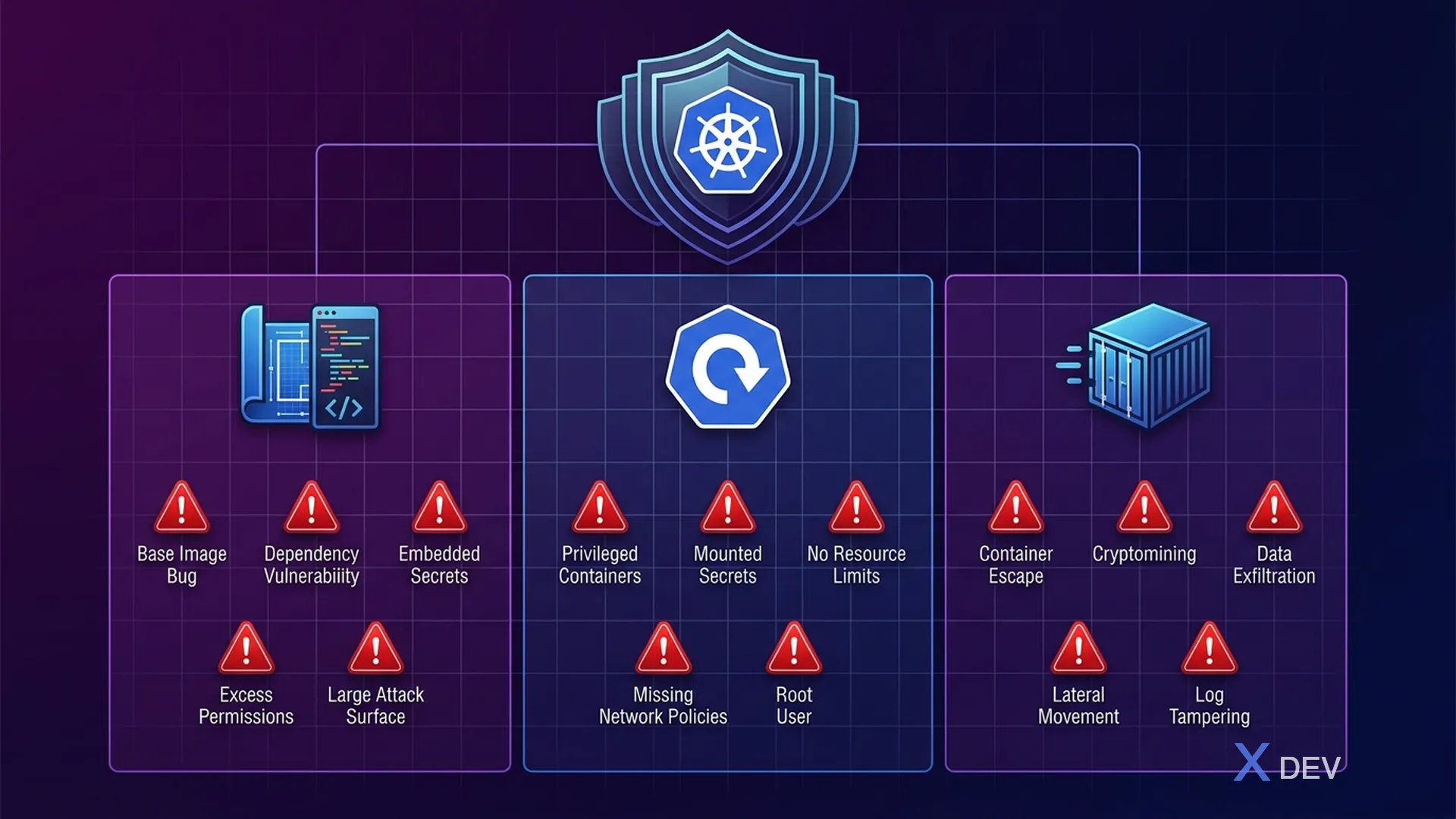
1.1。容器攻擊面
容器是醫療保健微服務的主要部署單元。每個容器都包含應用程式程式碼、依賴項和運行時——所有這些都是潛在的攻擊面。在醫療保健領域,容器受損可能會導致數百萬患者的 ePHI 洩漏。
┌─────────────────────────────────────────────────────────────┐
│           Container Attack Surface — Healthcare              │
│                                                              │
│  ┌─────────── Build Time ───────────┐                        │
│  │                                   │                        │
│  │  1. Base Image Vulnerabilities    │  CVE trong OS packages │
│  │  2. Application Dependencies      │  Vulnerable libraries  │
│  │  3. Secrets in Image Layers       │  Passwords, API keys   │
│  │  4. Excessive Permissions         │  Running as root       │
│  │  5. Unnecessary Packages          │  Increased attack sfc  │
│  └───────────────────────────────────┘                        │
│                                                              │
│  ┌─────────── Deploy Time ──────────┐                        │
│  │                                   │                        │
│  │  6. Privileged Containers         │  Host access           │
│  │  7. Writable Root Filesystem      │  Malware persistence   │
│  │  8. Unencrypted Secrets           │  K8s Secrets base64    │
│  │  9. No Resource Limits            │  DoS attacks           │
│  │  10. Missing Network Policies     │  Lateral movement      │
│  └───────────────────────────────────┘                        │
│                                                              │
│  ┌─────────── Runtime ──────────────┐                        │
│  │                                   │                        │
│  │  11. Container Escape             │  Kernel exploits       │
│  │  12. Cryptomining                 │  Resource hijacking    │
│  │  13. Data Exfiltration            │  ePHI theft            │
│  │  14. Process Injection            │  In-memory attacks     │
│  │  15. Reverse Shells               │  Remote access         │
│  └───────────────────────────────────┘                        │
└─────────────────────────────────────────────────────────────┘
1.2。容器安全生命週期
| 相 | 工具 | 行動 | 醫療保健焦點 |
|---|---|---|---|
| 建置 | Dockerfile 最佳實務 | 多階段、免 root、無發行版 | 最大限度地減少 PHI 處理服務中的 CVE |
| 掃描 | Trivy、Grype、Snyk | 影像掃描漏洞 | 阻止關鍵/高 CVE |
| 商店 | 港口,ECR | 登錄掃描、簽名 | 圖片來源驗證 |
| 部署 | Kyverno,OPA 看門人 | 准入控制 | 執行 Pod 安全標準 |
| 運行時 | 法爾科,Sysdig | 行為監測 | 偵測 PHI 存取異常 |
| 回覆 | Kubernetes、SIEM | 事件回應 | 隔離受感染的 Pod |
2. Quarkus 醫療保健服務的安全 Dockerfile
2.1。多階段建構-JVM模式
# Dockerfile.jvm — Secure multi-stage build for Quarkus JVM
# Healthcare Patient Service

# === Stage 1: Build ===
FROM registry.access.redhat.com/ubi8/openjdk-21:1.20 AS builder

# Don't run as root during build
USER 1001

WORKDIR /build

# Copy dependency files first (layer caching)
COPY --chown=1001:1001 pom.xml .
COPY --chown=1001:1001 mvnw .
COPY --chown=1001:1001 .mvn .mvn

# Download dependencies (cached layer)
RUN ./mvnw dependency:go-offline -B

# Copy source code
COPY --chown=1001:1001 src src

# Build application
RUN ./mvnw package -DskipTests -B \
    && mv target/quarkus-app /build/app

# === Stage 2: Runtime ===
# Use distroless-like UBI minimal for smallest attack surface
FROM registry.access.redhat.com/ubi8/openjdk-21-runtime:1.20

# Labels for traceability
LABEL maintainer="[email protected]" \
      org.opencontainers.image.title="patient-service" \
      org.opencontainers.image.description="Healthcare Patient Service" \
      org.opencontainers.image.version="1.0.0" \
      org.opencontainers.image.vendor="Hospital VN" \
      security.hospital.vn/data-classification="PHI" \
      security.hospital.vn/compliance="HIPAA"

# Environment
ENV LANGUAGE='en_US:en' \
    JAVA_OPTS_APPEND="-Djava.security.egd=file:/dev/urandom \
                      -Dquarkus.http.host=0.0.0.0 \
                      -XX:+UseZGC \
                      -XX:MaxRAMPercentage=75.0 \
                      -Djava.net.preferIPv4Stack=true"

# Non-root user (UID 1001 from base image)
USER 1001

WORKDIR /deployments

# Copy only the built application
COPY --from=builder --chown=1001:1001 /build/app/ ./

# Health check
HEALTHCHECK --interval=30s --timeout=5s --start-period=30s --retries=3 \
    CMD curl -f http://localhost:8080/q/health/ready || exit 1

# Expose only application port
EXPOSE 8080

# Read-only: application doesn't need to write to filesystem
# (enforced by SecurityContext in K8s, but good practice in Dockerfile too)

ENTRYPOINT ["java", "-jar", "quarkus-run.jar"]
2.2。原生鏡像建構-Distroless
# Dockerfile.native — Quarkus native image with distroless base
# Smallest possible attack surface for PHI-handling services

# === Stage 1: Build native image ===
FROM quay.io/quarkus/ubi-quarkus-mandrel-builder-image:jdk-21 AS builder

USER 1001
WORKDIR /build

COPY --chown=1001:1001 pom.xml .
COPY --chown=1001:1001 mvnw .
COPY --chown=1001:1001 .mvn .mvn

RUN ./mvnw dependency:go-offline -B

COPY --chown=1001:1001 src src

# Build native executable
RUN ./mvnw package -Dnative -DskipTests -B \
    -Dquarkus.native.additional-build-args="--no-fallback"

# === Stage 2: Minimal runtime ===
# Distroless: NO shell, NO package manager, NO utilities
# Attacker cannot exec into container or install tools
FROM quay.io/quarkus/quarkus-distroless-image:2.0

LABEL security.hospital.vn/data-classification="PHI" \
      security.hospital.vn/image-type="native-distroless"

# Non-root
USER 1001

WORKDIR /deployments

# Copy native executable only (single binary, ~50MB)
COPY --from=builder --chown=1001:1001 \
    /build/target/*-runner /deployments/application

EXPOSE 8080

ENTRYPOINT ["./application", "-Dquarkus.http.host=0.0.0.0"]
2.3。比較影像類型
| 指標 | JVM(UBI) | 原生(UBI 最小) | 本機(無發行版) |
|---|---|---|---|
| 圖片尺寸 | ~450 MB | 〜120 MB | 〜70 MB |
| 啟動時間 | 2-5 秒 | 0.02-0.05 秒 | 0.02-0.05 秒 |
| 記憶體 (RSS) | 〜200 MB | 〜30 MB | 〜30 MB |
| 包裹數量 | 〜200 | 〜80 | 〜5 |
| CVE 表面 | 高 | 中 | 最小 |
| 外殼訪問 | 是的 | 是的 | 否 |
| 調試工具 | 可用 | 有限公司 | 無 |
| 建議用於 | 開發/登台 | 生產 | PHI 服務 |
3. 影像掃描管道
3.1。 CI/CD 中的瑣碎掃描
# .github/workflows/container-security.yml
name: Container Security Pipeline

on:
  push:
    branches: [main, develop]
  pull_request:
    branches: [main]

env:
  REGISTRY: ghcr.io
  IMAGE_NAME: hospital-vn/patient-service

jobs:
  build-and-scan:
    runs-on: ubuntu-latest
    permissions:
      contents: read
      packages: write
      security-events: write

    steps:
      - name: Checkout code
        uses: actions/checkout@v4

      - name: Set up Docker Buildx
        uses: docker/setup-buildx-action@v3

      - name: Build image (no push yet)
        uses: docker/build-push-action@v5
        with:
          context: .
          file: ./Dockerfile.jvm
          push: false
          load: true
          tags: ${{ env.IMAGE_NAME }}:${{ github.sha }}
          cache-from: type=gha
          cache-to: type=gha,mode=max

      # === Trivy: Filesystem scan (dependencies) ===
      - name: Trivy filesystem scan
        uses: aquasecurity/trivy-action@master
        with:
          scan-type: 'fs'
          scan-ref: '.'
          format: 'sarif'
          output: 'trivy-fs-results.sarif'
          severity: 'CRITICAL,HIGH'
          exit-code: '1'  # Fail on CRITICAL/HIGH

      # === Trivy: Image scan ===
      - name: Trivy image scan
        uses: aquasecurity/trivy-action@master
        with:
          image-ref: ${{ env.IMAGE_NAME }}:${{ github.sha }}
          format: 'sarif'
          output: 'trivy-image-results.sarif'
          severity: 'CRITICAL,HIGH'
          exit-code: '1'
          vuln-type: 'os,library'
          ignore-unfixed: true

      # === Trivy: Config scan (Dockerfile best practices) ===
      - name: Trivy config scan
        uses: aquasecurity/trivy-action@master
        with:
          scan-type: 'config'
          scan-ref: '.'
          format: 'table'
          exit-code: '1'
          severity: 'CRITICAL,HIGH'
          trivyignores: '.trivyignore'

      # Upload results to GitHub Security tab
      - name: Upload Trivy results to GitHub Security
        uses: github/codeql-action/upload-sarif@v3
        if: always()
        with:
          sarif_file: 'trivy-image-results.sarif'

      # === Grype: Second opinion scan ===
      - name: Grype image scan
        uses: anchore/scan-action@v3
        with:
          image: ${{ env.IMAGE_NAME }}:${{ github.sha }}
          severity-cutoff: high
          fail-build: true
          output-format: sarif

      # === Sign and push if all scans pass ===
      - name: Login to registry
        if: github.event_name == 'push' && github.ref == 'refs/heads/main'
        uses: docker/login-action@v3
        with:
          registry: ${{ env.REGISTRY }}
          username: ${{ github.actor }}
          password: ${{ secrets.GITHUB_TOKEN }}

      - name: Push image
        if: github.event_name == 'push' && github.ref == 'refs/heads/main'
        run: |
          docker tag ${{ env.IMAGE_NAME }}:${{ github.sha }} \
            ${{ env.REGISTRY }}/${{ env.IMAGE_NAME }}:${{ github.sha }}
          docker push ${{ env.REGISTRY }}/${{ env.IMAGE_NAME }}:${{ github.sha }}

      # === Cosign: Sign the image ===
      - name: Install Cosign
        if: github.event_name == 'push' && github.ref == 'refs/heads/main'
        uses: sigstore/cosign-installer@v3

      - name: Sign image with Cosign
        if: github.event_name == 'push' && github.ref == 'refs/heads/main'
        env:
          COSIGN_PRIVATE_KEY: ${{ secrets.COSIGN_PRIVATE_KEY }}
          COSIGN_PASSWORD: ${{ secrets.COSIGN_PASSWORD }}
        run: |
          cosign sign --key env://COSIGN_PRIVATE_KEY \
            ${{ env.REGISTRY }}/${{ env.IMAGE_NAME }}:${{ github.sha }}
3.2。 Trivy 忽略醫療保健文件
# .trivyignore — Known accepted vulnerabilities
# Each entry MUST be reviewed and approved by security team

# CVE-2024-XXXXX: Low-risk vulnerability in logging library
# Approved by: Dr. Tran (CISO), Date: 2024-06-15
# Reason: Not exploitable in our configuration, fix ETA Q3 2024
# CVE-2024-XXXXX

# NEVER ignore CVEs related to:
# - Cryptographic libraries (PHI encryption at risk)
# - Authentication/authorization libraries
# - Network/TLS libraries
# - Database drivers
4.容器註冊表安全
4.1。港口註冊表配置
# harbor-values.yaml — Harbor registry with security features
expose:
  type: ingress
  tls:
    enabled: true
    certSource: secret
    secret:
      secretName: harbor-tls
  ingress:
    hosts:
      core: registry.hospital.vn

# Automatic vulnerability scanning on push
trivy:
  enabled: true
  skipUpdate: false
  gitHubToken: ""

# Prevent pulling vulnerable images
# Block images with CRITICAL vulnerabilities
vulnerabilitySeverity: "critical"
autoScanOnPush: true

# Content Trust (Notary) — verify image signatures
notary:
  enabled: true

# Immutable tags — prevent tag overwriting
# Once patient-service:v1.0.0 is pushed, it cannot be overwritten
4.2。醫療保健港口專案政策
#!/bin/bash
# setup-harbor-project.sh — Configure Harbor project for healthcare

HARBOR_URL="https://registry.hospital.vn"
HARBOR_USER="admin"
HARBOR_PASS="${HARBOR_ADMIN_PASSWORD}"

# Create healthcare project with strict policies
curl -X POST "${HARBOR_URL}/api/v2.0/projects" \
  -u "${HARBOR_USER}:${HARBOR_PASS}" \
  -H "Content-Type: application/json" \
  -d '{
    "project_name": "healthcare",
    "metadata": {
      "public": "false",
      "enable_content_trust": "true",
      "auto_scan": "true",
      "severity": "critical",
      "prevent_vul": "true",
      "reuse_sys_cve_allowlist": "false"
    },
    "storage_limit": 53687091200
  }'

# Set immutable tag rule: release tags cannot be overwritten
curl -X POST "${HARBOR_URL}/api/v2.0/projects/healthcare/immutabletagrules" \
  -u "${HARBOR_USER}:${HARBOR_PASS}" \
  -H "Content-Type: application/json" \
  -d '{
    "tag_selectors": [
      {
        "kind": "doublestar",
        "decoration": "matches",
        "pattern": "v*"
      }
    ],
    "scope_selectors": {
      "repository": [
        {
          "kind": "doublestar",
          "decoration": "repoMatches",
          "pattern": "**"
        }
      ]
    }
  }'

# Retention policy: keep last 10 tagged versions, clean untagged after 7 days
curl -X POST "${HARBOR_URL}/api/v2.0/retentions" \
  -u "${HARBOR_USER}:${HARBOR_PASS}" \
  -H "Content-Type: application/json" \
  -d '{
    "algorithm": "or",
    "rules": [
      {
        "action": "retain",
        "template": "latestPushedK",
        "params": {"latestPushedK": 10},
        "tag_selectors": [{"kind": "doublestar", "decoration": "matches", "pattern": "v*"}],
        "scope_selectors": {"repository": [{"kind": "doublestar", "decoration": "repoMatches", "pattern": "**"}]}
      }
    ],
    "trigger": {"kind": "Schedule", "settings": {"cron": "0 0 0 * * *"}}
  }'

echo "Harbor healthcare project configured with:"
echo "  - Auto vulnerability scanning on push"
echo "  - Content trust (image signing required)"
echo "  - Block pulling images with CRITICAL CVEs"
echo "  - Immutable release tags (v*)"
echo "  - Retention: keep last 10 releases"
5. Kubernetes Pod 安全標準
5.1。 Pod 安全標準概述
Kubernetes 定義了 3 個等級的 Pod 安全標準 (PSS):
Kubernetes Pod 安全標準 (PSS) — 3 個等級:
| 水平 | 描述 | 醫療保健用途 |
|---|---|---|
| 特權 | 無限制,完全主機存取 | ⚠️ 切勿用於醫療保健工作負載 |
| 基線 | 防止已知的權限升級(無主機網路/PID/IPC,無特權容器) | 適合監控、記錄 sidecar |
| 受限 ◄ 必填 | Baseline + 中的所有內容都必須以非 root 身份運行、放棄所有功能、只讀根文件系統、需要 Seccomp 配置文件、無權限升級 | 醫療保健所需 |
5.2。 Pod 安全標準執行
# namespace-pss.yaml — Enforce Restricted PSS on healthcare namespace
apiVersion: v1
kind: Namespace
metadata:
  name: healthcare-services
  labels:
    # Enforce Restricted level — reject non-compliant pods
    pod-security.kubernetes.io/enforce: restricted
    pod-security.kubernetes.io/enforce-version: latest
    # Warn on Restricted level — show warnings
    pod-security.kubernetes.io/warn: restricted
    pod-security.kubernetes.io/warn-version: latest
    # Audit on Restricted level — log violations
    pod-security.kubernetes.io/audit: restricted
    pod-security.kubernetes.io/audit-version: latest
5.3。適用於醫療服務的安全 Pod 規格
# patient-service-deployment.yaml
apiVersion: apps/v1
kind: Deployment
metadata:
  name: patient-service
  namespace: healthcare-services
  labels:
    app: patient-service
    security.hospital.vn/data-classification: phi
    security.hospital.vn/compliance: hipaa
spec:
  replicas: 3
  selector:
    matchLabels:
      app: patient-service
  template:
    metadata:
      labels:
        app: patient-service
        sidecar.istio.io/inject: "true"
    spec:
      # Service account with minimal permissions
      serviceAccountName: patient-service-sa
      automountServiceAccountToken: false  # Don't mount SA token unless needed

      # Security context for the entire Pod
      securityContext:
        runAsNonRoot: true           # Pod MUST run as non-root
        runAsUser: 1001              # Specific non-root UID
        runAsGroup: 1001
        fsGroup: 1001
        seccompProfile:
          type: RuntimeDefault       # Enable seccomp
        supplementalGroups: []

      containers:
        - name: patient-service
          image: registry.hospital.vn/healthcare/patient-service:v1.0.0@sha256:abc123...
          # Pin to digest, not just tag, for supply chain security

          ports:
            - containerPort: 8080
              name: http
              protocol: TCP

          # Container-level security context
          securityContext:
            allowPrivilegeEscalation: false  # Cannot escalate to root
            readOnlyRootFilesystem: true     # Filesystem is read-only
            runAsNonRoot: true
            runAsUser: 1001
            capabilities:
              drop:
                - ALL                        # Drop ALL Linux capabilities
            seccompProfile:
              type: RuntimeDefault

          # Resource limits — prevent DoS
          resources:
            requests:
              cpu: 250m
              memory: 256Mi
            limits:
              cpu: "1"
              memory: 512Mi

          # Health probes
          livenessProbe:
            httpGet:
              path: /q/health/live
              port: 8080
            initialDelaySeconds: 10
            periodSeconds: 30
          readinessProbe:
            httpGet:
              path: /q/health/ready
              port: 8080
            initialDelaySeconds: 5
            periodSeconds: 10

          # Environment from secrets (never hardcode)
          envFrom:
            - secretRef:
                name: patient-service-secrets

          # Volume mounts for writable directories
          volumeMounts:
            - name: tmp
              mountPath: /tmp
            - name: tls-certs
              mountPath: /etc/certs
              readOnly: true

      # Volumes
      volumes:
        - name: tmp
          emptyDir:
            sizeLimit: 100Mi     # Limit tmp size
        - name: tls-certs
          secret:
            secretName: patient-service-tls
            defaultMode: 0400    # Read-only for owner

      # Topology spread for high availability
      topologySpreadConstraints:
        - maxSkew: 1
          topologyKey: kubernetes.io/hostname
          whenUnsatisfiable: DoNotSchedule
          labelSelector:
            matchLabels:
              app: patient-service
6. Kubernetes 管理秘密
6.1。預設 Kubernetes Secret 的問題
預設 Kubernetes Secret 僅 base64 編碼,未加密。對於與 ePHI 相關的機密,不符合 HIPAA。
# Kubernetes Secret mặc định — KHÔNG AN TOÀN cho healthcare
# Secret value chỉ base64 encoded, ai có RBAC read secrets đều xem được

kubectl get secret patient-service-secrets -o jsonpath='{.data.DB_PASSWORD}' | base64 -d
# Output: MyP@ssw0rd  ← Bất kỳ ai có quyền get secrets đều thấy!
6.2。外部秘密操作員 + 保險庫
# external-secrets-operator.yaml
# Sync secrets from HashiCorp Vault → Kubernetes Secrets (encrypted)

# Step 1: SecretStore (connection to Vault)
apiVersion: external-secrets.io/v1beta1
kind: ClusterSecretStore
metadata:
  name: vault-healthcare
spec:
  provider:
    vault:
      server: "https://vault.hospital.vn"
      path: "healthcare"
      version: "v2"
      auth:
        kubernetes:
          mountPath: "kubernetes"
          role: "healthcare-services"
          serviceAccountRef:
            name: external-secrets-sa
            namespace: healthcare-services

---
# Step 2: ExternalSecret (what to sync)
apiVersion: external-secrets.io/v1beta1
kind: ExternalSecret
metadata:
  name: patient-service-secrets
  namespace: healthcare-services
  labels:
    app: patient-service
spec:
  refreshInterval: 1h
  secretStoreRef:
    name: vault-healthcare
    kind: ClusterSecretStore
  target:
    name: patient-service-secrets
    creationPolicy: Owner
    template:
      type: Opaque
      engineVersion: v2
      data:
        # Template to construct JDBC URL from Vault secrets
        QUARKUS_DATASOURCE_JDBC_URL: |
          jdbc:postgresql://{{ .db_host }}:5432/{{ .db_name }}?ssl=true&sslmode=verify-full
        QUARKUS_DATASOURCE_USERNAME: "{{ .db_username }}"
        QUARKUS_DATASOURCE_PASSWORD: "{{ .db_password }}"
        QUARKUS_OIDC_CREDENTIALS_SECRET: "{{ .oidc_secret }}"
        ENCRYPTION_MASTER_KEY: "{{ .phi_encryption_key }}"
  data:
    - secretKey: db_host
      remoteRef:
        key: healthcare/patient-service/database
        property: host
    - secretKey: db_name
      remoteRef:
        key: healthcare/patient-service/database
        property: name
    - secretKey: db_username
      remoteRef:
        key: healthcare/patient-service/database
        property: username
    - secretKey: db_password
      remoteRef:
        key: healthcare/patient-service/database
        property: password
    - secretKey: oidc_secret
      remoteRef:
        key: healthcare/patient-service/keycloak
        property: client_secret
    - secretKey: phi_encryption_key
      remoteRef:
        key: healthcare/patient-service/encryption
        property: master_key
6.3。醫療保健庫設置
#!/bin/bash
# vault-healthcare-setup.sh — Configure Vault for healthcare secrets

set -euo pipefail

VAULT_ADDR="https://vault.hospital.vn"
export VAULT_ADDR

# Enable KV v2 secrets engine for healthcare
vault secrets enable -path=healthcare kv-v2

# Create policy for patient-service
vault policy write patient-service-policy - <<EOF
# Patient service can read its own secrets only
path "healthcare/data/patient-service/*" {
  capabilities = ["read"]
}

# Cannot list other services' secrets
path "healthcare/data/*" {
  capabilities = ["deny"]
}

# Allow reading own metadata
path "healthcare/metadata/patient-service/*" {
  capabilities = ["read", "list"]
}
EOF

# Create policy for lab-service
vault policy write lab-service-policy - <<EOF
path "healthcare/data/lab-service/*" {
  capabilities = ["read"]
}
path "healthcare/data/*" {
  capabilities = ["deny"]
}
EOF

# Enable Kubernetes auth
vault auth enable kubernetes
vault write auth/kubernetes/config \
    kubernetes_host="https://kubernetes.default.svc" \
    kubernetes_ca_cert=@/var/run/secrets/kubernetes.io/serviceaccount/ca.crt

# Bind Kubernetes service accounts to Vault policies
vault write auth/kubernetes/role/healthcare-services \
    bound_service_account_names=external-secrets-sa \
    bound_service_account_namespaces=healthcare-services \
    policies=patient-service-policy,lab-service-policy \
    ttl=1h

# Store secrets
vault kv put healthcare/patient-service/database \
    host="pg-primary.healthcare-data.svc" \
    name="healthcare" \
    username="patient_svc" \
    password="$(openssl rand -base64 32)"

vault kv put healthcare/patient-service/encryption \
    master_key="$(openssl rand -hex 32)"

vault kv put healthcare/patient-service/keycloak \
    client_secret="$(openssl rand -base64 32)"

echo "Vault healthcare setup complete"
echo "  - KV v2 engine at 'healthcare/'"
echo "  - Per-service policies (least privilege)"
echo "  - Kubernetes auth configured"
7. 醫療保健領域的 Kubernetes RBAC
7.1。每個醫院/科室的命名空間隔離
# rbac-healthcare.yaml
# Kubernetes RBAC: namespace isolation per department

# === Namespace per department ===
apiVersion: v1
kind: Namespace
metadata:
  name: healthcare-cardiology
  labels:
    department: cardiology
    pod-security.kubernetes.io/enforce: restricted

---
apiVersion: v1
kind: Namespace
metadata:
  name: healthcare-oncology
  labels:
    department: oncology
    pod-security.kubernetes.io/enforce: restricted

---
# === Service accounts per service ===
apiVersion: v1
kind: ServiceAccount
metadata:
  name: patient-service-sa
  namespace: healthcare-services
  labels:
    app: patient-service
automountServiceAccountToken: false

---
# === Role: minimal permissions for deployment management ===
apiVersion: rbac.authorization.k8s.io/v1
kind: Role
metadata:
  name: healthcare-deployer
  namespace: healthcare-services
rules:
  - apiGroups: ["apps"]
    resources: ["deployments"]
    verbs: ["get", "list", "watch", "update", "patch"]
  - apiGroups: [""]
    resources: ["pods", "pods/log"]
    verbs: ["get", "list", "watch"]
  - apiGroups: [""]
    resources: ["configmaps"]
    verbs: ["get", "list"]
  # NO access to secrets — handled by External Secrets Operator
  # NO access to exec into pods — prevents direct container access

---
# === ClusterRole: read-only for monitoring team ===
apiVersion: rbac.authorization.k8s.io/v1
kind: ClusterRole
metadata:
  name: healthcare-monitor
rules:
  - apiGroups: [""]
    resources: ["pods", "services", "endpoints", "nodes"]
    verbs: ["get", "list", "watch"]
  - apiGroups: ["apps"]
    resources: ["deployments", "replicasets", "statefulsets"]
    verbs: ["get", "list", "watch"]
  # NO exec, NO secrets, NO delete

---
# === RoleBinding: DevOps team can deploy ===
apiVersion: rbac.authorization.k8s.io/v1
kind: RoleBinding
metadata:
  name: healthcare-deployer-binding
  namespace: healthcare-services
subjects:
  - kind: Group
    name: "devops-team"
    apiGroup: rbac.authorization.k8s.io
roleRef:
  kind: Role
  name: healthcare-deployer
  apiGroup: rbac.authorization.k8s.io

---
# === Deny exec — prevent shell access to PHI containers ===
apiVersion: rbac.authorization.k8s.io/v1
kind: ClusterRole
metadata:
  name: deny-pod-exec
rules:
  - apiGroups: [""]
    resources: ["pods/exec"]
    verbs: []
    # Empty verbs = no permissions for exec
8. 准入控制器:Kyverno
8.1。基維爾諾建築
Kyverno 准入控制器流程:
kubectl apply → API 伺服器 → Kyverno Webhook → 策略引擎(驗證 → ✓/✗、變異 → 修補程式、產生 → 新) → 允許/拒絕
8.2。基韋爾諾醫療保健政策
# kyverno-require-labels.yaml
# Validate: All healthcare resources MUST have compliance labels
apiVersion: kyverno.io/v1
kind: ClusterPolicy
metadata:
  name: require-healthcare-labels
  annotations:
    policies.kyverno.io/title: Require Healthcare Labels
    policies.kyverno.io/description: >-
      All resources in healthcare namespaces must have data-classification
      and compliance labels for HIPAA audit trail.
spec:
  validationFailureAction: Enforce
  background: true
  rules:
    - name: require-labels
      match:
        any:
          - resources:
              kinds:
                - Deployment
                - StatefulSet
                - DaemonSet
              namespaces:
                - "healthcare-*"
      validate:
        message: >-
          Healthcare resources must have labels:
          'security.hospital.vn/data-classification' and
          'security.hospital.vn/compliance'.
        pattern:
          metadata:
            labels:
              security.hospital.vn/data-classification: "phi | pii | sensitive | internal"
              security.hospital.vn/compliance: "hipaa | hipaa-vietnam"

---
# kyverno-disallow-privileged.yaml
# Validate: NO privileged containers in healthcare
apiVersion: kyverno.io/v1
kind: ClusterPolicy
metadata:
  name: disallow-privileged-healthcare
spec:
  validationFailureAction: Enforce
  rules:
    - name: no-privileged
      match:
        any:
          - resources:
              kinds:
                - Pod
              namespaces:
                - "healthcare-*"
      validate:
        message: "Privileged containers are NOT allowed in healthcare namespaces."
        pattern:
          spec:
            containers:
              - securityContext:
                  privileged: "false"
                  allowPrivilegeEscalation: "false"
            initContainers:
              - securityContext:
                  privileged: "false"
                  allowPrivilegeEscalation: "false"

---
# kyverno-image-whitelist.yaml
# Validate: Only allow images from trusted registry
apiVersion: kyverno.io/v1
kind: ClusterPolicy
metadata:
  name: restrict-image-registry
spec:
  validationFailureAction: Enforce
  rules:
    - name: validate-image-registry
      match:
        any:
          - resources:
              kinds:
                - Pod
              namespaces:
                - "healthcare-*"
      validate:
        message: >-
          Images must come from approved registries:
          registry.hospital.vn or quay.io/quarkus.
        pattern:
          spec:
            containers:
              - image: "registry.hospital.vn/* | quay.io/quarkus/*"
            initContainers:
              - image: "registry.hospital.vn/* | quay.io/quarkus/*"

---
# kyverno-require-image-digest.yaml
# Validate: Images must use digest, not just tag
apiVersion: kyverno.io/v1
kind: ClusterPolicy
metadata:
  name: require-image-digest
spec:
  validationFailureAction: Enforce
  rules:
    - name: check-digest
      match:
        any:
          - resources:
              kinds:
                - Pod
              namespaces:
                - "healthcare-*"
      validate:
        message: "Healthcare images must reference by digest (@sha256:...) for supply chain security."
        pattern:
          spec:
            containers:
              - image: "*@sha256:*"

---
# kyverno-require-readonly-rootfs.yaml
# Validate: Root filesystem must be read-only
apiVersion: kyverno.io/v1
kind: ClusterPolicy
metadata:
  name: require-readonly-rootfs
spec:
  validationFailureAction: Enforce
  rules:
    - name: readonly-rootfs
      match:
        any:
          - resources:
              kinds:
                - Pod
              namespaces:
                - "healthcare-*"
      validate:
        message: "Containers must have readOnlyRootFilesystem=true for security."
        pattern:
          spec:
            containers:
              - securityContext:
                  readOnlyRootFilesystem: true

---
# kyverno-mutate-defaults.yaml
# Mutate: Automatically add security defaults to pods
apiVersion: kyverno.io/v1
kind: ClusterPolicy
metadata:
  name: add-security-defaults
spec:
  rules:
    - name: add-seccomp-profile
      match:
        any:
          - resources:
              kinds:
                - Pod
              namespaces:
                - "healthcare-*"
      mutate:
        patchStrategicMerge:
          spec:
            securityContext:
              seccompProfile:
                type: RuntimeDefault
              runAsNonRoot: true
9. Falco 的運行時安全性
9.1。 Falco 醫療保健
Falco 是一個運行時安全工具,它使用eBPF(或核心模組)來監視容器中的系統呼叫。它在運行時檢測異常行為——建置時和部署時安全性被繞過時的最後一層保護。
┌─────────────────────────────────────────────────────────────┐
│              Falco Runtime Security Architecture             │
│                                                              │
│  Container ──► Kernel System Calls ──► eBPF Probe           │
│                                           │                  │
│                                           ▼                  │
│                                    ┌──────────────┐         │
│                                    │  Falco Engine │         │
│                                    │               │         │
│                                    │  Rules YAML   │         │
│                                    │  ┌──────────┐ │         │
│                                    │  │ Syscall  │ │         │
│                                    │  │ Filter   │ │         │
│                                    │  └──────────┘ │         │
│                                    └──────┬───────┘         │
│                                           │                  │
│                                           ▼                  │
│                              ┌──────────────────────┐       │
│                              │   Alert Outputs       │       │
│                              │  • Slack              │       │
│                              │  • PagerDuty          │       │
│                              │  • SIEM (ELK)         │       │
│                              │  • Kubernetes response│       │
│                              └──────────────────────┘       │
└─────────────────────────────────────────────────────────────┘
9.2。 Falco 醫療保健規則
# falco-healthcare-rules.yaml
# Custom Falco rules for healthcare container monitoring

# Rule 1: Detect shell execution in healthcare containers
- rule: Shell in Healthcare Container
  desc: A shell was spawned in a healthcare container (potential breach)
  condition: >
    spawned_process and
    container and
    shell_procs and
    k8s.ns.name startswith "healthcare"
  output: >
    CRITICAL: Shell spawned in healthcare container
    (user=%user.name command=%proc.cmdline container=%container.name
    namespace=%k8s.ns.name pod=%k8s.pod.name image=%container.image.repository)
  priority: CRITICAL
  tags: [healthcare, hipaa, container, shell]

# Rule 2: Detect reading sensitive files (potential ePHI exfiltration)
- rule: Sensitive File Read in Healthcare
  desc: Sensitive configuration or data files read in healthcare container
  condition: >
    open_read and
    container and
    k8s.ns.name startswith "healthcare" and
    (fd.name contains "/etc/certs/" or
     fd.name contains "/etc/secrets/" or
     fd.name contains "password" or
     fd.name contains "private-key")
  output: >
    WARNING: Sensitive file read in healthcare container
    (file=%fd.name user=%user.name command=%proc.cmdline
    container=%container.name pod=%k8s.pod.name)
  priority: WARNING
  tags: [healthcare, hipaa, sensitive-file]

# Rule 3: Detect unexpected outbound connections (data exfiltration)
- rule: Unexpected Outbound Connection from Healthcare
  desc: Healthcare container connecting to unexpected external IP
  condition: >
    outbound and
    container and
    k8s.ns.name startswith "healthcare" and
    not (fd.sip in (
      "10.0.0.0/8",
      "172.16.0.0/12",
      "192.168.0.0/16"
    ))
  output: >
    ALERT: Unexpected outbound connection from healthcare container
    (command=%proc.cmdline connection=%fd.name
    container=%container.name pod=%k8s.pod.name
    dest_ip=%fd.sip dest_port=%fd.sport)
  priority: ALERT
  tags: [healthcare, hipaa, exfiltration, network]

# Rule 4: Detect package installation (compromised container)
- rule: Package Manager in Healthcare Container
  desc: Package manager executed in healthcare container (should be immutable)
  condition: >
    spawned_process and
    container and
    k8s.ns.name startswith "healthcare" and
    package_mgmt_procs
  output: >
    CRITICAL: Package manager executed in immutable healthcare container
    (user=%user.name command=%proc.cmdline container=%container.name
    pod=%k8s.pod.name image=%container.image.repository)
  priority: CRITICAL
  tags: [healthcare, container, immutable]

# Rule 5: Detect database credential access patterns
- rule: Database Credential Access Pattern
  desc: Unusual pattern of database credential file access
  condition: >
    open_read and
    container and
    k8s.ns.name startswith "healthcare" and
    fd.name contains "datasource" and
    proc.name != "java"
  output: >
    WARNING: Non-Java process accessing database credentials
    (process=%proc.name file=%fd.name user=%user.name
    container=%container.name pod=%k8s.pod.name)
  priority: WARNING
  tags: [healthcare, credentials, database]

# Rule 6: Detect privilege escalation attempts
- rule: Privilege Escalation in Healthcare
  desc: Process attempting to change UID/GID in healthcare container
  condition: >
    container and
    k8s.ns.name startswith "healthcare" and
    (evt.type in (setuid, setgid, setreuid, setregid))
  output: >
    CRITICAL: Privilege escalation attempt in healthcare container
    (user=%user.name command=%proc.cmdline evt.type=%evt.type
    container=%container.name pod=%k8s.pod.name)
  priority: CRITICAL
  tags: [healthcare, privilege-escalation]

# Rule 7: Bulk data access detection
- rule: Bulk Data Query in Healthcare
  desc: Potential bulk data exfiltration via large query result
  condition: >
    container and
    k8s.ns.name startswith "healthcare" and
    evt.type = write and
    fd.l4proto = tcp and
    evt.rawres > 1048576
  output: >
    WARNING: Large data transfer detected in healthcare container
    (size=%evt.rawres bytes command=%proc.cmdline
    container=%container.name pod=%k8s.pod.name)
  priority: WARNING
  tags: [healthcare, hipaa, bulk-access, exfiltration]
9.3。 Falco 回應引擎
# falco-response.yaml — Automated response to Falco alerts
apiVersion: v1
kind: ConfigMap
metadata:
  name: falco-response-config
  namespace: healthcare-monitoring
data:
  response-rules.yaml: |
    rules:
      # Auto-kill pods with shell execution
      - name: "kill-shell-pod"
        trigger:
          rule: "Shell in Healthcare Container"
          priority: CRITICAL
        action:
          type: "kubernetes"
          parameters:
            action: "delete"
            resource: "pod"
            namespace: "{{ .k8s.ns.name }}"
            name: "{{ .k8s.pod.name }}"

      # Isolate pods with unexpected outbound connections
      - name: "isolate-exfiltration-pod"
        trigger:
          rule: "Unexpected Outbound Connection from Healthcare"
        action:
          type: "kubernetes"
          parameters:
            action: "label"
            resource: "pod"
            namespace: "{{ .k8s.ns.name }}"
            name: "{{ .k8s.pod.name }}"
            labels:
              security.hospital.vn/quarantined: "true"

      # Network policy to isolate quarantined pods
      - name: "apply-quarantine-network-policy"
        trigger:
          rule: "Unexpected Outbound Connection from Healthcare"
        action:
          type: "kubernetes"
          parameters:
            action: "apply"
            manifest: |
              apiVersion: networking.k8s.io/v1
              kind: NetworkPolicy
              metadata:
                name: quarantine-{{ .k8s.pod.name }}
                namespace: {{ .k8s.ns.name }}
              spec:
                podSelector:
                  matchLabels:
                    security.hospital.vn/quarantined: "true"
                policyTypes:
                  - Ingress
                  - Egress
                # No rules = deny all traffic
10.供應鏈安全
10.1。 SLSA 醫療保健框架
┌─────────────────────────────────────────────────────────────┐
│       SLSA (Supply-chain Levels for Software Artifacts)      │
│                                                              │
│  Level 0: No guarantees                                      │
│  Level 1: Documentation of build process                     │
│  Level 2: Tamper resistance of build service                 │
│  Level 3: Extra resistance to threats  ◄── Target            │
│  Level 4: Highest level of confidence                        │
│                                                              │
│  Healthcare Target: SLSA Level 3                             │
│  ├── Source: Version controlled, reviewed                    │
│  ├── Build: Isolated, reproducible, signed                   │
│  ├── Provenance: Non-falsifiable, available                  │
│  └── Dependencies: Complete, verified                        │
└─────────────────────────────────────────────────────────────┘
10.2。使用 Cosign 進行影像簽名
#!/bin/bash
# sign-and-verify.sh — Sign healthcare container images

set -euo pipefail

IMAGE="registry.hospital.vn/healthcare/patient-service"
TAG="v1.0.0"

# Generate signing key pair (one-time)
# cosign generate-key-pair

# Sign the image
cosign sign --key cosign.key "${IMAGE}:${TAG}"

# Verify the signature before deployment
cosign verify --key cosign.pub "${IMAGE}:${TAG}"

# Attach SBOM (Software Bill of Materials)
syft "${IMAGE}:${TAG}" -o spdx-json > sbom.json
cosign attach sbom --sbom sbom.json "${IMAGE}:${TAG}"

# Attach vulnerability scan results
trivy image "${IMAGE}:${TAG}" --format cosign-vuln > vuln.json
cosign attest --key cosign.key \
  --predicate vuln.json \
  --type vuln \
  "${IMAGE}:${TAG}"

echo "Image signed, SBOM attached, vulnerability attestation added"
10.3。 Kyverno 策略驗證簽名
# kyverno-verify-signature.yaml
# Only allow signed images from trusted registry
apiVersion: kyverno.io/v1
kind: ClusterPolicy
metadata:
  name: verify-image-signature
spec:
  validationFailureAction: Enforce
  webhookTimeoutSeconds: 30
  rules:
    - name: verify-cosign-signature
      match:
        any:
          - resources:
              kinds:
                - Pod
              namespaces:
                - "healthcare-*"
      verifyImages:
        - imageReferences:
            - "registry.hospital.vn/healthcare/*"
          attestors:
            - entries:
                - keys:
                    publicKeys: |-
                      -----BEGIN PUBLIC KEY-----
                      MFkwEwYHKoZIzj0CAQYIKoZIzj0DAQcDQgAE...
                      -----END PUBLIC KEY-----
          attestations:
            - type: https://cosign.sigstore.dev/attestation/vuln/v1
              conditions:
                - all:
                    - key: "{{ scanner }}"
                      operator: Equals
                      value: "trivy"
                    - key: "{{ count(vulnerabilities[?severity=='CRITICAL']) }}"
                      operator: Equals
                      value: "0"
11. CIS Kubernetes 醫療保健基準
11.1。自动 CIS 基准检查
#!/bin/bash
# cis-benchmark-healthcare.sh — Run CIS Kubernetes Benchmark

set -euo pipefail

echo "=== CIS Kubernetes Benchmark for Healthcare ==="
echo "Date: $(date -u +%Y-%m-%dT%H:%M:%SZ)"
echo ""

# Run kube-bench for CIS checks
kubectl apply -f - <<EOF
apiVersion: batch/v1
kind: Job
metadata:
  name: kube-bench-$(date +%s)
  namespace: healthcare-monitoring
spec:
  template:
    spec:
      hostPID: true
      containers:
        - name: kube-bench
          image: aquasec/kube-bench:latest
          command: ["kube-bench", "run", "--targets", "node,policies", "--json"]
          volumeMounts:
            - name: var-lib-kubelet
              mountPath: /var/lib/kubelet
              readOnly: true
            - name: etc-kubernetes
              mountPath: /etc/kubernetes
              readOnly: true
      restartPolicy: Never
      volumes:
        - name: var-lib-kubelet
          hostPath:
            path: /var/lib/kubelet
        - name: etc-kubernetes
          hostPath:
            path: /etc/kubernetes
  backoffLimit: 0
EOF

echo "CIS Benchmark job submitted. Check results with:"
echo "  kubectl logs job/kube-bench-* -n healthcare-monitoring"
11.2。醫療保健特定 CIS 檢查
| CIS 控制 | 描述 | 醫療保健需求 | 狀態檢查 |
|---|---|---|---|
| 1.2.1 | 匿名驗證已停用 | 必需 (HIPAA) | --anonymous-auth=false |
| 1.2.6 | 啟用 RBAC | 必填 | --authorization-mode=RBAC |
| 1.2.16 | 啟用審核日誌記錄 | 必需(HIPAA §164.312(b)) | --audit-log-path 集 |
| 1.2.22 | 審核日誌最大數量 ≥ 30 | 必需(HIPAA 6 年保留) | --audit-log-maxage=2190 |
| 4.2.1 | Kubelet 匿名驗證已停用 | 必填 | --anonymous-auth=false |
| 4.2.6 | Kubelet 的 TLS | 必要(HIPAA §164.312(e)) | 設定 TLS 憑證 |
| 5.1.1 | 叢集管理員角色受限 | 必填 | 最小 ClusterRoleBindings |
| 5.1.5 | 服務帳號令牌自動掛載已停用 | 建議 | automountServiceAccountToken: false |
| 5.2.1 | 強制實施 Pod 安全標準 | PHI 命名空間必要 | 命名空間上的 PSS 標籤 |
| 5.4.1 | 用於隔離的命名空間 | 每個部門都需要 | 每個部門的命名空間 |
總結
在本課程中,我們為醫療保健建立了全面的容器和 Kubernetes 安全性:
- 容器攻擊面:跨建置時、部署時和執行時的 15 個威脅向量 — 醫療保健容器處理每個階段都需要保護的 ePHI
- 安全 Dockerfile:多階段建置、非 root 使用者 (UID 1001)、distroless 基礎映像(從 450MB → 70MB 減少,從 ~200 個軟體包 → ~5),無 shell 訪問
- 影像掃描管道:CI/CD 中的 Trivy + Grype 雙重掃描,在 CRITICAL/HIGH CVE 上建置失敗,SARIF 上傳到 GitHub Security
- 容器註冊表:具有自動掃描、內容信任(公證)、漏洞門、不可變標籤、圖像保留策略的Harbor
- Pod 安全標準:醫療保健命名空間的受限 PSS 強制實施 — runAsNonRoot、dropAll 功能、readOnlyRootFilesystem、seccompProfile
- 安全性 Pod 規格:由摘要固定的映像、資源限制、無權限升級、tmp 的空目錄、TLS 憑證只讀掛載
- Secrets Management:外部 Secrets Operator + Vault 替換 Base64 Kubernetes Secrets、每服務 Vault 策略(最低權限)、自動輪調
- Kubernetes RBAC:每個服務的服務帳戶,拒絕執行 PHI 容器,每個部門的命名空間隔離,最小的 ClusterRoleBindings
- Kyverno 准入控制器:6 項政策強制執行醫療保健要求 — 標籤、無特權、註冊表白名單、圖片摘要、唯讀 rootfs、安全預設值
- Falco Runtime Security:7 個醫療保健自訂規則 — shell 偵測、敏感檔案存取、出站連線、套件管理器、大量資料存取、權限升級;自動回應(殺死 pod、隔離)
- 供應鏈安全性:SLSA 3 級目標、Cosign 影像簽章、SBOM 附件、漏洞證明、Kyverno 簽章驗證
- CIS 基準:映射到 HIPAA 要求的自動化 CIS Kubernetes 基準檢查
練習
-
安全性 Dockerfile:為 Quarkus 原生映像編寫多階段 Dockerfile。確保:(a) 建置階段使用 Mandrel 建構器,非 root,(b) 運行時階段使用 distroless 基礎,(c) 非 root 用戶,(d) 沒有可用的 shell,(e) 已定義 HEALTHCHECK。建構映像,驗證大小 < 100 MB, verify
docker exec失敗(無 shell),使用 Trivy 掃描 — 目標:0 CRITICAL,0 HIGH。 -
Kyverno 策略:在本機叢集 (kind/minikube) 上部署 Kyverno。建立 3 個 ClusterPolicies:(a) 阻止特權容器,(b) 強制執行登錄白名單(僅允許
registry.hospital.vn/*), (c) requirereadOnlyRootFilesystem: true。測試每個策略:部署 Pod 違反 → 驗證被拒絕,部署 Pod 符合 → 驗證接受。出口政策報告。 -
Falco運行時檢測:在Kubernetes上部署Falco(Helm圖表)。建立一個自訂規則來偵測:(a) shell 執行,(b) 敏感檔案讀取 (
/etc/shadow,/etc/certs/*), (c) 到非私有 IP 的出站連線。測試每條規則:kubectl exec觸發 shell 規則,cat /etc/shadowtrong container,curl external-ip。驗證 Falco 警報是否出現。 -
影像簽名管道:產生聯合簽名金鑰對。建立 Quarkus 映像,推送到本機註冊表(Docker 註冊表)。使用 Cosign 對影像進行簽名。創建 Kyverno 策略
verifyImages請求聯署簽名。使用未簽署的映像部署 pod → 驗證被拒絕。使用簽章鏡像部署 pod → 驗證是否接受。使用 Syft 連接 SBOM,驗證cosign verify-attestation.
| ◀ 上一篇 | 下一篇文章 ▶ |
|---|---|
| 第 21 課:醫療保健系統的零信任架構 | 第 23 課:醫療保健系統的滲透測試和漏洞評估 |