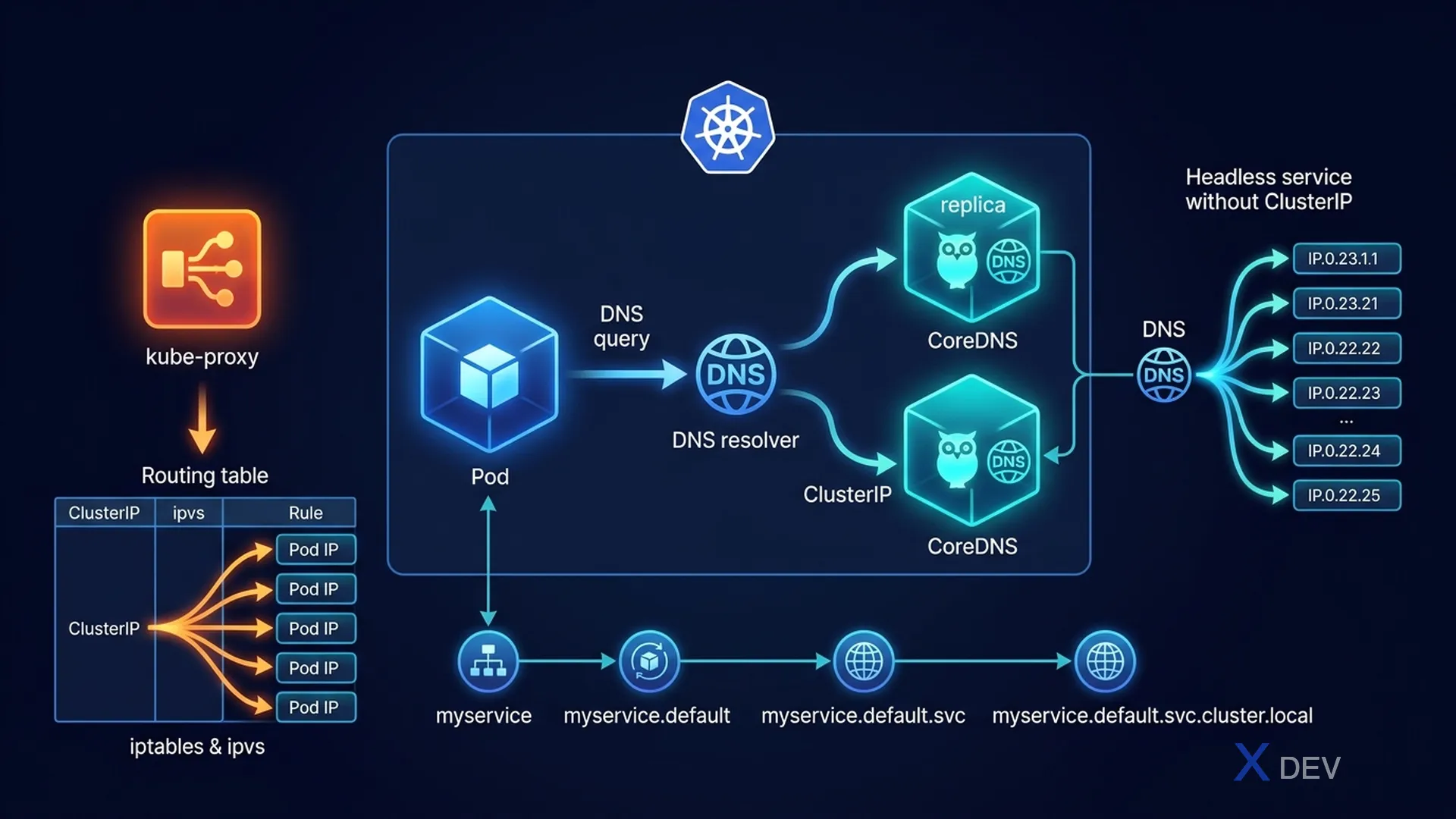
1. Services & Endpoints
Khi Service được tạo, Kubernetes tự động tạo Endpoints object chứa danh sách IPs của Pods matching selector.
# Service → Endpoints → Pods
kubectl get service my-app        # Virtual IP (ClusterIP)
kubectl get endpoints my-app      # List: 10.244.1.2:80, 10.244.1.3:80
kubectl describe endpoints my-app # Detailed

# Nếu Endpoints rỗng → service selector không match pod labels
# Debug: so sánh service selector vs pod labels
kubectl get svc my-app -o jsonpath='{.spec.selector}'
kubectl get pods --show-labels | grep app=my-app
2. CoreDNS Configuration
# CoreDNS runs as Deployment in kube-system
kubectl get pods -n kube-system -l k8s-app=kube-dns
kubectl get configmap coredns -n kube-system -o yaml

# Default Corefile:
.:53 {
    errors
    health { lameduck 5s }
    ready
    kubernetes cluster.local in-addr.arpa ip6.arpa {  # cluster domain
       pods insecure
       fallthrough in-addr.arpa ip6.arpa
    }
    prometheus :9153
    forward . /etc/resolv.conf  # Forward non-cluster queries to upstream
    cache 30
    loop
    reload
    loadbalance
}
Exam tip: CoreDNS troubleshooting: 1) Check CoreDNS Pods running, 2) Check kube-dns Service in kube-system, 3) Run
kubectl exec -it pod -- nslookup kubernetesto test DNS from inside pod, 4) Check Pod's/etc/resolv.confpoints to kube-dns cluster IP.
3. kube-proxy Modes
| Mode | Mechanism | Performance |
|---|---|---|
| iptables (default) | Linux iptables rules, random pod selection | Good, O(n) rules |
| IPVS | Linux IPVS (kernel, hash-based) | Better for large clusters |
| userspace (deprecated) | User-space proxy | Slow, legacy |
4. Headless Services
# Headless: clusterIP: None
# DNS returns Pod IPs directly (không qua virtual IP)
apiVersion: v1
kind: Service
metadata:
  name: mysql-headless
spec:
  clusterIP: None
  selector:
    app: mysql
  ports:
  - port: 3306

# DNS behavior:
# mysql-headless → multiple A records (one per Pod IP)
# mysql-0.mysql-headless → specific Pod IP (StatefulSet)
5. DNS Troubleshooting Commands
# Test DNS từ trong pod
kubectl run dns-test --image=busybox --rm -it -- nslookup kubernetes
kubectl run dns-test --image=busybox --rm -it -- nslookup my-service.namespace

# Check resolv.conf trong pod
kubectl exec -it my-pod -- cat /etc/resolv.conf
# Should show: nameserver 10.96.0.10 (kube-dns service IP)

# Check CoreDNS logs
kubectl logs -n kube-system -l k8s-app=kube-dns

# Check kube-dns service
kubectl get svc -n kube-system kube-dns
6. Cheat Sheet
| Problem | Check |
|---|---|
| Service không thể reach pods | kubectl get endpoints NAME |
| Endpoints empty | Service selector vs Pod labels mismatch |
| Pod không resolve DNS | /etc/resolv.conf + CoreDNS pods status |
| StatefulSet pod DNS | Cần headless service cùng tên với serviceName |
7. Practice Questions
Q1: A Service is created but traffic never reaches the Pods. The Endpoints object for the Service shows "no endpoints". What is the most likely cause?
- A) The Service port doesn't match the container port
- B) The Service selector labels don't match the Pod labels ✓
- C) A NetworkPolicy is blocking traffic
- D) The Pods are in a different cluster
Explanation: Empty Endpoints means the Service can't find any matching Pods. This is caused by a label selector mismatch. Verify with: kubectl get svc myapp -o jsonpath='{.spec.selector}' and compare with kubectl get pods --show-labels.
Q2: A Pod running in namespace "frontend" needs to reach a Service "payments" in namespace "backend". Which DNS name is correct?
- A) payments
- B) payments.backend
- C) payments.backend.svc.cluster.local ✓
- D) backend.payments.cluster.local
Explanation: Cross-namespace DNS requires the full namespace: {service}.{namespace}.svc.cluster.local. Short names only work within the same namespace. Both B and C work, but C is the most explicit and reliable form.
Q3: CoreDNS is not responding. What sequence of steps should you follow to diagnose?
- A) Restart the entire cluster
- B) Check CoreDNS Pods running, check kube-dns Service ClusterIP, test from inside a Pod with nslookup ✓
- C) Reinstall kube-proxy
- D) Recreate the kube-system namespace
Explanation: Systematic DNS debugging: (1) kubectl get pods -n kube-system -l k8s-app=kube-dns, (2) verify kube-dns Service has ClusterIP, (3) check Pod's /etc/resolv.conf points to that IP, (4) run nslookup from a test pod.