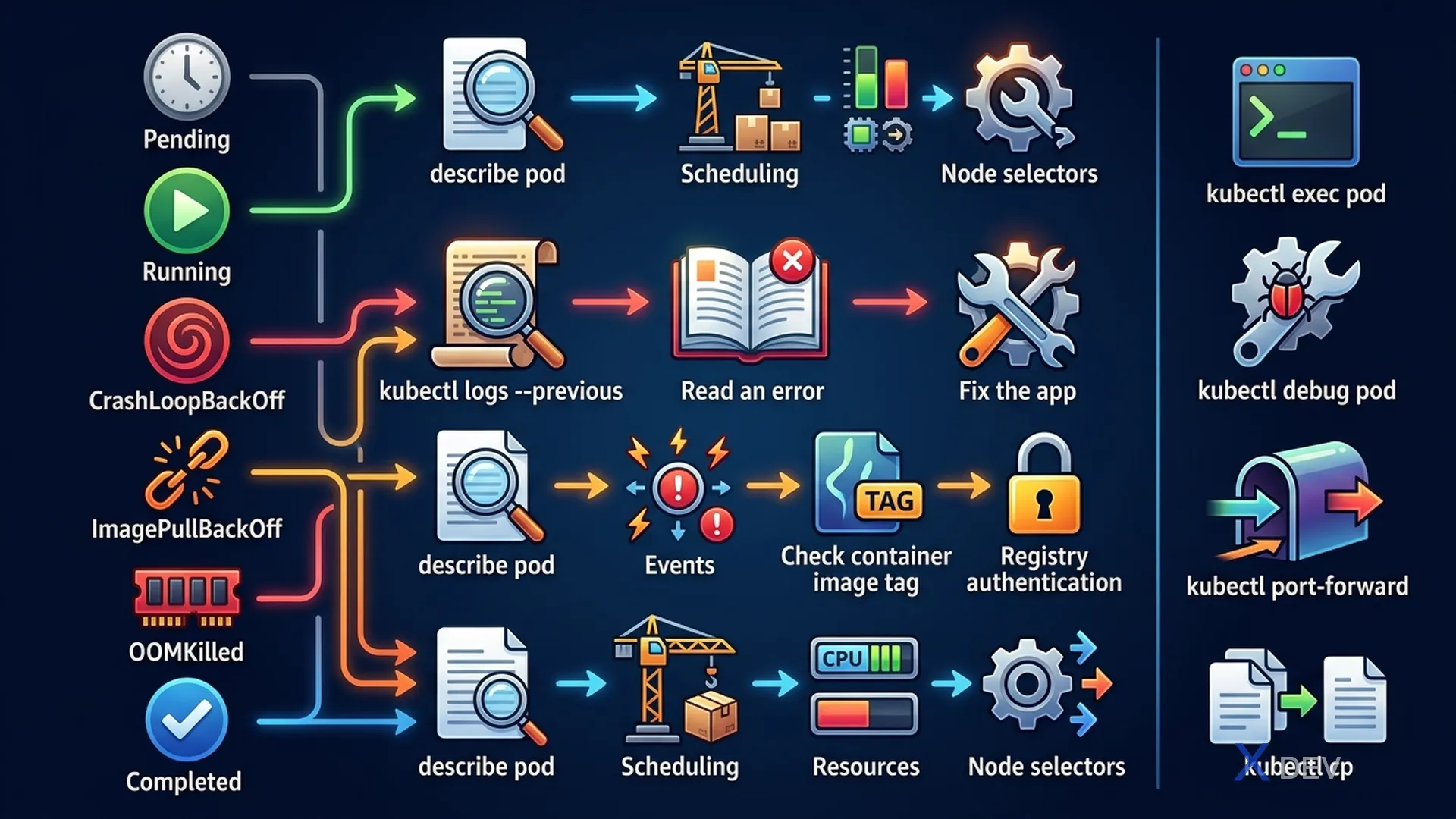
1. Pod Debug Workflow
Systematic Pod Troubleshooting:

  kubectl get pod POD_NAME
     │
     ├── Pending → Node issues or PVC not bound
     ├── Running but not working → Check logs, exec
     ├── CrashLoopBackOff → App crashing
     ├── ImagePullBackOff → Image or registry issue
     └── Error → Start/init failure

  For any issue → next step:
  kubectl describe pod POD_NAME
  (read Events section at bottom!)

  For logs:
  kubectl logs POD_NAME
  kubectl logs POD_NAME --previous  (after crash)
  kubectl logs POD_NAME -c CONTAINER  (multi-container)
2. Common Pod Issues
| State | Nguyên nhân | Debug |
|---|---|---|
| Pending | Không schedule được | describe pod → Events: Insufficient CPU/memory hoặc No nodes match affinity |
| ImagePullBackOff | Image không tồn tại / registry auth | Check image name typo, imagePullSecrets |
| CrashLoopBackOff | App crash liên tục | kubectl logs --previous, check app exit code |
| OOMKilled | Vượt memory limit | kubectl describe pod → Container Reason: OOMKilled |
| CreateContainerError | Volume mount, ConfigMap, Secret không tồn tại | describe pod Events |
Exam tip:
kubectl describe podEvents section là nơi quan trọng nhất để debug. CKA tasks thường yêu cầu bạn fix một broken pod — thường là typo trong image name, sai ConfigMap name, hoặc Port conflict.
3. Exec & Debug
# Exec into running container
kubectl exec -it POD_NAME -- /bin/sh
kubectl exec -it POD_NAME -c CONTAINER_NAME -- bash

# Debug with ephemeral container (v1.23+)
kubectl debug -it POD_NAME --image=busybox --target=app

# Copy files from/to pod
kubectl cp POD_NAME:/var/log/app.log ./app.log
kubectl cp ./config.yaml POD_NAME:/tmp/config.yaml

# Port-forward for quick testing
kubectl port-forward pod/POD_NAME 8080:80
kubectl port-forward svc/SERVICE_NAME 8080:80
4. Deployment Issues
# Check deployment status
kubectl rollout status deployment/myapp
kubectl get replicaset -l app=myapp  # Check RS history

# Pod template issue: deployment creates RS but pods fail
kubectl describe replicaset RS_NAME  # Check pod template errors

# Deployment stuck in progress?
kubectl describe deployment myapp | grep -A5 Conditions

# Check events at deployment level
kubectl get events --field-selector involvedObject.name=myapp --sort-by='.lastTimestamp'
5. Service Connectivity Debug
Debug service connectivity:

1. Check endpoints
   kubectl get endpoints SERVICE_NAME
   → Empty: selector mismatch

2. Test from within cluster
   kubectl run test --image=busybox --rm -it -- wget -O- http://SERVICE_NAME:PORT

3. Check kube-proxy
   kubectl get pods -n kube-system -l k8s-app=kube-proxy

4. Check iptables (on node)
   iptables -t nat -L KUBE-SERVICES | grep SERVICE_NAME
6. Cheat Sheet
| Task | Command |
|---|---|
| Previous container logs | kubectl logs POD --previous |
| All events in namespace | kubectl get events --sort-by='.lastTimestamp' |
| Quick connectivity test | kubectl run test --image=busybox --rm -it -- wget -qO- URL |
| Check pod exit code | kubectl describe pod | grep Exit Code |
| Multi-container logs | kubectl logs POD -c CONTAINER |
7. Practice Questions
Q1: A Pod is in CrashLoopBackOff. The application log shows "Error: failed to connect to database at localhost:5432". What is the issue?
- A) The database Service is misconfigured
- B) The app uses localhost to reach the database, but sidecar containers don't have a database running ✓
- C) The Pod lacks sufficient memory
- D) The database password in the Secret is incorrect
Explanation: Pods share a network namespace, so "localhost" within a Pod only reaches other containers in the SAME Pod. If the database is in a separate Pod, the app should use the Service DNS name (e.g., pg-service.namespace.svc.cluster.local), not localhost.
Q2: A Deployment's Pods are stuck in ImagePullBackOff. The image name is "mycompany/private-app:1.2". What should you verify first?
- A) The image exists on Docker Hub with exact tag
- B) The Deployment has an imagePullSecrets referencing registry credentials ✓
- C) The node has enough disk space
- D) The Service is correctly configured
Explanation: Private registries require authentication. The Pod must have an imagePullSecrets field referencing a Secret with registry credentials (type: kubernetes.io/dockerconfigjson). Also verify the image name and tag are correct.
Q3: You run "kubectl get endpoints myservice" and the result shows "<none>". What is the most likely problem?
- A) The Service port is wrong
- B) No Pods with labels matching the Service selector are in Ready state ✓
- C) The Ingress is misconfigured
- D) kube-proxy is not running
Explanation: Endpoints are populated when Pods match the Service selector AND are Ready. Common causes: label mismatch (typo in selector); all Pods are Pending/CrashLooping so not Ready; wrong namespace. Check: kubectl get pods -l APP=LABEL --show-labels.