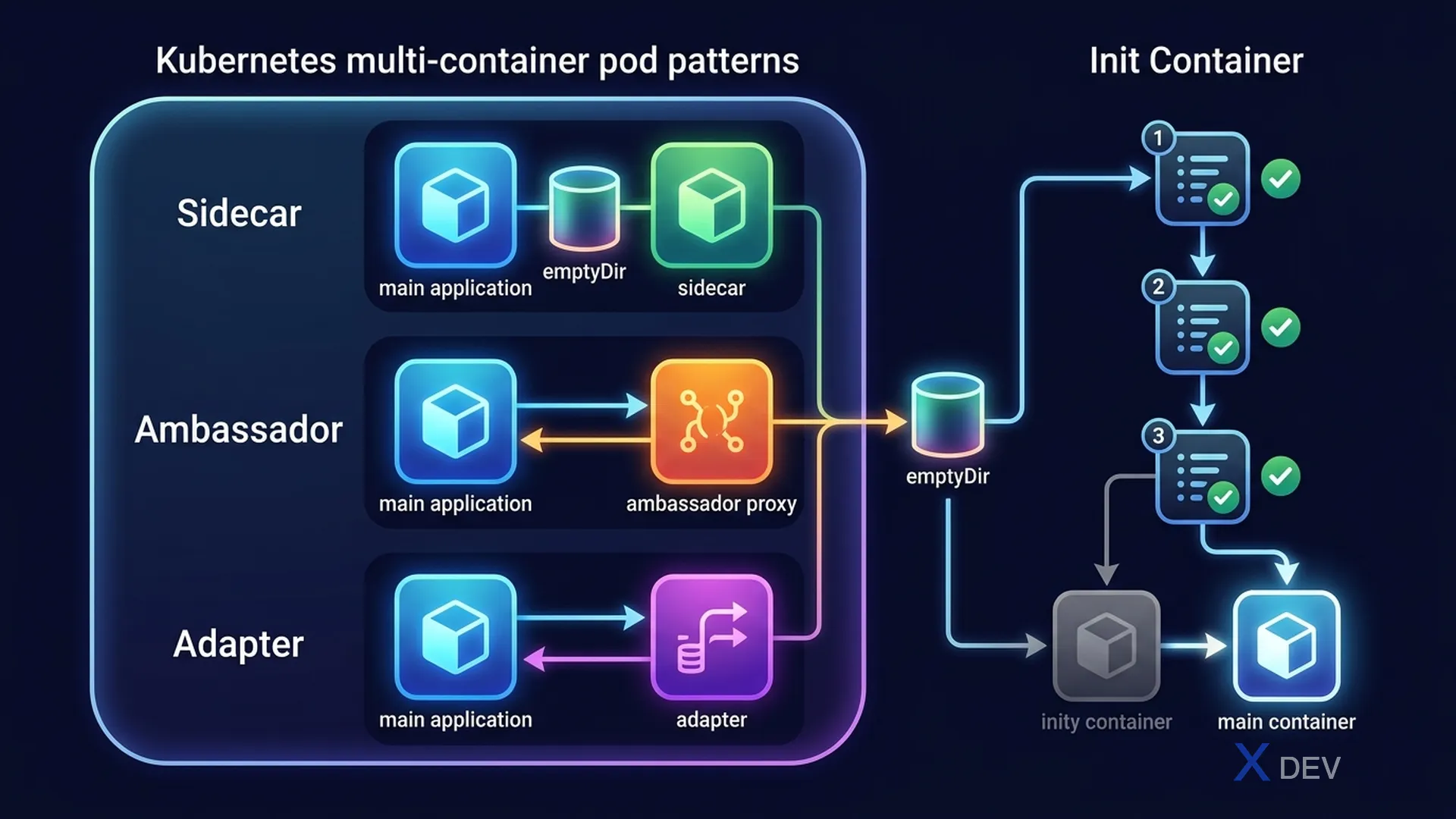
1. Multi-container Pod Patterns
Containers trong cùng một Pod chia sẻ: network (same IP), IPC, và có thể chia sẻ storage volumes. Dùng nhiều containers khi chúng cần phối hợp chặt chẽ.
| Pattern | Vai trò | Ví dụ thực tế |
|---|---|---|
| Sidecar | Extend/enhance container chính (cùng lifecycle) | Log shipper, service mesh proxy (Envoy), config reloader |
| Ambassador | Proxy traffic đến/từ container chính | Local proxy cache, connection multiplexer |
| Adapter | Transform output của container chính | Metrics format converter (app → Prometheus format) |
Sidecar Pattern:
┌─────────────────────────────────────────────┐
│                    POD                      │
│  ┌──────────────┐    ┌─────────────────┐    │
│  │  App         │    │  Log Sidecar    │    │
│  │  Container   │    │  (Fluentd)      │    │
│  └──────┬───────┘    └────────┬────────┘    │
│         │                     │             │
│         └──── Shared Volume ──┘             │
│              /var/log/app                   │
└─────────────────────────────────────────────┘
2. Multi-container Pod YAML
apiVersion: v1
kind: Pod
metadata:
  name: web-with-sidecar
spec:
  containers:
  - name: web
    image: nginx:1.21
    volumeMounts:
    - name: shared-logs
      mountPath: /var/log/nginx

  - name: log-shipper
    image: fluent/fluentd:v1.14
    volumeMounts:
    - name: shared-logs
      mountPath: /var/log/nginx
      readOnly: true  # Sidecar reads, doesn't write

  volumes:
  - name: shared-logs
    emptyDir: {}     # Ephemeral, lost when pod deleted
Exam tip: CKAD thường cho task tạo Pod với sidecar container. Key điểm: cần shared volume để containers communicate, và cả 2 containers phải mount volume đúng path. Sidecar thường mount
readOnly: true.
3. Init Containers
Init Containers chạy trước main containers, phải hoàn thành thành công trước khi Pod start. Dùng cho: DB migration, wait for dependency, pre-populate volume.
apiVersion: v1
kind: Pod
metadata:
  name: app-with-init
spec:
  initContainers:
  - name: wait-for-db
    image: busybox
    command: ['sh', '-c', 'until nc -z postgres-service 5432; do sleep 2; done']

  - name: db-migrate
    image: myapp:1.0
    command: ['python', 'manage.py', 'migrate']

  containers:
  - name: app
    image: myapp:1.0
    ports:
- containerPort: 8000| Property | Init Container | Regular Container |
|---|---|---|
| Execution order | Sequential, all before app | Parallel start |
| Must complete? | Yes (exit 0) | Runs continuously |
| Liveness probe | Not supported | Supported |
| Resources | Counted separately | Normal requests/limits |
4. Cheat Sheet
| Câu hỏi exam | Đáp án |
|---|---|
| Log collection từ app container? | Sidecar với shared volume |
| Wait for service before starting? | Init Container |
| Run DB migration before app? | Init Container với migration command |
| Shared storage giữa containers? | emptyDir volume |
5. Practice Questions
Q1: You need to ensure a Pod's main application only starts after a config file is downloaded from an external URL. What is the best approach?
- A) Use a Sidecar container to download the file
- B) Use an Init Container that runs wget and completes before the main container starts ✓
- C) Use a DaemonSet to pre-populate config on all nodes
- D) Mount a ConfigMap as the initial configuration
Explanation: Init Containers run sequentially before main containers and must complete (exit 0). They're perfect for "prerequisites" like downloading config, waiting for services, or running migrations. Sidecar runs in parallel alongside the main container.
Q2: Two containers in the same Pod need to share data. Container A writes to /tmp/data, Container B reads from /tmp/data. What should you configure?
- A) ExternalDNS shared volume
- B) emptyDir volume mounted at /tmp/data in both containers ✓
- C) A PersistentVolumeClaim for each container
- D) ConfigMap mounted as a volume
Explanation: emptyDir is created when a Pod is assigned to a Node, and deleted when the Pod is removed. It's perfect for sharing ephemeral data between containers in the same Pod. Both containers mount it at the same path.
Q3: A Pod has a single Init Container that keeps failing (exit code 1). What happens to the main application container?
- A) The main container starts after a timeout
- B) The main container is skipped and the Pod succeeds
- C) The main container never starts; Pod shows Init:Error or Init:CrashLoopBackOff ✓
- D) The init container failure is ignored if main container is defined
Explanation: Init Containers MUST exit with code 0. If they fail, Kubernetes restarts them based on Pod's restartPolicy. The main container never starts until all init containers complete successfully.