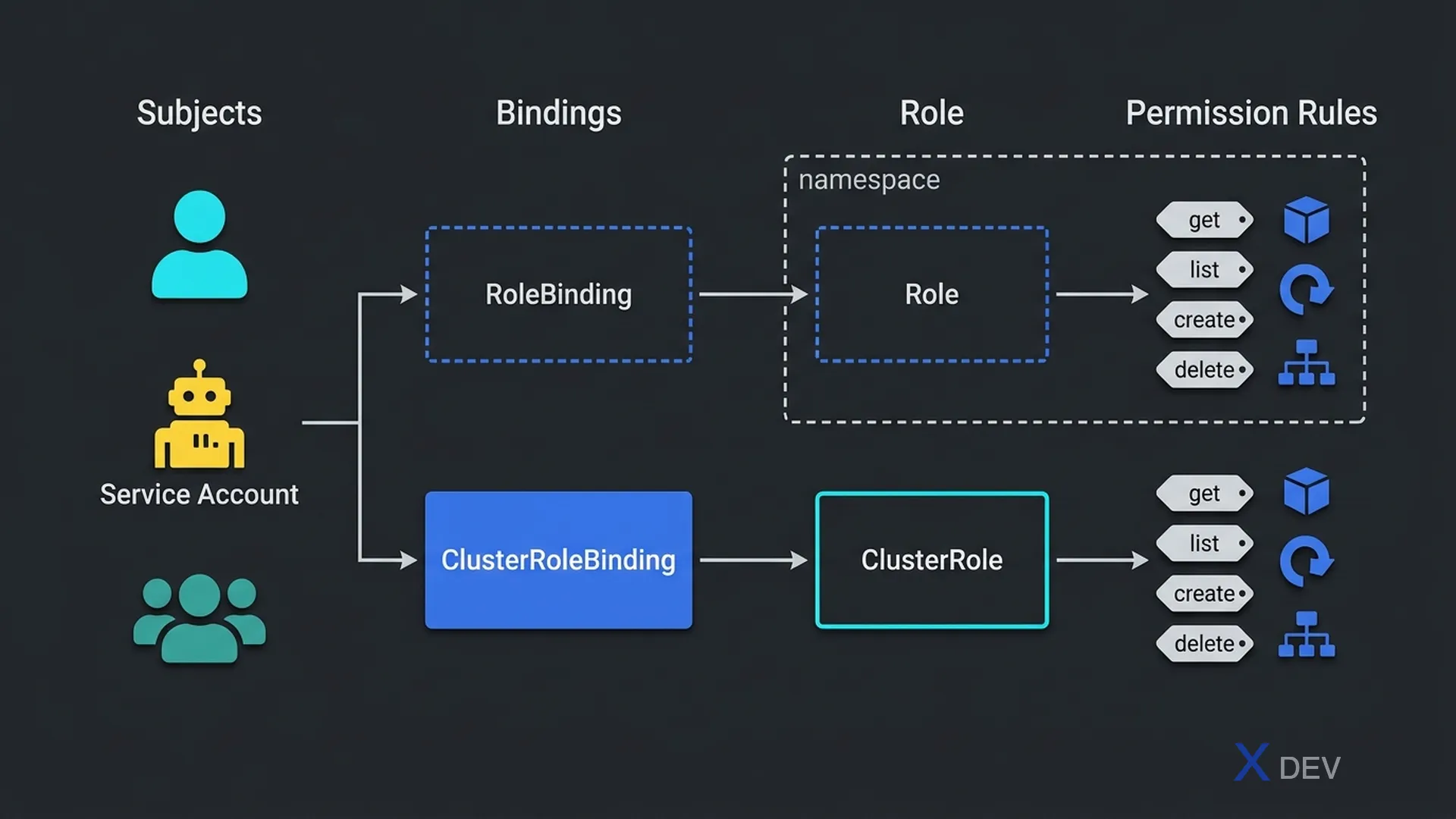
1. RBAC — Role-Based Access Control
RBAC kiểm soát ai (User, Group, ServiceAccount) được làm gì (verbs) với tài nguyên nào (resources) trong namespace hoặc cluster.
RBAC Flow:
Subject (Who?)    →    Role/ClusterRole (What?)    →    RoleBinding (Links)

  User "alice"          Role "pod-reader"              RoleBinding
  ServiceAccount        - get pods                     alice → pod-reader
  Group "devs"          - list pods                    (in namespace "dev")
- watch pods| Object | Scope | Dùng khi |
|---|---|---|
| Role | Namespace | Quyền trong 1 namespace |
| ClusterRole | Cluster-wide | Quyền trên toàn cluster hoặc non-namespaced resources (nodes) |
| RoleBinding | Namespace | Gán Role or ClusterRole cho Subject trong 1 namespace |
| ClusterRoleBinding | Cluster-wide | Gán ClusterRole cho Subject trên toàn cluster |
Exam tip: Có thể dùng RoleBinding để gán ClusterRole vào 1 namespace cụ thể — đây là cách tái sử dụng permission template mà không cấp quyền toàn cluster. Rất hay xuất hiện trong exam!
2. ServiceAccounts
Mỗi Pod có thể gắn một ServiceAccount. Token của ServiceAccount được mount tự động vào /var/run/secrets/kubernetes.io/serviceaccount/. Pods dùng token này để gọi Kubernetes API.
Default ServiceAccount flow:
  Pod → ServiceAccount → RBAC Role → API Server

Ví dụ: Prometheus cần đọc Pod metrics:
  ServiceAccount: prometheus-sa
  ClusterRole: pod-metrics-reader (verbs: get, list, watch)
  ClusterRoleBinding: prometheus-sa → pod-metrics-reader
3. Network Policies
Mặc định, tất cả Pods trong cluster có thể communicate với nhau. NetworkPolicy cho phép giới hạn traffic ingress/egress dựa trên Pod selector, namespace selector, hoặc IP block.
❌ Default (no NetworkPolicy): All pods talk to all pods
✅ With NetworkPolicy:
   frontend → backend (allowed)
   frontend → database (BLOCKED)
   backend → database (allowed)
Exam tip: NetworkPolicy chỉ có tác dụng khi CNI plugin hỗ trợ (Calico, Cilium, Weave). Flannel không hỗ trợ NetworkPolicy. Nếu không có policy nào → allow all. Nếu có ít nhất 1 policy → default deny cho traffic được select.
4. Pod Security Standards
Kubernetes định nghĩa 3 Pod Security Standards (thay thế PodSecurityPolicy từ v1.25):
| Profile | Mức độ hạn chế | Dùng cho |
|---|---|---|
| Privileged | Không hạn chế | System/infra workloads (kube-system) |
| Baseline | Ngăn escalation rõ ràng | Workloads thông thường |
| Restricted | Tuân thủ hardening tối đa | Security-sensitive apps |
5. SecurityContext
SecurityContext cấu hình bảo mật ở cấp Pod hoặc Container:
| Security setting | Ý nghĩa |
|---|---|
runAsNonRoot: true | Container không được chạy với UID 0 |
runAsUser: 1000 | Chạy container với UID 1000 |
readOnlyRootFilesystem: true | Filesystem read-only (write phải dùng volume) |
allowPrivilegeEscalation: false | Không cho process leo thang đặc quyền |
capabilities.drop: ["ALL"] | Bỏ tất cả Linux capabilities |
6. Cheat Sheet
| Câu hỏi exam | Đáp án |
|---|---|
| Pod cần gọi K8s API, dùng gì? | ServiceAccount |
| Giới hạn quyền user trong 1 namespace? | Role + RoleBinding |
| Giới hạn network traffic giữa Pods? | NetworkPolicy |
| NetworkPolicy cần gì để hoạt động? | CNI plugin hỗ trợ (Calico, Cilium) |
| Privileged → Restricted, Pod Security cần? | Pod Security Admission |
7. Practice Questions
Q1: An application Pod needs to access the Kubernetes API to list Pods in its own namespace. What should a cluster administrator create?
- A) ClusterRole with ClusterRoleBinding for all namespaces
- B) ServiceAccount with Role (list pods) and RoleBinding ✓
- C) Service with type LoadBalancer for API Server
- D) ConfigMap with API Server credentials
Explanation: The Pod needs a ServiceAccount, a Role granting "list pods" in its namespace, and a RoleBinding linking them. Using ClusterRole would over-grant access across all namespaces.
Q2: A NetworkPolicy is applied to a Pod. What is the default behavior for traffic not explicitly matched by any rule?
- A) All traffic is allowed (default allow)
- B) Traffic is logged but not blocked
- C) Traffic that matches the Pod selector is denied; all other traffic passes ✓
- D) All traffic to/from the Pod is denied
Explanation: Once a NetworkPolicy selects a Pod (via podSelector), all traffic not explicitly allowed is denied for that policy type (ingress/egress). Non-selected Pods remain unaffected and have full connectivity.
Q3: Which Pod Security Standard profile should be used for a system-level component that requires privileged access to the host?
- A) Restricted
- B) Baseline
- C) Privileged ✓
- D) SystemAdmin
Explanation: The Privileged profile places no restrictions on Pods, allowing all capabilities. It's intended for system/infrastructure components. Baseline prevents known privilege escalations; Restricted enforces maximum hardening.