簡介
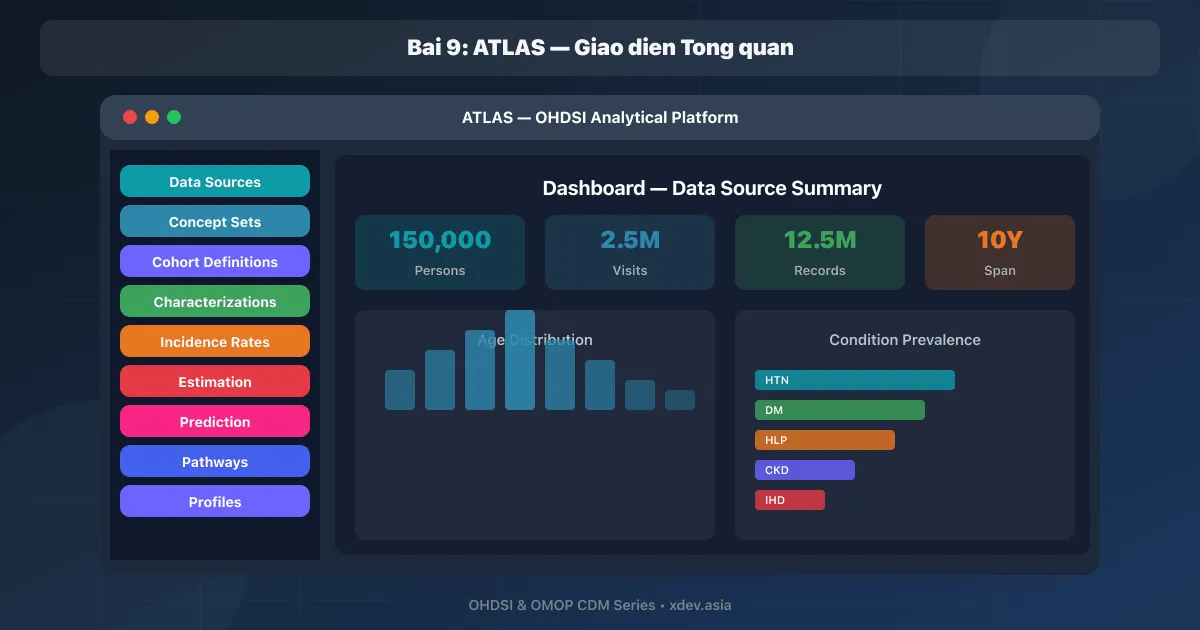
ATLAS 是 OHDSI 生態系統的主要 Web 應用程式 - 用於探索資料、建立佇列定義、運行特徵分析、發病率、估計和預測的直覺介面。 ATLAS 演示公開: https://atlas-demo.ohdsi.org
1.安裝ATLAS
1.1 Docker Compose(全端)
# docker-compose.yml — OHDSI Full Stack
services:
  # CDM Database
  cdm-db:
    image: postgres:16-alpine
    environment:
      POSTGRES_DB: ohdsi
      POSTGRES_USER: ohdsi_admin
      POSTGRES_PASSWORD: ${CDM_DB_PASS}
    volumes:
      - cdm-db-data:/var/lib/postgresql/data
      - ./init-scripts:/docker-entrypoint-initdb.d
    ports:
      - "5432:5432"

  # WebAPI Database
  webapi-db:
    image: postgres:16-alpine
    environment:
      POSTGRES_DB: ohdsi_webapi
      POSTGRES_USER: ohdsi
      POSTGRES_PASSWORD: ${WEBAPI_DB_PASS}
    volumes:
      - webapi-db-data:/var/lib/postgresql/data

  # WebAPI Backend
  webapi:
    image: ohdsi/webapi:latest
    depends_on:
      - webapi-db
    ports:
      - "8080:8080"
    environment:
      DATASOURCE_URL: jdbc:postgresql://webapi-db:5432/ohdsi_webapi
      DATASOURCE_USERNAME: ohdsi
      DATASOURCE_PASSWORD: ${WEBAPI_DB_PASS}
      DATASOURCE_OHDSI_SCHEMA: webapi
      SPRING_JPA_PROPERTIES_HIBERNATE_DEFAULT_SCHEMA: webapi
      FLYWAY_DATASOURCE_URL: jdbc:postgresql://webapi-db:5432/ohdsi_webapi
      FLYWAY_DATASOURCE_USERNAME: ohdsi
      FLYWAY_DATASOURCE_PASSWORD: ${WEBAPI_DB_PASS}
      FLYWAY_SCHEMAS: webapi
      FLYWAY_BASELINE_ON_MIGRATE: "true"
      SECURITY_PROVIDER: DisabledSecurity

  # ATLAS Frontend
  atlas:
    image: ohdsi/atlas:latest
    depends_on:
      - webapi
    ports:
      - "8088:8080"
    environment:
      WEBAPI_URL: http://localhost:8080/WebAPI/

volumes:
  cdm-db-data:
  webapi-db-data:
# Khởi chạy full stack
docker compose up -d

# Truy cập ATLAS
open http://localhost:8088/atlas
1.2 ATLAS配置
// config-local.js — ATLAS configuration
define([], function () {
  var configLocal = {};

  // WebAPI URL
  configLocal.api = {
    name: 'OHDSI',
    url: 'http://localhost:8080/WebAPI/'
  };

  // Authentication
  configLocal.authProviders = [{
    "name": "Local Security",
    "url": "user/login/db",
    "ajax": true,
    "icon": "fa fa-database",
    "isUseCredentialsForm": true
  }];

  // Default CDM source
  configLocal.cohortComparisonResultsEnabled = true;
  configLocal.userAuthenticationEnabled = false;

  return configLocal;
});
2.ATLAS介面
2.1 導覽選單
┌──────────────────────────────────────────────────────────┐
│  ATLAS — OHDSI                              [Source: ▼]  │
│                                                          │
│  ┌──────────────────┐                                    │
│  │ 🏠 Home          │                                    │
│  │ 📊 Data Sources  │ ← Xem thống kê dữ liệu CDM       │
│  │ 🔍 Search        │ ← Tìm concepts trong vocabulary   │
│  │ 📋 Concept Sets  │ ← Tập hợp concepts (tái sử dụng) │
│  │ 👥 Cohort Defs   │ ← Định nghĩa nhóm bệnh nhân      │
│  │ 📈 Characterize  │ ← Mô tả đặc điểm cohort          │
│  │ 📉 Incidence     │ ← Tỷ lệ mới mắc                 │
│  │ 🎯 Estimation    │ ← So sánh hiệu quả điều trị      │
│  │ 🔮 Prediction    │ ← Dự đoán kết quả bệnh nhân      │
│  │ 🛤️ Pathways      │ ← Lộ trình điều trị               │
│  │ ⚙️ Configuration │ ← Cài đặt                         │
│  └──────────────────┘                                    │
└──────────────────────────────────────────────────────────┘
2.2 資料來源
ATLAS → Data Sources → Chọn CDM Source

Dashboard hiển thị:
┌──────────────────────────────────────────────────────┐
│  Data Source: Hospital XYZ Vietnam                    │
│                                                      │
│  Summary:                                            │
│  ├── Persons: 50,000                                 │
│  ├── Observation Period: 2018 - 2024                 │
│  ├── Conditions: 1,200,000 records                   │
│  ├── Drug Exposures: 800,000 records                 │
│  ├── Measurements: 2,500,000 records                 │
│  └── Visits: 350,000 records                         │
│                                                      │
│  Reports (từ ACHILLES):                              │
│  ├── Person: Age/Gender distribution                 │
│  ├── Visit: Visit types, duration                    │
│  ├── Condition: Top conditions by prevalence          │
│  ├── Drug: Top drugs by utilization                   │
│  └── Measurement: Test distributions                 │
└──────────────────────────────────────────────────────┘

Yêu cầu: ACHILLES phải được chạy trước (xem Bài 13)
2.3 搜尋 — 尋找概念
ATLAS → Search → Nhập "diabetes"

Kết quả:
┌──────────┬──────────────────────────────┬────────┬──────────┐
│ ID       │ Name                         │ Domain │ Standard │
├──────────┼──────────────────────────────┼────────┼──────────┤
│ 201820   │ Diabetes mellitus            │ Cond   │ S        │
│ 201826   │ Type 2 diabetes mellitus     │ Cond   │ S        │
│ 201254   │ Type 1 diabetes mellitus     │ Cond   │ S        │
│ 443238   │ Diabetic neuropathy          │ Cond   │ S        │
│ 4193704  │ Type 2 DM w/renal compl     │ Cond   │ S        │
└──────────┴──────────────────────────────┴────────┴──────────┘

Click vào concept → xem chi tiết:
- Hierarchical relationships (parents, children)
- Related concepts
- Record count trong CDM (nếu ACHILLES chạy rồi)
3. ATLAS 基本工作流程
3.1 建立概念集
Concept Set = tập hợp concepts có thể tái sử dụng
Ví dụ: "Bệnh tăng huyết áp" = tất cả concepts liên quan HTN

Bước 1: Concept Sets → New Concept Set
Bước 2: Đặt tên: "Hypertension Conditions"
Bước 3: Search → "hypertension" → Add concepts:
         ☑ 320128 Essential hypertension
         ☑ 316866 Hypertensive disorder (+ Include Descendants)
Bước 4: Save

Khi Include Descendants = ON:
  → Tự động bao gồm tất cả con/cháu trong SNOMED hierarchy
  → Malignant HTN, Renovascular HTN, Gestational HTN... đều được bao gồm
3.2 建立群組定義(摘要)
Cohort = nhóm bệnh nhân thỏa mãn tiêu chí

Ví dụ: Bệnh nhân tăng huyết áp mới khởi phát
  Initial Event: Condition = "Hypertension Conditions" (concept set)
  Inclusion:
    - Có ít nhất 365 ngày observation trước event
    - Không có HTN diagnosis trong 365 ngày trước
  Exit: End of observation period

→ Chi tiết ở Bài 10
4. CDM 來源之間的切換
ATLAS hỗ trợ multi-source:

Dropdown "Source" → Chọn:
  ☑ Hospital XYZ Vietnam (50K patients)
  ○ Hospital ABC Northern (100K patients)
  ○ Insurance Dataset (500K patients)

Khi chuyển source:
→ Search results thay đổi (record counts khác)
→ Cohort generation chạy trên source đó
→ Characterization results từ source đó

→ Cùng 1 cohort definition, chạy trên nhiều sources
→ So sánh kết quả cross-source
5. ATLAS 設定提示
Performance:
- WebAPI cần ít nhất 2GB RAM (4GB khuyến nghị)
- CDM database cần indexes đầy đủ
- ACHILLES results cache giúp Data Sources load nhanh

Security:
- Production PHẢI enable authentication
- Dùng HTTPS (reverse proxy: Nginx/Traefik)
- Restrict network access đến WebAPI

Usability:
- Bookmark cohort definitions, concept sets (shared via URL)
- Export/Import cohort definitions (JSON format)
- Cộng đồng OHDSI chia sẻ cohort definitions phổ biến
  trên forums.ohdsi.org
總結
| 組件 | 目的 |
|---|---|
| 阿特拉斯 | OMOP CDM 資料分析的 Web UI |
| 網頁API | REST API 後端連接 ATLAS ↔ CDM 資料庫 |
| 資料來源 | CDM 統計儀表板(需要 ACHILLES) |
| 概念集 | 一組可重複使用的群組定義概念 |
| 群組定義 | 使用臨床標準定義病患群體 |
下一篇文章:ATLAS — 概念集與群組定義