
You can skip this section and still build OMOP — but your analytics will always be wrong. Vocabulary is what makes OMOP meaningful. This article is a deep dive into Concepts, hierarchies, mappings, and the Athena workflow.
1. Why vocabulary matters
A real-world example: you have three data sources:
- Hospital A: diagnosis code "ICD-10 E11.9"
- Hospital B: code "ICD-10 E11"
- Hospital C: SNOMED code "44054006"
All three describe type 2 diabetes. Without standardization, "total number of type 2 diabetes patients" returns the wrong answer.
OMOP solves this by picking one Standard Concept (here concept_id = 201826, SNOMED 44054006) and mapping every source code to it.
2. Concept — the basic unit
A Concept is one row in the CONCEPT table:
| concept_id | concept_name | domain_id | vocabulary_id | concept_class_id | standard_concept | concept_code |
|---|---|---|---|---|---|---|
| 201826 | Type 2 diabetes mellitus | Condition | SNOMED | Clinical Finding | S | 44054006 |
| 192279 | Diabetic complication | Condition | SNOMED | Clinical Finding | C | 74627003 |
| 45757466 | E11 (ICD-10-CM) | Condition | ICD10CM | ICD10CM code | (null = Source) | E11 |
standard_concept:
- S (Standard): use this for analytics
- C (Classification): for classification, not a standard concept
- NULL (Source): the original code, used for source_value
3. Vocabulary and Domain
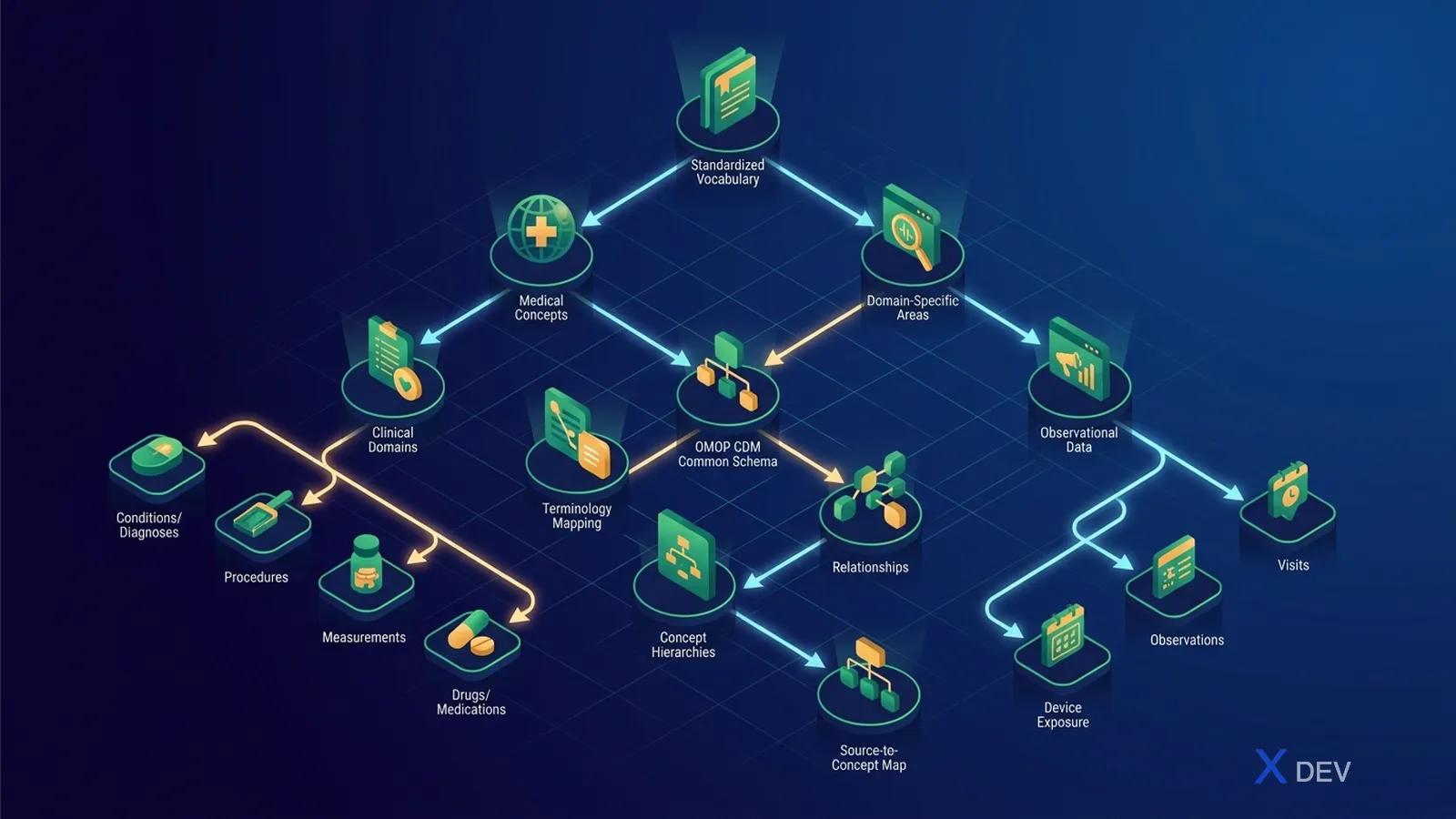
| Domain | OMOP table | Primary Standard Vocabulary |
|---|---|---|
| Condition | CONDITION_OCCURRENCE | SNOMED CT |
| Drug | DRUG_EXPOSURE | RxNorm + RxNorm Extension |
| Procedure | PROCEDURE_OCCURRENCE | SNOMED CT, CPT4, ICD-10-PCS |
| Measurement | MEASUREMENT | LOINC, SNOMED CT |
| Observation | OBSERVATION | SNOMED CT, LOINC |
| Device | DEVICE_EXPOSURE | SNOMED CT |
| Unit | (across) | UCUM |
| Race / Ethnicity | PERSON | OMOP Custom (needs custom mapping for Vietnam) |
4. Concept Relationship
The CONCEPT_RELATIONSHIP table stores relationships between concepts:
| concept_id_1 | concept_id_2 | relationship_id |
|---|---|---|
| 45757466 (ICD10 E11) | 201826 (SNOMED Diabetes T2) | "Maps to" |
| 201826 | 45757466 | "Mapped from" |
| 1503297 (Metformin) | 1503328 (Metformin 500mg tablet) | "Has form" |
Maps to is critical — it is how source codes are mapped to standard concepts:
-- Find the Standard Concept that ICD-10 E11 maps to
SELECT c2.concept_id, c2.concept_name
FROM concept c1
JOIN concept_relationship cr ON c1.concept_id = cr.concept_id_1
  AND cr.relationship_id = 'Maps to'
JOIN concept c2 ON cr.concept_id_2 = c2.concept_id
WHERE c1.vocabulary_id = 'ICD10CM' AND c1.concept_code = 'E11';
5. Concept Ancestor — the hierarchy
CONCEPT_ANCESTOR stores the descendant hierarchy:
-- Find every descendant of "Diabetes mellitus" (Type 1, Type 2, gestational, ...)
SELECT c.concept_id, c.concept_name, ca.min_levels_of_separation
FROM concept_ancestor ca
JOIN concept c ON ca.descendant_concept_id = c.concept_id
WHERE ca.ancestor_concept_id = 201820  -- Diabetes mellitus
  AND c.standard_concept = 'S';
Extremely powerful for cohort definitions: "any patient with diabetes" only needs the ancestor 201820.
6. Athena — the vocabulary portal

Workflow:
- Create a free account at athena.ohdsi.org
- Pick the vocabularies you need (SNOMED, RxNorm, LOINC, ICD10CM, ICD10, ATC, ...)
- Some vocabularies require a license (SNOMED CT for Vietnam: register as a SNOMED International affiliate — free for Vietnam as a low-income member)
- Download the zip — it contains CONCEPT.csv, CONCEPT_RELATIONSHIP.csv, and so on
- Import into your CDM database
7. Importing vocabularies into Postgres
-- Create the schema and tables using the CommonDataModel DDL
\i OMOPCDM_postgresql_5.4_ddl.sql

-- Import the CSVs (example)
COPY concept FROM '/path/CONCEPT.csv' DELIMITER E'\t' CSV HEADER QUOTE E'\b';
COPY concept_relationship FROM '/path/CONCEPT_RELATIONSHIP.csv' DELIMITER E'\t' CSV HEADER QUOTE E'\b';
COPY concept_ancestor FROM '/path/CONCEPT_ANCESTOR.csv' DELIMITER E'\t' CSV HEADER QUOTE E'\b';
-- ...

-- Create indexes
\i OMOPCDM_postgresql_5.4_indices.sql

-- Create primary keys
\i OMOPCDM_postgresql_5.4_primary_keys.sql
After import: ~6 million concepts (full set), ~12 GB. You can trim it down by only loading the vocabularies you need.
8. USAGI — the code mapping tool
USAGI helps you map source codes (Vietnamese ICD-10, Ministry of Health drug catalogue) to Standard Concepts:

Workflow:
- Provide an input CSV with
source_code, source_namecolumns - USAGI searches with Lucene
- The user reviews the top matches and accepts or edits them
- Export → into the
SOURCE_TO_CONCEPT_MAPtable
9. Vocabularies for Vietnam

9.1 Custom vocabularies for Vietnam
When no standard equivalent exists (e.g. Vietnam's 54 ethnic groups), create a Custom Vocabulary with:
vocabulary_id = 'VN_DANTOC'concept_idstarting at 2 billion (the OHDSI range reserved for custom concepts)- Register it in the VOCABULARY table
INSERT INTO vocabulary VALUES
  ('VN_DANTOC', 'Vietnamese ethnic groups (54)', 'http://...', '1.0', 2000000001);

INSERT INTO concept VALUES
  (2000001001, 'Kinh', 'Race', 'VN_DANTOC', 'Race', 'S', '01', NULL, NULL);
-- ...
9.2 SNOMED CT in Vietnam
Vietnam is a SNOMED International member (registered in 2024 via the Ministry of Health). The affiliate license is free for in-country individuals and organizations. Register at snomed.org.
10. Vocabulary upgrades
Athena releases vocabularies monthly. Upgrade workflow:

Note: concept_id is stable across versions, but Maps to relationships can change → you must re-run ETL to update the *_concept_id columns.
11. Common SQL patterns
11.1 Look up the standard concept for a source code
SELECT c2.concept_id, c2.concept_name, c2.vocabulary_id
FROM concept c1
JOIN concept_relationship cr ON c1.concept_id = cr.concept_id_1
  AND cr.relationship_id = 'Maps to'
JOIN concept c2 ON cr.concept_id_2 = c2.concept_id
WHERE c1.vocabulary_id = 'ICD10CM'
  AND c1.concept_code = 'E11.9';
11.2 Find every descendant of an ancestor
SELECT c.concept_id, c.concept_name
FROM concept_ancestor ca
JOIN concept c ON ca.descendant_concept_id = c.concept_id
WHERE ca.ancestor_concept_id = 201820  -- Diabetes mellitus
  AND c.standard_concept = 'S';
11.3 RxNorm: find every product containing an ingredient
SELECT product.concept_id, product.concept_name
FROM concept ing
JOIN concept_ancestor ca ON ing.concept_id = ca.ancestor_concept_id
JOIN concept product ON ca.descendant_concept_id = product.concept_id
WHERE ing.concept_name = 'Metformin'
  AND ing.concept_class_id = 'Ingredient'
  AND product.concept_class_id IN ('Branded Drug', 'Clinical Drug');
12. Common pitfalls
- ❌ Forgetting to upgrade vocabularies → analytics use obsolete concepts
- ❌ Mapping source → standard incorrectly → cohorts off by thousands of patients
- ❌ Using Classification (C) concepts instead of Standard (S) for analytics
- ❌ Forgetting hierarchies → cohorts miss disease variants (e.g. "Diabetes" without Type 1.5)
- ❌ Custom
concept_idcolliding with the standard range (must use the 2-billion+ range) - ❌ Failing to back up the vocabulary before an upgrade
13. Recommended workflow for a new project
- Read the OHDSI Themis conventions
- Download a vocabulary subset (SNOMED + ICD10CM + RxNorm + LOINC + ATC + UCUM) — covers 90% of Vietnamese needs
- Register as a SNOMED International affiliate (free for Vietnam)
- Import into Postgres + index
- Set up USAGI for the mapping team
- Map the largest source codes first (top 100 ICD-10 + top 200 drugs covers ~80% of volume)
- Save the mapping in
SOURCE_TO_CONCEPT_MAPand commit it to Git - Schedule quarterly vocabulary upgrades
Conclusion
Vocabulary is 50% of OMOP's value. Invest correctly — and you can join and analyze any dataset. Invest poorly — and your analytics will always be in doubt. Start small, review carefully, upgrade regularly.
Next article: OMOP Core Clinical Tables — Person, Visit, Condition, Drug, Measurement, Observation.