1. From Diffusion Models to LLM Applications
In Part 2, we mastered Diffusion Models — from forward/reverse processes to CLIP-guided generation. Now in Part 3, the focus shifts to Large Language Models (LLMs) and how to build real-world applications: inference pipelines, RAG, and chatbots.
This lesson focuses on LLM Inference Pipeline Design — how to control LLM output through sampling parameters, deploy models with NVIDIA NIM, build pipelines with LangChain LCEL, and create UI/APIs with Gradio + LangServe.
Exam tip: The NVIDIA DLI exam frequently asks about inference parameters (temperature, top-k, top-p) and when to use NIM vs other frameworks. Make sure you know the comparison table at the end of this lesson.
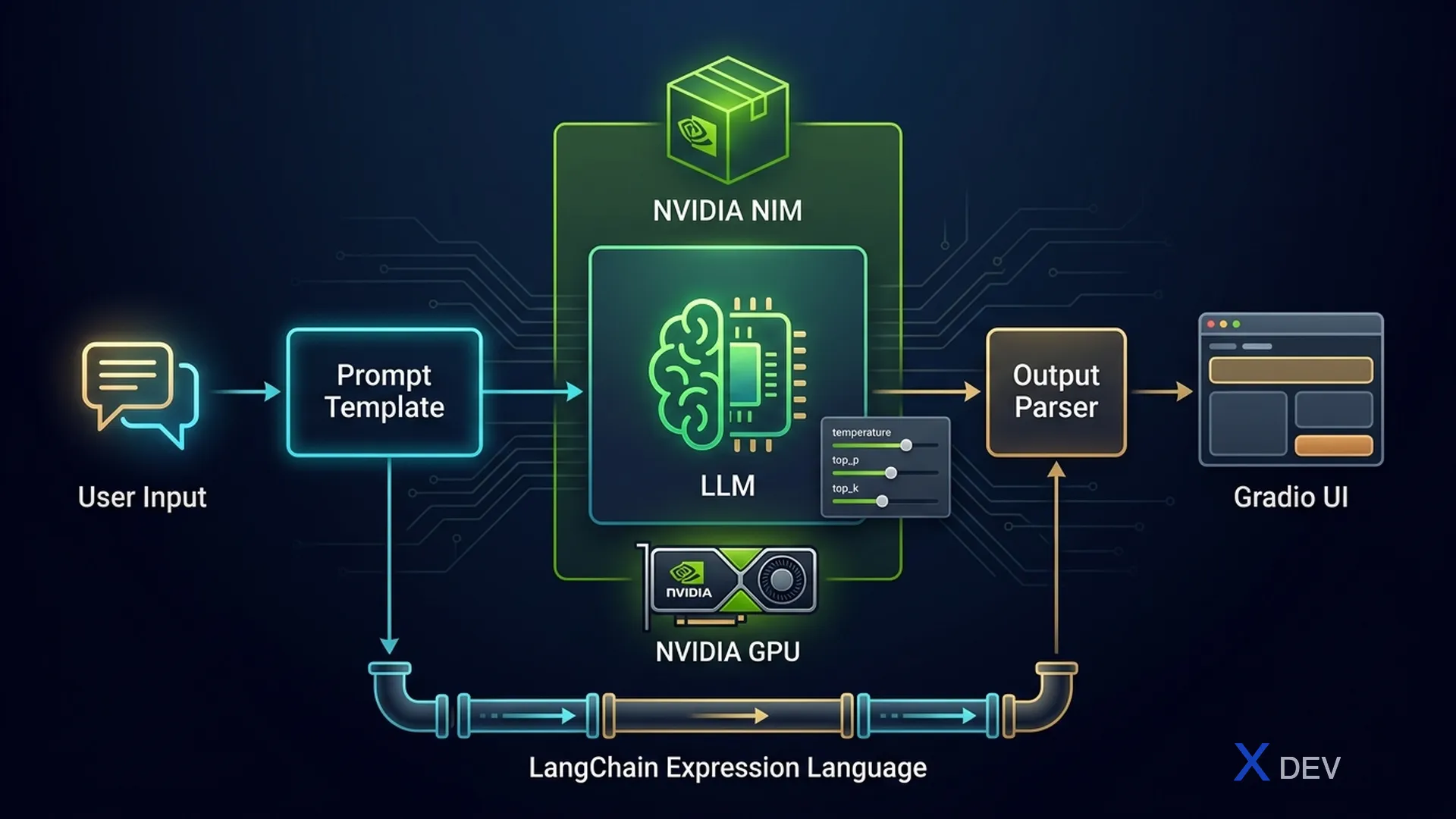
2. LLM Inference Fundamentals
2.1. Autoregressive Generation
LLMs generate text using an autoregressive mechanism: at each step, the model predicts the next token based on all previous tokens. This process repeats until a stop token is encountered or max_tokens is reached.
Autoregressive Generation Flow
═══════════════════════════════

Input: "Hanoi is"
         │
         ▼
┌─────────────────────┐
│   LLM Forward Pass   │
│   P(token | context) │
└──────────┬──────────┘
           │
           ▼
┌─────────────────────┐
│   Sampling Strategy  │──► temperature, top-k, top-p
│   Select next token  │
└──────────┬──────────┘
           │
           ▼
    token = "the"
           │
           ▼
Input: "Hanoi is the"
         │
         ▼
┌─────────────────────┐
│   LLM Forward Pass   │
└──────────┬──────────┘
           │
           ▼
    token = "capital"
           │
           ▼
   ... repeat until <EOS> or max_tokens
2.2. Sampling Parameters
The three most important parameters controlling the creativity of the output:
| Parameter | Range | Effect | Low Value | High Value |
|---|---|---|---|---|
| temperature | 0.0 – 2.0 | Adjusts entropy of the probability distribution | Deterministic, repetitive | Creative, more random |
| top_k | 1 – vocab_size | Limits to only the top K highest-probability tokens | More selective, less diverse | More choices |
| top_p | 0.0 – 1.0 | Nucleus sampling: only considers tokens with cumulative prob ≤ p | Only the most certain tokens | Considers more tokens |
Token Sampling Process (temperature + top-p)
═════════════════════════════════════════════

Raw logits:  [2.1, 1.8, 0.5, 0.3, -1.0, -2.5, ...]
                │
                ▼
         ┌──────────────┐
         │  ÷ temperature │  (temp=0.7 → sharper)
         └──────┬───────┘
                │
                ▼
Scaled probs: [0.35, 0.28, 0.12, 0.09, 0.08, 0.05, 0.03]
                │
                ▼
         ┌──────────────┐
         │   top-p=0.8   │  cumsum: 0.35→0.63→0.75→0.84 ✓
         │   Keep top 4   │  → discard tokens 5,6,7...
         └──────┬───────┘
                │
                ▼
Filtered:   [0.41, 0.33, 0.14, 0.12]  (re-normalized)
                │
                ▼
         Random sample → token "the"
2.3. Other Parameters
| Parameter | Description | Use Case |
|---|---|---|
| max_tokens | Limits the maximum number of output tokens | Control cost, latency |
| stop | Stop generation when this string is encountered | Structured output, function calling |
| repetition_penalty | Penalize already-appeared tokens (>1.0 = heavier penalty) | Avoid word/sentence repetition |
| frequency_penalty | Reduce probability based on frequency of occurrence | More diverse output |
| presence_penalty | Penalize if token has appeared at least once | Encourage new topics |
Exam tip: Common question: "To always get the same output (deterministic), which parameter should you set?" → temperature = 0.0. If asking "reduce word repetition" → use repetition_penalty > 1.0 or frequency_penalty > 0.
3. NVIDIA NIM (NVIDIA Inference Microservices)
3.1. What is NIM?
NVIDIA NIM is a set of pre-optimized inference containers that deploy LLM/multimodal models with maximum performance on NVIDIA GPUs. NIM comes with built-in TensorRT-LLM, quantization, and memory optimizations.
Key features:
- OpenAI-compatible API — drop-in replacement, call directly using the openai client
- TensorRT-LLM backend — optimized kernels for NVIDIA GPUs
- Continuous batching — efficiently processes multiple requests simultaneously
- gRPC + REST API — flexible integration
- Multi-GPU support — automatic tensor parallelism
3.2. NIM Architecture
NVIDIA NIM Architecture
════════════════════════

┌─────────────────────────────────────────────┐
│              NIM Container                   │
│                                              │
│  ┌──────────┐   ┌──────────────────────┐    │
│  │  REST API │   │   gRPC Endpoint      │    │
│  │ :8000     │   │   :8001              │    │
│  └─────┬────┘   └──────────┬───────────┘    │
│        │                    │                │
│        └────────┬───────────┘                │
│                 ▼                             │
│  ┌──────────────────────────────────┐       │
│  │     Request Router & Batcher     │       │
│  │     (Continuous Batching)        │       │
│  └──────────────┬───────────────────┘       │
│                 ▼                             │
│  ┌──────────────────────────────────┐       │
│  │     TensorRT-LLM Engine          │       │
│  │  ┌────────┐ ┌────────────────┐   │       │
│  │  │ KV Cache│ │ Paged Attention│   │       │
│  │  └────────┘ └────────────────┘   │       │
│  └──────────────┬───────────────────┘       │
│                 ▼                             │
│  ┌──────────────────────────────────┐       │
│  │       NVIDIA GPU(s)              │       │
│  │   A100 / H100 / L40S            │       │
│  └──────────────────────────────────┘       │
└─────────────────────────────────────────────┘
3.3. Pull & Run NIM Container
# Pull and run NIM container for Llama-3
# Requirements: NVIDIA GPU, Docker + NVIDIA Container Toolkit

# Terminal command:
# docker run -it --rm --gpus all \
#   -p 8000:8000 \
#   -e NGC_API_KEY=$NGC_API_KEY \
#   nvcr.io/nim/meta/llama-3.1-8b-instruct:latest
3.4. Call NIM API
from openai import OpenAI

# NIM is OpenAI API-compatible — just change base_url
client = OpenAI(
    base_url="http://localhost:8000/v1",
    api_key="not-used"  # Local NIM doesn't require a key
)

response = client.chat.completions.create(
    model="meta/llama-3.1-8b-instruct",
    messages=[
        {"role": "system", "content": "You are a helpful AI assistant."},
        {"role": "user", "content": "Explain the Transformer architecture"}
    ],
    temperature=0.7,
    top_p=0.9,
    max_tokens=512
)

print(response.choices[0].message.content)
3.5. NIM vs Raw HuggingFace Inference Comparison
| Criteria | NVIDIA NIM | HuggingFace Transformers |
|---|---|---|
| Backend | TensorRT-LLM | PyTorch |
| Throughput (tokens/s) | ~2500-4000 | ~300-800 |
| Latency (TTFT) | ~50-100ms | ~200-500ms |
| Batching | Continuous batching | Manual / static |
| API | OpenAI-compatible REST | Python API |
| Setup | 1 docker run command | Install libs + code |
| Quantization | Built-in (FP8, INT4) | Requires separate GPTQ/AWQ |
| Production ready | Yes (monitoring, scaling) | Needs additional serving layer |
Exam tip: NIM is always the correct answer when the exam asks "fastest way to deploy LLM on NVIDIA GPU" or "production-ready inference with TensorRT-LLM optimization". NIM ≠ training framework — it's only used for inference.
4. LangChain LCEL Pipeline Design
4.1. What is LCEL?
LangChain Expression Language (LCEL) is a declarative syntax for building LLM processing pipelines. It uses the | (pipe) operator to chain components together — similar to Unix pipes.
LCEL advantages:
- Streaming — supports token-by-token output streaming
- Async — native async support
- Batching — processes multiple inputs simultaneously
- Retry/Fallback — automatic retry on errors
- Tracing — integrates with LangSmith for debugging
4.2. Core Primitives
| Component | Role | Input → Output |
|---|---|---|
| PromptTemplate | Format prompt with variables | dict → PromptValue |
| ChatPromptTemplate | Format chat messages | dict → ChatPromptValue |
| ChatModel | Call LLM (ChatOpenAI, ChatNVIDIA...) | PromptValue → AIMessage |
| StrOutputParser | Extract string from AIMessage | AIMessage → str |
| JsonOutputParser | Parse JSON from output | AIMessage → dict |
| RunnablePassthrough | Pass input through unchanged | any → any |
| RunnableLambda | Wrap function as Runnable | any → any |
| RunnableParallel | Run multiple chains in parallel | dict → dict |
4.3. LCEL Pipeline Flow
LCEL Pipeline Architecture
════════════════════════════

Simple Chain:
─────────────
  {"topic": "AI"}
        │
        ▼
┌───────────────┐    ┌─────────────┐    ┌────────────────┐
│ PromptTemplate │──►│  ChatModel   │──►│ StrOutputParser │──► "AI is..."
│ "Explain {topic}"│  │ (ChatNVIDIA) │    │                │
└───────────────┘    └─────────────┘    └────────────────┘

       prompt      |      llm       |      parser
                   LCEL: prompt | llm | parser


Parallel Chain (RunnableParallel):
───────────────────────────────────
                 {"topic": "AI"}
                       │
              ┌────────┴────────┐
              ▼                 ▼
     ┌──────────────┐  ┌──────────────┐
     │  chain_summary│  │  chain_quiz  │
     │  prompt | llm │  │  prompt | llm│
     └──────┬───────┘  └──────┬───────┘
              │                 │
              └────────┬────────┘
                       ▼
            {"summary": "...", "quiz": "..."}
4.4. Code: LCEL Chain
from langchain_core.prompts import ChatPromptTemplate
from langchain_core.output_parsers import StrOutputParser
from langchain_nvidia_ai_endpoints import ChatNVIDIA

# 1. Initialize components
prompt = ChatPromptTemplate.from_messages([
    ("system", "You are a {domain} expert. Answer concisely."),
    ("human", "{question}")
])

llm = ChatNVIDIA(
    model="meta/llama-3.1-8b-instruct",
    temperature=0.3,
    top_p=0.9,
    max_tokens=512
)

parser = StrOutputParser()

# 2. Create chain using LCEL pipe syntax
chain = prompt | llm | parser

# 3. Invoke (synchronous)
result = chain.invoke({
    "domain": "deep learning",
    "question": "How does Transformer self-attention work?"
})
print(result)

# 4. Stream (token-by-token)
for chunk in chain.stream({
    "domain": "deep learning",
    "question": "Compare RNN and Transformer"
}):
    print(chunk, end="", flush=True)
4.5. Advanced: RunnableParallel & RunnableLambda
from langchain_core.runnables import (
    RunnablePassthrough,
    RunnableParallel,
    RunnableLambda
)

# Custom function wrapped as Runnable
def word_count(text: str) -> dict:
    return {"text": text, "word_count": len(text.split())}

# Parallel chain: summarize and count words simultaneously
parallel_chain = RunnableParallel(
    summary=prompt | llm | parser,
    metadata=RunnableLambda(
        lambda x: f"Query: {x['question']}"
    )
)

# Chain with passthrough — keep original input through pipeline
chain_with_context = (
    RunnablePassthrough.assign(
        answer=prompt | llm | parser
    )
)

# Invoke parallel
result = parallel_chain.invoke({
    "domain": "AI",
    "question": "What is Generative AI?"
})
# result = {"summary": "...", "metadata": "Query: What is Generative AI?"}
Exam tip: When the exam gives LCEL code and asks "what is the output type?", trace each step: PromptTemplate → PromptValue, ChatModel → AIMessage, StrOutputParser → str. If you forget the parser, the output will be an AIMessage object (not a string).
5. Build UI with Gradio & API with LangServe
5.1. Gradio: Rapid Chatbot UI
Gradio lets you create web UIs for ML models with just a few lines of code. The gr.ChatInterface component is especially well-suited for chatbots.
import gradio as gr
from langchain_core.prompts import ChatPromptTemplate
from langchain_core.output_parsers import StrOutputParser
from langchain_nvidia_ai_endpoints import ChatNVIDIA

# Setup chain
prompt = ChatPromptTemplate.from_messages([
    ("system", "You are a friendly AI assistant."),
    ("human", "{message}")
])
llm = ChatNVIDIA(model="meta/llama-3.1-8b-instruct")
chain = prompt | llm | StrOutputParser()

# Gradio handler
def respond(message, history):
    """Handle chat message — history is a list of [user, bot] pairs."""
    response = chain.invoke({"message": message})
    return response

# Launch UI
demo = gr.ChatInterface(
    fn=respond,
    title="NVIDIA NIM Chatbot",
    description="Chatbot powered by Llama 3.1 via NIM",
    examples=["What is Generative AI?", "Compare GAN and Diffusion"],
    theme="soft"
)
demo.launch(server_port=7860)
5.2. LangServe: Expose Chain as REST API
LangServe turns any LCEL chain into a REST API with auto-generated docs (Swagger). Suitable for production deployment.
# === Server (server.py) ===
from fastapi import FastAPI
from langserve import add_routes
from langchain_core.prompts import ChatPromptTemplate
from langchain_core.output_parsers import StrOutputParser
from langchain_nvidia_ai_endpoints import ChatNVIDIA

app = FastAPI(title="LLM API")

# Create chain
chain = (
    ChatPromptTemplate.from_messages([
        ("system", "AI assistant specializing in {domain}."),
        ("human", "{question}")
    ])
    | ChatNVIDIA(model="meta/llama-3.1-8b-instruct")
    | StrOutputParser()
)

# Expose chain at /chat endpoint
add_routes(app, chain, path="/chat")

# Run: uvicorn server:app --port 8080
# === Client (client.py) ===
from langserve import RemoteRunnable

# Connect to LangServe endpoint
chain = RemoteRunnable("http://localhost:8080/chat")

# Invoke just like a local chain
result = chain.invoke({
    "domain": "machine learning",
    "question": "What is overfitting?"
})
print(result)

# Streaming also works
for chunk in chain.stream({
    "domain": "NLP",
    "question": "How does tokenization work?"
}):
    print(chunk, end="")
Gradio + LangServe Deployment Pattern
═══════════════════════════════════════

   Browser (User)           Mobile App / Service
        │                          │
        ▼                          ▼
┌──────────────┐          ┌──────────────┐
│ Gradio UI     │          │ REST Client   │
│ :7860         │          │               │
└──────┬───────┘          └──────┬───────┘
       │                         │
       └────────┬────────────────┘
                ▼
      ┌──────────────────┐
      │  LangServe API    │
      │  FastAPI :8080    │
      │  /chat/invoke     │
      │  /chat/stream     │
      └────────┬─────────┘
               ▼
      ┌──────────────────┐
      │  LCEL Chain       │
      │  prompt|llm|parser│
      └────────┬─────────┘
               ▼
      ┌──────────────────┐
      │  NVIDIA NIM       │
      │  :8000            │
      └──────────────────┘
Exam tip: Gradio = prototyping/demo UI, LangServe = production REST API. If the exam asks "fastest way to demo a chatbot" → Gradio. "Expose chain for multiple clients" → LangServe. The two can be used together.
6. Dialog Management & Multi-turn Conversation
6.1. Memory Types
Chatbots need to remember context from previous conversation turns. LangChain provides several memory types:
| Memory Type | How It Works | Pros | Cons |
|---|---|---|---|
| ConversationBufferMemory | Stores entire history | No information lost | Token count grows quickly |
| ConversationBufferWindowMemory | Keeps the N most recent turns | Controls token usage | Loses older context |
| ConversationSummaryMemory | Summarizes history using LLM | Efficient compression | Costs extra LLM calls |
| ConversationSummaryBufferMemory | Summarizes old + keeps recent as-is | Balances detail/compression | More complex |
6.2. Message Types
LangChain uses typed messages to distinguish roles:
from langchain_core.messages import (
    SystemMessage,
    HumanMessage,
    AIMessage
)

messages = [
    SystemMessage(content="You are an AI assistant."),
    HumanMessage(content="Hello!"),
    AIMessage(content="Hi there! How can I help?"),
    HumanMessage(content="Explain the attention mechanism"),
]
6.3. Code: Multi-turn Chatbot with Memory
from langchain_core.prompts import ChatPromptTemplate, MessagesPlaceholder
from langchain_core.output_parsers import StrOutputParser
from langchain_core.chat_history import InMemoryChatMessageHistory
from langchain_core.runnables.history import RunnableWithMessageHistory
from langchain_nvidia_ai_endpoints import ChatNVIDIA

# 1. Prompt with slot for message history
prompt = ChatPromptTemplate.from_messages([
    ("system", "You are an AI assistant. Answer concisely."),
    MessagesPlaceholder(variable_name="history"),
    ("human", "{input}")
])

llm = ChatNVIDIA(model="meta/llama-3.1-8b-instruct")
chain = prompt | llm | StrOutputParser()

# 2. Session store — each user gets their own history
session_store = {}

def get_session_history(session_id: str):
    if session_id not in session_store:
        session_store[session_id] = InMemoryChatMessageHistory()
    return session_store[session_id]

# 3. Wrap chain with message history
chain_with_history = RunnableWithMessageHistory(
    chain,
    get_session_history,
    input_messages_key="input",
    history_messages_key="history"
)

# 4. Chat — same session_id preserves context
config = {"configurable": {"session_id": "user-123"}}

r1 = chain_with_history.invoke(
    {"input": "My name is Minh"},
    config=config
)
print(r1)  # "Hello Minh!..."

r2 = chain_with_history.invoke(
    {"input": "What is my name?"},
    config=config
)
print(r2)  # "Your name is Minh."  ← remembers context!
6.4. Window Memory Pattern
Window Memory (k=3): Keep only the 3 most recent turns
═══════════════════════════════════════════════════════

Turn 1: User: "Hello"              ─┐
Turn 2: AI: "Hi there!"             │ ← dropped when turn count > 3+k
Turn 3: User: "My name is Minh"     │
Turn 4: AI: "Hello Minh!"          ─┘

Turn 5: User: "Explain CNN"         ─┐
Turn 6: AI: "CNN is..."              │ ← kept
Turn 7: User: "Compare with RNN?"   ─┘

Prompt sent includes only: [System] + [Turn 5,6,7] + [Turn 8 input]
→ Saves tokens, but loses context "name is Minh"
Exam tip: "Chatbot forgets context after a few turns" → using BufferWindowMemory that's too small or no memory at all. "Token limit exceeded" → switch to ConversationSummaryMemory to compress history.
7. Inference Framework Comparison
| Feature | NVIDIA NIM | vLLM | TGI (HuggingFace) | Ollama |
|---|---|---|---|---|
| Backend | TensorRT-LLM | PagedAttention | PyTorch + Flash | llama.cpp |
| GPU Required | NVIDIA (A100/H100) | NVIDIA | NVIDIA | No (CPU OK) |
| Throughput | Highest | Very high | High | Low |
| Quantization | FP8, INT4 built-in | AWQ, GPTQ | GPTQ, bitsandbytes | GGUF |
| API | OpenAI-compatible | OpenAI-compatible | Custom + Messages | OpenAI-compatible |
| Setup | Docker (NGC) | pip install | Docker | 1 binary |
| Best for | Enterprise, production | Research, high-throughput | HF ecosystem | Local dev, laptop |
| NVIDIA optimized | ✅ Deepest | ✅ Good | Partial | ❌ |
Exam tip: The NVIDIA DLI exam favors NIM for all production deployment questions. "Best performance on NVIDIA GPU" → NIM. "Quick local testing on laptop" → Ollama. "Open-source high throughput" → vLLM.
8. Cheat Sheet
| Concept | Key Point |
|---|---|
| temperature = 0.0 | Deterministic output (reproducible) |
| temperature = 1.0+ | Creative, more random |
| top_p = 0.1 | Only selects the most certain tokens |
| top_k = 50 | Limits to 50 token candidates |
| NIM | Pre-optimized container, TensorRT-LLM, OpenAI API |
| LCEL pipe | prompt | llm | parser |
| RunnableParallel | Run multiple chains simultaneously |
| Gradio | Demo UI, gr.ChatInterface |
| LangServe | REST API from LCEL chain, FastAPI |
| BufferMemory | Stores entire history → token count grows quickly |
| SummaryMemory | Compresses history using LLM → saves tokens |
| WindowMemory (k=N) | Keeps the N most recent turns |
| MessagesPlaceholder | Slot in prompt for chat history |
| RunnableWithMessageHistory | Wrap chain + session-based memory |
9. Practice Questions
Q1: Build LCEL Chain with Streaming
Write an LCEL chain using PromptTemplate → ChatNVIDIA → StrOutputParser. The prompt takes a topic and asks the LLM to explain it. Add streaming output.
Show Answer Q1
from langchain_core.prompts import ChatPromptTemplate
from langchain_core.output_parsers import StrOutputParser
from langchain_nvidia_ai_endpoints import ChatNVIDIA

# Create prompt template
prompt = ChatPromptTemplate.from_messages([
    ("system", "You are an AI teacher. Explain clearly and simply."),
    ("human", "Explain in detail: {topic}")
])

# Create LLM
llm = ChatNVIDIA(
    model="meta/llama-3.1-8b-instruct",
    temperature=0.5,
    max_tokens=1024
)

# Create parser
parser = StrOutputParser()

# LCEL chain
chain = prompt | llm | parser

# Invoke (returns result all at once)
result = chain.invoke({"topic": "Diffusion Models"})
print(result)

# Stream (token-by-token) — use .stream() instead of .invoke()
for chunk in chain.stream({"topic": "Diffusion Models"}):
    print(chunk, end="", flush=True)

# Explanation:
# - .invoke() calls the chain and waits for the complete output
# - .stream() returns an iterator, each chunk is a portion of the output
# - StrOutputParser allows streaming because it passes through string chunks
# - If using JsonOutputParser, stream will return partial JSON
Q2: Configure NIM & Compare Temperature
Call the NIM endpoint using the OpenAI client. With the same prompt, compare output when temperature=0.0 vs temperature=1.0. Run each configuration 3 times and observe the differences.
Show Answer Q2
from openai import OpenAI

# Connect to NIM endpoint
client = OpenAI(
    base_url="http://localhost:8000/v1",
    api_key="not-used"
)

prompt_msg = [
    {"role": "system", "content": "Answer concisely in 1-2 sentences."},
    {"role": "user", "content": "Why is the sky blue?"}
]

print("=== Temperature = 0.0 (Deterministic) ===")
for i in range(3):
    resp = client.chat.completions.create(
        model="meta/llama-3.1-8b-instruct",
        messages=prompt_msg,
        temperature=0.0,  # Always picks the highest-probability token
        max_tokens=100
    )
    print(f"Run {i+1}: {resp.choices[0].message.content}")
# → All 3 runs produce IDENTICAL output

print("\n=== Temperature = 1.0 (Creative) ===")
for i in range(3):
    resp = client.chat.completions.create(
        model="meta/llama-3.1-8b-instruct",
        messages=prompt_msg,
        temperature=1.0,  # Broader distribution, more random
        max_tokens=100
    )
    print(f"Run {i+1}: {resp.choices[0].message.content}")
# → All 3 runs produce DIFFERENT output

# Key insight:
# - temp=0.0: greedy decoding, reproducible, use for factual tasks
# - temp=1.0: broader sampling, creative, use for brainstorming
# - NIM uses OpenAI-compatible API so client code is identical
Q3: Multi-turn Chatbot with Memory
Create a chatbot using ConversationBufferMemory integrated into an LCEL chain via RunnableWithMessageHistory. The bot must remember the user's name from a previous turn.
Show Answer Q3
from langchain_core.prompts import ChatPromptTemplate, MessagesPlaceholder
from langchain_core.output_parsers import StrOutputParser
from langchain_core.chat_history import InMemoryChatMessageHistory
from langchain_core.runnables.history import RunnableWithMessageHistory
from langchain_nvidia_ai_endpoints import ChatNVIDIA

# 1. Prompt with history placeholder
prompt = ChatPromptTemplate.from_messages([
    ("system", "You are a friendly assistant. Remember information the user shares."),
    MessagesPlaceholder(variable_name="history"),
    ("human", "{input}")
])

# 2. Chain
llm = ChatNVIDIA(model="meta/llama-3.1-8b-instruct", temperature=0.3)
chain = prompt | llm | StrOutputParser()

# 3. Session store
store = {}
def get_history(session_id: str):
    if session_id not in store:
        store[session_id] = InMemoryChatMessageHistory()
    return store[session_id]

# 4. Wrap with message history
chatbot = RunnableWithMessageHistory(
    chain,
    get_history,
    input_messages_key="input",
    history_messages_key="history"
)

# 5. Test multi-turn
cfg = {"configurable": {"session_id": "demo-001"}}

print(chatbot.invoke({"input": "My name is Lan"}, config=cfg))
# → "Hello Lan! Nice to meet you..."

print(chatbot.invoke({"input": "What is my name?"}, config=cfg))
# → "Your name is Lan." ← Bot remembers context!

print(chatbot.invoke({"input": "I like machine learning"}, config=cfg))
# → "That's great, Lan! Machine learning is..."

# Check saved history
history = store["demo-001"]
for msg in history.messages:
    print(f"{msg.type}: {msg.content[:50]}...")
Q4: Gradio ChatInterface + LangChain
Create a Gradio UI chatbot using gr.ChatInterface, with an LCEL chain calling NIM as the backend. Support streaming responses.
Show Answer Q4
import gradio as gr
from langchain_core.prompts import ChatPromptTemplate
from langchain_core.output_parsers import StrOutputParser
from langchain_nvidia_ai_endpoints import ChatNVIDIA

# 1. Setup LCEL chain
prompt = ChatPromptTemplate.from_messages([
    ("system", "You are an AI assistant specializing in deep learning."),
    ("human", "{message}")
])
llm = ChatNVIDIA(
    model="meta/llama-3.1-8b-instruct",
    temperature=0.7
)
chain = prompt | llm | StrOutputParser()

# 2. Streaming handler for Gradio
def respond_stream(message, history):
    """
    Gradio ChatInterface calls this function.
    - message: user's new message
    - history: list of [user_msg, bot_msg] pairs
    Yield each chunk so Gradio displays streaming.
    """
    partial = ""
    for chunk in chain.stream({"message": message}):
        partial += chunk
        yield partial  # Gradio updates UI on each yield

# 3. Launch Gradio app
demo = gr.ChatInterface(
    fn=respond_stream,
    title="🤖 DL Assistant (NIM-powered)",
    description="Ask anything about Deep Learning",
    examples=[
        "How does Transformer work?",
        "Compare CNN and ViT",
        "What is Batch Normalization used for?"
    ],
    theme="soft"
)

demo.launch(server_port=7860, share=False)

# Access: http://localhost:7860
# Gradio will display streaming responses in real-time
Q5: Debug — Chain returns empty output
The code below runs but the output is always empty or an unexpected object. Find and fix the bug.
# BUG: chain returns AIMessage object instead of string
from langchain_core.prompts import ChatPromptTemplate
from langchain_core.output_parsers import JsonOutputParser  # ← Hmm...
from langchain_nvidia_ai_endpoints import ChatNVIDIA

prompt = ChatPromptTemplate.from_messages([
    ("system", "Answer concisely in plain text."),
    ("human", "{question}")
])

llm = ChatNVIDIA(model="meta/llama-3.1-8b-instruct")
chain = prompt | llm | JsonOutputParser()  # ← Bug is here

result = chain.invoke({"question": "What is AI?"})
print(result)  # → Error or empty/weird output
Show Answer Q5
# BUG ANALYSIS:
# - The prompt asks the LLM to answer in plain text
# - But the parser is JsonOutputParser → expects JSON format
# - LLM returns "AI is artificial intelligence..." (not JSON)
# - JsonOutputParser tries to parse → fails or returns empty output

# FIX: Replace JsonOutputParser with StrOutputParser

from langchain_core.prompts import ChatPromptTemplate
from langchain_core.output_parsers import StrOutputParser  # ← FIX!
from langchain_nvidia_ai_endpoints import ChatNVIDIA

prompt = ChatPromptTemplate.from_messages([
    ("system", "Answer concisely in plain text."),
    ("human", "{question}")
])

llm = ChatNVIDIA(model="meta/llama-3.1-8b-instruct")
chain = prompt | llm | StrOutputParser()  # ← StrOutputParser

result = chain.invoke({"question": "What is AI?"})
print(result)  # → "AI (Artificial Intelligence) is..."

# RULE: OutputParser type MUST match output format:
# - Plain text → StrOutputParser
# - JSON output (prompt must request JSON) → JsonOutputParser
# - Structured output → PydanticOutputParser
# If mismatched → chain fails silently or raises error