1. Từ Diffusion Models sang LLM Applications
Trong Part 2, chúng ta đã làm chủ Diffusion Models — từ forward/reverse process đến CLIP-guided generation. Giờ sang Part 3, trọng tâm chuyển sang Large Language Models (LLMs) và cách xây dựng ứng dụng thực tế: inference pipeline, RAG, chatbot.
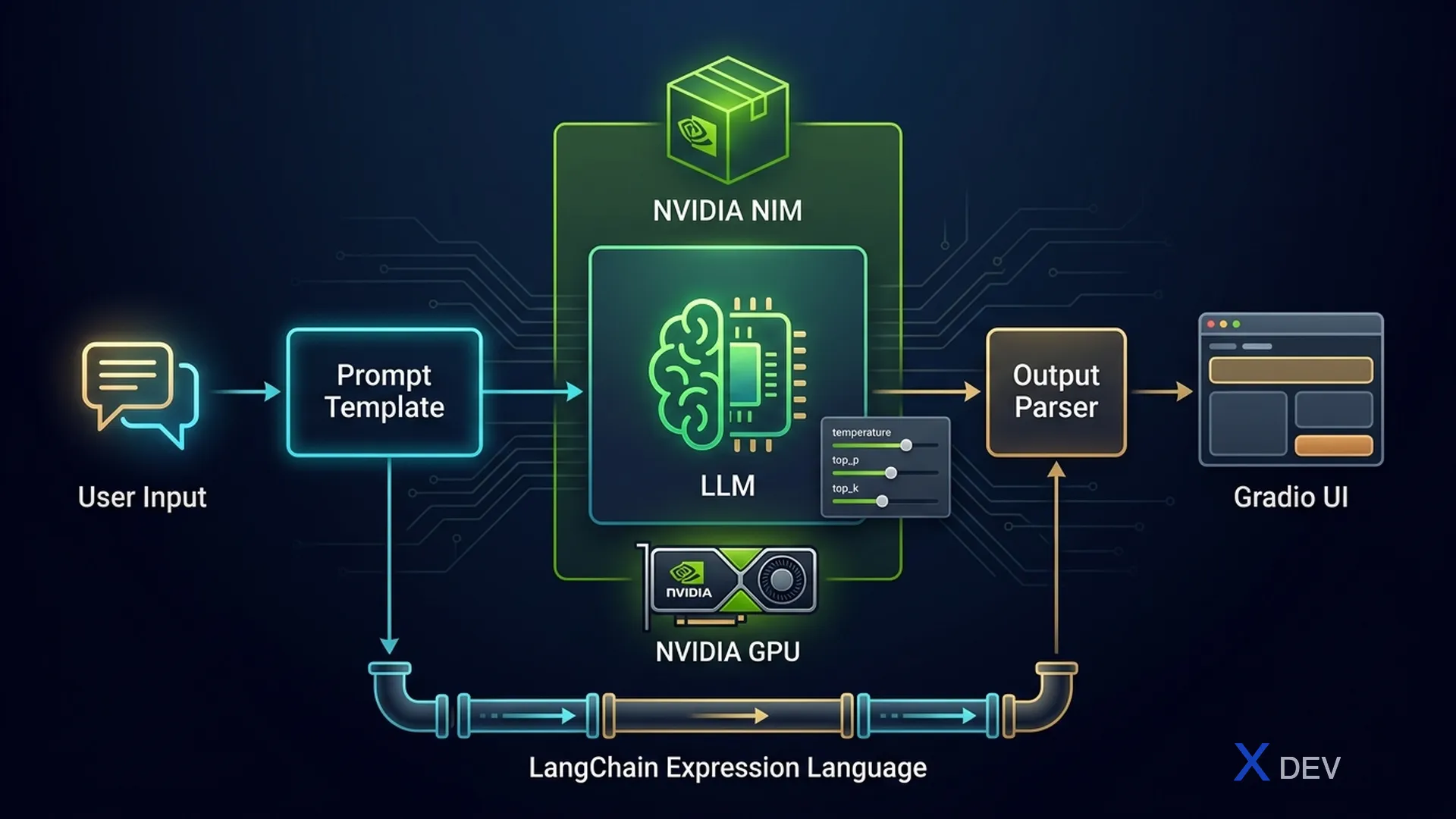
Bài này tập trung vào LLM Inference Pipeline Design — cách điều khiển output của LLM thông qua sampling parameters, triển khai model với NVIDIA NIM, xây pipeline với LangChain LCEL, và build UI/API với Gradio + LangServe.
Exam tip: Đề thi NVIDIA DLI rất hay hỏi về inference parameters (temperature, top-k, top-p) và khi nào dùng NIM vs framework khác. Nắm chắc bảng so sánh ở cuối bài.
2. LLM Inference Fundamentals
2.1. Autoregressive Generation
LLM sinh text theo cơ chế autoregressive: mỗi bước, model dự đoán token tiếp theo dựa trên tất cả token trước đó. Quá trình lặp lại cho đến khi gặp stop token hoặc đạt max_tokens.
Autoregressive Generation Flow
═══════════════════════════════

Input: "Hà Nội là"
         │
         ▼
┌─────────────────────┐
│   LLM Forward Pass   │
│   P(token | context) │
└──────────┬──────────┘
           │
           ▼
┌─────────────────────┐
│   Sampling Strategy  │──► temperature, top-k, top-p
│   Select next token  │
└──────────┬──────────┘
           │
           ▼
    token = "thủ"
           │
           ▼
Input: "Hà Nội là thủ"
         │
         ▼
┌─────────────────────┐
│   LLM Forward Pass   │
└──────────┬──────────┘
           │
           ▼
    token = "đô"
           │
           ▼
   ... lặp lại đến <EOS> hoặc max_tokens
2.2. Sampling Parameters
Ba tham số quan trọng nhất kiểm soát tính sáng tạo của output:
| Parameter | Range | Tác dụng | Giá trị thấp | Giá trị cao |
|---|---|---|---|---|
| temperature | 0.0 – 2.0 | Điều chỉnh entropy của phân phối xác suất | Deterministic, lặp lại | Sáng tạo, random hơn |
| top_k | 1 – vocab_size | Giới hạn chỉ xét top K token có xác suất cao nhất | Chọn lọc hơn, ít đa dạng | Nhiều lựa chọn hơn |
| top_p | 0.0 – 1.0 | Nucleus sampling: chỉ xét tokens có cumulative prob ≤ p | Chỉ token chắc chắn nhất | Xét nhiều token hơn |
Token Sampling Process (temperature + top-p)
═════════════════════════════════════════════

Raw logits:  [2.1, 1.8, 0.5, 0.3, -1.0, -2.5, ...]
                │
                ▼
         ┌──────────────┐
         │  ÷ temperature │  (temp=0.7 → sharper)
         └──────┬───────┘
                │
                ▼
Scaled probs: [0.35, 0.28, 0.12, 0.09, 0.08, 0.05, 0.03]
                │
                ▼
         ┌──────────────┐
         │   top-p=0.8   │  cumsum: 0.35→0.63→0.75→0.84 ✓
         │   Keep top 4   │  → loại bỏ token 5,6,7...
         └──────┬───────┘
                │
                ▼
Filtered:   [0.41, 0.33, 0.14, 0.12]  (re-normalized)
                │
                ▼
         Random sample → token "thủ"
2.3. Các tham số khác
| Parameter | Mô tả | Use case |
|---|---|---|
| max_tokens | Giới hạn số token output tối đa | Kiểm soát chi phí, latency |
| stop | Dừng generation khi gặp chuỗi này | Structured output, function calling |
| repetition_penalty | Phạt token đã xuất hiện (>1.0 = phạt nặng) | Tránh lặp từ/câu |
| frequency_penalty | Giảm xác suất theo tần suất xuất hiện | Output đa dạng hơn |
| presence_penalty | Phạt nếu token đã xuất hiện ít nhất 1 lần | Khuyến khích chủ đề mới |
Exam tip: Câu hỏi hay gặp: "Muốn output luôn giống nhau (deterministic), set parameter nào?" → temperature = 0.0. Nếu hỏi "giảm lặp từ" → dùng repetition_penalty > 1.0 hoặc frequency_penalty > 0.
3. NVIDIA NIM (NVIDIA Inference Microservices)
3.1. NIM là gì?
NVIDIA NIM là bộ pre-optimized inference containers cho phép deploy LLM/multimodal models với hiệu năng cao nhất trên GPU NVIDIA. NIM đã tích hợp sẵn TensorRT-LLM, quantization, và tối ưu memory.
Đặc điểm chính:
- OpenAI-compatible API — drop-in replacement, dùng openai client gọi thẳng
- TensorRT-LLM backend — tối ưu kernel cho NVIDIA GPU
- Continuous batching — xử lý nhiều request cùng lúc hiệu quả
- gRPC + REST API — flexible integration
- Multi-GPU support — tensor parallelism tự động
3.2. NIM Architecture
NVIDIA NIM Architecture
════════════════════════

┌─────────────────────────────────────────────┐
│              NIM Container                   │
│                                              │
│  ┌──────────┐   ┌──────────────────────┐    │
│  │  REST API │   │   gRPC Endpoint      │    │
│  │ :8000     │   │   :8001              │    │
│  └─────┬────┘   └──────────┬───────────┘    │
│        │                    │                │
│        └────────┬───────────┘                │
│                 ▼                             │
│  ┌──────────────────────────────────┐       │
│  │     Request Router & Batcher     │       │
│  │     (Continuous Batching)        │       │
│  └──────────────┬───────────────────┘       │
│                 ▼                             │
│  ┌──────────────────────────────────┐       │
│  │     TensorRT-LLM Engine          │       │
│  │  ┌────────┐ ┌────────────────┐   │       │
│  │  │ KV Cache│ │ Paged Attention│   │       │
│  │  └────────┘ └────────────────┘   │       │
│  └──────────────┬───────────────────┘       │
│                 ▼                             │
│  ┌──────────────────────────────────┐       │
│  │       NVIDIA GPU(s)              │       │
│  │   A100 / H100 / L40S            │       │
│  └──────────────────────────────────┘       │
└─────────────────────────────────────────────┘
3.3. Pull & Run NIM Container
# Pull và chạy NIM container cho Llama-3
# Yêu cầu: NVIDIA GPU, Docker + NVIDIA Container Toolkit

# Terminal command:
# docker run -it --rm --gpus all \
#   -p 8000:8000 \
#   -e NGC_API_KEY=$NGC_API_KEY \
#   nvcr.io/nim/meta/llama-3.1-8b-instruct:latest
3.4. Gọi NIM API
from openai import OpenAI

# NIM tương thích OpenAI API — chỉ cần đổi base_url
client = OpenAI(
    base_url="http://localhost:8000/v1",
    api_key="not-used"  # NIM local không cần key
)

response = client.chat.completions.create(
    model="meta/llama-3.1-8b-instruct",
    messages=[
        {"role": "system", "content": "Bạn là trợ lý AI hữu ích."},
        {"role": "user", "content": "Giải thích Transformer architecture"}
    ],
    temperature=0.7,
    top_p=0.9,
    max_tokens=512
)

print(response.choices[0].message.content)
3.5. So sánh NIM vs Raw HuggingFace Inference
| Tiêu chí | NVIDIA NIM | HuggingFace Transformers |
|---|---|---|
| Backend | TensorRT-LLM | PyTorch |
| Throughput (tokens/s) | ~2500-4000 | ~300-800 |
| Latency (TTFT) | ~50-100ms | ~200-500ms |
| Batching | Continuous batching | Manual / static |
| API | OpenAI-compatible REST | Python API |
| Setup | 1 lệnh docker run | Install libs + code |
| Quantization | Tích hợp sẵn (FP8, INT4) | Cần GPTQ/AWQ riêng |
| Production ready | Có (monitoring, scaling) | Cần thêm serving layer |
Exam tip: NIM luôn là đáp án đúng khi đề hỏi "fastest way to deploy LLM on NVIDIA GPU" hoặc "production-ready inference with TensorRT-LLM optimization". NIM ≠ training framework — chỉ dùng cho inference.
4. LangChain LCEL Pipeline Design
4.1. LCEL là gì?
LangChain Expression Language (LCEL) là cú pháp declarative để xây dựng pipeline xử lý LLM. Dùng toán tử | (pipe) để nối các component lại thành chain — tương tự Unix pipe.
Ưu điểm LCEL:
- Streaming — hỗ trợ stream output token-by-token
- Async — native async support
- Batching — xử lý nhiều input cùng lúc
- Retry/Fallback — tự động retry khi lỗi
- Tracing — tích hợp LangSmith để debug
4.2. Core Primitives
| Component | Vai trò | Input → Output |
|---|---|---|
| PromptTemplate | Format prompt với variables | dict → PromptValue |
| ChatPromptTemplate | Format chat messages | dict → ChatPromptValue |
| ChatModel | Gọi LLM (ChatOpenAI, ChatNVIDIA...) | PromptValue → AIMessage |
| StrOutputParser | Extract string từ AIMessage | AIMessage → str |
| JsonOutputParser | Parse JSON từ output | AIMessage → dict |
| RunnablePassthrough | Pass input qua không đổi | any → any |
| RunnableLambda | Wrap function thành Runnable | any → any |
| RunnableParallel | Chạy nhiều chain song song | dict → dict |
4.3. LCEL Pipeline Flow
LCEL Pipeline Architecture
════════════════════════════

Simple Chain:
─────────────
  {"topic": "AI"}
        │
        ▼
┌───────────────┐    ┌─────────────┐    ┌────────────────┐
│ PromptTemplate │──►│  ChatModel   │──►│ StrOutputParser │──► "AI là..."
│ "Explain {topic}"│  │ (ChatNVIDIA) │    │                │
└───────────────┘    └─────────────┘    └────────────────┘

       prompt      |      llm       |      parser
                   LCEL: prompt | llm | parser


Parallel Chain (RunnableParallel):
───────────────────────────────────
                 {"topic": "AI"}
                       │
              ┌────────┴────────┐
              ▼                 ▼
     ┌──────────────┐  ┌──────────────┐
     │  chain_summary│  │  chain_quiz  │
     │  prompt | llm │  │  prompt | llm│
     └──────┬───────┘  └──────┬───────┘
              │                 │
              └────────┬────────┘
                       ▼
            {"summary": "...", "quiz": "..."}
4.4. Code: LCEL Chain
from langchain_core.prompts import ChatPromptTemplate
from langchain_core.output_parsers import StrOutputParser
from langchain_nvidia_ai_endpoints import ChatNVIDIA

# 1. Khởi tạo components
prompt = ChatPromptTemplate.from_messages([
    ("system", "Bạn là chuyên gia {domain}. Trả lời ngắn gọn."),
    ("human", "{question}")
])

llm = ChatNVIDIA(
    model="meta/llama-3.1-8b-instruct",
    temperature=0.3,
    top_p=0.9,
    max_tokens=512
)

parser = StrOutputParser()

# 2. Tạo chain bằng LCEL pipe syntax
chain = prompt | llm | parser

# 3. Invoke (đồng bộ)
result = chain.invoke({
    "domain": "deep learning",
    "question": "Transformer self-attention hoạt động thế nào?"
})
print(result)

# 4. Stream (token-by-token)
for chunk in chain.stream({
    "domain": "deep learning",
    "question": "So sánh RNN và Transformer"
}):
    print(chunk, end="", flush=True)
4.5. Advanced: RunnableParallel & RunnableLambda
from langchain_core.runnables import (
    RunnablePassthrough,
    RunnableParallel,
    RunnableLambda
)

# Custom function wrapped thành Runnable
def word_count(text: str) -> dict:
    return {"text": text, "word_count": len(text.split())}

# Parallel chain: vừa summarize vừa đếm từ
parallel_chain = RunnableParallel(
    summary=prompt | llm | parser,
    metadata=RunnableLambda(
        lambda x: f"Query: {x['question']}"
    )
)

# Chain với passthrough — giữ input gốc qua pipeline
chain_with_context = (
    RunnablePassthrough.assign(
        answer=prompt | llm | parser
    )
)

# Invoke parallel
result = parallel_chain.invoke({
    "domain": "AI",
    "question": "Generative AI là gì?"
})
# result = {"summary": "...", "metadata": "Query: Generative AI là gì?"}
Exam tip: Khi đề cho code LCEL và hỏi "output type là gì", hãy trace từng bước: PromptTemplate → PromptValue, ChatModel → AIMessage, StrOutputParser → str. Nếu quên parser, output sẽ là AIMessage object (không phải string).
5. Build UI với Gradio & API với LangServe
5.1. Gradio: Rapid Chatbot UI
Gradio cho phép tạo web UI cho ML models chỉ với vài dòng code. Component gr.ChatInterface đặc biệt phù hợp cho chatbot.
import gradio as gr
from langchain_core.prompts import ChatPromptTemplate
from langchain_core.output_parsers import StrOutputParser
from langchain_nvidia_ai_endpoints import ChatNVIDIA

# Setup chain
prompt = ChatPromptTemplate.from_messages([
    ("system", "Bạn là trợ lý AI thân thiện."),
    ("human", "{message}")
])
llm = ChatNVIDIA(model="meta/llama-3.1-8b-instruct")
chain = prompt | llm | StrOutputParser()

# Gradio handler
def respond(message, history):
    """Handle chat message — history là list of [user, bot] pairs."""
    response = chain.invoke({"message": message})
    return response

# Launch UI
demo = gr.ChatInterface(
    fn=respond,
    title="NVIDIA NIM Chatbot",
    description="Chatbot powered by Llama 3.1 via NIM",
    examples=["Generative AI là gì?", "So sánh GAN và Diffusion"],
    theme="soft"
)
demo.launch(server_port=7860)
5.2. LangServe: Expose Chain as REST API
LangServe biến bất kỳ LCEL chain nào thành REST API với docs tự động (Swagger). Phù hợp cho production deployment.
# === Server (server.py) ===
from fastapi import FastAPI
from langserve import add_routes
from langchain_core.prompts import ChatPromptTemplate
from langchain_core.output_parsers import StrOutputParser
from langchain_nvidia_ai_endpoints import ChatNVIDIA

app = FastAPI(title="LLM API")

# Tạo chain
chain = (
    ChatPromptTemplate.from_messages([
        ("system", "Trợ lý AI chuyên về {domain}."),
        ("human", "{question}")
    ])
    | ChatNVIDIA(model="meta/llama-3.1-8b-instruct")
    | StrOutputParser()
)

# Expose chain tại /chat endpoint
add_routes(app, chain, path="/chat")

# Run: uvicorn server:app --port 8080
# === Client (client.py) ===
from langserve import RemoteRunnable

# Kết nối đến LangServe endpoint
chain = RemoteRunnable("http://localhost:8080/chat")

# Invoke giống như local chain
result = chain.invoke({
    "domain": "machine learning",
    "question": "Overfitting là gì?"
})
print(result)

# Stream cũng hoạt động
for chunk in chain.stream({
    "domain": "NLP",
    "question": "Tokenization hoạt động thế nào?"
}):
    print(chunk, end="")
Gradio + LangServe Deployment Pattern
═══════════════════════════════════════

   Browser (User)           Mobile App / Service
        │                          │
        ▼                          ▼
┌──────────────┐          ┌──────────────┐
│ Gradio UI     │          │ REST Client   │
│ :7860         │          │               │
└──────┬───────┘          └──────┬───────┘
       │                         │
       └────────┬────────────────┘
                ▼
      ┌──────────────────┐
      │  LangServe API    │
      │  FastAPI :8080    │
      │  /chat/invoke     │
      │  /chat/stream     │
      └────────┬─────────┘
               ▼
      ┌──────────────────┐
      │  LCEL Chain       │
      │  prompt|llm|parser│
      └────────┬─────────┘
               ▼
      ┌──────────────────┐
      │  NVIDIA NIM       │
      │  :8000            │
      └──────────────────┘
Exam tip: Gradio = prototyping/demo UI, LangServe = production REST API. Nếu đề hỏi "fastest way to demo a chatbot" → Gradio. "Expose chain for multiple clients" → LangServe. Hai cái có thể dùng cùng nhau.
6. Dialog Management & Multi-turn Conversation
6.1. Các loại Memory
Chatbot cần nhớ context từ các lượt hội thoại trước. LangChain cung cấp nhiều loại memory:
| Memory Type | Cách hoạt động | Ưu điểm | Nhược điểm |
|---|---|---|---|
| ConversationBufferMemory | Lưu toàn bộ lịch sử | Không mất thông tin | Token count tăng nhanh |
| ConversationBufferWindowMemory | Giữ N lượt gần nhất | Kiểm soát token | Mất context cũ |
| ConversationSummaryMemory | Tóm tắt lịch sử bằng LLM | Nén thông tin hiệu quả | Tốn thêm LLM call |
| ConversationSummaryBufferMemory | Tóm tắt cũ + giữ nguyên gần đây | Cân bằng chi tiết/nén | Phức tạp hơn |
6.2. Message Types
LangChain dùng typed messages để phân biệt vai trò:
from langchain_core.messages import (
    SystemMessage,
    HumanMessage,
    AIMessage
)

messages = [
    SystemMessage(content="Bạn là trợ lý AI."),
    HumanMessage(content="Xin chào!"),
    AIMessage(content="Chào bạn! Tôi có thể giúp gì?"),
    HumanMessage(content="Giải thích attention mechanism"),
]
6.3. Code: Multi-turn Chatbot với Memory
from langchain_core.prompts import ChatPromptTemplate, MessagesPlaceholder
from langchain_core.output_parsers import StrOutputParser
from langchain_core.chat_history import InMemoryChatMessageHistory
from langchain_core.runnables.history import RunnableWithMessageHistory
from langchain_nvidia_ai_endpoints import ChatNVIDIA

# 1. Prompt có slot cho message history
prompt = ChatPromptTemplate.from_messages([
    ("system", "Bạn là trợ lý AI. Trả lời ngắn gọn."),
    MessagesPlaceholder(variable_name="history"),
    ("human", "{input}")
])

llm = ChatNVIDIA(model="meta/llama-3.1-8b-instruct")
chain = prompt | llm | StrOutputParser()

# 2. Session store — mỗi user một history riêng
session_store = {}

def get_session_history(session_id: str):
    if session_id not in session_store:
        session_store[session_id] = InMemoryChatMessageHistory()
    return session_store[session_id]

# 3. Wrap chain với message history
chain_with_history = RunnableWithMessageHistory(
    chain,
    get_session_history,
    input_messages_key="input",
    history_messages_key="history"
)

# 4. Chat — cùng session_id giữ context
config = {"configurable": {"session_id": "user-123"}}

r1 = chain_with_history.invoke(
    {"input": "Tên tôi là Minh"},
    config=config
)
print(r1)  # "Xin chào Minh!..."

r2 = chain_with_history.invoke(
    {"input": "Tên tôi là gì?"},
    config=config
)
print(r2)  # "Tên bạn là Minh."  ← nhớ context!
6.4. Window Memory Pattern
Window Memory (k=3): Chỉ giữ 3 lượt gần nhất
═══════════════════════════════════════════════

Turn 1: User: "Xin chào"        ─┐
Turn 2: AI: "Chào bạn!"          │ ← bị loại khi turn > 3+k
Turn 3: User: "Tôi là Minh"      │
Turn 4: AI: "Chào Minh!"        ─┘

Turn 5: User: "Giải thích CNN"   ─┐
Turn 6: AI: "CNN là..."           │ ← giữ lại
Turn 7: User: "So với RNN?"      ─┘

Prompt gửi đi chỉ gồm: [System] + [Turn 5,6,7] + [Turn 8 input]
→ Tiết kiệm token, nhưng mất context "tên là Minh"
Exam tip: "Chatbot quên context sau vài lượt" → đang dùng BufferWindowMemory quá nhỏ hoặc không có memory. "Token limit exceeded" → chuyển sang ConversationSummaryMemory để nén lịch sử.
7. So sánh Inference Frameworks
| Feature | NVIDIA NIM | vLLM | TGI (HuggingFace) | Ollama |
|---|---|---|---|---|
| Backend | TensorRT-LLM | PagedAttention | PyTorch + Flash | llama.cpp |
| GPU Required | NVIDIA (A100/H100) | NVIDIA | NVIDIA | Không (CPU OK) |
| Throughput | Cao nhất | Rất cao | Cao | Thấp |
| Quantization | FP8, INT4 tích hợp | AWQ, GPTQ | GPTQ, bitsandbytes | GGUF |
| API | OpenAI-compatible | OpenAI-compatible | Custom + Messages | OpenAI-compatible |
| Setup | Docker (NGC) | pip install | Docker | 1 binary |
| Best for | Enterprise, production | Research, high-throughput | HF ecosystem | Local dev, laptop |
| NVIDIA optimized | ✅ Sâu nhất | ✅ Tốt | Một phần | ❌ |
Exam tip: Đề thi NVIDIA DLI sẽ ưu tiên NIM cho mọi câu hỏi deployment production. "Best performance on NVIDIA GPU" → NIM. "Quick local testing on laptop" → Ollama. "Open-source high throughput" → vLLM.
8. Cheat Sheet
| Concept | Key Point |
|---|---|
| temperature = 0.0 | Deterministic output (lặp lại) |
| temperature = 1.0+ | Creative, random hơn |
| top_p = 0.1 | Chỉ chọn token chắc chắn nhất |
| top_k = 50 | Giới hạn 50 token candidates |
| NIM | Pre-optimized container, TensorRT-LLM, OpenAI API |
| LCEL pipe | prompt | llm | parser |
| RunnableParallel | Chạy nhiều chain cùng lúc |
| Gradio | Demo UI, gr.ChatInterface |
| LangServe | REST API từ LCEL chain, FastAPI |
| BufferMemory | Lưu toàn bộ history → token tăng nhanh |
| SummaryMemory | Nén history bằng LLM → tiết kiệm token |
| WindowMemory (k=N) | Giữ N lượt gần nhất |
| MessagesPlaceholder | Slot trong prompt cho chat history |
| RunnableWithMessageHistory | Wrap chain + session-based memory |
9. Practice Questions
Q1: Build LCEL Chain với Streaming
Viết LCEL chain dùng PromptTemplate → ChatNVIDIA → StrOutputParser. Prompt nhận topic, yêu cầu LLM giải thích topic đó. Thêm streaming output.
Xem đáp án Q1
from langchain_core.prompts import ChatPromptTemplate
from langchain_core.output_parsers import StrOutputParser
from langchain_nvidia_ai_endpoints import ChatNVIDIA

# Tạo prompt template
prompt = ChatPromptTemplate.from_messages([
    ("system", "Bạn là giáo viên AI. Giải thích dễ hiểu."),
    ("human", "Giải thích chi tiết về: {topic}")
])

# Tạo LLM
llm = ChatNVIDIA(
    model="meta/llama-3.1-8b-instruct",
    temperature=0.5,
    max_tokens=1024
)

# Tạo parser
parser = StrOutputParser()

# LCEL chain
chain = prompt | llm | parser

# Invoke (trả kết quả 1 lần)
result = chain.invoke({"topic": "Diffusion Models"})
print(result)

# Stream (token-by-token) — dùng .stream() thay vì .invoke()
for chunk in chain.stream({"topic": "Diffusion Models"}):
    print(chunk, end="", flush=True)

# Giải thích:
# - .invoke() gọi chain và đợi toàn bộ output
# - .stream() trả về iterator, mỗi chunk là 1 phần output
# - StrOutputParser cho phép stream vì nó pass-through string chunks
# - Nếu dùng JsonOutputParser, stream sẽ trả partial JSON
Q2: Configure NIM & So sánh Temperature
Gọi NIM endpoint dùng OpenAI client. Cùng 1 prompt, so sánh output khi temperature=0.0 vs temperature=1.0. Chạy mỗi cấu hình 3 lần và quan sát sự khác biệt.
Xem đáp án Q2
from openai import OpenAI

# Kết nối NIM endpoint
client = OpenAI(
    base_url="http://localhost:8000/v1",
    api_key="not-used"
)

prompt_msg = [
    {"role": "system", "content": "Trả lời ngắn gọn trong 1-2 câu."},
    {"role": "user", "content": "Tại sao bầu trời có màu xanh?"}
]

print("=== Temperature = 0.0 (Deterministic) ===")
for i in range(3):
    resp = client.chat.completions.create(
        model="meta/llama-3.1-8b-instruct",
        messages=prompt_msg,
        temperature=0.0,  # Luôn chọn token có xác suất cao nhất
        max_tokens=100
    )
    print(f"Run {i+1}: {resp.choices[0].message.content}")
# → 3 lần cho output GIỐNG NHAU

print("\n=== Temperature = 1.0 (Creative) ===")
for i in range(3):
    resp = client.chat.completions.create(
        model="meta/llama-3.1-8b-instruct",
        messages=prompt_msg,
        temperature=1.0,  # Phân phối rộng, random hơn
        max_tokens=100
    )
    print(f"Run {i+1}: {resp.choices[0].message.content}")
# → 3 lần cho output KHÁC NHAU

# Key insight:
# - temp=0.0: greedy decoding, reproducible, dùng cho factual tasks
# - temp=1.0: sampling rộng hơn, creative, dùng cho brainstorming
# - NIM dùng OpenAI-compatible API nên client code giống hệt
Q3: Multi-turn Chatbot với Memory
Tạo chatbot sử dụng ConversationBufferMemory tích hợp vào LCEL chain thông qua RunnableWithMessageHistory. Bot phải nhớ tên user từ lượt trước.
Xem đáp án Q3
from langchain_core.prompts import ChatPromptTemplate, MessagesPlaceholder
from langchain_core.output_parsers import StrOutputParser
from langchain_core.chat_history import InMemoryChatMessageHistory
from langchain_core.runnables.history import RunnableWithMessageHistory
from langchain_nvidia_ai_endpoints import ChatNVIDIA

# 1. Prompt với history placeholder
prompt = ChatPromptTemplate.from_messages([
    ("system", "Bạn là trợ lý thân thiện. Nhớ thông tin user đã chia sẻ."),
    MessagesPlaceholder(variable_name="history"),
    ("human", "{input}")
])

# 2. Chain
llm = ChatNVIDIA(model="meta/llama-3.1-8b-instruct", temperature=0.3)
chain = prompt | llm | StrOutputParser()

# 3. Session store
store = {}
def get_history(session_id: str):
    if session_id not in store:
        store[session_id] = InMemoryChatMessageHistory()
    return store[session_id]

# 4. Wrap với message history
chatbot = RunnableWithMessageHistory(
    chain,
    get_history,
    input_messages_key="input",
    history_messages_key="history"
)

# 5. Test multi-turn
cfg = {"configurable": {"session_id": "demo-001"}}

print(chatbot.invoke({"input": "Tên tôi là Lan"}, config=cfg))
# → "Xin chào Lan! Rất vui được gặp bạn..."

print(chatbot.invoke({"input": "Tên tôi là gì?"}, config=cfg))
# → "Tên bạn là Lan." ← Bot nhớ context!

print(chatbot.invoke({"input": "Tôi thích machine learning"}, config=cfg))
# → "Tuyệt vời Lan! Machine learning là..."

# Kiểm tra history đã lưu
history = store["demo-001"]
for msg in history.messages:
    print(f"{msg.type}: {msg.content[:50]}...")
Q4: Gradio ChatInterface + LangChain
Tạo Gradio UI chatbot sử dụng gr.ChatInterface, backend là LCEL chain gọi NIM. Hỗ trợ streaming response.
Xem đáp án Q4
import gradio as gr
from langchain_core.prompts import ChatPromptTemplate
from langchain_core.output_parsers import StrOutputParser
from langchain_nvidia_ai_endpoints import ChatNVIDIA

# 1. Setup LCEL chain
prompt = ChatPromptTemplate.from_messages([
    ("system", "Bạn là trợ lý AI chuyên về deep learning."),
    ("human", "{message}")
])
llm = ChatNVIDIA(
    model="meta/llama-3.1-8b-instruct",
    temperature=0.7
)
chain = prompt | llm | StrOutputParser()

# 2. Streaming handler cho Gradio
def respond_stream(message, history):
    """
    Gradio ChatInterface gọi function này.
    - message: tin nhắn mới của user
    - history: list of [user_msg, bot_msg] pairs
    Yield từng chunk để Gradio hiển thị streaming.
    """
    partial = ""
    for chunk in chain.stream({"message": message}):
        partial += chunk
        yield partial  # Gradio cập nhật UI mỗi lần yield

# 3. Launch Gradio app
demo = gr.ChatInterface(
    fn=respond_stream,
    title="🤖 DL Assistant (NIM-powered)",
    description="Hỏi bất kỳ câu nào về Deep Learning",
    examples=[
        "Transformer hoạt động thế nào?",
        "So sánh CNN và ViT",
        "Batch Normalization dùng để làm gì?"
    ],
    theme="soft"
)

demo.launch(server_port=7860, share=False)

# Truy cập: http://localhost:7860
# Gradio sẽ hiển thị streaming response real-time
Q5: Debug — Chain trả về output rỗng
Code bên dưới chạy nhưng output luôn rỗng hoặc là object không mong muốn. Tìm và sửa lỗi.
# BUG: chain trả về AIMessage object thay vì string
from langchain_core.prompts import ChatPromptTemplate
from langchain_core.output_parsers import JsonOutputParser  # ← Hmm...
from langchain_nvidia_ai_endpoints import ChatNVIDIA

prompt = ChatPromptTemplate.from_messages([
    ("system", "Trả lời ngắn gọn bằng tiếng Việt."),
    ("human", "{question}")
])

llm = ChatNVIDIA(model="meta/llama-3.1-8b-instruct")
chain = prompt | llm | JsonOutputParser()  # ← Lỗi ở đây

result = chain.invoke({"question": "AI là gì?"})
print(result)  # → Error hoặc output rỗng/lạ
Xem đáp án Q5
# PHÂN TÍCH LỖI:
# - Prompt yêu cầu LLM trả lời bằng text thuần (tiếng Việt)
# - Nhưng parser là JsonOutputParser → expect JSON format
# - LLM trả về "AI là trí tuệ nhân tạo..." (not JSON)
# - JsonOutputParser cố parse → fail hoặc trả output rỗng

# SỬA: Thay JsonOutputParser bằng StrOutputParser

from langchain_core.prompts import ChatPromptTemplate
from langchain_core.output_parsers import StrOutputParser  # ← FIX!
from langchain_nvidia_ai_endpoints import ChatNVIDIA

prompt = ChatPromptTemplate.from_messages([
    ("system", "Trả lời ngắn gọn bằng tiếng Việt."),
    ("human", "{question}")
])

llm = ChatNVIDIA(model="meta/llama-3.1-8b-instruct")
chain = prompt | llm | StrOutputParser()  # ← StrOutputParser

result = chain.invoke({"question": "AI là gì?"})
print(result)  # → "AI (Artificial Intelligence) là trí tuệ nhân tạo..."

# RULE: OutputParser type PHẢI match output format:
# - Text thuần → StrOutputParser
# - JSON output (prompt phải yêu cầu JSON) → JsonOutputParser
# - Structured output → PydanticOutputParser
# Nếu mismatch → chain fail silently or raise error