1. Diffusion ModelsからLLMアプリケーションへ
パート2では、Diffusion Modelsを習得しました — forward/reverseプロセスからCLIPガイド生成まで。パート3では、大規模言語モデル(LLM)と実世界のアプリケーション構築に焦点を移します:推論パイプライン、RAG、チャットボット。
本レッスンでは、LLM推論パイプライン設計に焦点を当てます — サンプリングパラメータによるLLM出力の制御方法、NVIDIA NIMによるモデルデプロイ、LangChain LCELによるパイプライン構築、そしてGradio + LangServeによるUI/APIの作成です。
試験のヒント: NVIDIA DLI試験では、推論パラメータ(temperature、top-k、top-p)やNIMと他のフレームワークの使い分けについて頻繁に出題されます。本レッスン末尾の比較表を必ず押さえてください。
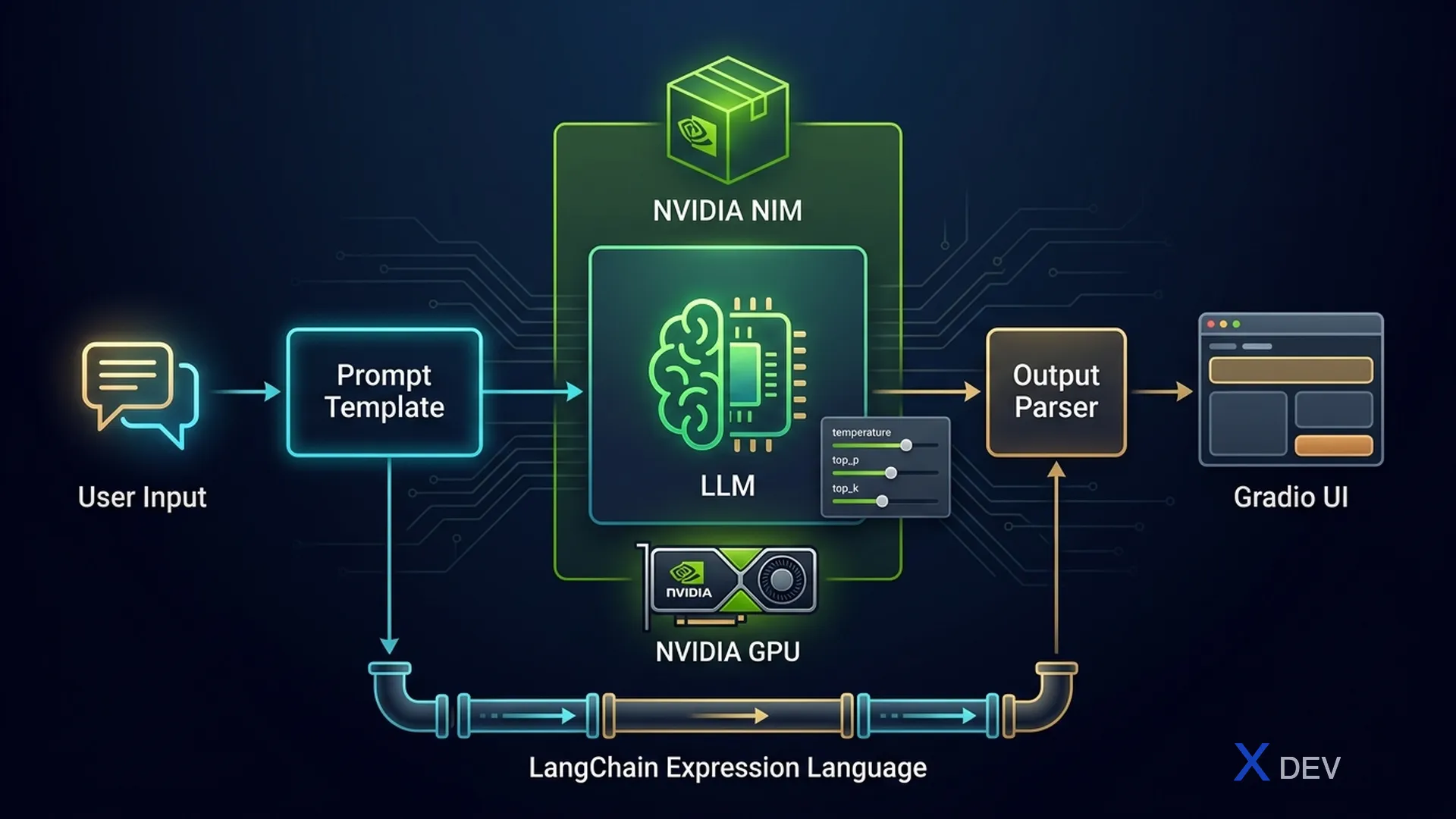
2. LLM推論の基礎
2.1. 自己回帰生成
LLMは自己回帰メカニズムでテキストを生成します:各ステップで、モデルはそれまでのすべてのトークンに基づいて次のトークンを予測します。このプロセスは停止トークンが出現するか、max_tokensに達するまで繰り返されます。
自己回帰生成の流れ
═══════════════════════════════

Input: "Hanoi is"
         │
         ▼
┌─────────────────────┐
│   LLM Forward Pass   │
│   P(token | context) │
└──────────┬──────────┘
           │
           ▼
┌─────────────────────┐
│   Sampling Strategy  │──► temperature, top-k, top-p
│   次のトークンを選択  │
└──────────┬──────────┘
           │
           ▼
    token = "the"
           │
           ▼
Input: "Hanoi is the"
         │
         ▼
┌─────────────────────┐
│   LLM Forward Pass   │
└──────────┬──────────┘
           │
           ▼
    token = "capital"
           │
           ▼
   ... <EOS> または max_tokens まで繰り返す
2.2. サンプリングパラメータ
出力の創造性を制御する最も重要な3つのパラメータ:
| パラメータ | 範囲 | 効果 | 低い値 | 高い値 |
|---|---|---|---|---|
| temperature | 0.0 – 2.0 | 確率分布のエントロピーを調整 | 決定論的、繰り返しが多い | 創造的、よりランダム |
| top_k | 1 – vocab_size | 確率上位K個のトークンのみに制限 | より選択的、多様性が低い | 選択肢が多い |
| top_p | 0.0 – 1.0 | Nucleusサンプリング:累積確率≤pのトークンのみ考慮 | 最も確実なトークンのみ | より多くのトークンを考慮 |
トークンサンプリングプロセス(temperature + top-p)
═════════════════════════════════════════════

Raw logits:  [2.1, 1.8, 0.5, 0.3, -1.0, -2.5, ...]
                │
                ▼
         ┌──────────────┐
         │  ÷ temperature │  (temp=0.7 → より鋭い分布)
         └──────┬───────┘
                │
                ▼
Scaled probs: [0.35, 0.28, 0.12, 0.09, 0.08, 0.05, 0.03]
                │
                ▼
         ┌──────────────┐
         │   top-p=0.8   │  cumsum: 0.35→0.63→0.75→0.84 ✓
         │   上位4つを保持 │  → トークン5,6,7...を除外
         └──────┬───────┘
                │
                ▼
Filtered:   [0.41, 0.33, 0.14, 0.12]  (再正規化)
                │
                ▼
         ランダムサンプリング → token "the"
2.3. その他のパラメータ
| パラメータ | 説明 | ユースケース |
|---|---|---|
| max_tokens | 出力トークンの最大数を制限 | コスト・レイテンシの制御 |
| stop | この文字列が出現したら生成を停止 | 構造化出力、function calling |
| repetition_penalty | 既出トークンにペナルティを付与(>1.0 = 強いペナルティ) | 単語・文の繰り返しを回避 |
| frequency_penalty | 出現頻度に基づいて確率を低下 | より多様な出力 |
| presence_penalty | 1回でも出現したトークンにペナルティ | 新しいトピックを促進 |
試験のヒント: よくある問題:「常に同じ出力(決定論的)を得るにはどのパラメータを設定すべきか?」→ temperature = 0.0。「単語の繰り返しを減らす」場合 → repetition_penalty > 1.0 または frequency_penalty > 0 を使用します。
3. NVIDIA NIM(NVIDIA Inference Microservices)
3.1. NIMとは?
NVIDIA NIMは、NVIDIA GPU上でLLM/マルチモーダルモデルを最高のパフォーマンスでデプロイするための最適化済み推論コンテナのセットです。NIMにはTensorRT-LLM、量子化、メモリ最適化が組み込まれています。
主な特徴:
- OpenAI互換API — ドロップイン置換可能、openaiクライアントで直接呼び出し
- TensorRT-LLMバックエンド — NVIDIA GPU向け最適化カーネル
- Continuous batching — 複数リクエストを効率的に同時処理
- gRPC + REST API — 柔軟な統合
- マルチGPUサポート — 自動テンソル並列化
3.2. NIMアーキテクチャ
NVIDIA NIMアーキテクチャ
════════════════════════

┌─────────────────────────────────────────────┐
│              NIMコンテナ                      │
│                                              │
│  ┌──────────┐   ┌──────────────────────┐    │
│  │  REST API │   │   gRPC Endpoint      │    │
│  │ :8000     │   │   :8001              │    │
│  └─────┬────┘   └──────────┬───────────┘    │
│        │                    │                │
│        └────────┬───────────┘                │
│                 ▼                             │
│  ┌──────────────────────────────────┐       │
│  │     Request Router & Batcher     │       │
│  │     (Continuous Batching)        │       │
│  └──────────────┬───────────────────┘       │
│                 ▼                             │
│  ┌──────────────────────────────────┐       │
│  │     TensorRT-LLM Engine          │       │
│  │  ┌────────┐ ┌────────────────┐   │       │
│  │  │ KV Cache│ │ Paged Attention│   │       │
│  │  └────────┘ └────────────────┘   │       │
│  └──────────────┬───────────────────┘       │
│                 ▼                             │
│  ┌──────────────────────────────────┐       │
│  │       NVIDIA GPU(s)              │       │
│  │   A100 / H100 / L40S            │       │
│  └──────────────────────────────────┘       │
└─────────────────────────────────────────────┘
3.3. NIMコンテナのPull & Run
# Llama-3用NIMコンテナのPullと実行
# 要件:NVIDIA GPU、Docker + NVIDIA Container Toolkit

# ターミナルコマンド:
# docker run -it --rm --gpus all \
#   -p 8000:8000 \
#   -e NGC_API_KEY=$NGC_API_KEY \
#   nvcr.io/nim/meta/llama-3.1-8b-instruct:latest
3.4. NIM APIの呼び出し
from openai import OpenAI

# NIMはOpenAI API互換 — base_urlを変更するだけ
client = OpenAI(
    base_url="http://localhost:8000/v1",
    api_key="not-used"  # ローカルNIMではキー不要
)

response = client.chat.completions.create(
    model="meta/llama-3.1-8b-instruct",
    messages=[
        {"role": "system", "content": "You are a helpful AI assistant."},
        {"role": "user", "content": "Explain the Transformer architecture"}
    ],
    temperature=0.7,
    top_p=0.9,
    max_tokens=512
)

print(response.choices[0].message.content)
3.5. NIMとHuggingFace推論の比較
| 基準 | NVIDIA NIM | HuggingFace Transformers |
|---|---|---|
| バックエンド | TensorRT-LLM | PyTorch |
| スループット(tokens/s) | ~2500-4000 | ~300-800 |
| レイテンシ(TTFT) | ~50-100ms | ~200-500ms |
| バッチ処理 | Continuous batching | 手動 / 静的 |
| API | OpenAI互換REST | Python API |
| セットアップ | docker runコマンド1つ | ライブラリインストール + コード |
| 量子化 | 組み込み(FP8、INT4) | 別途GPTQ/AWQが必要 |
| 本番対応 | 対応済み(モニタリング、スケーリング) | 追加のサービングレイヤーが必要 |
試験のヒント: 試験で「NVIDIA GPUでLLMを最速でデプロイする方法」や「TensorRT-LLM最適化による本番対応推論」を問われた場合、NIMが常に正解です。NIM ≠ 学習フレームワーク — 推論専用です。
4. LangChain LCELパイプライン設計
4.1. LCELとは?
LangChain Expression Language(LCEL)は、LLM処理パイプラインを構築するための宣言的構文です。|(パイプ)演算子でコンポーネントをチェーン接続します — Unixパイプに似ています。
LCELの利点:
- ストリーミング — トークン単位の出力ストリーミングに対応
- 非同期 — ネイティブasyncサポート
- バッチ処理 — 複数入力の同時処理
- リトライ/フォールバック — エラー時の自動リトライ
- トレーシング — LangSmithとの統合でデバッグ
4.2. コアプリミティブ
| コンポーネント | 役割 | 入力 → 出力 |
|---|---|---|
| PromptTemplate | 変数を使ってプロンプトをフォーマット | dict → PromptValue |
| ChatPromptTemplate | チャットメッセージをフォーマット | dict → ChatPromptValue |
| ChatModel | LLMを呼び出す(ChatOpenAI、ChatNVIDIA...) | PromptValue → AIMessage |
| StrOutputParser | AIMessageから文字列を抽出 | AIMessage → str |
| JsonOutputParser | 出力からJSONをパース | AIMessage → dict |
| RunnablePassthrough | 入力をそのまま通過 | any → any |
| RunnableLambda | 関数をRunnableとしてラップ | any → any |
| RunnableParallel | 複数チェーンを並列実行 | dict → dict |
4.3. LCELパイプラインの流れ
LCELパイプラインアーキテクチャ
════════════════════════════

シンプルチェーン:
─────────────
  {"topic": "AI"}
        │
        ▼
┌───────────────┐    ┌─────────────┐    ┌────────────────┐
│ PromptTemplate │──►│  ChatModel   │──►│ StrOutputParser │──► "AI is..."
│ "Explain {topic}"│  │ (ChatNVIDIA) │    │                │
└───────────────┘    └─────────────┘    └────────────────┘

       prompt      |      llm       |      parser
                   LCEL: prompt | llm | parser


並列チェーン(RunnableParallel):
───────────────────────────────────
                 {"topic": "AI"}
                       │
              ┌────────┴────────┐
              ▼                 ▼
     ┌──────────────┐  ┌──────────────┐
     │  chain_summary│  │  chain_quiz  │
     │  prompt | llm │  │  prompt | llm│
     └──────┬───────┘  └──────┬───────┘
              │                 │
              └────────┬────────┘
                       ▼
            {"summary": "...", "quiz": "..."}
4.4. コード:LCELチェーン
from langchain_core.prompts import ChatPromptTemplate
from langchain_core.output_parsers import StrOutputParser
from langchain_nvidia_ai_endpoints import ChatNVIDIA

# 1. コンポーネントの初期化
prompt = ChatPromptTemplate.from_messages([
    ("system", "You are a {domain} expert. Answer concisely."),
    ("human", "{question}")
])

llm = ChatNVIDIA(
    model="meta/llama-3.1-8b-instruct",
    temperature=0.3,
    top_p=0.9,
    max_tokens=512
)

parser = StrOutputParser()

# 2. LCELパイプ構文でチェーンを作成
chain = prompt | llm | parser

# 3. 同期呼び出し
result = chain.invoke({
    "domain": "deep learning",
    "question": "How does Transformer self-attention work?"
})
print(result)

# 4. ストリーミング(トークン単位)
for chunk in chain.stream({
    "domain": "deep learning",
    "question": "Compare RNN and Transformer"
}):
    print(chunk, end="", flush=True)
4.5. 応用:RunnableParallelとRunnableLambda
from langchain_core.runnables import (
    RunnablePassthrough,
    RunnableParallel,
    RunnableLambda
)

# カスタム関数をRunnableとしてラップ
def word_count(text: str) -> dict:
    return {"text": text, "word_count": len(text.split())}

# 並列チェーン:要約と単語数カウントを同時実行
parallel_chain = RunnableParallel(
    summary=prompt | llm | parser,
    metadata=RunnableLambda(
        lambda x: f"Query: {x['question']}"
    )
)

# パススルー付きチェーン — パイプライン全体で元の入力を保持
chain_with_context = (
    RunnablePassthrough.assign(
        answer=prompt | llm | parser
    )
)

# 並列呼び出し
result = parallel_chain.invoke({
    "domain": "AI",
    "question": "What is Generative AI?"
})
# result = {"summary": "...", "metadata": "Query: What is Generative AI?"}
試験のヒント: 試験でLCELコードが提示され「出力の型は何か?」と問われた場合、各ステップをトレースしてください:PromptTemplate → PromptValue、ChatModel → AIMessage、StrOutputParser → str。パーサーを忘れると、出力は文字列ではなくAIMessageオブジェクトになります。
5. GradioでUIを構築 & LangServeでAPIを構築
5.1. Gradio:高速チャットボットUI
Gradioを使えば、わずか数行のコードでMLモデルのWeb UIを作成できます。gr.ChatInterfaceコンポーネントはチャットボットに特に適しています。
import gradio as gr
from langchain_core.prompts import ChatPromptTemplate
from langchain_core.output_parsers import StrOutputParser
from langchain_nvidia_ai_endpoints import ChatNVIDIA

# チェーンのセットアップ
prompt = ChatPromptTemplate.from_messages([
    ("system", "You are a friendly AI assistant."),
    ("human", "{message}")
])
llm = ChatNVIDIA(model="meta/llama-3.1-8b-instruct")
chain = prompt | llm | StrOutputParser()

# Gradioハンドラー
def respond(message, history):
    """チャットメッセージを処理 — historyは[user, bot]ペアのリスト。"""
    response = chain.invoke({"message": message})
    return response

# UIを起動
demo = gr.ChatInterface(
    fn=respond,
    title="NVIDIA NIM Chatbot",
    description="Chatbot powered by Llama 3.1 via NIM",
    examples=["What is Generative AI?", "Compare GAN and Diffusion"],
    theme="soft"
)
demo.launch(server_port=7860)
5.2. LangServe:チェーンをREST APIとして公開
LangServeは任意のLCELチェーンを自動ドキュメント(Swagger)付きのREST APIに変換します。本番デプロイに適しています。
# === サーバー (server.py) ===
from fastapi import FastAPI
from langserve import add_routes
from langchain_core.prompts import ChatPromptTemplate
from langchain_core.output_parsers import StrOutputParser
from langchain_nvidia_ai_endpoints import ChatNVIDIA

app = FastAPI(title="LLM API")

# チェーンの作成
chain = (
    ChatPromptTemplate.from_messages([
        ("system", "AI assistant specializing in {domain}."),
        ("human", "{question}")
    ])
    | ChatNVIDIA(model="meta/llama-3.1-8b-instruct")
    | StrOutputParser()
)

# /chatエンドポイントでチェーンを公開
add_routes(app, chain, path="/chat")

# 実行: uvicorn server:app --port 8080
# === クライアント (client.py) ===
from langserve import RemoteRunnable

# LangServeエンドポイントに接続
chain = RemoteRunnable("http://localhost:8080/chat")

# ローカルチェーンと同様に呼び出し
result = chain.invoke({
    "domain": "machine learning",
    "question": "What is overfitting?"
})
print(result)

# ストリーミングも対応
for chunk in chain.stream({
    "domain": "NLP",
    "question": "How does tokenization work?"
}):
    print(chunk, end="")
Gradio + LangServeデプロイパターン
═══════════════════════════════════════

   ブラウザ(ユーザー)         モバイルアプリ / サービス
        │                          │
        ▼                          ▼
┌──────────────┐          ┌──────────────┐
│ Gradio UI     │          │ RESTクライアント│
│ :7860         │          │               │
└──────┬───────┘          └──────┬───────┘
       │                         │
       └────────┬────────────────┘
                ▼
      ┌──────────────────┐
      │  LangServe API    │
      │  FastAPI :8080    │
      │  /chat/invoke     │
      │  /chat/stream     │
      └────────┬─────────┘
               ▼
      ┌──────────────────┐
      │  LCELチェーン      │
      │  prompt|llm|parser│
      └────────┬─────────┘
               ▼
      ┌──────────────────┐
      │  NVIDIA NIM       │
      │  :8000            │
      └──────────────────┘
試験のヒント: Gradio = プロトタイピング/デモUI、LangServe = 本番REST API。試験で「チャットボットを最速でデモする方法」→ Gradio。「複数クライアントにチェーンを公開」→ LangServe。両方を組み合わせて使うことも可能です。
6. 対話管理とマルチターン会話
6.1. メモリの種類
チャットボットは前の会話ターンのコンテキストを記憶する必要があります。LangChainは複数のメモリタイプを提供しています:
| メモリタイプ | 仕組み | 利点 | 欠点 |
|---|---|---|---|
| ConversationBufferMemory | 履歴全体を保存 | 情報の損失なし | トークン数が急速に増加 |
| ConversationBufferWindowMemory | 直近N回のターンを保持 | トークン使用量を制御 | 古いコンテキストを失う |
| ConversationSummaryMemory | LLMで履歴を要約 | 効率的な圧縮 | 追加のLLM呼び出しコスト |
| ConversationSummaryBufferMemory | 古いものを要約 + 直近はそのまま保持 | 詳細と圧縮のバランス | より複雑 |
6.2. メッセージタイプ
LangChainは型付きメッセージでロールを区別します:
from langchain_core.messages import (
    SystemMessage,
    HumanMessage,
    AIMessage
)

messages = [
    SystemMessage(content="You are an AI assistant."),
    HumanMessage(content="Hello!"),
    AIMessage(content="Hi there! How can I help?"),
    HumanMessage(content="Explain the attention mechanism"),
]
6.3. コード:メモリ付きマルチターンチャットボット
from langchain_core.prompts import ChatPromptTemplate, MessagesPlaceholder
from langchain_core.output_parsers import StrOutputParser
from langchain_core.chat_history import InMemoryChatMessageHistory
from langchain_core.runnables.history import RunnableWithMessageHistory
from langchain_nvidia_ai_endpoints import ChatNVIDIA

# 1. メッセージ履歴用スロット付きプロンプト
prompt = ChatPromptTemplate.from_messages([
    ("system", "You are an AI assistant. Answer concisely."),
    MessagesPlaceholder(variable_name="history"),
    ("human", "{input}")
])

llm = ChatNVIDIA(model="meta/llama-3.1-8b-instruct")
chain = prompt | llm | StrOutputParser()

# 2. セッションストア — 各ユーザーが独自の履歴を持つ
session_store = {}

def get_session_history(session_id: str):
    if session_id not in session_store:
        session_store[session_id] = InMemoryChatMessageHistory()
    return session_store[session_id]

# 3. メッセージ履歴でチェーンをラップ
chain_with_history = RunnableWithMessageHistory(
    chain,
    get_session_history,
    input_messages_key="input",
    history_messages_key="history"
)

# 4. チャット — 同じsession_idでコンテキストを保持
config = {"configurable": {"session_id": "user-123"}}

r1 = chain_with_history.invoke(
    {"input": "My name is Minh"},
    config=config
)
print(r1)  # "Hello Minh!..."

r2 = chain_with_history.invoke(
    {"input": "What is my name?"},
    config=config
)
print(r2)  # "Your name is Minh."  ← コンテキストを記憶!
6.4. ウィンドウメモリパターン
ウィンドウメモリ(k=3):直近3ターンのみ保持
═══════════════════════════════════════════════════════

Turn 1: User: "Hello"              ─┐
Turn 2: AI: "Hi there!"             │ ← ターン数 > 3+k で削除
Turn 3: User: "My name is Minh"     │
Turn 4: AI: "Hello Minh!"          ─┘

Turn 5: User: "Explain CNN"         ─┐
Turn 6: AI: "CNN is..."              │ ← 保持
Turn 7: User: "Compare with RNN?"   ─┘

送信されるプロンプト:[System] + [Turn 5,6,7] + [Turn 8 input]
→ トークンを節約するが、「name is Minh」のコンテキストは失われる
試験のヒント: 「チャットボットが数ターン後にコンテキストを忘れる」→ BufferWindowMemoryが小さすぎるか、メモリが一切ない状態です。「トークン上限超過」→ ConversationSummaryMemoryに切り替えて履歴を圧縮します。
7. 推論フレームワーク比較
| 機能 | NVIDIA NIM | vLLM | TGI(HuggingFace) | Ollama |
|---|---|---|---|---|
| バックエンド | TensorRT-LLM | PagedAttention | PyTorch + Flash | llama.cpp |
| GPU必須 | NVIDIA(A100/H100) | NVIDIA | NVIDIA | 不要(CPU可) |
| スループット | 最高 | 非常に高い | 高い | 低い |
| 量子化 | FP8、INT4組み込み | AWQ、GPTQ | GPTQ、bitsandbytes | GGUF |
| API | OpenAI互換 | OpenAI互換 | カスタム + Messages | OpenAI互換 |
| セットアップ | Docker(NGC) | pip install | Docker | バイナリ1つ |
| 最適な用途 | エンタープライズ、本番環境 | 研究、高スループット | HFエコシステム | ローカル開発、ノートPC |
| NVIDIA最適化 | ✅ 最も深い | ✅ 良好 | 部分的 | ❌ |
試験のヒント: NVIDIA DLI試験では、本番デプロイの問題はすべてNIMが有利です。「NVIDIA GPUで最高性能」→ NIM。「ノートPCで素早くローカルテスト」→ Ollama。「オープンソースの高スループット」→ vLLM。
8. チートシート
| 概念 | ポイント |
|---|---|
| temperature = 0.0 | 決定論的出力(再現可能) |
| temperature = 1.0+ | 創造的、よりランダム |
| top_p = 0.1 | 最も確実なトークンのみ選択 |
| top_k = 50 | 候補を50トークンに制限 |
| NIM | 最適化済みコンテナ、TensorRT-LLM、OpenAI API |
| LCELパイプ | prompt | llm | parser |
| RunnableParallel | 複数チェーンを同時実行 |
| Gradio | デモUI、gr.ChatInterface |
| LangServe | LCELチェーンからREST API、FastAPI |
| BufferMemory | 履歴全体を保存 → トークン数が急速に増加 |
| SummaryMemory | LLMで履歴を圧縮 → トークンを節約 |
| WindowMemory(k=N) | 直近Nターンを保持 |
| MessagesPlaceholder | プロンプト内のチャット履歴スロット |
| RunnableWithMessageHistory | チェーン + セッションベースメモリのラップ |
9. 練習問題
Q1:ストリーミング付きLCELチェーンの構築
PromptTemplate → ChatNVIDIA → StrOutputParserを使ったLCELチェーンを作成してください。プロンプトはtopicを受け取り、LLMにその説明を求めます。ストリーミング出力を追加してください。
回答 Q1を表示
from langchain_core.prompts import ChatPromptTemplate
from langchain_core.output_parsers import StrOutputParser
from langchain_nvidia_ai_endpoints import ChatNVIDIA

# プロンプトテンプレートの作成
prompt = ChatPromptTemplate.from_messages([
    ("system", "You are an AI teacher. Explain clearly and simply."),
    ("human", "Explain in detail: {topic}")
])

# LLMの作成
llm = ChatNVIDIA(
    model="meta/llama-3.1-8b-instruct",
    temperature=0.5,
    max_tokens=1024
)

# パーサーの作成
parser = StrOutputParser()

# LCELチェーン
chain = prompt | llm | parser

# 同期呼び出し(結果を一括で返す)
result = chain.invoke({"topic": "Diffusion Models"})
print(result)

# ストリーミング(トークン単位) — .invoke()の代わりに.stream()を使用
for chunk in chain.stream({"topic": "Diffusion Models"}):
    print(chunk, end="", flush=True)

# 解説:
# - .invoke()はチェーンを呼び出し、完全な出力を待つ
# - .stream()はイテレータを返し、各チャンクが出力の一部
# - StrOutputParserは文字列チャンクをそのまま通すのでストリーミング可能
# - JsonOutputParserを使用すると、ストリームは部分的なJSONを返す
Q2:NIMの設定とTemperatureの比較
OpenAIクライアントを使ってNIMエンドポイントを呼び出してください。同じプロンプトでtemperature=0.0とtemperature=1.0の出力を比較してください。各設定で3回実行し、違いを観察してください。
回答 Q2を表示
from openai import OpenAI

# NIMエンドポイントに接続
client = OpenAI(
    base_url="http://localhost:8000/v1",
    api_key="not-used"
)

prompt_msg = [
    {"role": "system", "content": "Answer concisely in 1-2 sentences."},
    {"role": "user", "content": "Why is the sky blue?"}
]

print("=== Temperature = 0.0(決定論的)===")
for i in range(3):
    resp = client.chat.completions.create(
        model="meta/llama-3.1-8b-instruct",
        messages=prompt_msg,
        temperature=0.0,  # 常に最高確率のトークンを選択
        max_tokens=100
    )
    print(f"Run {i+1}: {resp.choices[0].message.content}")
# → 3回とも同一の出力

print("\n=== Temperature = 1.0(創造的)===")
for i in range(3):
    resp = client.chat.completions.create(
        model="meta/llama-3.1-8b-instruct",
        messages=prompt_msg,
        temperature=1.0,  # より広い分布、よりランダム
        max_tokens=100
    )
    print(f"Run {i+1}: {resp.choices[0].message.content}")
# → 3回とも異なる出力

# 重要なポイント:
# - temp=0.0:貪欲デコーディング、再現可能、事実に基づくタスクに使用
# - temp=1.0:より広いサンプリング、創造的、ブレインストーミングに使用
# - NIMはOpenAI互換APIのため、クライアントコードは同一
Q3:メモリ付きマルチターンチャットボット
ConversationBufferMemoryをRunnableWithMessageHistory経由でLCELチェーンに統合したチャットボットを作成してください。ボットは前のターンでユーザーの名前を記憶できる必要があります。
回答 Q3を表示
from langchain_core.prompts import ChatPromptTemplate, MessagesPlaceholder
from langchain_core.output_parsers import StrOutputParser
from langchain_core.chat_history import InMemoryChatMessageHistory
from langchain_core.runnables.history import RunnableWithMessageHistory
from langchain_nvidia_ai_endpoints import ChatNVIDIA

# 1. 履歴プレースホルダー付きプロンプト
prompt = ChatPromptTemplate.from_messages([
    ("system", "You are a friendly assistant. Remember information the user shares."),
    MessagesPlaceholder(variable_name="history"),
    ("human", "{input}")
])

# 2. チェーン
llm = ChatNVIDIA(model="meta/llama-3.1-8b-instruct", temperature=0.3)
chain = prompt | llm | StrOutputParser()

# 3. セッションストア
store = {}
def get_history(session_id: str):
    if session_id not in store:
        store[session_id] = InMemoryChatMessageHistory()
    return store[session_id]

# 4. メッセージ履歴でラップ
chatbot = RunnableWithMessageHistory(
    chain,
    get_history,
    input_messages_key="input",
    history_messages_key="history"
)

# 5. マルチターンのテスト
cfg = {"configurable": {"session_id": "demo-001"}}

print(chatbot.invoke({"input": "My name is Lan"}, config=cfg))
# → "Hello Lan! Nice to meet you..."

print(chatbot.invoke({"input": "What is my name?"}, config=cfg))
# → "Your name is Lan." ← ボットがコンテキストを記憶!

print(chatbot.invoke({"input": "I like machine learning"}, config=cfg))
# → "That's great, Lan! Machine learning is..."

# 保存された履歴を確認
history = store["demo-001"]
for msg in history.messages:
    print(f"{msg.type}: {msg.content[:50]}...")
Q4:Gradio ChatInterface + LangChain
gr.ChatInterfaceを使ったGradio UIチャットボットを作成し、バックエンドとしてNIMを呼び出すLCELチェーンを使用してください。ストリーミングレスポンスに対応してください。
回答 Q4を表示
import gradio as gr
from langchain_core.prompts import ChatPromptTemplate
from langchain_core.output_parsers import StrOutputParser
from langchain_nvidia_ai_endpoints import ChatNVIDIA

# 1. LCELチェーンのセットアップ
prompt = ChatPromptTemplate.from_messages([
    ("system", "You are an AI assistant specializing in deep learning."),
    ("human", "{message}")
])
llm = ChatNVIDIA(
    model="meta/llama-3.1-8b-instruct",
    temperature=0.7
)
chain = prompt | llm | StrOutputParser()

# 2. Gradio用ストリーミングハンドラー
def respond_stream(message, history):
    """
    Gradio ChatInterfaceがこの関数を呼び出します。
    - message:ユーザーの新しいメッセージ
    - history:[user_msg, bot_msg]ペアのリスト
    各チャンクをyieldしてGradioがストリーミング表示。
    """
    partial = ""
    for chunk in chain.stream({"message": message}):
        partial += chunk
        yield partial  # yieldのたびにGradioがUIを更新

# 3. Gradioアプリを起動
demo = gr.ChatInterface(
    fn=respond_stream,
    title="🤖 DL Assistant (NIM-powered)",
    description="Ask anything about Deep Learning",
    examples=[
        "How does Transformer work?",
        "Compare CNN and ViT",
        "What is Batch Normalization used for?"
    ],
    theme="soft"
)

demo.launch(server_port=7860, share=False)

# アクセス:http://localhost:7860
# Gradioがストリーミングレスポンスをリアルタイムで表示
Q5:デバッグ — チェーンが空の出力を返す
以下のコードは実行されますが、出力が常に空または予期しないオブジェクトです。バグを見つけて修正してください。
# バグ:チェーンが文字列ではなくAIMessageオブジェクトを返す
from langchain_core.prompts import ChatPromptTemplate
from langchain_core.output_parsers import JsonOutputParser  # ← うーん...
from langchain_nvidia_ai_endpoints import ChatNVIDIA

prompt = ChatPromptTemplate.from_messages([
    ("system", "Answer concisely in plain text."),
    ("human", "{question}")
])

llm = ChatNVIDIA(model="meta/llama-3.1-8b-instruct")
chain = prompt | llm | JsonOutputParser()  # ← バグはここ

result = chain.invoke({"question": "What is AI?"})
print(result)  # → エラーまたは空/おかしな出力
回答 Q5を表示
# バグ分析:
# - プロンプトはLLMにプレーンテキストで回答するよう指示している
# - しかしパーサーはJsonOutputParser → JSON形式を期待
# - LLMは "AI is artificial intelligence..."(JSONではない)を返す
# - JsonOutputParserがパースを試みる → 失敗または空の出力

# 修正:JsonOutputParserをStrOutputParserに置き換え

from langchain_core.prompts import ChatPromptTemplate
from langchain_core.output_parsers import StrOutputParser  # ← 修正!
from langchain_nvidia_ai_endpoints import ChatNVIDIA

prompt = ChatPromptTemplate.from_messages([
    ("system", "Answer concisely in plain text."),
    ("human", "{question}")
])

llm = ChatNVIDIA(model="meta/llama-3.1-8b-instruct")
chain = prompt | llm | StrOutputParser()  # ← StrOutputParser

result = chain.invoke({"question": "What is AI?"})
print(result)  # → "AI (Artificial Intelligence) is..."

# ルール:OutputParserの型は出力形式と一致させる必要があります:
# - プレーンテキスト → StrOutputParser
# - JSON出力(プロンプトでJSONを要求する必要あり) → JsonOutputParser
# - 構造化出力 → PydanticOutputParser
# 不一致の場合 → チェーンがサイレントに失敗するかエラーが発生