Introduction
After loading the document (lesson 4), the next step is chunking. This is the step that determines 60% of the quality of retrieval — choosing the wrong chunk size = finding the wrong context = AI giving the wrong answer.
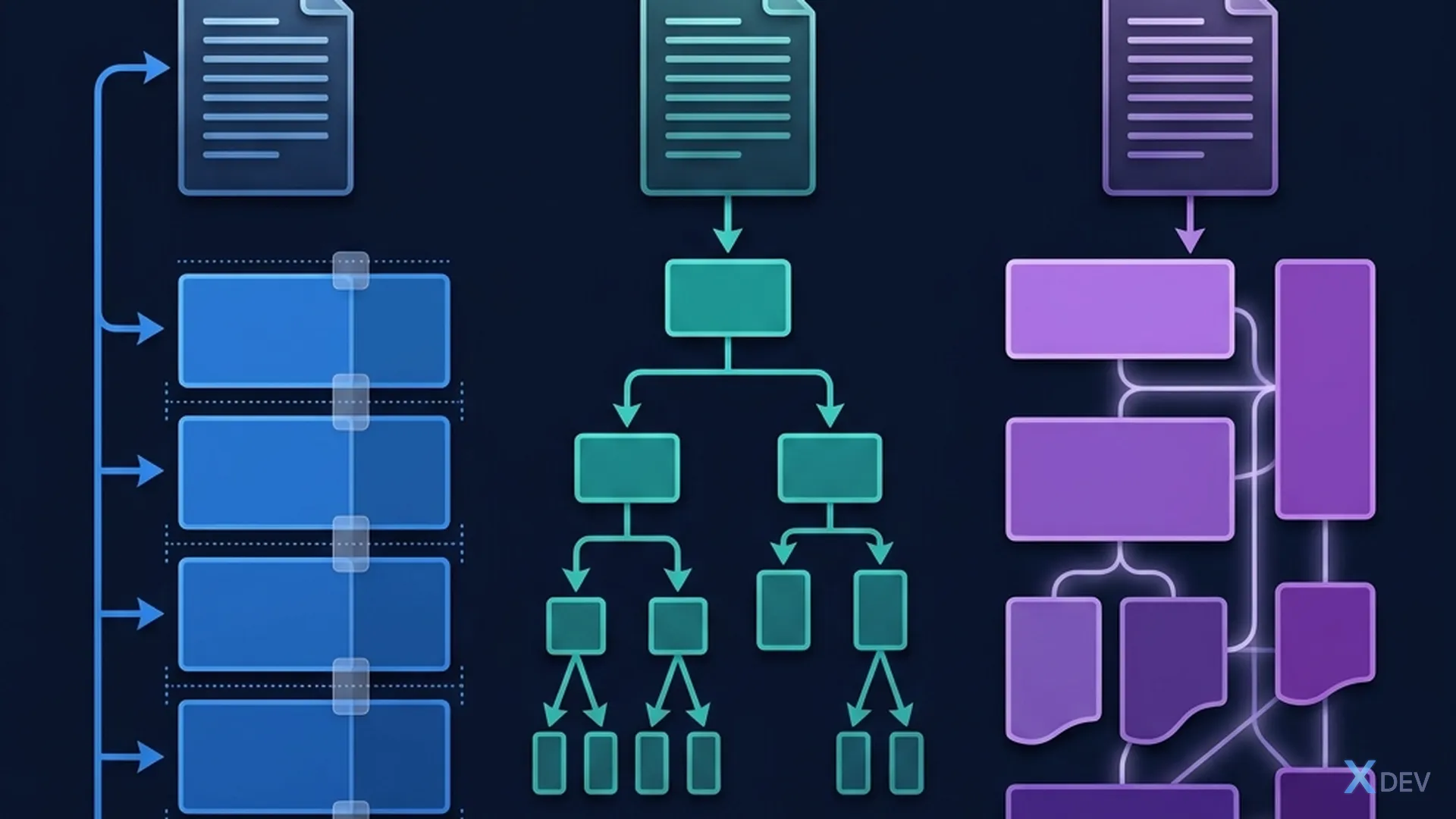
For example: Imagine you are looking for a paragraph in a 500-page book. If you divide the book into chapters (too large) → you can find it but with a lot of redundant information. If divided into individual sentences (too small) → context is lost. Good chunking = dividing into just enough paragraphs to keep the complete meaning.
1. Why is Chunking necessary?
1.1 Three main reasons
| Reason | Explanation |
|---|---|
| Context window | LLM has limited tokens (4K-128K). Can't fit a 100-page document |
| Retrieval accuracy | Small chunk = more accurate search (less noise) |
| Cost | Each token costs money. Chunk just enough = economical |
1.2 How does Chunk size affect it?
Chunk quá NHỎ (50 từ):
  ✅ Tìm kiếm chính xác
  ❌ Mất context xung quanh
  ❌ 1 ý bị tách thành 3 chunks → AI không hiểu

Chunk quá LỚN (2000 từ):
  ✅ Giữ đủ context
  ❌ Chứa nhiều thông tin không liên quan (noise)
  ❌ Embedding quality giảm (quá nhiều ý trong 1 vector)

Chunk VỪA ĐỦ (300-500 từ):
  ✅ Giữ context đủ cho 1 ý chính
  ✅ Embedding chính xác
  ✅ Ít noise
2. Chunking Strategies
2.1 Fixed-Size Chunking — The simplest
"""Fixed-size: chia theo số ký tự cố định"""
from langchain.text_splitter import CharacterTextSplitter

text = """Chính sách nghỉ phép năm 2026:

1. Nhân viên full-time được 15 ngày phép/năm.
2. Nhân viên part-time được 8 ngày phép/năm.
3. Nhân viên trên 5 năm được +3 ngày.

Quy trình xin phép:
- Gửi đơn trước 3 ngày làm việc
- Được quản lý phê duyệt
- Nghỉ khẩn cấp: thông báo trong ngày"""

splitter = CharacterTextSplitter(
    separator="\n",       # Cắt theo dòng mới
    chunk_size=200,       # Mỗi chunk tối đa 200 ký tự
    chunk_overlap=30,     # Overlap 30 ký tự
)

chunks = splitter.split_text(text)
for i, chunk in enumerate(chunks):
    print(f"\n--- Chunk {i+1} ({len(chunk)} chars) ---")
    print(chunk)
2.2 Recursive Character Splitting — Most Popular
"""Recursive: thử chia theo \n\n → \n → ". " → " " → """"""
from langchain.text_splitter import RecursiveCharacterTextSplitter

splitter = RecursiveCharacterTextSplitter(
    chunk_size=500,
    chunk_overlap=50,
    separators=["\n\n", "\n", ". ", " ", ""],  # Thứ tự ưu tiên
)

chunks = splitter.split_text(text)
# Ưu tiên cắt theo paragraph → sentence → word
Why "recursive"?
1. Thử cắt theo "\n\n" (paragraph) → nếu chunk < 500 chars → OK
2. Nếu paragraph > 500 chars → thử cắt theo "\n" (dòng)
3. Nếu dòng > 500 chars → thử cắt theo ". " (câu)
4. Nếu câu > 500 chars → cắt theo " " (từ)
5. Last resort: cắt giữa từ (hiếm khi xảy ra)
2.3 Semantic Chunking — The smartest
"""Semantic: cắt dựa trên ý nghĩa, không phải kích thước"""
from langchain_experimental.text_splitter import SemanticChunker
from langchain_openai import OpenAIEmbeddings

embeddings = OpenAIEmbeddings(model="text-embedding-3-small")

# Semantic chunker: chia khi "ý nghĩa thay đổi"
splitter = SemanticChunker(
    embeddings,
    breakpoint_threshold_type="percentile",  # Cắt khi similarity drop
    breakpoint_threshold_amount=80,          # Percentile 80 → new chunk
)

chunks = splitter.split_text(long_document)

# Chunks sẽ có size KHÁC NHAU — nhưng mỗi chunk chứa
# 1 ý trọn vẹn (tự detect khi nào chuyển chủ đề)
2.4 Compare 3 strategies
| Strategy | Advantages | Disadvantages | When to use |
|---|---|---|---|
| Fixed-size | Simple, fast | Cut in the middle | Prototype |
| Recursive | Balance, respect boundaries | Chunk size is equal | Most projects |
| Semantic | Chunk by meaning | Expensive API (embed), slow | High-quality RAG |
Recommendation: Start with RecursiveCharacterTextSplitter. If you need high quality, try SemanticChunker.
3. Chunk Overlap — Why is it needed?
3.1 Problem: Cut mid-sentence
Chunk 1: "...nhân viên trên 5 năm được"     ← Cắt giữa ý!
Chunk 2: "+3 ngày phép mỗi năm."             ← Mất context!
Overlap = repeat part between 2 consecutive chunks:
Chunk 1: "...nhân viên trên 5 năm được +3 ngày phép mỗi năm."
Chunk 2: "được +3 ngày phép mỗi năm. Quy trình xin phép:..."
          ^^^^^^^^^^^^^^^^^^^^^^^^^^^^^ overlap
3.2 Choose overlap size
Chunk size: 500 chars
Overlap recommendations:
- 10% (50 chars): minimal, nhanh, ít trùng
- 20% (100 chars): balanced ← RECOMMENDED
- 30% (150 chars): safe, tốt cho văn bản phức tạp

Overlap > 30%: quá nhiều trùng lặp, lãng phí storage
4. Optimize Chunk Size
4.1 Benchmark chunk size
"""Benchmark: test nhiều chunk sizes để tìm tối ưu"""
from langchain.text_splitter import RecursiveCharacterTextSplitter
from langchain_openai import OpenAIEmbeddings, ChatOpenAI
from langchain_community.vectorstores import Chroma

# Test data: 20 câu hỏi + đáp án đúng (golden test set)
test_qa = [
    {"question": "Nghỉ phép bao nhiêu ngày?", "expected": "15 ngày"},
    {"question": "Ai phê duyệt nghỉ phép?", "expected": "quản lý"},
    # ... 18 câu nữa
]

chunk_sizes = [200, 300, 500, 800, 1000, 1500]
results = {}

for size in chunk_sizes:
    # Chunk
    splitter = RecursiveCharacterTextSplitter(
        chunk_size=size, chunk_overlap=int(size * 0.2)
    )
    chunks = splitter.split_documents(documents)

    # Index
    vectorstore = Chroma.from_documents(chunks, OpenAIEmbeddings())
    retriever = vectorstore.as_retriever(search_kwargs={"k": 3})

    # Test retrieval accuracy
    correct = 0
    for qa in test_qa:
        results_docs = retriever.invoke(qa["question"])
        # Kiểm tra đáp án có trong retrieved docs không
        context = " ".join([d.page_content for d in results_docs])
        if qa["expected"].lower() in context.lower():
            correct += 1

    accuracy = correct / len(test_qa) * 100
    results[size] = {"accuracy": accuracy, "num_chunks": len(chunks)}
    print(f"Chunk size {size}: {accuracy:.0f}% accuracy, {len(chunks)} chunks")

# Kết quả thường: 300-500 tốt nhất cho hầu hết trường hợp
4.2 Guidelines by document type
| Document type | Chunk size | Overlap | Reason |
|---|---|---|---|
| FAQ / Q&A | 200-300 | 20 | Each Q&A = 1 chunk |
| Technical Documents | 500-800 | 100 | Need broad context |
| Law / Contract | 300-500 | 50 | Each clause = 1 chunk |
| Blog / Article | 500-1000 | 100 | Paragraph-based |
| Code docs | 300-500 | 50 | Function/class-based |
| Chat logs | 200-400 | 30 | Message-based |
💡 Exercise 4: Benchmark 3 chunk sizes (200, 500, 1000) on real documents. Create 10 test questions. Which chunk size gives the best retrieval accuracy?
5. Advanced: Document-Based Chunking
5.1 Markdown Header Splitting
"""Chia theo markdown headers — giữ nguyên cấu trúc"""
from langchain.text_splitter import MarkdownHeaderTextSplitter

md_text = """
# Chính sách nhân sự

## 1. Nghỉ phép
### 1.1 Nghỉ phép năm
15 ngày cho full-time, 8 ngày cho part-time.

### 1.2 Nghỉ ốm
Tối đa 30 ngày/năm có lương.

## 2. Lương thưởng
### 2.1 Lương cơ bản
Review mỗi 6 tháng.
"""

headers_to_split_on = [
    ("#", "H1"),
    ("##", "H2"),
    ("###", "H3"),
]

splitter = MarkdownHeaderTextSplitter(headers_to_split_on)
chunks = splitter.split_text(md_text)

for chunk in chunks:
    print(f"Headers: {chunk.metadata}")
    print(f"Content: {chunk.page_content[:80]}...")
    print()

# Output: chunk "1.1 Nghỉ phép năm" sẽ có metadata
# {"H1": "Chính sách nhân sự", "H2": "1. Nghỉ phép", "H3": "1.1 Nghỉ phép năm"}
5.2 Parent Document Retriever
Ý tưởng: Lưu chunks NHỎ để search chính xác,
         nhưng trả về chunk LỚN (parent) cho LLM.

Chunks nhỏ (search):  "15 ngày phép" (50 từ)
↓ match
Parent chunk (context): "Chính sách nghỉ phép: 15 ngày cho
                         full-time, 8 ngày cho part-time.
                         Nghỉ trên 5 năm được +3 ngày..." (300 từ)

→ Search chính xác + Context đầy đủ = Best of both worlds!
Summary
| Concepts | Remember |
|---|---|
| Chunking | Split the document into small paragraphs for RAG |
| Recursive | Best strategy for most cases |
| Semantic | The smartest, cut to the heart |
| Overlap | 10-20% chunk_size, avoid losing context |
| Chunk size | 300-500 chars for most use cases |
| Benchmark | Always test chunk size on real data |
General exercises
- ✅ Complete small exercises (4)
- Chunking Pipeline: Write function
smart_chunk(doc, doc_type)Choose strategy + size based on document type. - Visualization: Chunk a long document, visualize: number chunks, highlight overlap, count tokens per chunk.
- End-to-End: Load PDF → Chunk (3 strategies) → Index into ChromaDB → Query 10 questions → Compare accuracy.
Next article: Metadata, Filtering & Hybrid Search — add metadata for chunks and combine vector + keyword search.