1. RAGパイプラインからRAGエージェントへ
1.1. 静的RAGの限界
第7課では静的RAGパイプラインを構築しました — K件のドキュメントを検索 → プロンプトに挿入 → LLMが回答。このパイプラインは単純な質問には有効ですが、3つの重大な限界があります:
- 推論がない — パイプラインは常に検索→生成を行い、「検索すべきか?」「追加のステップが必要か?」を判断できません。
- ツールが使えない — データソースはベクトルストアの1つだけです。APIの呼び出し、計算、Web検索はできません。
- 検索が1回のみ — 1回だけ検索します。結果が不十分でも、別のクエリで再検索できません。
- 記憶がない — 各質問は独立して処理されます。前の質問のコンテキストを記憶できません。
1.2. RAGエージェント — ツールとしての検索
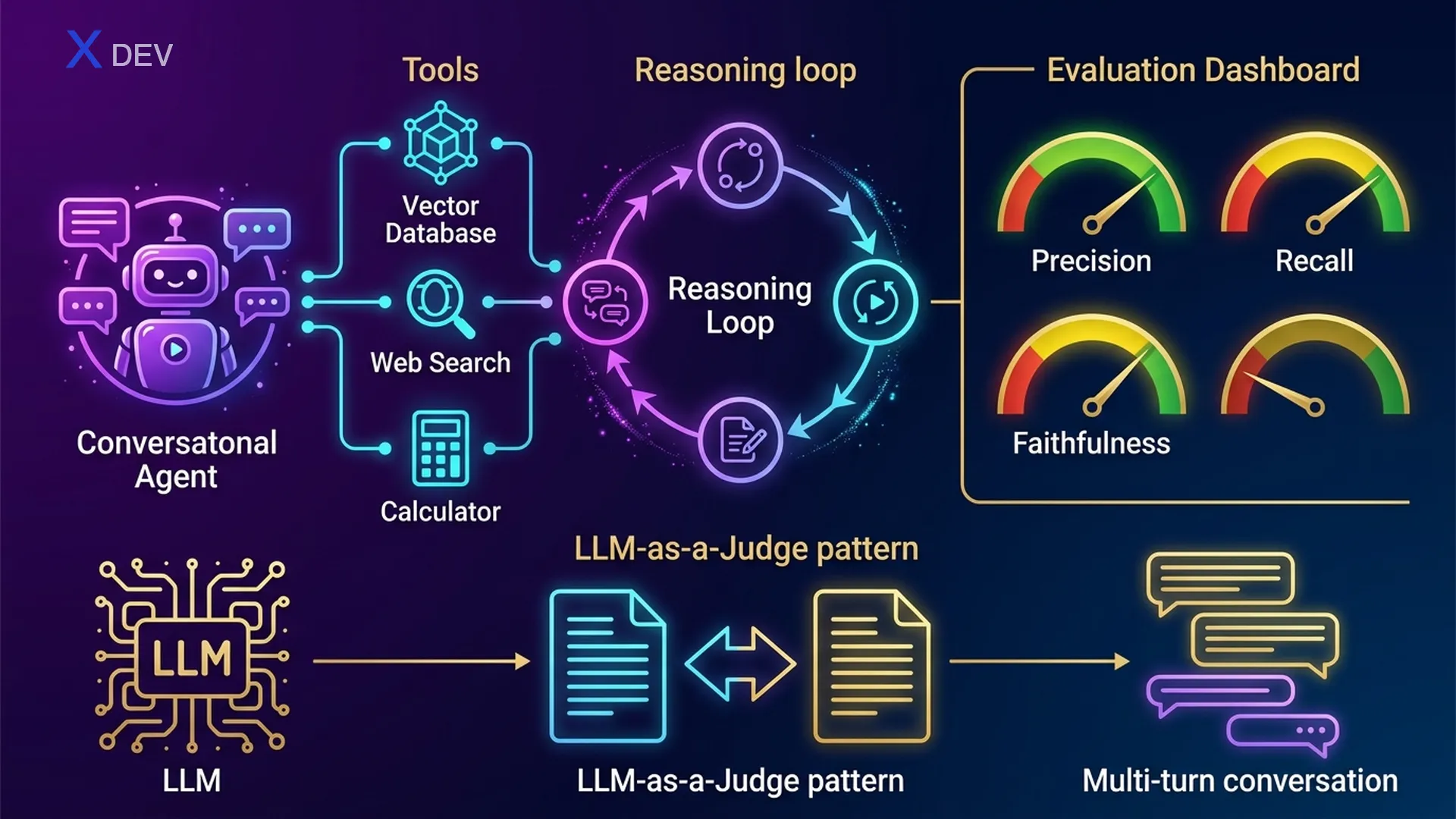
RAGエージェントは、検索をLLMが選択できる多くのツールの1つに変えることで、静的RAGをアップグレードします。エージェントは以下のことができます:
- いつ検索するかを判断 — すでに答えを知っている場合 → 検索不要
- どのツールを選択するかを判断 — 社内文書にはリトリーバー、ニュースにはWeb検索、計算には電卓
- 反復的な推論 — 検索 → 情報不足と判断 → 別のクエリで再検索
- 複数ソースからの統合 — 複数ツールの結果を組み合わせて回答
1.3. ReActパターン — Thought → Action → Observation
ReAct(Reasoning + Acting)はLLMエージェントで最も一般的なパターンです。LLMはループを実行します:思考(Thought)→ アクション選択(Action)→ 結果の観察(Observation)→ 最終回答(Final Answer)が得られるまで繰り返します。
ReAct Agent Loop — RAGエージェントの意思決定フロー
══════════════════════════════════════════════════════════════════

  ユーザー: "第3四半期の会社の売上を業界平均と比較して"
       │
       ▼
  ┌─────────────────────────────────────────────────────────┐
  │  THOUGHT: 2つの情報が必要 — 社内の売上 +               │
  │           業界平均                                      │
  │  ACTION:  retriever_tool("第3四半期 会社の売上")         │
  └────────────────────────┬────────────────────────────────┘
                           │
                           ▼
  ┌─────────────────────────────────────────────────────────┐
  │  OBSERVATION: "第3四半期の売上:1500億ドン"              │
  │  THOUGHT: 社内の売上を取得。業界平均が必要 →            │
  │           Web検索                                       │
  │  ACTION:  web_search_tool("2025年第3四半期 ベトナム      │
  │           テック業界 平均売上")                           │
  └────────────────────────┬────────────────────────────────┘
                           │
                           ▼
  ┌─────────────────────────────────────────────────────────┐
  │  OBSERVATION: "ベトナムテック業界の第3四半期平均:1200億" │
  │  THOUGHT: データが揃った。比較 → 計算                   │
  │  ACTION:  calculator_tool("(150 - 120) / 120 * 100")   │
  └────────────────────────┬────────────────────────────────┘
                           │
                           ▼
  ┌─────────────────────────────────────────────────────────┐
  │  OBSERVATION: "25.0"                                    │
  │  THOUGHT: 全データ取得完了。回答を作成。                │
  │  FINAL ANSWER: "会社の第3四半期の売上(1500億)は       │
  │   業界平均(1200億)より25%高いです。"                   │
  └─────────────────────────────────────────────────────────┘
試験のヒント:「LLMがいつ検索し、いつ他のツールを使うかを自律的に判断する」→ 答えはAgent(静的RAG chainではない)。「LLMが推論とアクションを反復的に行うパターンは?」→ ReAct。重要な区別:Chain = 固定シーケンス、Agent = 動的な意思決定。
| 特徴 | 静的RAG Chain | RAGエージェント |
|---|---|---|
| 実行フロー | 固定:検索 → 生成 | 動的:LLMが各ステップを決定 |
| ツール | リトリーバー1つのみ | 複数:リトリーバー、検索、電卓、API... |
| 推論 | なし — 常に検索 | ReActループ:Thought → Action → Observation |
| マルチステップ | 1回の検索 | 異なるクエリで複数回検索可能 |
| 記憶 | ステートレス | 会話履歴を保持可能 |
| 複雑さ | シンプルで予測可能 | 強力だがデバッグが難しい |
| レイテンシー | 低い(LLM呼び出し1回) | 高い(LLM呼び出し複数回) |
| ユースケース | ドキュメントに対する単純なQ&A | 複数ソースが必要な複雑なタスク |
2. LangChainでRAGエージェントを構築する
2.1. ツールの定義
最初のステップ:エージェントが使用できるツールを定義します。各ツールには名前、説明(LLMは説明を読んでどのツールを使うか決定します)、および関数があります。
from langchain_nvidia_ai_endpoints import ChatNVIDIA, NVIDIAEmbeddings
from langchain_community.vectorstores import FAISS
from langchain.text_splitter import RecursiveCharacterTextSplitter
from langchain_community.document_loaders import PyPDFLoader
from langchain.tools.retriever import create_retriever_tool
from langchain_community.tools.tavily_search import TavilySearchResults
from langchain_core.tools import tool

# === ツール1:ドキュメントリトリーバー ===
loader = PyPDFLoader("company_docs.pdf")
docs = loader.load()
splitter = RecursiveCharacterTextSplitter(chunk_size=500, chunk_overlap=50)
chunks = splitter.split_documents(docs)
embeddings = NVIDIAEmbeddings(model="NV-Embed-QA")
vectorstore = FAISS.from_documents(chunks, embeddings)
retriever = vectorstore.as_retriever(search_kwargs={"k": 4})

retriever_tool = create_retriever_tool(
    retriever,
    name="company_docs_search",
    description="Search for information in internal company documents. "
                "Use when the user asks about policies, processes, or HR matters."
)

# === ツール2:Web検索 ===
web_search_tool = TavilySearchResults(
    max_results=3,
    description="Search for information on the internet. "
                "Use when you need recent news, market data, "
                "or information not available in internal documents."
)

# === ツール3:電卓 ===
@tool
def calculator_tool(expression: str) -> str:
    """Calculate mathematical expressions. Use when you need to compute
    percentages, compare figures, or perform arithmetic."""
    try:
        result = eval(expression)  # 本番環境ではnumexprやsympyを使用
        return str(result)
    except Exception as e:
        return f"Calculation error: {e}"

# ツールリスト
tools = [retriever_tool, web_search_tool, calculator_tool]
試験のヒント:ツールの説明は非常に重要です — LLMは説明を読んでどのツールを使うかを決定します。説明が曖昧だと → エージェントが間違ったツールを選択します。試験で出題される可能性があります:「エージェントが間違ったツールを選択する、根本原因は?」→ ツールの説明を確認してください。
2.2. エージェントの作成 — Tool Calling Agent
LangChainはエージェントを作成する2つの方法を提供しています:create_react_agent(ReActプロンプトベース)とcreate_tool_calling_agent(ネイティブのtool calling APIを使用)。NVIDIA NIM / OpenAI互換モデルには、tool calling agentが推奨されます。
from langchain.agents import create_tool_calling_agent, AgentExecutor
from langchain_core.prompts import ChatPromptTemplate, MessagesPlaceholder

# tool calling対応のLLM
llm = ChatNVIDIA(
    model="meta/llama-3.1-70b-instruct",
    temperature=0.1
)

# エージェントプロンプト — {agent_scratchpad}は必須
prompt = ChatPromptTemplate.from_messages([
    ("system", """You are an intelligent company assistant. Use tools
to find accurate information. Always cite your sources.
If you can't find the information → clearly state "Information not found."
Never fabricate information."""),
    MessagesPlaceholder(variable_name="chat_history", optional=True),
    ("human", "{input}"),
    MessagesPlaceholder(variable_name="agent_scratchpad"),
])

# エージェントの作成
agent = create_tool_calling_agent(llm, tools, prompt)

# AgentExecutor:エージェントループを実行
agent_executor = AgentExecutor(
    agent=agent,
    tools=tools,
    verbose=True,           # ReActループを表示
    max_iterations=5,       # イテレーション回数を制限(無限ループ防止!)
    handle_parsing_errors=True,
    return_intermediate_steps=True  # デバッグ:使用されたツールを確認
)
2.3. エージェントの実行
# === クエリ1:検索が必要 ===
result = agent_executor.invoke({
    "input": "What is the company's leave policy?"
})
print(result["output"])
# エージェント:Thought → company_docs_search使用 → 回答

# === クエリ2:Web検索が必要 ===
result = agent_executor.invoke({
    "input": "What is NVIDIA's stock price today?"
})
# エージェント:Thought → web_search使用 → 回答

# === クエリ3:複数ツール ===
result = agent_executor.invoke({
    "input": "Compare Q3 company revenue with the VN tech industry average"
})
# エージェント:retriever → web_search → calculator → 統合

# === 中間ステップの確認(デバッグ) ===
for step in result["intermediate_steps"]:
    action, observation = step
    print(f"Tool: {action.tool}")
    print(f"Input: {action.tool_input}")
    print(f"Output: {observation[:100]}...")
    print("---")
2.4. ツール選択ロジック
LLMはユーザークエリとツールの説明の間の意味的マッチングに基づいてツールを選択します。プロセスは以下の通りです:
ツール選択 — LLMがツールを選ぶ仕組み
═══════════════════════════════════════════════════════

  ユーザークエリ: "第3四半期の売上は?"
       │
       ▼
  ┌──────────────────────────────────────────────────┐
  │  LLMがツールの説明を読む:                        │
  │                                                  │
  │  1. company_docs_search:                         │
  │     "社内文書を検索。                              │
  │      ポリシー、プロセスに使用..."                   │
  │     → 関連度:高 ✅(社内 + 数値データ)           │
  │                                                  │
  │  2. web_search:                                  │
  │     "インターネットを検索。ニュース、               │
  │      市場データに使用..."                           │
  │     → 関連度:中(文書に見つからない場合に         │
  │       必要かも)                                   │
  │                                                  │
  │  3. calculator:                                  │
  │     "数式を計算..."                                │
  │     → 関連度:低(まだ計算は不要)                 │
  └──────────────────────┬───────────────────────────┘
                         │
                         ▼
          選択: company_docs_search ✅
試験のヒント:「エージェントが間違ったツールを呼び出す」→ ツールの説明が十分に明確かどうかを確認してください。「エージェントがツールを何度も呼び出す(無限ループ)」→ max_iterationsを設定してください。AgentExecutorの最も重要な2つのパラメータ:max_iterations(デフォルト15、5〜10に制限すべき)とhandle_parsing_errors=True。
3. マルチターン対話型RAG
3.1. 問題:記憶がない
静的RAGパイプラインは各クエリを独立して処理します。ユーザーがフォローアップの質問をすると、パイプラインはコンテキストを理解できません:
チャット履歴がない場合の問題
═══════════════════════════════════════════════

  ユーザー: "休暇制度は?"
  ボット:   "従業員は年間12日間..."              ✅

  ユーザー: "病気休暇は?"              ← フォローアップ
  ボット:   ???                          ← 「病気休暇」にはコンテキストがない
                                            リトリーバーは「病気休暇」で検索
                                            → 関連文書を見逃す可能性

  ユーザー: "有給ですか?"              ← 何が「有給」なのか?
  ボット:   ???                          ← コンテキスト完全に喪失
3.2. 質問のコンテキスト化 — 履歴に基づく書き換え
解決策:検索の前に、会話履歴のコンテキストを含めて質問を書き換えます。「病気休暇は?」→「会社の病気休暇制度はどうなっていますか?有給ですか?」
from langchain_core.prompts import ChatPromptTemplate, MessagesPlaceholder
from langchain_core.output_parsers import StrOutputParser
from langchain.chains import create_history_aware_retriever

# チャット履歴に基づいて質問を書き換えるプロンプト
contextualize_q_prompt = ChatPromptTemplate.from_messages([
    ("system", """Given the conversation history and the latest question,
rewrite the question as a standalone question that can be understood
without the previous context.
Do NOT answer the question — only rewrite if needed, or keep as-is."""),
    MessagesPlaceholder("chat_history"),
    ("human", "{input}"),
])

llm = ChatNVIDIA(model="meta/llama-3.1-70b-instruct", temperature=0.1)

# 履歴対応リトリーバー:クエリを書き換え → 検索
history_aware_retriever = create_history_aware_retriever(
    llm, retriever, contextualize_q_prompt
)
3.3. 完全な対話型RAGチェーン
from langchain.chains import create_retrieval_chain
from langchain.chains.combine_documents import create_stuff_documents_chain
from langchain_core.messages import HumanMessage, AIMessage

# QAプロンプト
qa_prompt = ChatPromptTemplate.from_messages([
    ("system", """You are an AI assistant. Answer based on the provided context.
If not found → say "Not found in the documents."

Context:
{context}"""),
    MessagesPlaceholder("chat_history"),
    ("human", "{input}"),
])

# チェーン:stuff documents
question_answer_chain = create_stuff_documents_chain(llm, qa_prompt)

# 完全な対話型RAGチェーン
rag_chain = create_retrieval_chain(
    history_aware_retriever, question_answer_chain
)

# === マルチターン会話 ===
chat_history = []

# ターン1
response1 = rag_chain.invoke({
    "input": "What is the leave policy?",
    "chat_history": chat_history
})
print(response1["answer"])
# → "Employees get 12 days of leave per year..."

chat_history.extend([
    HumanMessage(content="What is the leave policy?"),
    AIMessage(content=response1["answer"])
])

# ターン2 — フォローアップ
response2 = rag_chain.invoke({
    "input": "What about sick leave?",
    "chat_history": chat_history
})
print(response2["answer"])
# 質問が書き換えられる:"What is the company's sick leave policy?"
# → より正確な検索が可能!
3.4. 履歴の自動管理:RunnableWithMessageHistory
from langchain_community.chat_message_histories import ChatMessageHistory
from langchain_core.runnables.history import RunnableWithMessageHistory

# セッション履歴を保存
session_store = {}

def get_session_history(session_id: str):
    if session_id not in session_store:
        session_store[session_id] = ChatMessageHistory()
    return session_store[session_id]

# チェーンにメッセージ履歴管理をラップ
conversational_rag = RunnableWithMessageHistory(
    rag_chain,
    get_session_history,
    input_messages_key="input",
    history_messages_key="chat_history",
    output_messages_key="answer",
)

# 使用方法 — session_idで履歴が自動管理される
config = {"configurable": {"session_id": "user-123"}}

r1 = conversational_rag.invoke(
    {"input": "What is the leave policy?"},
    config=config
)
# 自動的に履歴を保存

r2 = conversational_rag.invoke(
    {"input": "What about sick leave?"},        # 履歴に基づいて自動的に書き換え
    config=config
)
マルチターン対話型RAGのフロー
════════════════════════════════════════════════════════════════════

  ユーザー: "休暇制度は?"     session_id: "user-123"
       │
       ▼
  ┌──────────────────┐     履歴: []  (空)
  │ 質問コンテキスト化│───► 独立質問: "休暇制度は?"
  └────────┬─────────┘     (そのまま、書き換え不要)
           │
           ▼
  ┌──────────────────┐
  │  リトリーバー     │───► 休暇制度に関する4つのチャンク
  └────────┬─────────┘
           │
           ▼
  ┌──────────────────┐
  │  LLM生成         │───► "従業員は年間12日間..."
  └────────┬─────────┘
           │
           ▼
  履歴に保存: [Human: "休暇制度は...", AI: "従業員は..."]

  ─────────────────────────────────────────────────────────────

  ユーザー: "病気休暇は?"        session_id: "user-123"
       │
       ▼
  ┌──────────────────┐     履歴: [休暇制度のQ&A]
  │ 質問コンテキスト化│───► 書き換え: "会社の病気休暇制度は
  └────────┬─────────┘              どうなっていますか?"
           │
           ▼
  ┌──────────────────┐
  │  リトリーバー     │───► 書き換えたクエリで検索 → より正確!
  └────────┬─────────┘
           │
           ▼
  ┌──────────────────┐
  │  LLM生成         │───► "病気休暇:年間最大30日..."
  └──────────────────┘
試験のヒント:「ユーザーがフォローアップの質問をしたが、リトリーバーが間違った結果を返す」→ history-aware retrieverが不足しています(検索前に質問をコンテキスト化する必要があります)。「マルチセッションのチャット履歴を管理する」→ RunnableWithMessageHistory + session_id。DLI試験ではcontextualize promptの役割について出題される可能性があります — 常に強調:独立した質問に書き換える、回答はしない。
4. RAGの評価指標
4.1. なぜ評価が必要なのか?
「結果は良さそう」では本番環境には不十分です。RAGパイプラインの品質を測定し、設定間(チャンクサイズ、埋め込みモデル、リトリーバーの種類...)で比較するための体系的な評価が必要です。
4.2. 4つの主要指標
| 指標 | 何を測定するか? | 計算方法 | 許容閾値 |
|---|---|---|---|
| Faithfulness | 回答が「捏造」していないか?回答内のすべての主張がコンテキストに存在するか? | 回答を主張に分割 → 各主張をコンテキストと照合 | ≥ 0.85 |
| Answer Relevance | 回答が実際に質問に答えているか? | 回答から質問を生成 → 元の質問とコサイン類似度を比較 | ≥ 0.80 |
| Context Precision | 検索されたドキュメントは関連しているか?(精度) | 検索されたドキュメントのうち実際に関連しているものの数 / 検索された総数 | ≥ 0.75 |
| Context Recall | 必要なドキュメントが十分に検索されたか?(再現率) | 正解データの主張のうち、検索されたドキュメントに遡れるものの数 | ≥ 0.80 |
RAG評価 — 各指標が測定するもの
════════════════════════════════════════════════════════════════

  質問: "返品ポリシーは?"

  検索されたコンテキスト(3件):
  ┌─────────────────────────────────────────────────────────┐
  │ Doc 1: "レシートがあれば30日以内に返品可能"         ✅   │
  │ Doc 2: "商品は元の未開封の状態でなければならない"    ✅   │
  │ Doc 3: "今週の社員食堂メニュー"                    ❌   │
  └─────────────────────────────────────────────────────────┘
  Context Precision = 2/3 = 0.67 ← Doc 3は無関係!

  正解データ: "30日以内に返品可能、レシート必要、未開封、
               メールでCSに連絡"
  検索結果がカバー: 返品 ✅、レシート ✅、未開封 ✅、メール ❌
  Context Recall = 3/4 = 0.75  ← メールの情報が欠落

  生成された回答: "レシートがあり、商品が未開封であれば
                   30日以内に返品可能です。"
  主張: [30日 ✅、レシート ✅、未開封 ✅]
  Faithfulness = 3/3 = 1.0    ← すべての主張が根拠あり!

  回答は質問に答えているか? → はい、ただし不完全
  Answer Relevance ≈ 0.85     ← 関連しているがメールの詳細が欠落
4.3. RAGASフレームワーク
RAGAS(Retrieval Augmented Generation Assessment)はRAGを評価する最も人気のあるオープンソースフレームワークです。RAGASは人間のラベル付けなしに上記4つの指標すべてを自動的に計算します(LLMを使用して評価)。
from ragas import evaluate
from ragas.metrics import (
    faithfulness,
    answer_relevancy,
    context_precision,
    context_recall,
)
from datasets import Dataset

# 評価データセットを準備
eval_data = {
    "question": [
        "What is the refund policy?",
        "How many days of leave?"
    ],
    "answer": [
        "Refund within 30 days with receipt.",
        "Employees get 12 days of leave per year."
    ],
    "contexts": [
        ["Refund within 30 days with original receipt.", "Product must be sealed."],
        ["Full-time employees: 12 days leave/year.", "Probation: 1 day/month."]
    ],
    "ground_truth": [
        "Customers can get a refund within 30 days with original receipt and sealed product.",
        "Full-time employees get 12 days leave/year, probation 1 day/month."
    ]
}

dataset = Dataset.from_dict(eval_data)

# 評価を実行!
results = evaluate(
    dataset,
    metrics=[faithfulness, answer_relevancy, context_precision, context_recall],
)

print(results)
# {'faithfulness': 0.95, 'answer_relevancy': 0.88,
#  'context_precision': 0.83, 'context_recall': 0.75}

# pandasに変換して詳細分析
df = results.to_pandas()
print(df)
試験のヒント:「回答に検索コンテキストにない情報が含まれている」→ Faithfulnessが低い。「検索されたドキュメントが質問に関連していない」→ Context Precisionが低い。「回答は正しいが質問に答えていない」→ Answer Relevanceが低い。「重要なドキュメントが欠落」→ Context Recallが低い。最も人気のあるRAG評価フレームワーク → RAGAS。
5. LLM-as-Judge評価
5.1. なぜLLM-as-Judgeなのか?
手動評価(人間による評価)は正確ですがスケールしません:1000件の回答 × 3人のアノテーター = 3000件のレビュー。LLM-as-Judgeは、より強力な(または同等の)LLMを使用して、別のLLMの出力を自動評価します。
| 評価方法 | メリット | デメリット |
|---|---|---|
| 人間による評価 | ゴールドスタンダード、ニュアンスを捉える | 高コスト、遅い、スケールしない |
| 自動指標(BLEU, ROUGE) | 高速、低コスト、再現可能 | 意味的品質を捉えられない |
| LLM-as-Judge | スケーラブル、意味を捉える | バイアス、judge LLMのコスト、不完全 |
| RAGAS(LLMベース) | 自動化、複数指標 | judge LLMの品質に依存 |
5.2. 評価プロンプトテンプレート
from langchain_core.prompts import ChatPromptTemplate
from langchain_core.output_parsers import JsonOutputParser

# Faithfulness評価プロンプト
faithfulness_eval_prompt = ChatPromptTemplate.from_template("""
You are an impartial judge evaluating the faithfulness of an AI answer.

**Faithfulness** means every claim in the answer must be supported by
the provided context. The answer should NOT contain information
that cannot be traced back to the context.

**Context:**
{context}

**Question:**
{question}

**Answer to evaluate:**
{answer}

Evaluate step by step:
1. List all claims made in the answer.
2. For each claim, check if it is supported by the context.
3. Count supported claims vs total claims.

Respond in JSON format:
{{
  "claims": [
    {{"claim": "...", "supported": true/false, "evidence": "..."}}
  ],
  "faithfulness_score": ,
  "reasoning": "..."
}}
""")

# Judge LLM — 利用可能な最強モデルを使用
judge_llm = ChatNVIDIA(
    model="meta/llama-3.1-70b-instruct",
    temperature=0.0           # temperature=0で一貫した評価
)

faithfulness_chain = faithfulness_eval_prompt | judge_llm | JsonOutputParser()

# 回答を評価
eval_result = faithfulness_chain.invoke({
    "context": "The company offers refunds within 30 days with original receipt.",
    "question": "What is the refund policy?",
    "answer": "Refund within 30 days with receipt. Contact CS via email."
})

print(eval_result)
# {
#   "claims": [
#     {"claim": "Refund within 30 days", "supported": true, ...},
#     {"claim": "need receipt", "supported": true, ...},
#     {"claim": "Contact CS via email", "supported": false, ...}  ← 幻覚!
#   ],
#   "faithfulness_score": 0.67,
#   "reasoning": "2/3 claims supported. 'Contact CS via email' not in context."
# }
5.3. ペアワイズ比較 — A vs Bの比較
絶対スコアリングの代わりに、ペアワイズ比較は2つの出力を評価し、より良い方を選びます。この方法は絶対スコアリングよりもバイアスが少ないです。
pairwise_prompt = ChatPromptTemplate.from_template("""
You are comparing two AI responses to the same question.

**Question:** {question}
**Context:** {context}

**Response A:**
{response_a}

**Response B:**
{response_b}

Compare on these criteria:
1. Faithfulness: grounded in context?
2. Completeness: covers all relevant info?
3. Clarity: well-structured and easy to understand?

Choose the better response. Respond in JSON:
{{
  "winner": "A" or "B" or "TIE",
  "criteria_scores": {{
    "faithfulness": {{"A": <1-5>, "B": <1-5>}},
    "completeness": {{"A": <1-5>, "B": <1-5>}},
    "clarity": {{"A": <1-5>, "B": <1-5>}}
  }},
  "reasoning": "..."
}}
""")

pairwise_chain = pairwise_prompt | judge_llm | JsonOutputParser()
5.4. LLM-as-Judgeの限界
- 冗長性バイアス — LLM judgeは、短い回答の方が良い場合でも、長い出力を高く評価する傾向があります
- 位置バイアス — ペアワイズ評価で、最初の出力を好む傾向があります(A > B)。対策:2回評価してA↔Bの位置を入れ替える
- 自己強化バイアス — LLM judgeは自身の出力を好みます。judgeには別のモデルを使用してください
- 推論の限界 — judgeは専門分野(医療、法律)の微妙なエラーを見逃す可能性があります
LLM-as-Judgeバイアスの軽減
══════════════════════════════════════════

  位置バイアスの対策:
  ┌──────────────────────────────┐
  │  ラウンド1: A先、B後          │──► ラウンド1の勝者: A
  │  ラウンド2: B先、A後          │──► ラウンド2の勝者: A
  │  最終結果: 一貫 → Aが勝利    │
  │  (不一致の場合 → TIE)       │
  └──────────────────────────────┘

  冗長性バイアスの対策:
  ┌──────────────────────────────┐
  │  プロンプト: "正確さと簡潔さに│
  │  基づいて評価してください。    │
  │  長い ≠ より良い。"           │
  └──────────────────────────────┘
試験のヒント:「LLMの出力を大規模に評価する」→ LLM-as-Judge。「LLM judgeが長い回答を好む」→ 冗長性バイアス。「LLM judgeがペアの最初の選択肢を好む」→ 位置バイアス。位置バイアスの対策 → 位置を入れ替えて平均化。DLI試験でよく出題されます:「最もスケーラブルな評価方法は?」→ LLM-as-Judge(人間による評価ではない)。
6. 試験対策 — DLI S-FX-15
6.1. S-FX-15試験の概要
コースS-FX-15:「Generative AI with Diffusion Models and Large Language Models」は、Jupyterノートブックでの実技試験で終了します。制限時間内にコーディングタスクを完了する必要があります。
| 項目 | 詳細 |
|---|---|
| 形式 | Jupyterノートブック — コードセルに記入し、テストを実行 |
| 所要時間 | 約2時間(ラボセッション内) |
| 合格条件 | すべての必須セルを完了+正しい出力 |
| 利用可能なツール | コースのノートブック、NVIDIAドキュメント(DLI環境内) |
| 再受験 | 不合格の場合、再受験可能(DLIポリシーに従う) |
6.2. 主要な出題範囲
S-FX-15の試験は、コースの3つのパートすべての主要領域をカバーします:
| パート | 主要トピック | 予想される試験タスク |
|---|---|---|
| パート1:生成AI基礎 | 拡散モデル、VAE、GAN | 拡散パイプラインの設定、画像生成 |
| パート2:LLMコア | Transformer、トークナイザー、PEFT、推論 | モデルの読み込み、トークン化、LoRAファインチューニング、推論パラメータ |
| パート3:RAG&アプリケーション | RAGパイプライン、エージェント、評価 | RAGの構築、評価の実装、ガードレールの追加 |
6.3. 時間管理戦略
S-FX-15 時間管理
════════════════════════════════════════════

  合計:約120分

  ┌─────────────────────────────────────┐
  │  0-10分: ノートブック全体を読む      │ ← すぐにコードを書かない!
  │          簡単/難しいセルをマーク      │
  │          依存関係を特定              │
  └─────────────────────────────────────┘
  ┌─────────────────────────────────────┐
  │  10-50分: 簡単なセルから先に        │ ← クイックウィンを先に
  │           Import、セットアップ、設定 │
  │           シンプルなタスク           │
  └─────────────────────────────────────┘
  ┌─────────────────────────────────────┐
  │  50-100分: 難しいセル               │ ← RAGパイプライン、評価
  │            マルチステップタスク      │
  │            必要に応じてデバッグ      │
  └─────────────────────────────────────┘
  ┌─────────────────────────────────────┐
  │  100-120分: レビュー&修正          │ ← すべてのセルを上から下へ実行
  │             出力が一致するか確認     │
  │             エラーがあれば修正       │
  └─────────────────────────────────────┘
6.4. よくある間違い — これらを避けてください
| 間違い | 結果 | 対策 |
|---|---|---|
チャンク分割時にchunk_overlapを忘れる | 境界でコンテキストが切断 → 回答品質低下 | 常にoverlap = chunk_sizeの10〜20%に設定 |
| リトリーバーとインジェストで異なるembeddingモデルを使用 | 次元の不一致 → クラッシュ | embeddingと検索の両方で同じモデルを使用 |
評価でtemperature=0を設定しない | 評価結果が再現不可能 | 評価タスクはtemperature=0 |
| エージェントの無限ループ | タイムアウト、セル失敗 | max_iterations=5を設定 |
handle_parsing_errors=Trueを忘れる | LLMが不正な形式を返すとエージェントがクラッシュ | 常にこのフラグを有効にする |
| RAGプロンプトでコンテキストのフォーマットが不適切 | LLMがコンテキストを無視 → 幻覚 | プロンプトテンプレートで{context}を明確に分離 |
| セルを順番通りに実行しない | 変数未定義エラー | 上から下へ実行、または「Restart & Run All」 |
| パッケージのインストールを忘れる | Importエラー | 最初に!pip installセルを実行 |
6.5. 合格のためのヒント
- 説明をよく読む — 各セルには通常TODOを示すコメントがあります。コーディング前によく読んでください。
- コースのノートブックが参考資料 — 試験タスクは通常、コースの演習のバリエーションです。完了したノートブックを参照してください。
- NVIDIA APIパターン — インポートと初期化の方法を覚えておいてください:
ChatNVIDIA(model=...)、NVIDIAEmbeddings(model=...)。 - 各セルをテスト — セルを書いたらすぐに実行してください。全部書き終わるまで待たないでください。
- 出力形式が重要 — 説明でdictを返すよう要求されている場合 → stringではなくdictを返してください。
試験のヒント:S-FX-15の試験は実技コーディングに重点を置いており、多肢選択ではありません。優先的に復習すべき項目:RAGパイプラインのセットアップ(ほぼ必ず出題)、PEFT/LoRAの設定、拡散パイプライン。コースのノートブックを参照してください — 試験では通常、異なるデータ/モデルで同様のタスクが要求されます。
7. チートシート
| 概念 | 要点 |
|---|---|
| 静的RAG vs エージェント | Chain = 固定フロー;Agent = 動的、LLMが決定 |
| ReActパターン | Thought → Action → Observationのループ |
| ツールの説明 | LLMは説明に基づいてツールを選択 — 明確であること! |
| create_tool_calling_agent | ネイティブのtool calling APIを使用(NVIDIA NIMに推奨) |
| AgentExecutor max_iterations | デフォルト15、無限ループ防止のため5〜10に設定すべき |
| handle_parsing_errors | 常にTrue — LLMが不正な形式を返した時のクラッシュを防止 |
| History-aware retriever | フォローアップクエリを検索前に独立した質問に書き換え |
| RunnableWithMessageHistory | session_idによるチャット履歴の自動管理 |
| Faithfulness | 回答はコンテキストに基づいているか?(≥ 0.85) |
| Answer Relevance | 回答は質問に答えているか?(≥ 0.80) |
| Context Precision | 検索されたドキュメントは関連しているか?(≥ 0.75) |
| Context Recall | 十分なドキュメントが検索されたか?(≥ 0.80) |
| RAGAS | 上記4指標を測定するフレームワーク、LLM評価を使用 |
| LLM-as-Judge | 強力なLLMを使用して別のLLMの出力を評価 — スケーラブル |
| 冗長性バイアス | judgeが長い回答を好む |
| 位置バイアス | judgeがペアの最初の選択肢を好む → A↔Bを入れ替えて平均化 |
| S-FX-15の形式 | 実技Jupyterノートブック、約2時間、コーディングベース |
| S-FX-15の戦略 | 全体を読む → 簡単なものから → 難しいものへ → レビュー |
8. 練習問題 — コーディング
Q1: リトリーバー+Web検索のRAGエージェントを構築
2つのツール:retriever_tool(社内文書を検索)とweb_search_tool(インターネットを検索)を持つRAGエージェントを構築してください。エージェントはどのツールをいつ使うかを自律的に判断する必要があります。ツール選択ロジックを確認するために中間ステップを出力してください。
回答Q1を表示
from langchain_nvidia_ai_endpoints import ChatNVIDIA, NVIDIAEmbeddings
from langchain_community.vectorstores import FAISS
from langchain.text_splitter import RecursiveCharacterTextSplitter
from langchain.tools.retriever import create_retriever_tool
from langchain_community.tools.tavily_search import TavilySearchResults
from langchain.agents import create_tool_calling_agent, AgentExecutor
from langchain_core.prompts import ChatPromptTemplate, MessagesPlaceholder

# === リトリーバーのセットアップ ===
from langchain_core.documents import Document
docs = [
    Document(page_content="Employees get 12 days of leave per year. Probation: 1 day/month.",
             metadata={"source": "hr_policy.pdf"}),
    Document(page_content="Refund within 30 days with original receipt. Product must be sealed.",
             metadata={"source": "refund_policy.pdf"}),
]

embeddings = NVIDIAEmbeddings(model="NV-Embed-QA")
vectorstore = FAISS.from_documents(docs, embeddings)
retriever = vectorstore.as_retriever(search_kwargs={"k": 2})

# === ツールの定義 ===
retriever_tool = create_retriever_tool(
    retriever,
    name="internal_docs_search",
    description="Search internal company documents: HR policies, "
                "processes, refunds. Use for internal company questions."
)

web_search_tool = TavilySearchResults(
    max_results=3,
    description="Search the internet. Use when you need external information: "
                "news, stock prices, market data, public information."
)

tools = [retriever_tool, web_search_tool]

# === エージェントの作成 ===
llm = ChatNVIDIA(model="meta/llama-3.1-70b-instruct", temperature=0.1)

prompt = ChatPromptTemplate.from_messages([
    ("system", "You are an AI assistant. Use tools to find accurate information. "
               "Cite your sources when answering."),
    ("human", "{input}"),
    MessagesPlaceholder(variable_name="agent_scratchpad"),
])

agent = create_tool_calling_agent(llm, tools, prompt)
agent_executor = AgentExecutor(
    agent=agent,
    tools=tools,
    verbose=True,
    max_iterations=5,
    handle_parsing_errors=True,
    return_intermediate_steps=True,
)

# === テスト:社内の質問 → リトリーバーを使用すべき ===
result1 = agent_executor.invoke({"input": "What is the leave policy?"})
print("Answer:", result1["output"])
print("\nTools used:")
for step in result1["intermediate_steps"]:
    print(f"  → {step[0].tool}: {step[0].tool_input}")

# === テスト:外部の質問 → Web検索を使用すべき ===
result2 = agent_executor.invoke({"input": "NVIDIA stock price today?"})
print("Answer:", result2["output"])
print("\nTools used:")
for step in result2["intermediate_steps"]:
    print(f"  → {step[0].tool}: {step[0].tool_input}")
ツール選択の説明:エージェントはツールの説明を読みます。「Leave policy」は「internal company documents, HR policies」にマッチ → internal_docs_searchを選択。「NVIDIA stock price」は「news, stock prices, market data」にマッチ → web_searchを選択。
Q2: マルチターンRAGのHistory-aware Retrieverを実装
フォローアップの質問を理解できる対話型RAGパイプラインを構築してください。3ターンの会話でテスト:最初の質問 → フォローアップ → もう1つのフォローアップ。
回答Q2を表示
from langchain_nvidia_ai_endpoints import ChatNVIDIA, NVIDIAEmbeddings
from langchain_community.vectorstores import FAISS
from langchain_core.documents import Document
from langchain_core.prompts import ChatPromptTemplate, MessagesPlaceholder
from langchain_core.messages import HumanMessage, AIMessage
from langchain.chains import create_history_aware_retriever, create_retrieval_chain
from langchain.chains.combine_documents import create_stuff_documents_chain

# === セットアップ ===
docs = [
    Document(page_content="Full-time employees: 12 days leave/year. Can carry over max 5 days to next year."),
    Document(page_content="Sick leave: up to 30 days/year with pay. Doctor's note required from day 3."),
    Document(page_content="Maternity leave: 6 months for women, 5 days for men. Per Vietnam labor law."),
]

embeddings = NVIDIAEmbeddings(model="NV-Embed-QA")
vectorstore = FAISS.from_documents(docs, embeddings)
retriever = vectorstore.as_retriever(search_kwargs={"k": 2})
llm = ChatNVIDIA(model="meta/llama-3.1-70b-instruct", temperature=0.1)

# === History-awareリトリーバー ===
contextualize_prompt = ChatPromptTemplate.from_messages([
    ("system", "Given the conversation history, rewrite the question as a standalone question. "
               "Do NOT answer, only rewrite."),
    MessagesPlaceholder("chat_history"),
    ("human", "{input}"),
])

history_aware_retriever = create_history_aware_retriever(
    llm, retriever, contextualize_prompt
)

# === QAチェーン ===
qa_prompt = ChatPromptTemplate.from_messages([
    ("system", "Answer based on context. If not found → say so.\n\n"
               "Context:\n{context}"),
    MessagesPlaceholder("chat_history"),
    ("human", "{input}"),
])

qa_chain = create_stuff_documents_chain(llm, qa_prompt)
rag_chain = create_retrieval_chain(history_aware_retriever, qa_chain)

# === 3ターンの会話 ===
chat_history = []

# ターン1
r1 = rag_chain.invoke({"input": "What is the leave policy?", "chat_history": chat_history})
print(f"Turn 1: {r1['answer']}")
chat_history.extend([
    HumanMessage(content="What is the leave policy?"),
    AIMessage(content=r1["answer"])
])

# ターン2 — フォローアップ
r2 = rag_chain.invoke({"input": "What about sick leave?", "chat_history": chat_history})
print(f"Turn 2: {r2['answer']}")
# "What about sick leave?" → 書き換え: "What is the company's sick leave policy?"
chat_history.extend([
    HumanMessage(content="What about sick leave?"),
    AIMessage(content=r2["answer"])
])

# ターン3 — もう1つのフォローアップ
r3 = rag_chain.invoke({"input": "Do I need any documents?", "chat_history": chat_history})
print(f"Turn 3: {r3['answer']}")
# "Do I need any documents?" → 書き換え: "What documents are needed for sick leave?"
Q3: Faithfulnessスコアを計算
contextとanswerを受け取り、LLMを使用して回答を主張に分割し、各主張をコンテキストと照合し、faithfulnessスコア [0.0 - 1.0] を返すcalculate_faithfulness()関数を実装してください。
回答Q3を表示
from langchain_nvidia_ai_endpoints import ChatNVIDIA
from langchain_core.prompts import ChatPromptTemplate
from langchain_core.output_parsers import JsonOutputParser

def calculate_faithfulness(context: str, answer: str) -> dict:
    """
    Faithfulnessスコアを計算:回答内の主張のうち
    コンテキストに裏付けられている割合。
    戻り値: {"score": float, "claims": list, "reasoning": str}
    """
    llm = ChatNVIDIA(model="meta/llama-3.1-70b-instruct", temperature=0.0)

    prompt = ChatPromptTemplate.from_template("""
Analyze the faithfulness of the answer given the context.

Context:
{context}

Answer:
{answer}

Steps:
1. Break the answer into individual factual claims.
2. For each claim, determine if it is supported by the context.
3. Calculate: faithfulness_score = supported_claims / total_claims

Return JSON:
{{
  "claims": [
    {{"text": "claim text", "supported": true, "evidence": "quote from context"}},
    {{"text": "claim text", "supported": false, "evidence": "not found"}}
  ],
  "supported_count": ,
  "total_count": ,
  "score": ,
  "reasoning": "summary"
}}
""")

    chain = prompt | llm | JsonOutputParser()
    result = chain.invoke({"context": context, "answer": answer})
    return result


# === テスト ===
context = (
    "Company ABC offers refunds within 30 days from purchase date. "
    "Customers must present the original receipt. "
    "Product must still be sealed and unused."
)
answer = (
    "Company ABC offers refunds within 30 days with receipt. "
    "Product must be sealed. "
    "Call hotline 1900-xxxx for support."  # ← コンテキストにない!
)

result = calculate_faithfulness(context, answer)
print(f"Faithfulness Score: {result['score']}")
# 期待値: ~0.67 (3つの主張のうち2つが裏付けられている)
for claim in result["claims"]:
    status = "✅" if claim["supported"] else "❌"
    print(f"  {status} {claim['text']}")
Q4: 構造化ルーブリックによるLLM-as-Judge評価器を実装
3つの基準を含むルーブリックを持つLLM-as-Judgeパターンで評価器を構築してください:Faithfulness(1-5)、Completeness(1-5)、Clarity(1-5)。評価器はquestion、context、answerを受け取り、スコア+理由を返します。また、位置バイアスを軽減するための位置入れ替えペアワイズ比較も実装してください。
回答Q4を表示
from langchain_nvidia_ai_endpoints import ChatNVIDIA
from langchain_core.prompts import ChatPromptTemplate
from langchain_core.output_parsers import JsonOutputParser

judge_llm = ChatNVIDIA(model="meta/llama-3.1-70b-instruct", temperature=0.0)

# === パートA:単一回答の評価 ===
single_eval_prompt = ChatPromptTemplate.from_template("""
You are an expert evaluator. Score the AI response on a 1-5 scale.

**Question:** {question}
**Context:** {context}
**Response:** {response}

**Rubric:**
- Faithfulness (1-5): Is every claim supported by context? 5 = all claims grounded.
- Completeness (1-5): Does it cover all relevant info from context? 5 = comprehensive.
- Clarity (1-5): Well-structured and easy to understand? 5 = excellent.

Return JSON:
{{
  "scores": {{
    "faithfulness": <1-5>,
    "completeness": <1-5>,
    "clarity": <1-5>
  }},
  "overall": ,
  "reasoning": "..."
}}
""")

single_eval_chain = single_eval_prompt | judge_llm | JsonOutputParser()

# === パートB:位置バイアス軽減付きペアワイズ比較 ===
pairwise_prompt = ChatPromptTemplate.from_template("""
Compare two responses. Which is better overall?

**Question:** {question}
**Context:** {context}

**Response 1:**
{response_1}

**Response 2:**
{response_2}

Return JSON:
{{
  "winner": "1" or "2" or "TIE",
  "scores_1": {{"faithfulness": <1-5>, "completeness": <1-5>, "clarity": <1-5>}},
  "scores_2": {{"faithfulness": <1-5>, "completeness": <1-5>, "clarity": <1-5>}},
  "reasoning": "..."
}}
""")

pairwise_chain = pairwise_prompt | judge_llm | JsonOutputParser()


def pairwise_eval_debiased(question, context, resp_a, resp_b):
    """位置バイアス軽減付きペアワイズ評価:2回評価し、順序を入れ替える。"""

    # ラウンド1:A先
    r1 = pairwise_chain.invoke({
        "question": question, "context": context,
        "response_1": resp_a, "response_2": resp_b
    })

    # ラウンド2:B先(入れ替え)
    r2 = pairwise_chain.invoke({
        "question": question, "context": context,
        "response_1": resp_b, "response_2": resp_a
    })

    # 正規化:r2の勝者をマッピング
    r2_winner_mapped = {"1": "2", "2": "1", "TIE": "TIE"}[r2["winner"]]

    # 最終的な勝者を決定
    if r1["winner"] == r2_winner_mapped:
        final_winner = r1["winner"]  # 一貫 → 高信頼度
        confidence = "HIGH"
    else:
        final_winner = "TIE"         # 不一致 → 位置バイアスの可能性
        confidence = "LOW (positional bias detected)"

    return {
        "final_winner": f"Response {'A' if final_winner == '1' else 'B' if final_winner == '2' else 'TIE'}",
        "confidence": confidence,
        "round1": r1,
        "round2_swapped": r2,
    }


# === テスト ===
question = "What is the refund policy?"
context = "Refund within 30 days with receipt. Product must be sealed."
resp_a = "Refund within 30 days with receipt and sealed product."
resp_b = "The company supports refunds. Contact the hotline for details."

# 単一評価
score_a = single_eval_chain.invoke({
    "question": question, "context": context, "response": resp_a
})
print(f"Response A overall: {score_a['overall']}")

# ペアワイズ比較(バイアス軽減済み)
comparison = pairwise_eval_debiased(question, context, resp_a, resp_b)
print(f"Winner: {comparison['final_winner']} ({comparison['confidence']})")
Q5: デバッグ — エージェントの無限ループ
以下のコードにはバグがあります:エージェントがツールを呼び続けて停止しません(無限ループ)。根本原因を見つけて修正してください。ヒント:max_iterationsとhandle_parsing_errorsを確認してください。
# バグのあるコード — 問題を見つけて修正してください
from langchain.agents import create_tool_calling_agent, AgentExecutor
from langchain_core.prompts import ChatPromptTemplate, MessagesPlaceholder

llm = ChatNVIDIA(model="meta/llama-3.1-70b-instruct", temperature=0.9)

prompt = ChatPromptTemplate.from_messages([
    ("system", "You are a helpful assistant."),
    ("human", "{input}"),
    # バグ:agent_scratchpadがない!
])

agent = create_tool_calling_agent(llm, tools, prompt)

agent_executor = AgentExecutor(
    agent=agent,
    tools=tools,
    verbose=True,
    # バグ:max_iterationsがない → デフォルト15、高すぎる
    # バグ:handle_parsing_errorsがない → パース失敗時にクラッシュ
)

result = agent_executor.invoke({"input": "Compare Q3 revenue with industry"})
回答Q5を表示
# 修正済みコード — 4つのバグを修正

llm = ChatNVIDIA(
    model="meta/llama-3.1-70b-instruct",
    temperature=0.1          # 修正1:低いtemperature → より安定した出力
                              # temperature=0.9 → エージェントが「創造的」すぎる → ランダムにツールを選択
)

prompt = ChatPromptTemplate.from_messages([
    ("system", "You are a helpful assistant. Use tools to find accurate information."),
    ("human", "{input}"),
    MessagesPlaceholder(variable_name="agent_scratchpad"),
    # 修正2:agent_scratchpadは必須!
    # LangChainがThought/Action/Observationの履歴を注入する場所
    # これがないと → エージェントがツールの結果を見れない → 永遠にツールを呼び続ける
])

agent = create_tool_calling_agent(llm, tools, prompt)

agent_executor = AgentExecutor(
    agent=agent,
    tools=tools,
    verbose=True,
    max_iterations=5,            # 修正3:イテレーション回数を制限
    handle_parsing_errors=True,  # 修正4:パースエラーを適切に処理
    return_intermediate_steps=True,
)

result = agent_executor.invoke({"input": "Compare Q3 revenue with industry"})

# === 4つのバグのまとめ ===
# 1. temperature=0.9が高すぎる → 不安定なツール選択
# 2. MessagesPlaceholder("agent_scratchpad")がない → エージェントが
#    ツールからのobservationを見れない → 無限にツールを呼び続ける(根本原因!)
# 3. max_iterationsがない → 収束しない場合永遠に実行
# 4. handle_parsing_errorsがない → パース失敗時にリトライせずクラッシュ
根本原因:agent_scratchpadの欠落が主な問題です。これはLangChainがThought/Action/Observationの履歴を注入するプレースホルダーです。これがないと → エージェントはすでにツールを呼んだことを知らない → 再度呼び続けます。max_iterationsはセーフティネットであり、低いtemperatureはエージェントがより安定した判断を行うのに役立ちます。