1. From RAG Pipeline to RAG Agent
1.1. Hạn chế của Static RAG
Bài 7 đã xây dựng static RAG pipeline — retrieve K docs → stuff vào prompt → LLM trả lời. Pipeline này hoạt động tốt cho câu hỏi đơn giản, nhưng có ba hạn chế nghiêm trọng:
- No reasoning — pipeline luôn retrieve rồi generate, không biết "nên retrieve không?" hay "cần thêm bước nào?"
- No tool use — chỉ có một nguồn dữ liệu (vector store). Không thể gọi API, tính toán, hay web search.
- Single retrieval — retrieve đúng 1 lần. Nếu kết quả không đủ → không biết retrieve lại với query khác.
- No memory — mỗi câu hỏi xử lý độc lập. Không nhớ context từ câu hỏi trước.
1.2. RAG Agent — Retrieval as a Tool
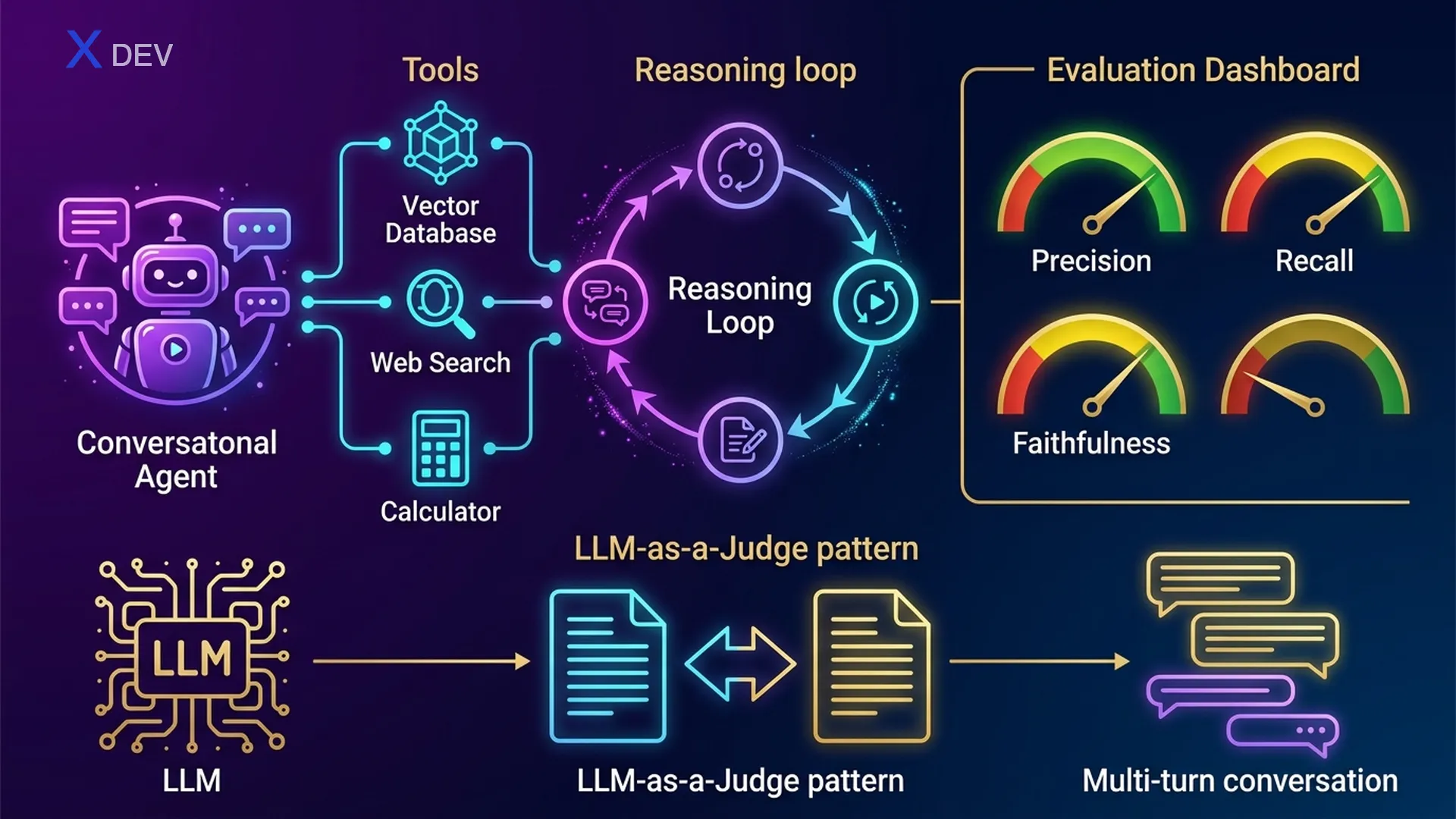
RAG Agent nâng cấp static RAG bằng cách biến retrieval thành một trong nhiều tools mà LLM có thể chọn sử dụng. Agent có khả năng:
- Decide WHEN to retrieve — nếu đã biết câu trả lời → không cần retrieve
- Choose WHAT tool — retriever cho tài liệu nội bộ, web search cho tin tức, calculator cho tính toán
- Iterative reasoning — retrieve → nhận ra thiếu info → retrieve lại với query khác
- Synthesize from multiple sources — kết hợp kết quả từ nhiều tools
1.3. ReAct Pattern — Thought → Action → Observation
ReAct (Reasoning + Acting) là pattern phổ biến nhất cho LLM agents. LLM thực hiện loop: suy nghĩ (Thought) → chọn hành động (Action) → quan sát kết quả (Observation) → lặp lại cho đến khi có Final Answer.
ReAct Agent Loop — RAG Agent Decision Flow
══════════════════════════════════════════════════════════════════

  User: "So sánh doanh thu Q3 của công ty với trung bình ngành"
       │
       ▼
  ┌─────────────────────────────────────────────────────────┐
  │  THOUGHT: Cần 2 thông tin — doanh thu nội bộ + TB ngành│
  │  ACTION:  retriever_tool("doanh thu Q3 công ty")        │
  └────────────────────────┬────────────────────────────────┘
                           │
                           ▼
  ┌─────────────────────────────────────────────────────────┐
  │  OBSERVATION: "Doanh thu Q3: 150 tỷ VND"               │
  │  THOUGHT: Có doanh thu nội bộ rồi. Cần TB ngành → web  │
  │  ACTION:  web_search_tool("average revenue Q3 2025      │
  │           tech industry Vietnam")                        │
  └────────────────────────┬────────────────────────────────┘
                           │
                           ▼
  ┌─────────────────────────────────────────────────────────┐
  │  OBSERVATION: "TB ngành tech VN Q3: 120 tỷ"            │
  │  THOUGHT: Có đủ data. Cần so sánh → tính toán          │
  │  ACTION:  calculator_tool("(150 - 120) / 120 * 100")   │
  └────────────────────────┬────────────────────────────────┘
                           │
                           ▼
  ┌─────────────────────────────────────────────────────────┐
  │  OBSERVATION: "25.0"                                    │
  │  THOUGHT: Đủ data rồi. Tổng hợp câu trả lời.          │
  │  FINAL ANSWER: "Doanh thu Q3 công ty (150 tỷ) cao hơn  │
  │   trung bình ngành (120 tỷ) khoảng 25%."               │
  └─────────────────────────────────────────────────────────┘
Exam tip: "LLM tự quyết định khi nào retrieve, khi nào dùng tool khác" → đáp án là Agent (không phải static RAG chain). "Pattern nào cho phép LLM reasoning + acting iteratively?" → ReAct. Phân biệt: Chain = fixed sequence, Agent = dynamic decision.
| Feature | Static RAG Chain | RAG Agent |
|---|---|---|
| Execution flow | Fixed: Retrieve → Generate | Dynamic: LLM decides each step |
| Tools | 1 retriever only | Multiple: retriever, search, calc, API... |
| Reasoning | None — always retrieves | ReAct loop: Thought → Action → Observation |
| Multi-step | Single retrieval | Can retrieve multiple times with different queries |
| Memory | Stateless | Can maintain conversation history |
| Complexity | Simple, predictable | Powerful but harder to debug |
| Latency | Thấp (1 LLM call) | Cao hơn (nhiều LLM calls) |
| Use case | Simple Q&A over docs | Complex tasks needing multiple sources |
2. Build a RAG Agent với LangChain
2.1. Define Tools
Bước đầu tiên: định nghĩa các tools mà agent có thể sử dụng. Mỗi tool có name, description (LLM đọc description để quyết định dùng tool nào), và function.
from langchain_nvidia_ai_endpoints import ChatNVIDIA, NVIDIAEmbeddings
from langchain_community.vectorstores import FAISS
from langchain.text_splitter import RecursiveCharacterTextSplitter
from langchain_community.document_loaders import PyPDFLoader
from langchain.tools.retriever import create_retriever_tool
from langchain_community.tools.tavily_search import TavilySearchResults
from langchain_core.tools import tool

# === Tool 1: Document Retriever ===
loader = PyPDFLoader("company_docs.pdf")
docs = loader.load()
splitter = RecursiveCharacterTextSplitter(chunk_size=500, chunk_overlap=50)
chunks = splitter.split_documents(docs)
embeddings = NVIDIAEmbeddings(model="NV-Embed-QA")
vectorstore = FAISS.from_documents(chunks, embeddings)
retriever = vectorstore.as_retriever(search_kwargs={"k": 4})

retriever_tool = create_retriever_tool(
    retriever,
    name="company_docs_search",
    description="Tìm kiếm thông tin trong tài liệu nội bộ công ty. "
                "Dùng khi user hỏi về chính sách, quy trình, nhân sự."
)

# === Tool 2: Web Search ===
web_search_tool = TavilySearchResults(
    max_results=3,
    description="Tìm kiếm thông tin trên internet. "
                "Dùng khi cần tin tức mới, dữ liệu thị trường, "
                "hoặc thông tin không có trong tài liệu nội bộ."
)

# === Tool 3: Calculator ===
@tool
def calculator_tool(expression: str) -> str:
    """Tính toán biểu thức toán học. Dùng khi cần tính phần trăm,
    so sánh số liệu, hoặc các phép tính số học."""
    try:
        result = eval(expression)  # Production: dùng numexpr hoặc sympy
        return str(result)
    except Exception as e:
        return f"Lỗi tính toán: {e}"

# Danh sách tools
tools = [retriever_tool, web_search_tool, calculator_tool]
Exam tip: Tool description cực kỳ quan trọng — LLM đọc description để quyết định dùng tool nào. Description mơ hồ → agent chọn sai tool. Đề có thể hỏi: "Agent chọn sai tool, nguyên nhân?" → kiểm tra tool description.
2.2. Create Agent — Tool Calling Agent
LangChain cung cấp hai cách tạo agent: create_react_agent (ReAct prompt-based) và create_tool_calling_agent (dùng native tool calling API). Với NVIDIA NIM / OpenAI-compatible models, nên dùng tool calling agent.
from langchain.agents import create_tool_calling_agent, AgentExecutor
from langchain_core.prompts import ChatPromptTemplate, MessagesPlaceholder

# LLM với tool calling support
llm = ChatNVIDIA(
    model="meta/llama-3.1-70b-instruct",
    temperature=0.1
)

# Agent prompt — PHẢI có {agent_scratchpad}
prompt = ChatPromptTemplate.from_messages([
    ("system", """Bạn là trợ lý thông minh của công ty. Sử dụng các tools
để tìm thông tin chính xác. Luôn trích dẫn nguồn.
Nếu không tìm được → nói rõ "Không tìm thấy thông tin."
Không bao giờ bịa thông tin."""),
    MessagesPlaceholder(variable_name="chat_history", optional=True),
    ("human", "{input}"),
    MessagesPlaceholder(variable_name="agent_scratchpad"),
])

# Tạo agent
agent = create_tool_calling_agent(llm, tools, prompt)

# AgentExecutor: chạy agent loop
agent_executor = AgentExecutor(
    agent=agent,
    tools=tools,
    verbose=True,           # Hiện ReAct loop
    max_iterations=5,       # Giới hạn iterations (tránh infinite loop!)
    handle_parsing_errors=True,
    return_intermediate_steps=True  # Debug: xem agent đã dùng tools nào
)
2.3. Run Agent
# === Query 1: Cần retrieval ===
result = agent_executor.invoke({
    "input": "Chính sách nghỉ phép của công ty là gì?"
})
print(result["output"])
# Agent sẽ: Thought → dùng company_docs_search → trả lời

# === Query 2: Cần web search ===
result = agent_executor.invoke({
    "input": "NVIDIA stock price hôm nay bao nhiêu?"
})
# Agent sẽ: Thought → dùng web_search → trả lời

# === Query 3: Multi-tool ===
result = agent_executor.invoke({
    "input": "So sánh doanh thu Q3 công ty với trung bình ngành tech VN"
})
# Agent sẽ: retriever → web_search → calculator → tổng hợp

# === Xem intermediate steps (debug) ===
for step in result["intermediate_steps"]:
    action, observation = step
    print(f"Tool: {action.tool}")
    print(f"Input: {action.tool_input}")
    print(f"Output: {observation[:100]}...")
    print("---")
2.4. Tool Selection Logic
LLM chọn tool dựa trên semantic matching giữa user query và tool description. Quá trình:
Tool Selection — How LLM Chooses Tools
═══════════════════════════════════════════════════════

  User Query: "Doanh thu Q3 là bao nhiêu?"
       │
       ▼
  ┌──────────────────────────────────────────────────┐
  │  LLM reads tool descriptions:                    │
  │                                                  │
  │  1. company_docs_search:                         │
  │     "Tìm thông tin trong tài liệu nội bộ.       │
  │      Dùng khi hỏi chính sách, quy trình..."     │
  │     → Relevance: HIGH ✅ (nội bộ + số liệu)     │
  │                                                  │
  │  2. web_search:                                  │
  │     "Tìm trên internet. Dùng khi cần tin tức,   │
  │      dữ liệu thị trường..."                     │
  │     → Relevance: MEDIUM (có thể cần nếu không   │
  │       tìm được trong docs)                       │
  │                                                  │
  │  3. calculator:                                  │
  │     "Tính toán biểu thức toán học..."            │
  │     → Relevance: LOW (chưa cần tính toán)        │
  └──────────────────────┬───────────────────────────┘
                         │
                         ▼
          Selected: company_docs_search ✅
Exam tip: "Agent gọi tool không phù hợp" → kiểm tra tool description có rõ ràng không. "Agent gọi tool quá nhiều lần (infinite loop)" → set max_iterations. Hai parameter quan trọng nhất của AgentExecutor: max_iterations (default 15, nên giới hạn 5-10) và handle_parsing_errors=True.
3. Multi-turn Conversational RAG
3.1. Vấn đề: Không có Memory
Static RAG pipeline xử lý mỗi query độc lập. Khi user hỏi follow-up, pipeline không hiểu context:
Vấn đề khi không có Chat History
═══════════════════════════════════════════════

  User:  "Chính sách nghỉ phép là gì?"
  Bot:   "Nhân viên được nghỉ 12 ngày/năm..."  ✅

  User:  "Còn nghỉ bệnh thì sao?"     ← follow-up
  Bot:   ???                             ← "nghỉ bệnh" không rõ context
                                            Retriever search "nghỉ bệnh"
                                            → có thể miss relevant docs

  User:  "Có tính lương không?"          ← "có" và "tính lương" → gì?
  Bot:   ???                             ← Hoàn toàn mất context
3.2. Contextualize Question — Rewrite dựa theo History
Giải pháp: trước khi retrieve, rewrite câu hỏi để bao gồm context từ conversation history. "Còn nghỉ bệnh thì sao?" → "Chính sách nghỉ bệnh của công ty là gì? Có được trả lương không?"
from langchain_core.prompts import ChatPromptTemplate, MessagesPlaceholder
from langchain_core.output_parsers import StrOutputParser
from langchain.chains import create_history_aware_retriever

# Prompt rewrite câu hỏi dựa trên chat history
contextualize_q_prompt = ChatPromptTemplate.from_messages([
    ("system", """Dựa vào lịch sử hội thoại và câu hỏi mới nhất,
hãy viết lại câu hỏi thành một câu độc lập (standalone question)
mà không cần context trước đó cũng hiểu được.
KHÔNG trả lời câu hỏi — chỉ viết lại nếu cần, hoặc giữ nguyên."""),
    MessagesPlaceholder("chat_history"),
    ("human", "{input}"),
])

llm = ChatNVIDIA(model="meta/llama-3.1-70b-instruct", temperature=0.1)

# History-aware retriever: rewrite query → retrieve
history_aware_retriever = create_history_aware_retriever(
    llm, retriever, contextualize_q_prompt
)
3.3. Full Conversational RAG Chain
from langchain.chains import create_retrieval_chain
from langchain.chains.combine_documents import create_stuff_documents_chain
from langchain_core.messages import HumanMessage, AIMessage

# QA prompt
qa_prompt = ChatPromptTemplate.from_messages([
    ("system", """Bạn là trợ lý AI. Trả lời dựa trên context được cung cấp.
Nếu không tìm thấy → nói "Không tìm thấy trong tài liệu."

Context:
{context}"""),
    MessagesPlaceholder("chat_history"),
    ("human", "{input}"),
])

# Chain: stuff documents
question_answer_chain = create_stuff_documents_chain(llm, qa_prompt)

# Full conversational RAG chain
rag_chain = create_retrieval_chain(
    history_aware_retriever, question_answer_chain
)

# === Multi-turn conversation ===
chat_history = []

# Turn 1
response1 = rag_chain.invoke({
    "input": "Chính sách nghỉ phép là gì?",
    "chat_history": chat_history
})
print(response1["answer"])
# → "Nhân viên được nghỉ 12 ngày phép/năm..."

chat_history.extend([
    HumanMessage(content="Chính sách nghỉ phép là gì?"),
    AIMessage(content=response1["answer"])
])

# Turn 2 — follow-up
response2 = rag_chain.invoke({
    "input": "Còn nghỉ bệnh thì sao?",
    "chat_history": chat_history
})
print(response2["answer"])
# Câu hỏi được rewrite thành: "Chính sách nghỉ bệnh của công ty là gì?"
# → Retrieve chính xác hơn!
3.4. Auto-manage History: RunnableWithMessageHistory
from langchain_community.chat_message_histories import ChatMessageHistory
from langchain_core.runnables.history import RunnableWithMessageHistory

# Store session histories
session_store = {}

def get_session_history(session_id: str):
    if session_id not in session_store:
        session_store[session_id] = ChatMessageHistory()
    return session_store[session_id]

# Wrap chain với message history management
conversational_rag = RunnableWithMessageHistory(
    rag_chain,
    get_session_history,
    input_messages_key="input",
    history_messages_key="chat_history",
    output_messages_key="answer",
)

# Sử dụng — history được quản lý tự động theo session_id
config = {"configurable": {"session_id": "user-123"}}

r1 = conversational_rag.invoke(
    {"input": "Chính sách nghỉ phép?"},
    config=config
)
# Tự động lưu history

r2 = conversational_rag.invoke(
    {"input": "Còn nghỉ bệnh?"},        # sẽ tự rewrite dựa trên history
    config=config
)
Multi-turn Conversational RAG Flow
════════════════════════════════════════════════════════════════════

  User: "Chính sách nghỉ phép?"        session_id: "user-123"
       │
       ▼
  ┌──────────────────┐     History: []  (empty)
  │ Contextualize Q  │───► Standalone: "Chính sách nghỉ phép?"
  └────────┬─────────┘     (giữ nguyên vì không cần rewrite)
           │
           ▼
  ┌──────────────────┐
  │  Retriever       │───► 4 chunks về nghỉ phép
  └────────┬─────────┘
           │
           ▼
  ┌──────────────────┐
  │  LLM Generate    │───► "Nhân viên được 12 ngày/năm..."
  └────────┬─────────┘
           │
           ▼
  Save to History: [Human: "Chính sách...", AI: "Nhân viên..."]

  ─────────────────────────────────────────────────────────────

  User: "Còn nghỉ bệnh?"               session_id: "user-123"
       │
       ▼
  ┌──────────────────┐     History: [nghỉ phép Q&A]
  │ Contextualize Q  │───► Rewrite: "Chính sách nghỉ bệnh
  └────────┬─────────┘              của công ty là gì?"
           │
           ▼
  ┌──────────────────┐
  │  Retriever       │───► Tìm với rewritten query → chính xác hơn!
  └────────┬─────────┘
           │
           ▼
  ┌──────────────────┐
  │  LLM Generate    │───► "Nghỉ bệnh: tối đa 30 ngày/năm..."
  └──────────────────┘
Exam tip: "User hỏi follow-up nhưng retriever trả sai kết quả" → thiếu history-aware retriever (cần contextualize question trước khi retrieve). "Quản lý multi-session chat history" → RunnableWithMessageHistory + session_id. Đề DLI có thể hỏi vai trò của contextualize prompt — luôn nhấn mạnh: rewrite thành standalone question, KHÔNG trả lời.
4. Evaluation Metrics cho RAG
4.1. Tại sao cần Evaluation?
"Nhìn thấy kết quả ổn" không đủ cho production. Cần systematic evaluation để đo lường chất lượng RAG pipeline và so sánh giữa các configurations (chunk size, embedding model, retriever type...).
4.2. Bốn Metrics Chính
| Metric | Đo cái gì? | Cách tính | Threshold chấp nhận |
|---|---|---|---|
| Faithfulness | Answer có "bịa" không? Mọi claim trong answer đều có trong context? | Chia answer thành claims → check từng claim against context | ≥ 0.85 |
| Answer Relevance | Answer có thực sự trả lời câu hỏi không? | Generate câu hỏi từ answer → so cosine similarity với original question | ≥ 0.80 |
| Context Precision | Docs retrieved có relevant không? (precision) | Bao nhiêu docs retrieved thực sự liên quan / tổng số docs retrieved | ≥ 0.75 |
| Context Recall | Đã retrieve đủ docs cần thiết chưa? (recall) | Bao nhiêu claims trong ground truth có thể traced back to retrieved docs | ≥ 0.80 |
RAG Evaluation — What Each Metric Measures
════════════════════════════════════════════════════════════════

  Question: "Chính sách hoàn tiền?"

  Retrieved Context (3 docs):
  ┌─────────────────────────────────────────────────────────┐
  │ Doc 1: "Hoàn tiền trong 30 ngày nếu có hóa đơn"  ✅   │
  │ Doc 2: "Sản phẩm phải còn nguyên seal"            ✅   │
  │ Doc 3: "Menu canteen tuần này"                     ❌   │
  └─────────────────────────────────────────────────────────┘
  Context Precision = 2/3 = 0.67 ← Doc 3 irrelevant!

  Ground Truth: "Hoàn tiền 30 ngày, cần hóa đơn, nguyên seal,
                 liên hệ CS qua email"
  Retrieved covers: hoàn tiền ✅, hóa đơn ✅, seal ✅, email ❌
  Context Recall = 3/4 = 0.75  ← Thiếu info về email

  Generated Answer: "Hoàn tiền trong 30 ngày nếu có hóa đơn
                     và sản phẩm nguyên seal."
  Claims: [30 ngày ✅, hóa đơn ✅, nguyên seal ✅]
  Faithfulness = 3/3 = 1.0    ← Mọi claim đều grounded!

  Does answer address the question? → Có, nhưng chưa đầy đủ
  Answer Relevance ≈ 0.85     ← Relevant nhưng thiếu chi tiết email
4.3. RAGAS Framework
RAGAS (Retrieval Augmented Generation Assessment) là framework open-source phổ biến nhất để evaluate RAG. RAGAS tự động tính 4 metrics ở trên mà không cần human labels (dùng LLM để evaluate).
from ragas import evaluate
from ragas.metrics import (
    faithfulness,
    answer_relevancy,
    context_precision,
    context_recall,
)
from datasets import Dataset

# Chuẩn bị evaluation dataset
eval_data = {
    "question": [
        "Chính sách hoàn tiền là gì?",
        "Nghỉ phép bao nhiêu ngày?"
    ],
    "answer": [
        "Hoàn tiền trong 30 ngày nếu có hóa đơn.",
        "Nhân viên được 12 ngày phép mỗi năm."
    ],
    "contexts": [
        ["Hoàn tiền trong 30 ngày khi có hóa đơn gốc.", "Sản phẩm nguyên seal."],
        ["Nhân viên chính thức: 12 ngày phép/năm.", "Thử việc: 1 ngày/tháng."]
    ],
    "ground_truth": [
        "Khách hàng được hoàn tiền trong 30 ngày với hóa đơn gốc và sản phẩm nguyên seal.",
        "Nhân viên chính thức được nghỉ 12 ngày phép/năm, thử việc 1 ngày/tháng."
    ]
}

dataset = Dataset.from_dict(eval_data)

# Evaluate!
results = evaluate(
    dataset,
    metrics=[faithfulness, answer_relevancy, context_precision, context_recall],
)

print(results)
# {'faithfulness': 0.95, 'answer_relevancy': 0.88,
#  'context_precision': 0.83, 'context_recall': 0.75}

# Convert to pandas để phân tích chi tiết
df = results.to_pandas()
print(df)
Exam tip: "Answer chứa thông tin không có trong retrieved context" → Faithfulness thấp. "Retrieved docs không liên quan đến câu hỏi" → Context Precision thấp. "Answer đúng nhưng không trả lời đúng câu hỏi" → Answer Relevance thấp. "Thiếu docs quan trọng" → Context Recall thấp. Framework evaluate RAG phổ biến → RAGAS.
5. LLM-as-Judge Evaluation
5.1. Tại sao cần LLM-as-Judge?
Manual evaluation (con người đánh giá) chính xác nhưng không scale: 1000 câu trả lời × 3 annotators = 3000 lượt review. LLM-as-Judge dùng một LLM mạnh hơn (hoặc cùng tier) để tự động đánh giá output của LLM khác.
| Evaluation Method | Pros | Cons |
|---|---|---|
| Human evaluation | Gold standard, nuanced | Expensive, slow, không scalable |
| Automatic metrics (BLEU, ROUGE) | Fast, cheap, reproducible | Không capture semantic quality |
| LLM-as-Judge | Scalable, captures semantics | Bias, cost of judge LLM, không hoàn hảo |
| RAGAS (LLM-based) | Automated, multi-metric | Phụ thuộc quality của judge LLM |
5.2. Evaluation Prompt Template
from langchain_core.prompts import ChatPromptTemplate
from langchain_core.output_parsers import JsonOutputParser

# Faithfulness evaluator prompt
faithfulness_eval_prompt = ChatPromptTemplate.from_template("""
You are an impartial judge evaluating the faithfulness of an AI answer.

**Faithfulness** means every claim in the answer must be supported by
the provided context. The answer should NOT contain information
that cannot be traced back to the context.

**Context:**
{context}

**Question:**
{question}

**Answer to evaluate:**
{answer}

Evaluate step by step:
1. List all claims made in the answer.
2. For each claim, check if it is supported by the context.
3. Count supported claims vs total claims.

Respond in JSON format:
{{
  "claims": [
    {{"claim": "...", "supported": true/false, "evidence": "..."}}
  ],
  "faithfulness_score": ,
  "reasoning": "..."
}}
""")

# Judge LLM — nên dùng model mạnh nhất available
judge_llm = ChatNVIDIA(
    model="meta/llama-3.1-70b-instruct",
    temperature=0.0           # temperature=0 cho consistent evaluation
)

faithfulness_chain = faithfulness_eval_prompt | judge_llm | JsonOutputParser()

# Evaluate một câu trả lời
eval_result = faithfulness_chain.invoke({
    "context": "Công ty hoàn tiền trong 30 ngày nếu có hóa đơn gốc.",
    "question": "Chính sách hoàn tiền?",
    "answer": "Hoàn tiền trong 30 ngày với hóa đơn. Liên hệ email CS."
})

print(eval_result)
# {
#   "claims": [
#     {"claim": "Hoàn tiền trong 30 ngày", "supported": true, ...},
#     {"claim": "cần hóa đơn", "supported": true, ...},
#     {"claim": "Liên hệ email CS", "supported": false, ...}  ← hallucination!
#   ],
#   "faithfulness_score": 0.67,
#   "reasoning": "2/3 claims supported. 'Liên hệ email CS' not in context."
# }
5.3. Pairwise Comparison — So sánh A vs B
Thay vì chấm điểm tuyệt đối, pairwise so sánh hai output và chọn cái tốt hơn. Method này ít bị bias hơn absolute scoring.
pairwise_prompt = ChatPromptTemplate.from_template("""
You are comparing two AI responses to the same question.

**Question:** {question}
**Context:** {context}

**Response A:**
{response_a}

**Response B:**
{response_b}

Compare on these criteria:
1. Faithfulness: grounded in context?
2. Completeness: covers all relevant info?
3. Clarity: well-structured and easy to understand?

Choose the better response. Respond in JSON:
{{
  "winner": "A" or "B" or "TIE",
  "criteria_scores": {{
    "faithfulness": {{"A": <1-5>, "B": <1-5>}},
    "completeness": {{"A": <1-5>, "B": <1-5>}},
    "clarity": {{"A": <1-5>, "B": <1-5>}}
  }},
  "reasoning": "..."
}}
""")

pairwise_chain = pairwise_prompt | judge_llm | JsonOutputParser()
5.4. Limitations của LLM-as-Judge
- Verbosity bias — LLM judge có xu hướng đánh giá cao output dài hơn, even if shorter answer is better
- Positional bias — trong pairwise, prefer output ở vị trí đầu (A > B). Giải pháp: đánh giá 2 lần swap vị trí A↔B
- Self-enhancement bias — LLM judge ưu tiên output của chính mình. Dùng model khác làm judge
- Limited reasoning — judge có thể miss subtle errors in specialized domains (medical, legal)
Mitigate LLM-as-Judge Bias
══════════════════════════════════════════

  Positional Bias Fix:
  ┌──────────────────────────┐
  │  Round 1: A first, B sec │──► Winner round 1: A
  │  Round 2: B first, A sec │──► Winner round 2: A
  │  Final: Consistent → A   │
  │  (If inconsistent → TIE) │
  └──────────────────────────┘

  Verbosity Bias Fix:
  ┌──────────────────────────┐
  │  Prompt: "Evaluate based │
  │  on accuracy and concise-│
  │  ness. Longer ≠ better." │
  └──────────────────────────┘
Exam tip: "Evaluate LLM output at scale" → LLM-as-Judge. "LLM judge prefer longer answers" → verbosity bias. "LLM judge prefer first option in pair" → positional bias. Fix positional bias → swap positions and average. Đề DLI thường hỏi: "Which evaluation method scales best?" → LLM-as-Judge (not human evaluation).
6. Assessment Prep — DLI S-FX-15
6.1. S-FX-15 Assessment Overview
Course S-FX-15: "Generative AI with Diffusion Models and Large Language Models" kết thúc bằng một hands-on assessment trong Jupyter notebook. Bạn cần hoàn thành các coding tasks trong thời gian giới hạn.
| Aspect | Detail |
|---|---|
| Format | Jupyter notebook — fill in code cells, run tests |
| Duration | ~2 giờ (trong lab session) |
| Passing | Hoàn thành tất cả required cells + output chính xác |
| Tools available | Course notebooks, NVIDIA docs (trong DLI environment) |
| Retake | Có thể retake nếu fail (theo policy DLI) |
6.2. Key Areas Covered
Assessment S-FX-15 bao gồm các lĩnh vực chính từ cả ba phần đã học:
| Part | Key Topics | Likely Assessment Tasks |
|---|---|---|
| Part 1: Generative AI Fundamentals | Diffusion models, VAE, GAN | Configure diffusion pipeline, generate images |
| Part 2: LLM Core | Transformer, tokenizer, PEFT, inference | Load model, tokenize, LoRA fine-tuning, inference params |
| Part 3: RAG & Applications | RAG pipeline, agent, evaluation | Build RAG, implement evaluation, add guardrails |
6.3. Time Management Strategy
S-FX-15 Time Management
════════════════════════════════════════════

  Total: ~120 minutes

  ┌─────────────────────────────────────┐
  │  0-10 min: Đọc toàn bộ notebook    │ ← KHÔNG code ngay!
  │            Đánh dấu cells dễ/khó   │
  │            Xác định dependencies    │
  └─────────────────────────────────────┘
  ┌─────────────────────────────────────┐
  │  10-50 min: Làm cells dễ trước     │ ← Quick wins first
  │             Import, setup, config   │
  │             Straightforward tasks   │
  └─────────────────────────────────────┘
  ┌─────────────────────────────────────┐
  │  50-100 min: Cells khó             │ ← RAG pipeline, eval
  │              Multi-step tasks       │
  │              Debug if needed        │
  └─────────────────────────────────────┘
  ┌─────────────────────────────────────┐
  │  100-120 min: Review & fix         │ ← Run ALL cells top-down
  │               Check outputs match   │
  │               Fix any errors        │
  └─────────────────────────────────────┘
6.4. Common Mistakes — Tránh những lỗi này
| Mistake | Consequence | Fix |
|---|---|---|
Quên chunk_overlap khi chunking | Context bị cắt ở ranh giới → answer kém | Luôn set overlap = 10-20% chunk_size |
| Dùng sai embedding model cho retriever vs ingestion | Dimension mismatch → crash | Cùng model cho cả embed và retrieve |
Không set temperature=0 cho evaluation | Kết quả evaluation không reproducible | Evaluation tasks: temperature=0 |
| Agent infinite loop | Timeout, fail cell | Set max_iterations=5 |
Quên handle_parsing_errors=True | Agent crash khi LLM trả format sai | Luôn bật flag này |
| Không format context đúng trong RAG prompt | LLM bỏ qua context → hallucinate | Chia rõ {context} trong prompt template |
| Run cells không theo thứ tự | Variable undefined errors | Run top-down, hoặc "Restart & Run All" |
| Quên install packages | Import errors | Chạy !pip install cell đầu tiên |
6.5. Tips for Passing
- Đọc kỹ instructions — mỗi cell thường có comment chỉ rõ TODO. Đọc kỹ trước khi code.
- Course notebooks là tài liệu — assessment tasks thường là variations của exercises trong course. Tham khảo notebooks đã làm.
- NVIDIA API patterns — nhớ cách import và init:
ChatNVIDIA(model=...),NVIDIAEmbeddings(model=...). - Test từng cell — chạy cell ngay sau khi viết, đừng đợi viết xong hết rồi mới run.
- Output format matters — nếu đề yêu cầu return dict → return dict, không return string.
Exam tip: Assessment S-FX-15 nặng về hands-on coding, không phải multiple choice. Ưu tiên ôn lại: RAG pipeline setup (đề thường có), PEFT/LoRA configuration, diffusion pipeline. Tham khảo course notebooks — assessment thường yêu cầu tương tự nhưng với data/model khác.
7. Cheat Sheet
| Concept | Key Point |
|---|---|
| Static RAG vs Agent | Chain = fixed flow; Agent = dynamic, LLM decides |
| ReAct pattern | Thought → Action → Observation loop |
| Tool description | LLM chọn tool dựa trên description — phải rõ ràng! |
| create_tool_calling_agent | Dùng native tool calling API (ưu tiên cho NVIDIA NIM) |
| AgentExecutor max_iterations | Default 15, nên set 5-10 để tránh infinite loop |
| handle_parsing_errors | Luôn True — tránh crash khi LLM trả format sai |
| History-aware retriever | Rewrite follow-up query thành standalone trước khi retrieve |
| RunnableWithMessageHistory | Auto-manage chat history theo session_id |
| Faithfulness | Answer grounded in context? (≥ 0.85) |
| Answer Relevance | Answer trả lời đúng câu hỏi? (≥ 0.80) |
| Context Precision | Retrieved docs có relevant? (≥ 0.75) |
| Context Recall | Đã retrieve đủ docs? (≥ 0.80) |
| RAGAS | Framework đo 4 metrics trên, dùng LLM evaluate |
| LLM-as-Judge | Dùng LLM mạnh đánh giá output LLM khác — scalable |
| Verbosity bias | Judge prefer longer answers |
| Positional bias | Judge prefer first option → swap A↔B rồi average |
| S-FX-15 format | Hands-on Jupyter notebook, ~2h, coding-based |
| S-FX-15 strategy | Đọc hết → làm dễ trước → khó sau → review |
8. Practice Questions — Coding
Q1: Build RAG Agent với Retriever + Web Search
Xây dựng một RAG Agent có 2 tools: retriever_tool (tìm trong tài liệu nội bộ) và web_search_tool (tìm trên internet). Agent phải tự quyết định khi nào dùng tool nào. In ra intermediate steps để thấy tool selection logic.
Xem đáp án Q1
from langchain_nvidia_ai_endpoints import ChatNVIDIA, NVIDIAEmbeddings
from langchain_community.vectorstores import FAISS
from langchain.text_splitter import RecursiveCharacterTextSplitter
from langchain.tools.retriever import create_retriever_tool
from langchain_community.tools.tavily_search import TavilySearchResults
from langchain.agents import create_tool_calling_agent, AgentExecutor
from langchain_core.prompts import ChatPromptTemplate, MessagesPlaceholder

# === Setup retriever ===
from langchain_core.documents import Document
docs = [
    Document(page_content="Nhân viên được 12 ngày phép/năm. Thử việc: 1 ngày/tháng.",
             metadata={"source": "hr_policy.pdf"}),
    Document(page_content="Hoàn tiền trong 30 ngày với hóa đơn gốc. Sản phẩm nguyên seal.",
             metadata={"source": "refund_policy.pdf"}),
]

embeddings = NVIDIAEmbeddings(model="NV-Embed-QA")
vectorstore = FAISS.from_documents(docs, embeddings)
retriever = vectorstore.as_retriever(search_kwargs={"k": 2})

# === Define tools ===
retriever_tool = create_retriever_tool(
    retriever,
    name="internal_docs_search",
    description="Tìm thông tin trong tài liệu nội bộ công ty: chính sách nhân sự, "
                "quy trình, hoàn tiền. Dùng cho câu hỏi về nội bộ công ty."
)

web_search_tool = TavilySearchResults(
    max_results=3,
    description="Tìm kiếm trên internet. Dùng khi cần thông tin bên ngoài: "
                "tin tức, giá cổ phiếu, thông tin thị trường, dữ liệu public."
)

tools = [retriever_tool, web_search_tool]

# === Create agent ===
llm = ChatNVIDIA(model="meta/llama-3.1-70b-instruct", temperature=0.1)

prompt = ChatPromptTemplate.from_messages([
    ("system", "Bạn là trợ lý AI. Dùng tools để tìm thông tin chính xác. "
               "Trích dẫn nguồn khi trả lời."),
    ("human", "{input}"),
    MessagesPlaceholder(variable_name="agent_scratchpad"),
])

agent = create_tool_calling_agent(llm, tools, prompt)
agent_executor = AgentExecutor(
    agent=agent,
    tools=tools,
    verbose=True,
    max_iterations=5,
    handle_parsing_errors=True,
    return_intermediate_steps=True,
)

# === Test: internal question → should use retriever ===
result1 = agent_executor.invoke({"input": "Chính sách nghỉ phép là gì?"})
print("Answer:", result1["output"])
print("\nTools used:")
for step in result1["intermediate_steps"]:
    print(f"  → {step[0].tool}: {step[0].tool_input}")

# === Test: external question → should use web search ===
result2 = agent_executor.invoke({"input": "NVIDIA stock price today?"})
print("Answer:", result2["output"])
print("\nTools used:")
for step in result2["intermediate_steps"]:
    print(f"  → {step[0].tool}: {step[0].tool_input}")
Giải thích tool selection: Agent đọc tool descriptions. "Chính sách nghỉ phép" matches "tài liệu nội bộ công ty, chính sách nhân sự" → chọn internal_docs_search. "NVIDIA stock price" matches "tin tức, giá cổ phiếu, thông tin thị trường" → chọn web_search.
Q2: Implement History-aware Retriever cho Multi-turn RAG
Xây dựng conversational RAG pipeline có khả năng hiểu follow-up questions. Test với 3-turn conversation: câu hỏi gốc → follow-up → follow-up nữa.
Xem đáp án Q2
from langchain_nvidia_ai_endpoints import ChatNVIDIA, NVIDIAEmbeddings
from langchain_community.vectorstores import FAISS
from langchain_core.documents import Document
from langchain_core.prompts import ChatPromptTemplate, MessagesPlaceholder
from langchain_core.messages import HumanMessage, AIMessage
from langchain.chains import create_history_aware_retriever, create_retrieval_chain
from langchain.chains.combine_documents import create_stuff_documents_chain

# === Setup ===
docs = [
    Document(page_content="Nhân viên chính thức: 12 ngày phép/năm. Tích lũy tối đa 5 ngày sang năm sau."),
    Document(page_content="Nghỉ bệnh: tối đa 30 ngày/năm có lương. Cần giấy bác sĩ từ ngày thứ 3."),
    Document(page_content="Nghỉ thai sản: 6 tháng cho nữ, 5 ngày cho nam. Theo luật lao động VN."),
]

embeddings = NVIDIAEmbeddings(model="NV-Embed-QA")
vectorstore = FAISS.from_documents(docs, embeddings)
retriever = vectorstore.as_retriever(search_kwargs={"k": 2})
llm = ChatNVIDIA(model="meta/llama-3.1-70b-instruct", temperature=0.1)

# === History-aware retriever ===
contextualize_prompt = ChatPromptTemplate.from_messages([
    ("system", "Dựa vào lịch sử hội thoại, viết lại câu hỏi thành standalone question. "
               "KHÔNG trả lời, chỉ rewrite."),
    MessagesPlaceholder("chat_history"),
    ("human", "{input}"),
])

history_aware_retriever = create_history_aware_retriever(
    llm, retriever, contextualize_prompt
)

# === QA chain ===
qa_prompt = ChatPromptTemplate.from_messages([
    ("system", "Trả lời dựa trên context. Nếu không có → nói không tìm thấy.\n\n"
               "Context:\n{context}"),
    MessagesPlaceholder("chat_history"),
    ("human", "{input}"),
])

qa_chain = create_stuff_documents_chain(llm, qa_prompt)
rag_chain = create_retrieval_chain(history_aware_retriever, qa_chain)

# === 3-turn conversation ===
chat_history = []

# Turn 1
r1 = rag_chain.invoke({"input": "Chính sách nghỉ phép?", "chat_history": chat_history})
print(f"Turn 1: {r1['answer']}")
chat_history.extend([
    HumanMessage(content="Chính sách nghỉ phép?"),
    AIMessage(content=r1["answer"])
])

# Turn 2 — follow-up
r2 = rag_chain.invoke({"input": "Còn nghỉ bệnh thì sao?", "chat_history": chat_history})
print(f"Turn 2: {r2['answer']}")
# "Còn nghỉ bệnh thì sao?" → rewrite: "Chính sách nghỉ bệnh của công ty?"
chat_history.extend([
    HumanMessage(content="Còn nghỉ bệnh thì sao?"),
    AIMessage(content=r2["answer"])
])

# Turn 3 — another follow-up
r3 = rag_chain.invoke({"input": "Cần giấy tờ gì không?", "chat_history": chat_history})
print(f"Turn 3: {r3['answer']}")
# "Cần giấy tờ gì không?" → rewrite: "Nghỉ bệnh cần giấy tờ gì?"
Q3: Calculate Faithfulness Score
Implement hàm calculate_faithfulness() nhận vào context và answer, dùng LLM để chia answer thành claims, check từng claim against context, trả về faithfulness score [0.0 - 1.0].
Xem đáp án Q3
from langchain_nvidia_ai_endpoints import ChatNVIDIA
from langchain_core.prompts import ChatPromptTemplate
from langchain_core.output_parsers import JsonOutputParser

def calculate_faithfulness(context: str, answer: str) -> dict:
    """
    Calculate faithfulness score: fraction of claims in answer
    that are supported by context.
    Returns: {"score": float, "claims": list, "reasoning": str}
    """
    llm = ChatNVIDIA(model="meta/llama-3.1-70b-instruct", temperature=0.0)

    prompt = ChatPromptTemplate.from_template("""
Analyze the faithfulness of the answer given the context.

Context:
{context}

Answer:
{answer}

Steps:
1. Break the answer into individual factual claims.
2. For each claim, determine if it is supported by the context.
3. Calculate: faithfulness_score = supported_claims / total_claims

Return JSON:
{{
  "claims": [
    {{"text": "claim text", "supported": true, "evidence": "quote from context"}},
    {{"text": "claim text", "supported": false, "evidence": "not found"}}
  ],
  "supported_count": ,
  "total_count": ,
  "score": ,
  "reasoning": "summary"
}}
""")

    chain = prompt | llm | JsonOutputParser()
    result = chain.invoke({"context": context, "answer": answer})
    return result


# === Test ===
context = (
    "Công ty ABC hoàn tiền trong 30 ngày kể từ ngày mua. "
    "Khách hàng cần xuất trình hóa đơn gốc. "
    "Sản phẩm phải còn nguyên seal và chưa sử dụng."
)
answer = (
    "Công ty ABC hoàn tiền trong 30 ngày nếu có hóa đơn. "
    "Sản phẩm phải nguyên seal. "
    "Liên hệ hotline 1900-xxxx để được hỗ trợ."  # ← NOT in context!
)

result = calculate_faithfulness(context, answer)
print(f"Faithfulness Score: {result['score']}")
# Expected: ~0.67 (2/3 claims supported)
for claim in result["claims"]:
    status = "✅" if claim["supported"] else "❌"
    print(f"  {status} {claim['text']}")
Q4: Implement LLM-as-Judge Evaluator với Structured Rubric
Build một evaluator dùng LLM-as-Judge pattern với rubric có 3 criteria: Faithfulness (1-5), Completeness (1-5), Clarity (1-5). Evaluator nhận question, context, answer và trả về scores + reasoning. Implement cả pairwise comparison với swap positions để giảm positional bias.
Xem đáp án Q4
from langchain_nvidia_ai_endpoints import ChatNVIDIA
from langchain_core.prompts import ChatPromptTemplate
from langchain_core.output_parsers import JsonOutputParser

judge_llm = ChatNVIDIA(model="meta/llama-3.1-70b-instruct", temperature=0.0)

# === Part A: Single response evaluation ===
single_eval_prompt = ChatPromptTemplate.from_template("""
You are an expert evaluator. Score the AI response on a 1-5 scale.

**Question:** {question}
**Context:** {context}
**Response:** {response}

**Rubric:**
- Faithfulness (1-5): Is every claim supported by context? 5 = all claims grounded.
- Completeness (1-5): Does it cover all relevant info from context? 5 = comprehensive.
- Clarity (1-5): Well-structured and easy to understand? 5 = excellent.

Return JSON:
{{
  "scores": {{
    "faithfulness": <1-5>,
    "completeness": <1-5>,
    "clarity": <1-5>
  }},
  "overall": ,
  "reasoning": "..."
}}
""")

single_eval_chain = single_eval_prompt | judge_llm | JsonOutputParser()

# === Part B: Pairwise with positional bias mitigation ===
pairwise_prompt = ChatPromptTemplate.from_template("""
Compare two responses. Which is better overall?

**Question:** {question}
**Context:** {context}

**Response 1:**
{response_1}

**Response 2:**
{response_2}

Return JSON:
{{
  "winner": "1" or "2" or "TIE",
  "scores_1": {{"faithfulness": <1-5>, "completeness": <1-5>, "clarity": <1-5>}},
  "scores_2": {{"faithfulness": <1-5>, "completeness": <1-5>, "clarity": <1-5>}},
  "reasoning": "..."
}}
""")

pairwise_chain = pairwise_prompt | judge_llm | JsonOutputParser()


def pairwise_eval_debiased(question, context, resp_a, resp_b):
    """Pairwise eval with positional bias mitigation: evaluate twice, swap order."""

    # Round 1: A first
    r1 = pairwise_chain.invoke({
        "question": question, "context": context,
        "response_1": resp_a, "response_2": resp_b
    })

    # Round 2: B first (swapped)
    r2 = pairwise_chain.invoke({
        "question": question, "context": context,
        "response_1": resp_b, "response_2": resp_a
    })

    # Normalize: map r2 winner back
    r2_winner_mapped = {"1": "2", "2": "1", "TIE": "TIE"}[r2["winner"]]

    # Determine final winner
    if r1["winner"] == r2_winner_mapped:
        final_winner = r1["winner"]  # Consistent → confident
        confidence = "HIGH"
    else:
        final_winner = "TIE"         # Inconsistent → likely positional bias
        confidence = "LOW (positional bias detected)"

    return {
        "final_winner": f"Response {'A' if final_winner == '1' else 'B' if final_winner == '2' else 'TIE'}",
        "confidence": confidence,
        "round1": r1,
        "round2_swapped": r2,
    }


# === Test ===
question = "Chính sách hoàn tiền?"
context = "Hoàn tiền trong 30 ngày với hóa đơn. Sản phẩm nguyên seal."
resp_a = "Hoàn tiền 30 ngày nếu có hóa đơn và sản phẩm còn seal."
resp_b = "Công ty hỗ trợ hoàn tiền. Chi tiết liên hệ tổng đài."

# Single eval
score_a = single_eval_chain.invoke({
    "question": question, "context": context, "response": resp_a
})
print(f"Response A overall: {score_a['overall']}")

# Pairwise (debiased)
comparison = pairwise_eval_debiased(question, context, resp_a, resp_b)
print(f"Winner: {comparison['final_winner']} ({comparison['confidence']})")
Q5: Debug — Agent Infinite Loop
Code dưới đây có bug: agent liên tục gọi tool và không bao giờ dừng (infinite loop). Tìm nguyên nhân và sửa. Hint: kiểm tra max_iterations và handle_parsing_errors.
# BUG CODE — tìm và sửa lỗi
from langchain.agents import create_tool_calling_agent, AgentExecutor
from langchain_core.prompts import ChatPromptTemplate, MessagesPlaceholder

llm = ChatNVIDIA(model="meta/llama-3.1-70b-instruct", temperature=0.9)

prompt = ChatPromptTemplate.from_messages([
    ("system", "You are a helpful assistant."),
    ("human", "{input}"),
    # BUG: thiếu agent_scratchpad!
])

agent = create_tool_calling_agent(llm, tools, prompt)

agent_executor = AgentExecutor(
    agent=agent,
    tools=tools,
    verbose=True,
    # BUG: không set max_iterations → default 15, quá cao
    # BUG: không set handle_parsing_errors → crash nếu parse fails
)

result = agent_executor.invoke({"input": "So sánh doanh thu Q3 với ngành"})
Xem đáp án Q5
# FIXED CODE — 4 bugs đã sửa

llm = ChatNVIDIA(
    model="meta/llama-3.1-70b-instruct",
    temperature=0.1          # FIX 1: temperature thấp → output ổn định hơn
                              # temperature=0.9 → agent "sáng tạo" quá → chọn tool lung tung
)

prompt = ChatPromptTemplate.from_messages([
    ("system", "You are a helpful assistant. Use tools to find accurate information."),
    ("human", "{input}"),
    MessagesPlaceholder(variable_name="agent_scratchpad"),
    # FIX 2: PHẢI có agent_scratchpad!
    # Đây là nơi LangChain inject Thought/Action/Observation history
    # Thiếu → agent không thấy kết quả tool → gọi tool lại liên tục
])

agent = create_tool_calling_agent(llm, tools, prompt)

agent_executor = AgentExecutor(
    agent=agent,
    tools=tools,
    verbose=True,
    max_iterations=5,            # FIX 3: giới hạn iterations
    handle_parsing_errors=True,  # FIX 4: handle parse errors gracefully
    return_intermediate_steps=True,
)

result = agent_executor.invoke({"input": "So sánh doanh thu Q3 với ngành"})

# === Tổng kết 4 bugs ===
# 1. temperature=0.9 quá cao → agent không stable trong tool selection
# 2. Thiếu MessagesPlaceholder("agent_scratchpad") → agent không thấy
#    observation từ tools → gọi tool lại vô hạn (root cause infinite loop!)
# 3. Không set max_iterations → chạy mãi nếu agent không converge
# 4. Không handle_parsing_errors → crash thay vì retry khi parse fails
Root cause: Thiếu agent_scratchpad là nguyên nhân chính. Đây là placeholder nơi LangChain inject lịch sử Thought/Action/Observation. Thiếu nó → agent không biết mình đã gọi tool → gọi lại liên tục. max_iterations là safety net, temperature thấp giúp agent ra quyết định ổn định hơn.