1. 從RAG Pipeline到RAG Agent
1.1. 靜態RAG的限制
第7課建構了一個靜態RAG pipeline — 檢索K份文件 → 塞入提示詞 → LLM回答。這個pipeline對簡單問題效果不錯,但有三個嚴重限制:
- 沒有推理能力 — pipeline總是先檢索再生成;它不知道「是否需要檢索?」或「是否需要額外步驟?」
- 沒有工具使用 — 只有一個資料來源(向量資料庫)。無法呼叫API、執行計算或進行網路搜尋。
- 單次檢索 — 只檢索一次。如果結果不足 → 無法用不同查詢重新檢索。
- 沒有記憶 — 每個問題獨立處理。無法記住前面問題的上下文。
1.2. RAG Agent — 將檢索作為工具
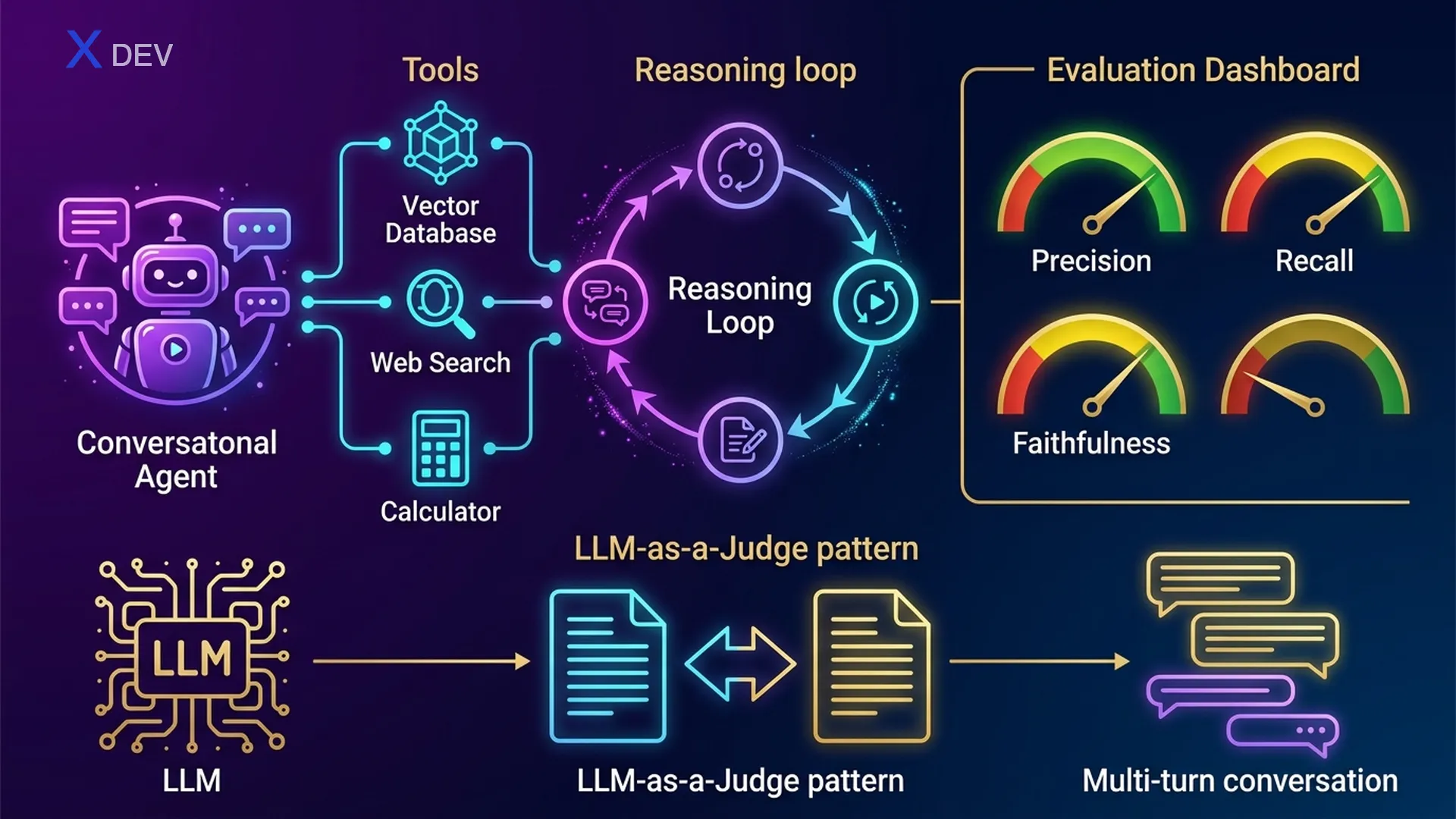
RAG Agent將靜態RAG升級,把檢索轉變為LLM可以選擇使用的眾多工具之一。Agent可以:
- 決定何時檢索 — 如果已經知道答案 → 不需要檢索
- 選擇使用哪個工具 — 檢索器用於內部文件、網路搜尋用於新聞、計算器用於數學運算
- 迭代推理 — 檢索 → 發現資訊不足 → 用不同查詢重新檢索
- 綜合多個來源 — 結合多個工具的結果
1.3. ReAct模式 — Thought → Action → Observation
ReAct(Reasoning + Acting)是LLM代理最流行的模式。LLM執行一個迴圈:思考(Thought)→ 選擇動作(Action)→ 觀察結果(Observation)→ 重複直到得出最終答案。
ReAct Agent Loop — RAG Agent 決策流程
══════════════════════════════════════════════════════════════════

  使用者:"比較公司Q3營收與行業平均值"
       │
       ▼
  ┌─────────────────────────────────────────────────────────┐
  │  THOUGHT: 需要2項資訊 — 內部營收 +                       │
  │           行業平均值                                     │
  │  ACTION:  retriever_tool("Q3公司營收")                   │
  └────────────────────────┬────────────────────────────────┘
                           │
                           ▼
  ┌─────────────────────────────────────────────────────────┐
  │  OBSERVATION: "Q3營收:1.5億"                            │
  │  THOUGHT: 已有內部營收。需要行業平均值 →                   │
  │           網路搜尋                                       │
  │  ACTION:  web_search_tool("2025年Q3科技行業              │
  │           平均營收")                                     │
  └────────────────────────┬────────────────────────────────┘
                           │
                           ▼
  ┌─────────────────────────────────────────────────────────┐
  │  OBSERVATION: "科技行業Q3平均值:1.2億"                    │
  │  THOUGHT: 資料齊全。需要比較 → 計算                       │
  │  ACTION:  calculator_tool("(150 - 120) / 120 * 100")   │
  └────────────────────────┬────────────────────────────────┘
                           │
                           ▼
  ┌─────────────────────────────────────────────────────────┐
  │  OBSERVATION: "25.0"                                    │
  │  THOUGHT: 所有資料齊全。綜合回答。                         │
  │  FINAL ANSWER: "公司Q3營收(1.5億)比行業平均值            │
  │   (1.2億)高25%。"                                      │
  └─────────────────────────────────────────────────────────┘
考試提示:「LLM自主決定何時檢索、何時使用其他工具」→ 答案是Agent(不是靜態RAG chain)。「哪種模式允許LLM迭代推理+行動?」→ ReAct。關鍵區別:Chain = 固定序列,Agent = 動態決策。
| 特性 | 靜態RAG Chain | RAG Agent |
|---|---|---|
| 執行流程 | 固定:檢索 → 生成 | 動態:LLM決定每一步 |
| 工具 | 僅1個檢索器 | 多個:檢索器、搜尋、計算、API... |
| 推理 | 無 — 總是檢索 | ReAct迴圈:Thought → Action → Observation |
| 多步驟 | 單次檢索 | 可用不同查詢多次檢索 |
| 記憶 | 無狀態 | 可維護對話歷史 |
| 複雜度 | 簡單、可預測 | 強大但較難除錯 |
| 延遲 | 低(1次LLM呼叫) | 較高(多次LLM呼叫) |
| 使用場景 | 簡單的文件問答 | 需要多個來源的複雜任務 |
2. 使用LangChain建構RAG Agent
2.1. 定義工具
第一步:定義Agent可以使用的工具。每個工具有一個名稱、描述(LLM讀取描述來決定使用哪個工具)和一個函式。
from langchain_nvidia_ai_endpoints import ChatNVIDIA, NVIDIAEmbeddings
from langchain_community.vectorstores import FAISS
from langchain.text_splitter import RecursiveCharacterTextSplitter
from langchain_community.document_loaders import PyPDFLoader
from langchain.tools.retriever import create_retriever_tool
from langchain_community.tools.tavily_search import TavilySearchResults
from langchain_core.tools import tool

# === 工具1:文件檢索器 ===
loader = PyPDFLoader("company_docs.pdf")
docs = loader.load()
splitter = RecursiveCharacterTextSplitter(chunk_size=500, chunk_overlap=50)
chunks = splitter.split_documents(docs)
embeddings = NVIDIAEmbeddings(model="NV-Embed-QA")
vectorstore = FAISS.from_documents(chunks, embeddings)
retriever = vectorstore.as_retriever(search_kwargs={"k": 4})

retriever_tool = create_retriever_tool(
    retriever,
    name="company_docs_search",
    description="Search for information in internal company documents. "
                "Use when the user asks about policies, processes, or HR matters."
)

# === 工具2:網路搜尋 ===
web_search_tool = TavilySearchResults(
    max_results=3,
    description="Search for information on the internet. "
                "Use when you need recent news, market data, "
                "or information not available in internal documents."
)

# === 工具3:計算器 ===
@tool
def calculator_tool(expression: str) -> str:
    """Calculate mathematical expressions. Use when you need to compute
    percentages, compare figures, or perform arithmetic."""
    try:
        result = eval(expression)  # Production: use numexpr or sympy
        return str(result)
    except Exception as e:
        return f"Calculation error: {e}"

# 工具列表
tools = [retriever_tool, web_search_tool, calculator_tool]
考試提示:工具描述至關重要 — LLM讀取描述來決定使用哪個工具。描述模糊 → Agent選錯工具。考試可能會問:「Agent選錯工具,根本原因是什麼?」→ 檢查工具描述。
2.2. 建立Agent — Tool Calling Agent
LangChain提供兩種建立Agent的方式:create_react_agent(基於ReAct提示詞)和create_tool_calling_agent(使用原生tool calling API)。對於NVIDIA NIM / OpenAI相容模型,優先使用tool calling agent。
from langchain.agents import create_tool_calling_agent, AgentExecutor
from langchain_core.prompts import ChatPromptTemplate, MessagesPlaceholder

# 支援tool calling的LLM
llm = ChatNVIDIA(
    model="meta/llama-3.1-70b-instruct",
    temperature=0.1
)

# Agent提示詞 — 必須包含 {agent_scratchpad}
prompt = ChatPromptTemplate.from_messages([
    ("system", """You are an intelligent company assistant. Use tools
to find accurate information. Always cite your sources.
If you can't find the information → clearly state "Information not found."
Never fabricate information."""),
    MessagesPlaceholder(variable_name="chat_history", optional=True),
    ("human", "{input}"),
    MessagesPlaceholder(variable_name="agent_scratchpad"),
])

# 建立Agent
agent = create_tool_calling_agent(llm, tools, prompt)

# AgentExecutor:執行Agent迴圈
agent_executor = AgentExecutor(
    agent=agent,
    tools=tools,
    verbose=True,           # 顯示ReAct迴圈
    max_iterations=5,       # 限制迭代次數(防止無限迴圈!)
    handle_parsing_errors=True,
    return_intermediate_steps=True  # 除錯:查看使用了哪些工具
)
2.3. 執行Agent
# === 查詢1:需要檢索 ===
result = agent_executor.invoke({
    "input": "What is the company's leave policy?"
})
print(result["output"])
# Agent將:Thought → 使用company_docs_search → 回答

# === 查詢2:需要網路搜尋 ===
result = agent_executor.invoke({
    "input": "What is NVIDIA's stock price today?"
})
# Agent將:Thought → 使用web_search → 回答

# === 查詢3:多工具 ===
result = agent_executor.invoke({
    "input": "Compare Q3 company revenue with the VN tech industry average"
})
# Agent將:retriever → web_search → calculator → 綜合

# === 查看中間步驟(除錯) ===
for step in result["intermediate_steps"]:
    action, observation = step
    print(f"Tool: {action.tool}")
    print(f"Input: {action.tool_input}")
    print(f"Output: {observation[:100]}...")
    print("---")
2.4. 工具選擇邏輯
LLM根據使用者查詢與工具描述之間的語義匹配來選擇工具。過程如下:
工具選擇 — LLM如何選擇工具
═══════════════════════════════════════════════════════

  使用者查詢:"Q3營收是多少?"
       │
       ▼
  ┌──────────────────────────────────────────────────┐
  │  LLM讀取工具描述:                                │
  │                                                  │
  │  1. company_docs_search:                         │
  │     "搜尋內部公司文件。                             │
  │      用於政策、流程..."                             │
  │     → 相關性:高 ✅(內部 + 數據)                  │
  │                                                  │
  │  2. web_search:                                  │
  │     "搜尋網路。用於新聞、                           │
  │      市場資料..."                                  │
  │     → 相關性:中(如果文件中找不到                   │
  │       可能需要)                                   │
  │                                                  │
  │  3. calculator:                                  │
  │     "計算數學運算式..."                             │
  │     → 相關性:低(目前不需要計算)                   │
  └──────────────────────┬───────────────────────────┘
                         │
                         ▼
          選擇:company_docs_search ✅
考試提示:「Agent呼叫了錯誤的工具」→ 檢查工具描述是否足夠清晰。「Agent呼叫工具太多次(無限迴圈)」→ 設定max_iterations。AgentExecutor兩個最重要的參數:max_iterations(預設15,應限制為5-10)和handle_parsing_errors=True。
3. 多輪對話式RAG
3.1. 問題:沒有記憶
靜態RAG pipeline獨立處理每個查詢。當使用者提出後續問題時,pipeline無法理解上下文:
沒有聊天歷史的問題
═══════════════════════════════════════════════

  使用者:"請假政策是什麼?"
  機器人:"員工每年有12天假期..."              ✅

  使用者:"病假呢?"                   ← 後續問題
  機器人:???                          ← "病假"缺乏上下文
                                        檢索器搜尋"病假"
                                        → 可能遺漏相關文件

  使用者:"有薪嗎?"                   ← "有薪"→ 什麼有薪?
  機器人:???                          ← 上下文完全遺失
3.2. 問題脈絡化 — 根據歷史重寫問題
解決方案:在檢索之前,重寫問題以包含對話歷史中的上下文。「病假呢?」→「公司的病假政策是什麼?是否有薪?」
from langchain_core.prompts import ChatPromptTemplate, MessagesPlaceholder
from langchain_core.output_parsers import StrOutputParser
from langchain.chains import create_history_aware_retriever

# 根據聊天歷史重寫問題的提示詞
contextualize_q_prompt = ChatPromptTemplate.from_messages([
    ("system", """Given the conversation history and the latest question,
rewrite the question as a standalone question that can be understood
without the previous context.
Do NOT answer the question — only rewrite if needed, or keep as-is."""),
    MessagesPlaceholder("chat_history"),
    ("human", "{input}"),
])

llm = ChatNVIDIA(model="meta/llama-3.1-70b-instruct", temperature=0.1)

# 歷史感知檢索器:重寫查詢 → 檢索
history_aware_retriever = create_history_aware_retriever(
    llm, retriever, contextualize_q_prompt
)
3.3. 完整的對話式RAG Chain
from langchain.chains import create_retrieval_chain
from langchain.chains.combine_documents import create_stuff_documents_chain
from langchain_core.messages import HumanMessage, AIMessage

# QA提示詞
qa_prompt = ChatPromptTemplate.from_messages([
    ("system", """You are an AI assistant. Answer based on the provided context.
If not found → say "Not found in the documents."

Context:
{context}"""),
    MessagesPlaceholder("chat_history"),
    ("human", "{input}"),
])

# Chain:stuff documents
question_answer_chain = create_stuff_documents_chain(llm, qa_prompt)

# 完整的對話式RAG chain
rag_chain = create_retrieval_chain(
    history_aware_retriever, question_answer_chain
)

# === 多輪對話 ===
chat_history = []

# 第1輪
response1 = rag_chain.invoke({
    "input": "What is the leave policy?",
    "chat_history": chat_history
})
print(response1["answer"])
# → "員工每年有12天假期..."

chat_history.extend([
    HumanMessage(content="What is the leave policy?"),
    AIMessage(content=response1["answer"])
])

# 第2輪 — 後續問題
response2 = rag_chain.invoke({
    "input": "What about sick leave?",
    "chat_history": chat_history
})
print(response2["answer"])
# 問題被重寫為:"公司的病假政策是什麼?"
# → 檢索更精確!
3.4. 自動管理歷史:RunnableWithMessageHistory
from langchain_community.chat_message_histories import ChatMessageHistory
from langchain_core.runnables.history import RunnableWithMessageHistory

# 儲存session歷史
session_store = {}

def get_session_history(session_id: str):
    if session_id not in session_store:
        session_store[session_id] = ChatMessageHistory()
    return session_store[session_id]

# 用訊息歷史管理包裝chain
conversational_rag = RunnableWithMessageHistory(
    rag_chain,
    get_session_history,
    input_messages_key="input",
    history_messages_key="chat_history",
    output_messages_key="answer",
)

# 使用方式 — 歷史由session_id自動管理
config = {"configurable": {"session_id": "user-123"}}

r1 = conversational_rag.invoke(
    {"input": "What is the leave policy?"},
    config=config
)
# 自動儲存歷史

r2 = conversational_rag.invoke(
    {"input": "What about sick leave?"},        # 根據歷史自動重寫
    config=config
)
多輪對話式RAG流程
════════════════════════════════════════════════════════════════════

  使用者:"請假政策是什麼?"     session_id: "user-123"
       │
       ▼
  ┌──────────────────┐     歷史:[](空)
  │ 問題脈絡化       │───► 獨立問題:"請假政策是什麼?"
  └────────┬─────────┘     (保持原樣,不需要重寫)
           │
           ▼
  ┌──────────────────┐
  │  檢索器          │───► 4個關於請假政策的文件片段
  └────────┬─────────┘
           │
           ▼
  ┌──────────────────┐
  │  LLM生成         │───► "員工每年有12天假期..."
  └────────┬─────────┘
           │
           ▼
  儲存至歷史:[Human: "請假政策是...", AI: "員工..."]

  ─────────────────────────────────────────────────────────────

  使用者:"病假呢?"              session_id: "user-123"
       │
       ▼
  ┌──────────────────┐     歷史:[請假政策問答]
  │ 問題脈絡化       │───► 重寫:"公司的病假政策
  └────────┬─────────┘              是什麼?"
           │
           ▼
  ┌──────────────────┐
  │  檢索器          │───► 用重寫的查詢搜尋 → 更精確!
  └────────┬─────────┘
           │
           ▼
  ┌──────────────────┐
  │  LLM生成         │───► "病假:每年最多30天..."
  └──────────────────┘
考試提示:「使用者提出後續問題但檢索器返回錯誤結果」→ 缺少歷史感知檢索器(需要在檢索前將問題脈絡化)。「管理多session聊天歷史」→ RunnableWithMessageHistory + session_id。DLI考試可能會問脈絡化提示詞的角色 — 要強調:重寫為獨立問題,不要回答。
4. RAG評估指標
4.1. 為什麼需要評估?
「結果看起來還不錯」對生產環境來說是不夠的。你需要系統性評估來衡量RAG pipeline品質,並比較不同配置(chunk size、embedding模型、檢索器類型...)。
4.2. 四個關鍵指標
| 指標 | 衡量什麼? | 如何計算 | 可接受閾值 |
|---|---|---|---|
| 忠實度(Faithfulness) | 答案是否「捏造」?答案中所有聲明是否都存在於上下文中? | 將答案拆分為聲明 → 逐一比對上下文 | ≥ 0.85 |
| 答案相關性(Answer Relevance) | 答案是否確實回應了問題? | 從答案生成問題 → 與原始問題比較餘弦相似度 | ≥ 0.80 |
| 上下文精確度(Context Precision) | 檢索的文件是否相關?(精確率) | 檢索的文件中實際相關的數量 / 總檢索文件數 | ≥ 0.75 |
| 上下文召回率(Context Recall) | 是否檢索到足夠的必要文件?(召回率) | 標準答案中有多少聲明可以追溯到檢索的文件 | ≥ 0.80 |
RAG評估 — 每個指標衡量什麼
════════════════════════════════════════════════════════════════

  問題:"退款政策是什麼?"

  檢索的上下文(3份文件):
  ┌─────────────────────────────────────────────────────────┐
  │ 文件1:"30天內可憑收據退款"                          ✅   │
  │ 文件2:"產品必須保持原始密封包裝"                     ✅   │
  │ 文件3:"本週餐廳菜單"                               ❌   │
  └─────────────────────────────────────────────────────────┘
  上下文精確度 = 2/3 = 0.67 ← 文件3不相關!

  標準答案:"30天內退款,需收據,原始密封,
                 透過email聯繫客服"
  檢索涵蓋:退款 ✅、收據 ✅、密封 ✅、email ❌
  上下文召回率 = 3/4 = 0.75  ← 缺少email相關資訊

  生成的答案:"如有收據且產品仍密封,
                     可在30天內退款。"
  聲明:[30天 ✅、收據 ✅、密封 ✅]
  忠實度 = 3/3 = 1.0    ← 所有聲明都有依據!

  答案是否回應了問題?→ 是,但不完整
  答案相關性 ≈ 0.85     ← 相關但缺少email細節
4.3. RAGAS框架
RAGAS(Retrieval Augmented Generation Assessment)是最受歡迎的RAG評估開源框架。RAGAS自動計算上述所有4個指標,無需人工標註(使用LLM進行評估)。
from ragas import evaluate
from ragas.metrics import (
    faithfulness,
    answer_relevancy,
    context_precision,
    context_recall,
)
from datasets import Dataset

# 準備評估資料集
eval_data = {
    "question": [
        "What is the refund policy?",
        "How many days of leave?"
    ],
    "answer": [
        "Refund within 30 days with receipt.",
        "Employees get 12 days of leave per year."
    ],
    "contexts": [
        ["Refund within 30 days with original receipt.", "Product must be sealed."],
        ["Full-time employees: 12 days leave/year.", "Probation: 1 day/month."]
    ],
    "ground_truth": [
        "Customers can get a refund within 30 days with original receipt and sealed product.",
        "Full-time employees get 12 days leave/year, probation 1 day/month."
    ]
}

dataset = Dataset.from_dict(eval_data)

# 評估!
results = evaluate(
    dataset,
    metrics=[faithfulness, answer_relevancy, context_precision, context_recall],
)

print(results)
# {'faithfulness': 0.95, 'answer_relevancy': 0.88,
#  'context_precision': 0.83, 'context_recall': 0.75}

# 轉換為pandas進行詳細分析
df = results.to_pandas()
print(df)
考試提示:「答案包含不在檢索上下文中的資訊」→ 低忠實度。「檢索的文件與問題不相關」→ 低上下文精確度。「答案正確但未回應問題」→ 低答案相關性。「缺少重要文件」→ 低上下文召回率。最受歡迎的RAG評估框架 → RAGAS。
5. LLM-as-Judge評估
5.1. 為什麼使用LLM-as-Judge?
人工評估(人類評審)準確但無法規模化:1000個答案 × 3位標註者 = 3000次審查。LLM-as-Judge使用更強(或同等級)的LLM來自動評估另一個LLM的輸出。
| 評估方法 | 優點 | 缺點 |
|---|---|---|
| 人工評估 | 黃金標準、細緻入微 | 昂貴、緩慢、無法規模化 |
| 自動指標(BLEU、ROUGE) | 快速、便宜、可重現 | 無法捕捉語義品質 |
| LLM-as-Judge | 可規模化、捕捉語義 | 偏差、judge LLM成本、不完美 |
| RAGAS(基於LLM) | 自動化、多指標 | 依賴judge LLM品質 |
5.2. 評估提示詞範本
from langchain_core.prompts import ChatPromptTemplate
from langchain_core.output_parsers import JsonOutputParser

# 忠實度評估器提示詞
faithfulness_eval_prompt = ChatPromptTemplate.from_template("""
You are an impartial judge evaluating the faithfulness of an AI answer.

**Faithfulness** means every claim in the answer must be supported by
the provided context. The answer should NOT contain information
that cannot be traced back to the context.

**Context:**
{context}

**Question:**
{question}

**Answer to evaluate:**
{answer}

Evaluate step by step:
1. List all claims made in the answer.
2. For each claim, check if it is supported by the context.
3. Count supported claims vs total claims.

Respond in JSON format:
{{
  "claims": [
    {{"claim": "...", "supported": true/false, "evidence": "..."}}
  ],
  "faithfulness_score": ,
  "reasoning": "..."
}}
""")

# Judge LLM — 使用可用的最強模型
judge_llm = ChatNVIDIA(
    model="meta/llama-3.1-70b-instruct",
    temperature=0.0           # temperature=0以獲得一致的評估結果
)

faithfulness_chain = faithfulness_eval_prompt | judge_llm | JsonOutputParser()

# 評估一個回應
eval_result = faithfulness_chain.invoke({
    "context": "The company offers refunds within 30 days with original receipt.",
    "question": "What is the refund policy?",
    "answer": "Refund within 30 days with receipt. Contact CS via email."
})

print(eval_result)
# {
#   "claims": [
#     {"claim": "Refund within 30 days", "supported": true, ...},
#     {"claim": "need receipt", "supported": true, ...},
#     {"claim": "Contact CS via email", "supported": false, ...}  ← 幻覺!
#   ],
#   "faithfulness_score": 0.67,
#   "reasoning": "2/3 claims supported. 'Contact CS via email' not in context."
# }
5.3. 成對比較 — A vs B比較
與絕對評分不同,成對比較評估兩個輸出並選出較好的一個。此方法比絕對評分更不容易產生偏差。
pairwise_prompt = ChatPromptTemplate.from_template("""
You are comparing two AI responses to the same question.

**Question:** {question}
**Context:** {context}

**Response A:**
{response_a}

**Response B:**
{response_b}

Compare on these criteria:
1. Faithfulness: grounded in context?
2. Completeness: covers all relevant info?
3. Clarity: well-structured and easy to understand?

Choose the better response. Respond in JSON:
{{
  "winner": "A" or "B" or "TIE",
  "criteria_scores": {{
    "faithfulness": {{"A": <1-5>, "B": <1-5>}},
    "completeness": {{"A": <1-5>, "B": <1-5>}},
    "clarity": {{"A": <1-5>, "B": <1-5>}}
  }},
  "reasoning": "..."
}}
""")

pairwise_chain = pairwise_prompt | judge_llm | JsonOutputParser()
5.4. LLM-as-Judge的限制
- 冗長偏差 — LLM評審傾向給較長的輸出更高分數,即使較短的答案更好
- 位置偏差 — 在成對評估中,傾向偏好第一個輸出(A > B)。修正:評估兩次並交換A↔B位置
- 自我增強偏差 — LLM評審偏好自己的輸出。使用不同模型作為評審
- 推理能力有限 — 評審可能在專業領域(醫療、法律)忽略細微錯誤
減緩LLM-as-Judge偏差
══════════════════════════════════════════

  位置偏差修正:
  ┌──────────────────────────────┐
  │  第1輪:A在前、B在後         │──► 第1輪贏家:A
  │  第2輪:B在前、A在後         │──► 第2輪贏家:A
  │  最終:一致 → A獲勝          │
  │  (如果不一致 → 平手)        │
  └──────────────────────────────┘

  冗長偏差修正:
  ┌──────────────────────────────┐
  │  提示詞:"根據準確性和          │
  │  簡潔性進行評估。              │
  │  更長 ≠ 更好。"               │
  └──────────────────────────────┘
考試提示:「大規模評估LLM輸出」→ LLM-as-Judge。「LLM評審偏好較長的答案」→ 冗長偏差。「LLM評審偏好成對中的第一個選項」→ 位置偏差。修正位置偏差 → 交換位置後取平均。DLI考試經常問:「哪種評估方法最具規模化能力?」→ LLM-as-Judge(不是人工評估)。
6. 考試準備 — DLI S-FX-15
6.1. S-FX-15考試概述
課程S-FX-15:「Generative AI with Diffusion Models and Large Language Models」以Jupyter notebook中的實作考核作為結束。你需要在時間限制內完成編程任務。
| 方面 | 詳情 |
|---|---|
| 形式 | Jupyter notebook — 填寫程式碼儲存格,執行測試 |
| 時間 | 約2小時(在實驗室session內) |
| 通過條件 | 完成所有必要的儲存格 + 正確輸出 |
| 可用工具 | 課程notebook、NVIDIA文件(在DLI環境內) |
| 重考 | 如未通過可重考(依DLI政策) |
6.2. 涵蓋的關鍵領域
S-FX-15考核涵蓋課程三個部分的關鍵領域:
| 部分 | 關鍵主題 | 可能的考核任務 |
|---|---|---|
| 第1部分:Generative AI基礎 | 擴散模型、VAE、GAN | 設定擴散pipeline、生成圖像 |
| 第2部分:LLM核心 | Transformer、tokenizer、PEFT、推論 | 載入模型、tokenize、LoRA微調、推論參數 |
| 第3部分:RAG與應用 | RAG pipeline、agent、評估 | 建構RAG、實作評估、加入guardrails |
6.3. 時間管理策略
S-FX-15 時間管理
════════════════════════════════════════════

  總計:約120分鐘

  ┌─────────────────────────────────────┐
  │  0-10分鐘:閱讀整個notebook        │ ← 不要馬上開始寫程式!
  │            標記簡單/困難的儲存格    │
  │            確認依賴關係             │
  └─────────────────────────────────────┘
  ┌─────────────────────────────────────┐
  │  10-50分鐘:先做簡單的儲存格       │ ← 先取得容易的分數
  │             Import、設定、配置      │
  │             直接明瞭的任務          │
  └─────────────────────────────────────┘
  ┌─────────────────────────────────────┐
  │  50-100分鐘:困難的儲存格          │ ← RAG pipeline、評估
  │              多步驟任務             │
  │              需要時進行除錯         │
  └─────────────────────────────────────┘
  ┌─────────────────────────────────────┐
  │  100-120分鐘:檢查與修正           │ ← 從頭到尾執行所有儲存格
  │               確認輸出正確         │
  │               修正任何錯誤         │
  └─────────────────────────────────────┘
6.4. 常見錯誤 — 避免這些
| 錯誤 | 後果 | 修正方法 |
|---|---|---|
切割時忘記chunk_overlap | 上下文在邊界處被截斷 → 答案品質差 | 始終設定overlap = chunk_size的10-20% |
| 檢索器和嵌入使用不同的embedding模型 | 維度不匹配 → 崩潰 | 嵌入和檢索使用相同模型 |
評估時未設定temperature=0 | 評估結果不可重現 | 評估任務:temperature=0 |
| Agent無限迴圈 | 逾時、儲存格失敗 | 設定max_iterations=5 |
忘記handle_parsing_errors=True | LLM返回錯誤格式時Agent崩潰 | 始終啟用此標誌 |
| RAG提示詞中未正確格式化上下文 | LLM忽略上下文 → 產生幻覺 | 在提示詞範本中清楚分隔{context} |
| 不按順序執行儲存格 | 變數未定義錯誤 | 從上到下執行,或「Restart & Run All」 |
| 忘記安裝套件 | Import錯誤 | 先執行!pip install儲存格 |
6.5. 通過考試的技巧
- 仔細閱讀說明 — 每個儲存格通常有註解說明TODO。寫程式前要詳細閱讀。
- 課程notebook是你的參考 — 考核任務通常是課程練習的變體。參考已完成的notebook。
- NVIDIA API模式 — 記住如何匯入和初始化:
ChatNVIDIA(model=...)、NVIDIAEmbeddings(model=...)。 - 逐一測試儲存格 — 寫完後立即執行儲存格,不要等到全部寫完。
- 輸出格式很重要 — 如果說明要求返回dict → 返回dict,不是string。
考試提示:S-FX-15考核著重實作編程,非選擇題。優先複習:RAG pipeline設定(幾乎必考)、PEFT/LoRA配置、擴散pipeline。參考課程notebook — 考核通常需要類似任務但使用不同資料/模型。
7. 速查表
| 概念 | 關鍵要點 |
|---|---|
| 靜態RAG vs Agent | Chain = 固定流程;Agent = 動態,LLM決定 |
| ReAct模式 | Thought → Action → Observation迴圈 |
| 工具描述 | LLM根據描述選擇工具 — 必須清晰! |
| create_tool_calling_agent | 使用原生tool calling API(NVIDIA NIM優先選擇) |
| AgentExecutor max_iterations | 預設15,應設為5-10以防止無限迴圈 |
| handle_parsing_errors | 始終設True — 防止LLM返回錯誤格式時崩潰 |
| 歷史感知檢索器 | 在檢索前將後續查詢重寫為獨立問題 |
| RunnableWithMessageHistory | 透過session_id自動管理聊天歷史 |
| 忠實度(Faithfulness) | 答案是否有上下文依據?(≥ 0.85) |
| 答案相關性(Answer Relevance) | 答案是否回應了問題?(≥ 0.80) |
| 上下文精確度(Context Precision) | 檢索的文件是否相關?(≥ 0.75) |
| 上下文召回率(Context Recall) | 是否檢索到足夠的文件?(≥ 0.80) |
| RAGAS | 衡量上述4個指標的框架,使用LLM評估 |
| LLM-as-Judge | 使用強大的LLM評估另一個LLM的輸出 — 可規模化 |
| 冗長偏差 | 評審偏好較長的答案 |
| 位置偏差 | 評審偏好第一個選項 → 交換A↔B後取平均 |
| S-FX-15形式 | 實作Jupyter notebook,約2小時,基於編程 |
| S-FX-15策略 | 全部閱讀 → 先做簡單的 → 再做困難的 → 檢查 |
8. 練習題 — 編程
Q1:建構包含檢索器 + 網路搜尋的RAG Agent
建構一個包含2個工具的RAG Agent:retriever_tool(搜尋內部文件)和web_search_tool(搜尋網路)。Agent必須自主決定何時使用哪個工具。印出中間步驟以查看工具選擇邏輯。
顯示答案 Q1
from langchain_nvidia_ai_endpoints import ChatNVIDIA, NVIDIAEmbeddings
from langchain_community.vectorstores import FAISS
from langchain.text_splitter import RecursiveCharacterTextSplitter
from langchain.tools.retriever import create_retriever_tool
from langchain_community.tools.tavily_search import TavilySearchResults
from langchain.agents import create_tool_calling_agent, AgentExecutor
from langchain_core.prompts import ChatPromptTemplate, MessagesPlaceholder

# === 設定檢索器 ===
from langchain_core.documents import Document
docs = [
    Document(page_content="Employees get 12 days of leave per year. Probation: 1 day/month.",
             metadata={"source": "hr_policy.pdf"}),
    Document(page_content="Refund within 30 days with original receipt. Product must be sealed.",
             metadata={"source": "refund_policy.pdf"}),
]

embeddings = NVIDIAEmbeddings(model="NV-Embed-QA")
vectorstore = FAISS.from_documents(docs, embeddings)
retriever = vectorstore.as_retriever(search_kwargs={"k": 2})

# === 定義工具 ===
retriever_tool = create_retriever_tool(
    retriever,
    name="internal_docs_search",
    description="Search internal company documents: HR policies, "
                "processes, refunds. Use for internal company questions."
)

web_search_tool = TavilySearchResults(
    max_results=3,
    description="Search the internet. Use when you need external information: "
                "news, stock prices, market data, public information."
)

tools = [retriever_tool, web_search_tool]

# === 建立Agent ===
llm = ChatNVIDIA(model="meta/llama-3.1-70b-instruct", temperature=0.1)

prompt = ChatPromptTemplate.from_messages([
    ("system", "You are an AI assistant. Use tools to find accurate information. "
               "Cite your sources when answering."),
    ("human", "{input}"),
    MessagesPlaceholder(variable_name="agent_scratchpad"),
])

agent = create_tool_calling_agent(llm, tools, prompt)
agent_executor = AgentExecutor(
    agent=agent,
    tools=tools,
    verbose=True,
    max_iterations=5,
    handle_parsing_errors=True,
    return_intermediate_steps=True,
)

# === 測試:內部問題 → 應使用retriever ===
result1 = agent_executor.invoke({"input": "What is the leave policy?"})
print("Answer:", result1["output"])
print("\nTools used:")
for step in result1["intermediate_steps"]:
    print(f"  → {step[0].tool}: {step[0].tool_input}")

# === 測試:外部問題 → 應使用web search ===
result2 = agent_executor.invoke({"input": "NVIDIA stock price today?"})
print("Answer:", result2["output"])
print("\nTools used:")
for step in result2["intermediate_steps"]:
    print(f"  → {step[0].tool}: {step[0].tool_input}")
工具選擇說明:Agent讀取工具描述。「Leave policy」匹配「internal company documents, HR policies」→ 選擇internal_docs_search。「NVIDIA stock price」匹配「news, stock prices, market data」→ 選擇web_search。
Q2:實作歷史感知檢索器以支援多輪RAG
建構一個能理解後續問題的對話式RAG pipeline。用3輪對話進行測試:原始問題 → 後續問題 → 再一個後續問題。
顯示答案 Q2
from langchain_nvidia_ai_endpoints import ChatNVIDIA, NVIDIAEmbeddings
from langchain_community.vectorstores import FAISS
from langchain_core.documents import Document
from langchain_core.prompts import ChatPromptTemplate, MessagesPlaceholder
from langchain_core.messages import HumanMessage, AIMessage
from langchain.chains import create_history_aware_retriever, create_retrieval_chain
from langchain.chains.combine_documents import create_stuff_documents_chain

# === 設定 ===
docs = [
    Document(page_content="Full-time employees: 12 days leave/year. Can carry over max 5 days to next year."),
    Document(page_content="Sick leave: up to 30 days/year with pay. Doctor's note required from day 3."),
    Document(page_content="Maternity leave: 6 months for women, 5 days for men. Per Vietnam labor law."),
]

embeddings = NVIDIAEmbeddings(model="NV-Embed-QA")
vectorstore = FAISS.from_documents(docs, embeddings)
retriever = vectorstore.as_retriever(search_kwargs={"k": 2})
llm = ChatNVIDIA(model="meta/llama-3.1-70b-instruct", temperature=0.1)

# === 歷史感知檢索器 ===
contextualize_prompt = ChatPromptTemplate.from_messages([
    ("system", "Given the conversation history, rewrite the question as a standalone question. "
               "Do NOT answer, only rewrite."),
    MessagesPlaceholder("chat_history"),
    ("human", "{input}"),
])

history_aware_retriever = create_history_aware_retriever(
    llm, retriever, contextualize_prompt
)

# === QA chain ===
qa_prompt = ChatPromptTemplate.from_messages([
    ("system", "Answer based on context. If not found → say so.\n\n"
               "Context:\n{context}"),
    MessagesPlaceholder("chat_history"),
    ("human", "{input}"),
])

qa_chain = create_stuff_documents_chain(llm, qa_prompt)
rag_chain = create_retrieval_chain(history_aware_retriever, qa_chain)

# === 3輪對話 ===
chat_history = []

# 第1輪
r1 = rag_chain.invoke({"input": "What is the leave policy?", "chat_history": chat_history})
print(f"第1輪:{r1['answer']}")
chat_history.extend([
    HumanMessage(content="What is the leave policy?"),
    AIMessage(content=r1["answer"])
])

# 第2輪 — 後續問題
r2 = rag_chain.invoke({"input": "What about sick leave?", "chat_history": chat_history})
print(f"第2輪:{r2['answer']}")
# "What about sick leave?" → 重寫為:"公司的病假政策是什麼?"
chat_history.extend([
    HumanMessage(content="What about sick leave?"),
    AIMessage(content=r2["answer"])
])

# 第3輪 — 再一個後續問題
r3 = rag_chain.invoke({"input": "Do I need any documents?", "chat_history": chat_history})
print(f"第3輪:{r3['answer']}")
# "Do I need any documents?" → 重寫為:"病假需要什麼文件?"
Q3:計算忠實度分數
實作一個calculate_faithfulness()函式,接收context和answer,使用LLM將答案拆分為聲明,檢查每個聲明是否與上下文一致,並返回忠實度分數[0.0 - 1.0]。
顯示答案 Q3
from langchain_nvidia_ai_endpoints import ChatNVIDIA
from langchain_core.prompts import ChatPromptTemplate
from langchain_core.output_parsers import JsonOutputParser

def calculate_faithfulness(context: str, answer: str) -> dict:
    """
    計算忠實度分數:答案中有依據的聲明佔比。
    返回:{"score": float, "claims": list, "reasoning": str}
    """
    llm = ChatNVIDIA(model="meta/llama-3.1-70b-instruct", temperature=0.0)

    prompt = ChatPromptTemplate.from_template("""
Analyze the faithfulness of the answer given the context.

Context:
{context}

Answer:
{answer}

Steps:
1. Break the answer into individual factual claims.
2. For each claim, determine if it is supported by the context.
3. Calculate: faithfulness_score = supported_claims / total_claims

Return JSON:
{{
  "claims": [
    {{"text": "claim text", "supported": true, "evidence": "quote from context"}},
    {{"text": "claim text", "supported": false, "evidence": "not found"}}
  ],
  "supported_count": ,
  "total_count": ,
  "score": ,
  "reasoning": "summary"
}}
""")

    chain = prompt | llm | JsonOutputParser()
    result = chain.invoke({"context": context, "answer": answer})
    return result


# === 測試 ===
context = (
    "Company ABC offers refunds within 30 days from purchase date. "
    "Customers must present the original receipt. "
    "Product must still be sealed and unused."
)
answer = (
    "Company ABC offers refunds within 30 days with receipt. "
    "Product must be sealed. "
    "Call hotline 1900-xxxx for support."  # ← 不在上下文中!
)

result = calculate_faithfulness(context, answer)
print(f"忠實度分數:{result['score']}")
# 預期:約0.67(3個聲明中有2個有依據)
for claim in result["claims"]:
    status = "✅" if claim["supported"] else "❌"
    print(f"  {status} {claim['text']}")
Q4:實作帶結構化評分標準的LLM-as-Judge評估器
使用LLM-as-Judge模式建構一個評估器,包含3個評分標準:忠實度(1-5)、完整性(1-5)、清晰度(1-5)。評估器接收question、context、answer並返回分數 + 推理。同時實作帶位置交換的成對比較以減少位置偏差。
顯示答案 Q4
from langchain_nvidia_ai_endpoints import ChatNVIDIA
from langchain_core.prompts import ChatPromptTemplate
from langchain_core.output_parsers import JsonOutputParser

judge_llm = ChatNVIDIA(model="meta/llama-3.1-70b-instruct", temperature=0.0)

# === 部分A:單一回應評估 ===
single_eval_prompt = ChatPromptTemplate.from_template("""
You are an expert evaluator. Score the AI response on a 1-5 scale.

**Question:** {question}
**Context:** {context}
**Response:** {response}

**Rubric:**
- Faithfulness (1-5): Is every claim supported by context? 5 = all claims grounded.
- Completeness (1-5): Does it cover all relevant info from context? 5 = comprehensive.
- Clarity (1-5): Well-structured and easy to understand? 5 = excellent.

Return JSON:
{{
  "scores": {{
    "faithfulness": <1-5>,
    "completeness": <1-5>,
    "clarity": <1-5>
  }},
  "overall": ,
  "reasoning": "..."
}}
""")

single_eval_chain = single_eval_prompt | judge_llm | JsonOutputParser()

# === 部分B:帶位置偏差緩解的成對比較 ===
pairwise_prompt = ChatPromptTemplate.from_template("""
Compare two responses. Which is better overall?

**Question:** {question}
**Context:** {context}

**Response 1:**
{response_1}

**Response 2:**
{response_2}

Return JSON:
{{
  "winner": "1" or "2" or "TIE",
  "scores_1": {{"faithfulness": <1-5>, "completeness": <1-5>, "clarity": <1-5>}},
  "scores_2": {{"faithfulness": <1-5>, "completeness": <1-5>, "clarity": <1-5>}},
  "reasoning": "..."
}}
""")

pairwise_chain = pairwise_prompt | judge_llm | JsonOutputParser()


def pairwise_eval_debiased(question, context, resp_a, resp_b):
    """帶位置偏差緩解的成對評估:評估兩次,交換順序。"""

    # 第1輪:A在前
    r1 = pairwise_chain.invoke({
        "question": question, "context": context,
        "response_1": resp_a, "response_2": resp_b
    })

    # 第2輪:B在前(交換)
    r2 = pairwise_chain.invoke({
        "question": question, "context": context,
        "response_1": resp_b, "response_2": resp_a
    })

    # 標準化:將r2的贏家映射回來
    r2_winner_mapped = {"1": "2", "2": "1", "TIE": "TIE"}[r2["winner"]]

    # 決定最終贏家
    if r1["winner"] == r2_winner_mapped:
        final_winner = r1["winner"]  # 一致 → 有信心
        confidence = "高"
    else:
        final_winner = "TIE"         # 不一致 → 可能是位置偏差
        confidence = "低(偵測到位置偏差)"

    return {
        "final_winner": f"回應{'A' if final_winner == '1' else 'B' if final_winner == '2' else '平手'}",
        "confidence": confidence,
        "round1": r1,
        "round2_swapped": r2,
    }


# === 測試 ===
question = "What is the refund policy?"
context = "Refund within 30 days with receipt. Product must be sealed."
resp_a = "Refund within 30 days with receipt and sealed product."
resp_b = "The company supports refunds. Contact the hotline for details."

# 單一評估
score_a = single_eval_chain.invoke({
    "question": question, "context": context, "response": resp_a
})
print(f"回應A總分:{score_a['overall']}")

# 成對比較(去偏差)
comparison = pairwise_eval_debiased(question, context, resp_a, resp_b)
print(f"贏家:{comparison['final_winner']}({comparison['confidence']})")
Q5:除錯 — Agent無限迴圈
以下程式碼有bug:Agent持續呼叫工具而不停止(無限迴圈)。找出根本原因並修正。提示:檢查max_iterations和handle_parsing_errors。
# BUG CODE — 找出並修正問題
from langchain.agents import create_tool_calling_agent, AgentExecutor
from langchain_core.prompts import ChatPromptTemplate, MessagesPlaceholder

llm = ChatNVIDIA(model="meta/llama-3.1-70b-instruct", temperature=0.9)

prompt = ChatPromptTemplate.from_messages([
    ("system", "You are a helpful assistant."),
    ("human", "{input}"),
    # BUG:缺少agent_scratchpad!
])

agent = create_tool_calling_agent(llm, tools, prompt)

agent_executor = AgentExecutor(
    agent=agent,
    tools=tools,
    verbose=True,
    # BUG:沒有max_iterations → 預設15,太高
    # BUG:沒有handle_parsing_errors → 解析失敗時崩潰
)

result = agent_executor.invoke({"input": "Compare Q3 revenue with industry"})
顯示答案 Q5
# 修正後的程式碼 — 修正了4個bug

llm = ChatNVIDIA(
    model="meta/llama-3.1-70b-instruct",
    temperature=0.1          # 修正1:低temperature → 輸出更穩定
                              # temperature=0.9 → Agent太「有創意」→ 隨機選擇工具
)

prompt = ChatPromptTemplate.from_messages([
    ("system", "You are a helpful assistant. Use tools to find accurate information."),
    ("human", "{input}"),
    MessagesPlaceholder(variable_name="agent_scratchpad"),
    # 修正2:必須包含agent_scratchpad!
    # 這是LangChain注入Thought/Action/Observation歷史的位置
    # 缺少它 → Agent看不到工具結果 → 無止盡地再次呼叫工具
])

agent = create_tool_calling_agent(llm, tools, prompt)

agent_executor = AgentExecutor(
    agent=agent,
    tools=tools,
    verbose=True,
    max_iterations=5,            # 修正3:限制迭代次數
    handle_parsing_errors=True,  # 修正4:優雅處理解析錯誤
    return_intermediate_steps=True,
)

result = agent_executor.invoke({"input": "Compare Q3 revenue with industry"})

# === 4個bug摘要 ===
# 1. temperature=0.9太高 → 工具選擇不穩定
# 2. 缺少MessagesPlaceholder("agent_scratchpad") → Agent看不到
#    來自工具的觀察結果 → 無限呼叫工具(根本原因!)
# 3. 沒有max_iterations → 如果Agent不收斂就會永遠執行
# 4. 沒有handle_parsing_errors → 解析失敗時崩潰而非重試
根本原因:缺少agent_scratchpad是主要問題。這是LangChain注入Thought/Action/Observation歷史的佔位符。沒有它 → Agent不知道自己已經呼叫過工具 → 無限重複呼叫。max_iterations是安全網,較低的temperature有助於Agent做出更穩定的決策。