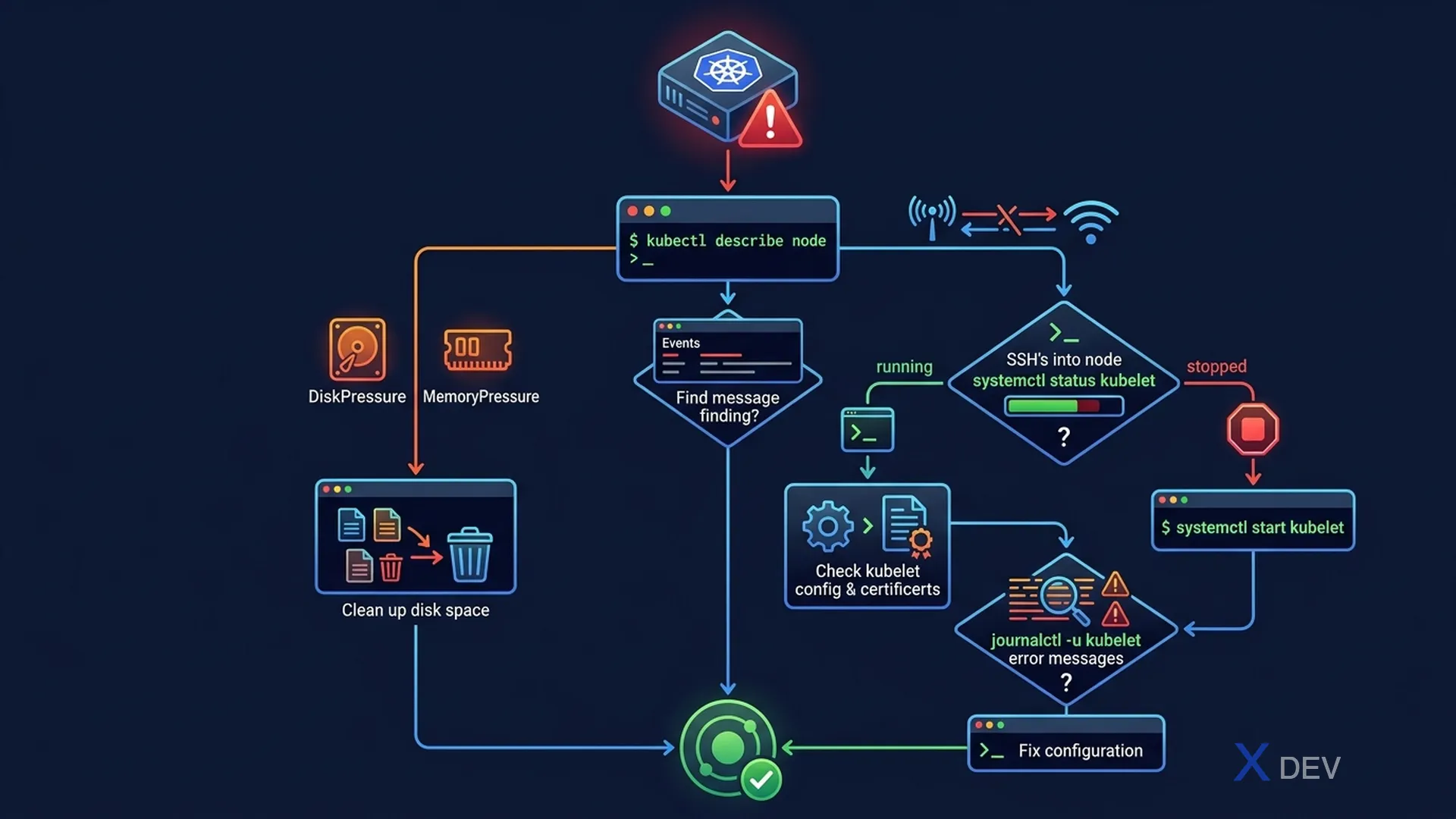
1. Node Conditions
kubectl describe node node1 | grep -A20 Conditions

Normal state:
  Type              Status
  ----              ------
  MemoryPressure    False   ← OK (True = low memory)
  DiskPressure      False   ← OK (True = low disk)
  PIDPressure       False   ← OK (True = too many processes)
  Ready             True    ← Node is healthy

Problem states:
  Ready             False   → kubelet not working
  Ready             Unknown → Node unreachable (network issue)
2. Troubleshoot NotReady Node
Systematic approach — run in order:

1. Check node status
   kubectl get nodes
   kubectl describe node NODE_NAME | tail -40

2. SSH to node
   ssh node1

3. Check kubelet service
   systemctl status kubelet
   journalctl -u kubelet -n 50 --no-pager

4. Check container runtime
   systemctl status containerd
   crictl ps           # List running containers
   crictl pods         # List pod sandboxes

5. Check certificates (common issue after cluster age)
   ls /var/lib/kubelet/pki/
   openssl x509 -in /var/lib/kubelet/pki/kubelet.crt -noout -dates

6. Restart services if needed
   systemctl restart kubelet
   systemctl restart containerd
Exam tip: Quy trình debug NotReady:
kubectl describe node→ SSH →systemctl status kubelet→journalctl -u kubelet. Hầu hết lỗi: kubelet stopped, wrong API server address, hoặc certificate expired.
3. Common Node Issues
| Symptom | Nguyên nhân | Fix |
|---|---|---|
| Node NotReady | kubelet crashed | systemctl restart kubelet |
| Node Unknown | Network partition | Check node network, firewall |
| MemoryPressure: True | Memory thiếu | Evict pods, scale node |
| DiskPressure: True | Disk đầy | Clean /var/log, /tmp, unused images |
| Pods stuck Terminating | Node unreachable | kubectl delete pod --force --grace-period=0 |
4. kubelet Configuration
# kubelet config locations
/var/lib/kubelet/config.yaml     # Main config
/etc/kubernetes/kubelet.conf     # kubeconfig (how kubelet connects to API server)
/var/lib/kubelet/kubeconfig      # Alternative path

# Common kubelet config issues:
# Wrong apiserver address
cat /etc/kubernetes/kubelet.conf | grep server

# Wrong cluster DNS
cat /var/lib/kubelet/config.yaml | grep clusterDNS

# Check kubelet's certificate
cat /var/lib/kubelet/config.yaml | grep client-certificate
5. Node Image & Disk Cleanup
# Check disk usage
df -h
du -sh /var/log/*
du -sh /var/lib/containerd

# Clean unused container images
crictl rmi --prune

# Remove old logs
find /var/log/pods -mtime +7 -delete

# Check PID pressure
ps aux | wc -l
6. Cheat Sheet
| Task | Command |
|---|---|
| Node health summary | kubectl describe node NAME |
| Kubelet status | systemctl status kubelet |
| Kubelet logs | journalctl -u kubelet -n 100 |
| Running containers on node | crictl ps |
| Force delete stuck pod | kubectl delete pod NAME --force --grace-period=0 |
7. Practice Questions
Q1: A node shows "Ready: Unknown" status. Which of the following is most likely causing this?
- A) The kubelet process crashed on the node
- B) The node cannot be reached by the control plane (network issue) ✓
- C) All Pods on the node are OOM-killed
- D) The node has insufficient CPU resources
Explanation: Ready: Unknown means the API server hasn't received a heartbeat from the kubelet recently. This typically indicates node is unreachable (network partition, node powered off). Ready: False means kubelet is reachable but reports a problem.
Q2: After SSH-ing to a NotReady node, you run "systemctl status kubelet" and see "Active: failed". What should you check next?
- A) kubectl get pods -n kube-system
- B) journalctl -u kubelet -n 50 to read the error logs ✓
- C) Delete and recreate the node
- D) Run kubeadm reset on the node
Explanation: When kubelet fails, journalctl shows the detailed error: certificate issues, wrong API server URL, missing /var/lib/kubelet/config.yaml, etc. This is always the first diagnostic step after confirming kubelet is down.
Q3: A node is reporting DiskPressure: True. What is the immediate effect on workloads?
- A) All Pods are immediately deleted
- B) The node is marked unschedulable and BestEffort/Burstable Pods are evicted ✓
- C) Only new Pod scheduling is prevented
- D) The kubelet service stops
Explanation: Under disk pressure, Kubernetes triggers pod eviction starting with BestEffort (no requests/limits), then Burstable. Guaranteed Pods are last to be evicted. The node is also tainted to prevent new scheduling.