Giới thiệu
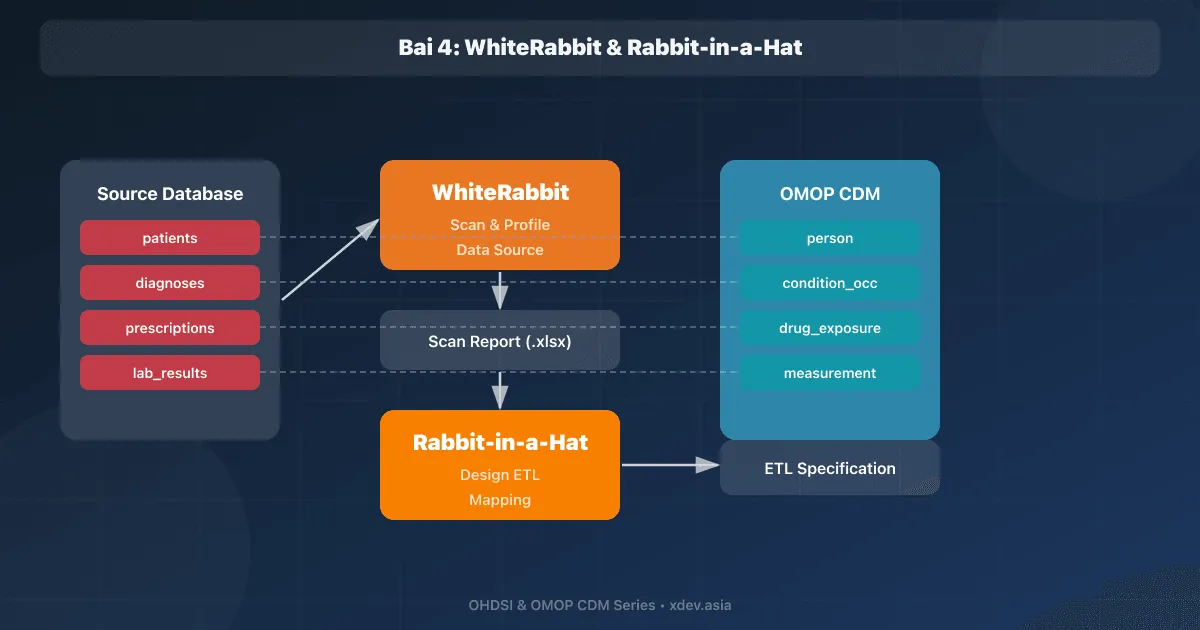
Trước khi viết bất kỳ dòng ETL code nào, bạn cần hiểu rõ dữ liệu nguồn và thiết kế mapping sang OMOP CDM. Hai công cụ OHDSI giúp việc này:
- WhiteRabbit: Scan database/CSV nguồn, tạo report chi tiết về tables, fields, values
- Rabbit-in-a-Hat: GUI tool thiết kế mapping table → table, field → field
1. WhiteRabbit — Scan dữ liệu nguồn
1.1 Cài đặt
# Download từ GitHub releases
# https://github.com/OHDSI/WhiteRabbit/releases

# Yêu cầu: Java 17+
java -version

# Chạy WhiteRabbit
java -jar WhiteRabbit.jar
1.2 Giao diện WhiteRabbit
┌─────────────────────────────────────────────────────┐
│  WhiteRabbit                                        │
│                                                     │
│  Source Data Location                                │
│  ┌─────────────────────────────────────────────┐    │
│  │ Type: [PostgreSQL ▼]                        │    │
│  │ Server: localhost                            │    │
│  │ Port: 5432                                   │    │
│  │ Database: hospital_db                        │    │
│  │ User: admin                                  │    │
│  │ Password: ****                               │    │
│  └─────────────────────────────────────────────┘    │
│                                                     │
│  Scan Options                                       │
│  ☑ Scan field values (top 1000 per field)           │
│  ☑ Calculate value frequencies                       │
│  ☑ Min/Max values                                    │
│  □ Scan all tables (or select specific)              │
│                                                     │
│  [Connect]  [Scan Tables]  [Generate Report]        │
└─────────────────────────────────────────────────────┘
1.3 Nguồn dữ liệu hỗ trợ
Database:
- PostgreSQL, MySQL, SQL Server, Oracle
- Amazon Redshift, Microsoft APS
- Microsoft Access

File:
- CSV (comma-separated)
- TSV (tab-separated)
- SAS Transport files (.xpt)
1.4 Thực hiện Scan
Bước 1: Chọn loại source data (Database hoặc Delimited text files)
Bước 2: Nhập connection details
Bước 3: Click "Connect" → hiển thị danh sách tables
Bước 4: Chọn tables cần scan (hoặc Select All)
Bước 5: Cấu hình scan options:
         - Rows per table: 100,000 (default, đủ cho profiling)
         - Min cell count: 5 (ẩn values có < 5 records — bảo vệ PII)
         - Max distinct values: 1,000
Bước 6: Click "Scan Tables"
Bước 7: Chọn thư mục output → Generate "ScanReport.xlsx"
1.5 Phân tích Scan Report
ScanReport.xlsx chứa các sheets:

Sheet "Overview":
┌──────────────────┬──────────┬───────────┐
│ Table            │ Rows     │ Fields    │
├──────────────────┼──────────┼───────────┤
│ patients         │ 50,000   │ 12        │
│ encounters       │ 350,000  │ 18        │
│ diagnoses        │ 1,200,000│ 8         │
│ medications      │ 800,000  │ 15        │
│ lab_results      │ 2,500,000│ 10        │
└──────────────────┴──────────┴───────────┘

Sheet "patients":
┌──────────────┬──────────┬──────────────┬─────────────────────┐
│ Field        │ Type     │ N rows       │ Top Values          │
├──────────────┼──────────┼──────────────┼─────────────────────┤
│ patient_id   │ VARCHAR  │ 50,000       │ BN001, BN002, ...   │
│ gender       │ VARCHAR  │ 50,000       │ M(52%), F(48%)      │
│ birth_date   │ DATE     │ 49,800       │ Min:1920, Max:2024  │
│ ethnicity    │ VARCHAR  │ 45,000       │ Kinh(85%), Tày(5%)  │
│ phone        │ VARCHAR  │ 48,000       │ 09xx..., 03xx...    │
└──────────────┴──────────┴──────────────┴─────────────────────┘

Sheet "diagnoses":
┌──────────────┬──────────┬──────────────┬─────────────────────┐
│ Field        │ Type     │ N rows       │ Top Values          │
├──────────────┼──────────┼──────────────┼─────────────────────┤
│ diagnosis_id │ INT      │ 1,200,000    │                     │
│ patient_id   │ VARCHAR  │ 1,200,000    │                     │
│ encounter_id │ INT      │ 1,200,000    │                     │
│ icd_code     │ VARCHAR  │ 1,200,000    │ I10(15%), J06(8%)   │
│ diagnosis_dt │ DATE     │ 1,198,000    │ Min:2018, Max:2024  │
│ diag_type    │ VARCHAR  │ 1,200,000    │ MAIN(60%), SUB(40%) │
└──────────────┴──────────┴──────────────┴─────────────────────┘
Điều quan trọng phát hiện từ Scan Report:
✅ Phát hiện PII (phone, address) → cần loại bỏ/hash trong ETL
✅ Null rates: birth_date 200 nulls (0.4%) → acceptable
✅ Value distributions: gender chỉ có M/F → mapping đơn giản
✅ Date format: YYYY-MM-DD → chuẩn, không cần transform
✅ icd_code: ICD-10 codes → mapping via Athena
⚠️ ethnicity: 5000 nulls (10%) → cần xử lý default value
⚠️ diagnosis_dt: 2000 nulls → condition_start_date NOT NULL trong CDM!
2. Rabbit-in-a-Hat — Thiết kế ETL Mapping
2.1 Mở Rabbit-in-a-Hat
# Rabbit-in-a-Hat đi kèm trong package WhiteRabbit
java -jar WhiteRabbit.jar

# Hoặc chạy riêng
java -jar RabbitInAHat.jar
2.2 Workflow
Bước 1: File → Open Scan Report → Chọn ScanReport.xlsx
         → Hiển thị source tables bên trái

Bước 2: Tải OMOP CDM schema
         → Hiển thị CDM tables bên phải

Bước 3: Kéo thả mapping table → table
         ┌────────────┐          ┌─────────────────────┐
         │ patients   │ ───────→ │ PERSON              │
         │ encounters │ ───────→ │ VISIT_OCCURRENCE     │
         │ diagnoses  │ ───────→ │ CONDITION_OCCURRENCE │
         │ medications│ ───────→ │ DRUG_EXPOSURE        │
         │ lab_results│ ───────→ │ MEASUREMENT          │
         └────────────┘          └─────────────────────┘

Bước 4: Double-click mapping arrow → mở field-level mapping
         ┌─ patients ────────┐    ┌─ PERSON ─────────────────┐
         │ patient_id    ────┼───→│ person_source_value      │
         │ gender         ───┼───→│ gender_source_value      │
         │                   │    │ gender_concept_id (logic) │
         │ birth_date    ───┼───→│ birth_datetime           │
         │                   │    │ year_of_birth (extract)   │
         │                   │    │ month_of_birth (extract)  │
         │ ethnicity     ───┼───→│ ethnicity_source_value   │
         └───────────────────┘    └──────────────────────────┘

Bước 5: Thêm logic/comments cho mỗi field mapping
         gender → gender_concept_id:
         "CASE WHEN gender = 'M' THEN 8507
               WHEN gender = 'F' THEN 8532
               ELSE 0 END"

Bước 6: Export ETL specification document (Word/HTML)
2.3 Giao diện Mapping
┌─────────────────────────────────────────────────────────────┐
│  Rabbit-in-a-Hat                                            │
│                                                             │
│  Source Tables          Mapping           CDM Tables         │
│  ┌────────────┐                          ┌──────────────┐  │
│  │ patients   │ ═══════════════════════→ │ PERSON       │  │
│  │ (50,000)   │                          │              │  │
│  ├────────────┤                          ├──────────────┤  │
│  │ encounters │ ═══════════════════════→ │ VISIT_       │  │
│  │ (350,000)  │                          │ OCCURRENCE   │  │
│  ├────────────┤                          ├──────────────┤  │
│  │ diagnoses  │ ═══════════════════════→ │ CONDITION_   │  │
│  │ (1,200,000)│                          │ OCCURRENCE   │  │
│  ├────────────┤                          ├──────────────┤  │
│  │ medications│ ═══════════════════════→ │ DRUG_        │  │
│  │ (800,000)  │                          │ EXPOSURE     │  │
│  ├────────────┤                          ├──────────────┤  │
│  │ lab_results│ ═══════════════════════→ │ MEASUREMENT  │  │
│  │ (2,500,000)│                          │              │  │
│  └────────────┘                          └──────────────┘  │
│                                                             │
│  [Add Mapping]  [Details]  [Export]  [Save]                 │
└─────────────────────────────────────────────────────────────┘
3. ETL Specification Document
3.1 Ví dụ mapping specification
Table: patients → PERSON

┌───────────────────┬───────────────────────┬─────────────────────────────┐
│ Source Field      │ CDM Field             │ Logic                       │
├───────────────────┼───────────────────────┼─────────────────────────────┤
│ patient_id        │ person_source_value   │ Direct copy                 │
│ [generated]       │ person_id             │ Auto-increment sequence     │
│ gender            │ gender_source_value   │ Direct copy                 │
│ gender            │ gender_concept_id     │ M→8507, F→8532, else→0     │
│ birth_date        │ birth_datetime        │ Direct copy                 │
│ birth_date        │ year_of_birth         │ EXTRACT(YEAR FROM birth_dt) │
│ birth_date        │ month_of_birth        │ EXTRACT(MONTH FROM birth_dt)│
│ birth_date        │ day_of_birth          │ EXTRACT(DAY FROM birth_dt)  │
│ ethnicity         │ ethnicity_source_value│ Direct copy                 │
│ ethnicity         │ ethnicity_concept_id  │ Kinh→38003564, else→0      │
│ [constant]        │ race_concept_id       │ 8515 (Asian)               │
└───────────────────┴───────────────────────┴─────────────────────────────┘

Table: diagnoses → CONDITION_OCCURRENCE

┌───────────────────┬──────────────────────────┬──────────────────────────┐
│ Source Field      │ CDM Field                │ Logic                    │
├───────────────────┼──────────────────────────┼──────────────────────────┤
│ [generated]       │ condition_occurrence_id  │ Auto-increment           │
│ patient_id        │ person_id               │ Lookup patients mapping  │
│ icd_code          │ condition_source_value   │ Direct copy              │
│ icd_code          │ condition_source_concept_│ Lookup SOURCE_TO_CONCEPT │
│                   │ id                       │ _MAP or CONCEPT table    │
│ icd_code          │ condition_concept_id     │ Via "Maps to" relation   │
│ diagnosis_dt      │ condition_start_date     │ Direct copy              │
│ [null]            │ condition_end_date       │ NULL (không có end date) │
│ [constant]        │ condition_type_concept_id│ 32817 (EHR)             │
│ encounter_id      │ visit_occurrence_id      │ Lookup encounters mapping│
│ diag_type         │ condition_status_concept_│ MAIN→32902, SUB→32908   │
│                   │ id                       │                          │
└───────────────────┴──────────────────────────┴──────────────────────────┘
4. Best Practices
4.1 Quy trình ETL chuẩn OHDSI
1. Scan source data (WhiteRabbit)                    ← 1-2 ngày
2. Review scan report với domain experts             ← 1-2 ngày
3. Design ETL mapping (Rabbit-in-a-Hat)              ← 1-2 tuần
4. Map source codes → Standard Concepts (Usagi)      ← 1-2 tuần
5. Implement ETL scripts                             ← 2-4 tuần
6. Load data & run ACHILLES + DQD                    ← 1-2 ngày
7. Review quality issues, fix ETL                    ← 1-2 tuần
8. Repeat steps 5-7 until quality acceptable         ← iterations
4.2 Lưu ý quan trọng
WhiteRabbit:
- Min cell count = 5: ẩn values có ít records → bảo vệ PII
- KHÔNG scan columns chứa free-text notes (HIPAA risk)
- Scan nên chạy trên bản copy, không trên production database

Rabbit-in-a-Hat:
- Lưu file .json.gz thường xuyên (format riêng của RiaH)
- 1 source table có thể map sang nhiều CDM tables
  Ví dụ: encounters → VISIT_OCCURRENCE + OBSERVATION_PERIOD
- Document logic phức tạp trong Comments
- Organize ETL team review sessions (RiaH projected on screen)
Tóm tắt
| Công cụ | Mục đích | Output |
|---|---|---|
| WhiteRabbit | Scan dữ liệu nguồn, profiling | ScanReport.xlsx |
| Rabbit-in-a-Hat | GUI thiết kế ETL mapping | ETL Specification Document |
| Bước | Hoạt động |
|---|---|
| 1 | WhiteRabbit scan → hiểu cấu trúc + data quality nguồn |
| 2 | Rabbit-in-a-Hat → thiết kế table & field mappings |
| 3 | Export ETL specification → tài liệu cho team implement |
Bài tiếp theo: Usagi — Mapping mã nguồn sang OMOP Standard Concepts