Introduction
Before installing any tools, the team should agree on an architecture. Without one, the local AI stack will quickly devolve into a collection of scattered scripts — everyone running things differently, inconsistent outputs, and when errors occur, no one knows where to start fixing.
This lesson goes from fundamentals to practice in an easy-to-apply approach:
- Why local AI needs architecture from the start
- The 4-layer model for dev teams
- Designing API contracts so frontend, backend, and data teams can work independently
- Routing models by task type
- Anti-patterns that kill local AI projects early
- A 30-day deployment checklist
After this lesson, you'll have a blueprint clear enough to start deploying without guessing.
1. Architecture Goals
A good local AI stack must simultaneously achieve:
- Privacy-first: data never leaves the machine or internal network
- Predictable latency: stable responses according to SLOs
- Replaceable components: swap models or vector DBs without breaking the app
- Testable behavior: with eval suites and regression tests
Brief explanation:
- Privacy-first: sensitive data like internal tickets, operational documents, and logs are never sent to external services.
- Predictable latency: product teams need a consistent experience, not randomly fast or slow.
- Replaceable components: today you use Gemma 4, tomorrow you might switch models but the API stays the same.
- Testable behavior: every time you change a prompt or model, you must know whether quality went up or down with data.
2. When Is Local AI Worth the Investment?
Not every project needs local AI right away. Signs you should invest:
- You handle sensitive internal data and don't want to send it to the cloud.
- The team wants full control over prompts, models, and policies.
- Use cases are highly repetitive (code review, ticket triage, runbook summaries).
- You're willing to trade operational effort for reduced dependency on API providers.
If you don't have these needs yet, start with cloud APIs for speed, then gradually migrate to local.
2. Four Required Layers
Client Layer (Web/VS Code/CLI)
Application Layer (API gateway, policy, tracing)
Model Layer (Ollama + Gemma 4)
Knowledge Layer (docs, embeddings, vector DB)
Each layer has clear contracts to reduce coupling between product and AI platform teams.
Detailed role of each layer:
2.1 Client Layer
Where users interact:
- Internal web chat
- VS Code extension
- CLI for operations engineers
Principle: clients should not know model details. Clients only call the unified API contract.
2.2 Application Layer
The most important layer for "productionizing" LLMs:
- API gateway
- Auth and rate limiting
- Model routing
- Prompt template management
- Logging and tracing
Without this layer, quality control becomes very difficult as the number of clients grows.
2.3 Model Layer
Where actual inference runs:
- Ollama runtime
- Gemma 4 and fallback models
This layer should focus on doing one thing well: receiving standardized prompts and returning outputs quickly and reliably.
2.4 Knowledge Layer
The data layer for RAG:
- Source documents
- Embedding index
- Vector database
- Data metadata and versioning
The knowledge layer should be managed like a data product, not an ad-hoc document folder.
3. Boundary Principles Between Layers
This is what determines long-term scalability:
- Clients don't call the model runtime directly.
- The model layer doesn't directly access user UI/sessions.
- Retrieval only goes through the application layer to preserve policy and logging.
- Prompt templates are versioned centrally, not scattered across services.
This mindset allows changing individual components without creating a domino effect.
3. Standard Task Flows
- Chat flow: user prompt -> API gateway -> LLM -> response
- RAG flow: prompt -> retriever -> context builder -> LLM -> cited answer
- Batch flow: ingest docs -> chunk -> embed -> upsert index
Tip: always attach a request_id to trace across all flows.
Expanded with real-world examples:
3.1 Chat Flow
Use case: PM wants to summarize 30 comments in a task.
- Client sends prompt to gateway.
- Gateway applies the "summarization" prompt contract.
- Gateway selects a lightweight model to optimize latency.
- LLM responds.
- Gateway returns the response with latency and request_id.
3.2 RAG Flow
Use case: Dev asks "How is PITR configured for our internal PostgreSQL?"
- Gateway receives the question.
- Retriever fetches relevant chunks from the knowledge layer.
- Context builder merges the best segments.
- LLM generates an answer with citations.
- Gateway returns the response + source list.
3.3 Batch Flow
Use case: Docs team updates 20 new documents.
- Ingestion job runs on schedule.
- Chunking + embedding for changed documents.
- Upsert to the staging index.
- Quick eval run before promoting to the active index.
A good batch flow significantly reduces the risk of "RAG answering from stale documents."
4. API Contract Design
At minimum, you should have 3 endpoints:
POST /chat: conversation tasks without document retrievalPOST /rag: Q&A tasks on the knowledge basePOST /eval/run: run benchmarks or regression sets
Response should include:
answermodellatency_mscitations(if RAG)request_id
Example suggested response:
{
  "request_id": "req_20260403_001",
  "model": "gemma4",
  "answer": "You need to enable WAL archiving before configuring PITR...",
  "citations": [
    {"doc_id": "pg-backup-v2", "section": "3. PITR"}
  ],
  "latency_ms": 1820,
  "degraded_mode": false
}
A good API doesn't just return results — it also returns data for operations and debugging.
5. Prompt Contract Rules
Each use case should have its own prompt contract instead of one generic prompt for everything:
- Coding assistant contract
- Summarization contract
- Extraction contract
- QnA with citation contract
Each contract must specify:
- Output objective
- Output format
- Fallback conditions when data is insufficient
- Prohibitions (no reasoning beyond context)
When contracts are clearly separated, testing and rollback become much easier.
5. Model Routing Rules
You shouldn't use one model for everything.
- Light: short summaries, classification
- Medium: coding assistance, planning
- Heavy: long analysis, multi-document synthesis
Design the router at the API layer to avoid hard-coding models in clients.
An additional practical strategy:
- If the prompt is below a length threshold and doesn't need RAG: route to lightweight model
- If the prompt needs citations: route to RAG pipeline + medium model
- If the prompt is long or multi-step: route to heavy model with higher timeout
What matters is that routing is policy-based, not left to each developer's judgment.
6. Minimum Logging and Observability
Don't wait until production to add logging. From the start, log at minimum:
- request_id
- endpoint
- selected_model
- latency_ms
- token_estimate
- retrieval_hit_count (for RAG)
- fallback_triggered
When errors occur, you'll know whether it's the model, retrieval, or prompt at fault.
7. Basic Security for Internal Local AI
Even when running locally, security principles still apply:
- Don't expose the model endpoint to the entire network.
- Have API keys or internal auth at the gateway.
- Don't log raw prompts containing sensitive data.
- Have retention policies for chat history.
Local doesn't automatically mean secure.
6. Anti-Patterns to Avoid
- Client calling Ollama directly, bypassing the gateway.
- Mixing retrieval logic into the UI.
- Not versioning prompts/templates.
- Not storing metadata about models and latency.
- Changing prompts without regression tests.
Two more common anti-patterns:
- Ingesting documents manually without a standardized pipeline.
- Using a single index for all environments (dev/staging/prod).
These two mistakes often cause hard-to-detect incidents because data and behavior get mixed together.
7. Immediate Action Checklist
- Have a 4-layer diagram with an owner for each layer
- Have a shared API contract for the entire team
- Have a model routing policy
- Have a unified logging schema
- Have an early eval roadmap
Advanced checklist for the first 30 days:
- Have prompt contracts for at least 3 main use cases
- Have a golden set of at least 20 test cases for regression
- Have a latency dashboard with p50/p95
- Have a fallback model procedure for timeouts
- Have a zero-downtime index update process
8. 30-Day Deployment Roadmap
Week 1
- Finalize the 4-layer architecture
- Build the API gateway and basic chat endpoint
- Standardize the logging schema
Week 2
- Deploy the first RAG pipeline
- Standardize metadata and chunking policy
- Start building the eval question set
Week 3
- Add model routing and fallback
- Optimize latency by use case
- Add a quality monitoring dashboard
Week 4
- Run periodic regression tests
- Review internal security
- Write incident handling runbooks
This roadmap is more realistic than trying to do everything on day one.
9. Hands-on Exercises
- Redraw your team's current local AI architecture using the 4-layer model.
- Define API contracts for 2 endpoints: chat and rag.
- List 3 main use cases and choose a model routing policy for each.
- Design a logging schema with at least 7 fields.
- Write the first 10 golden tests for your most important use case.
Demo Code
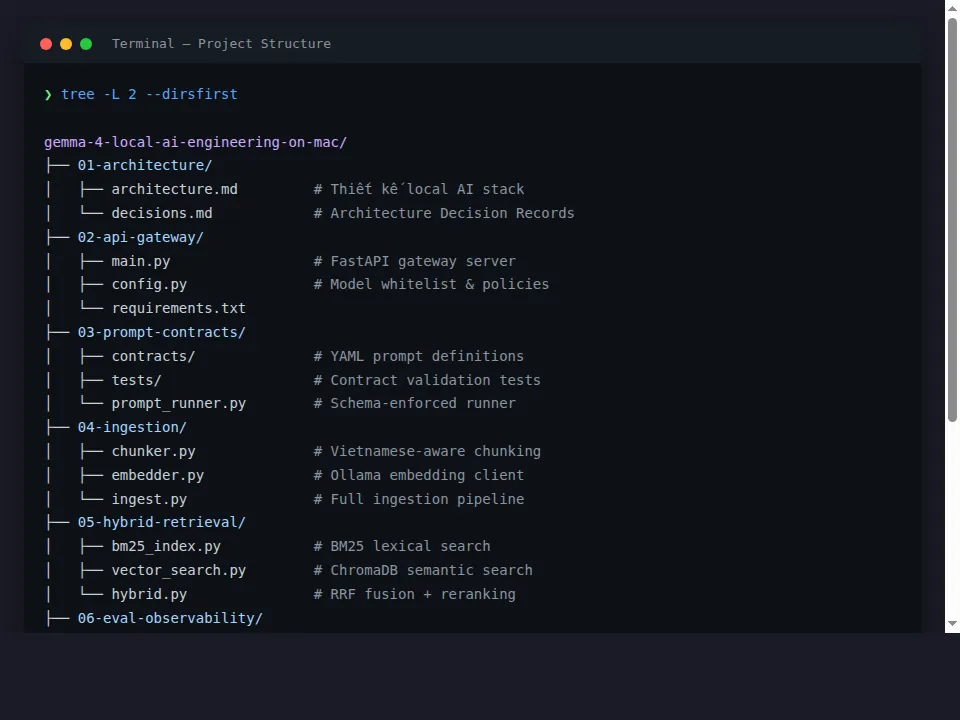
All demo source code for this series is organized in the GitHub repo:
Project structure organized by lesson:
Summary
Getting the design right from the start helps a local AI stack survive long-term, scale effectively, and drastically reduce the cost of fixing mistakes later. When you separate layers cleanly, standardize API contracts, manage prompts as code, and measure quality with data, local AI is no longer a demo — it becomes a real engineering capability for your team.