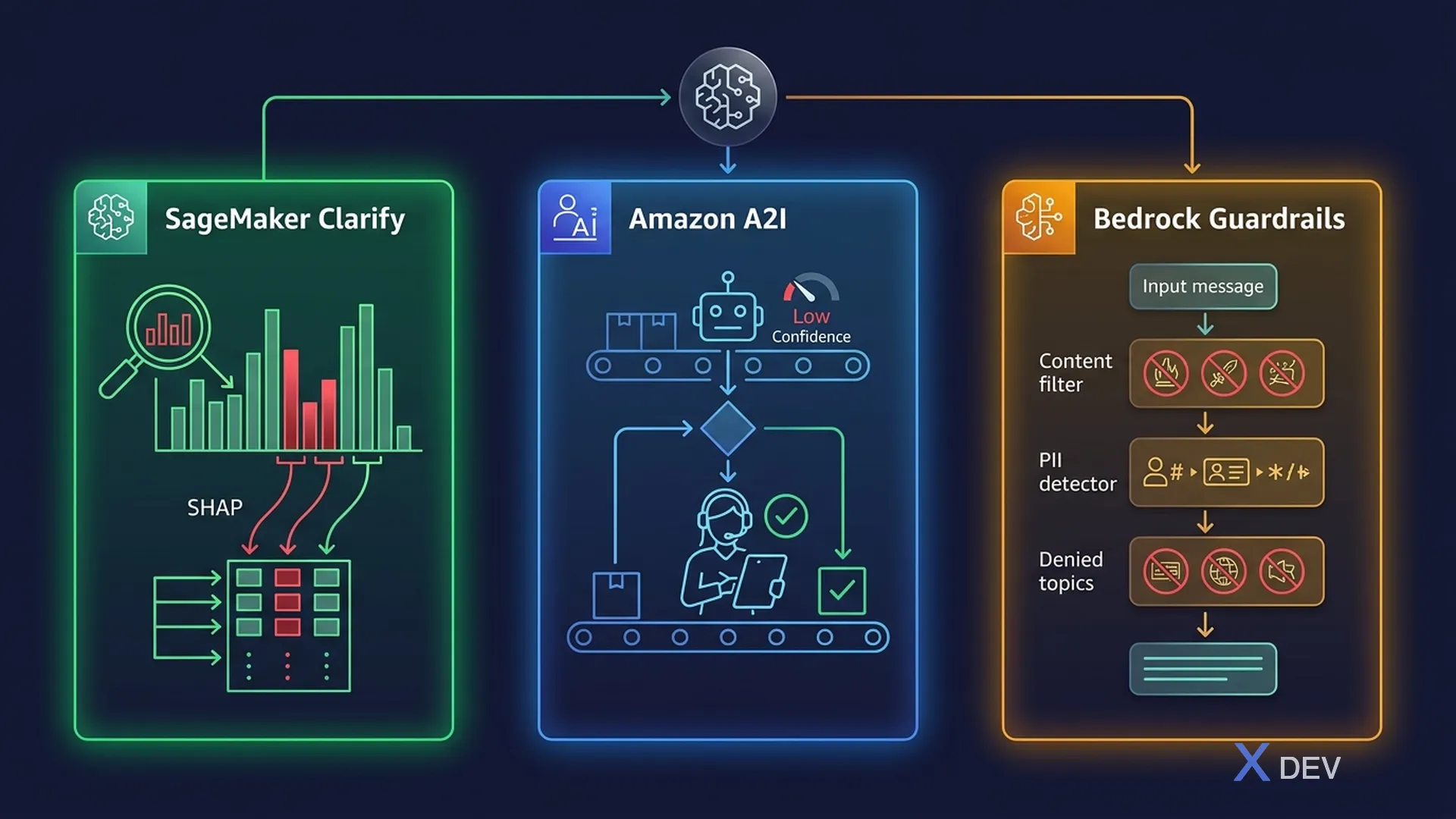
AWS Responsible AI Tools: SageMaker Clarify, Amazon A2I và Bedrock Guardrails
1. Amazon SageMaker Clarify
SageMaker Clarify helps detect bias in data and models, and provides model explainability — the go-to AWS service for Responsible AI.
1.1. Three Core Capabilities
| Capability | When | What it does |
|---|---|---|
| Pre-training bias detection | Before training | Detects imbalances in training data across demographic groups |
| Post-training bias detection | After training | Detects bias in model predictions (e.g., different accuracy across groups) |
| Explainability (SHAP) | After training | Shows feature contributions to each prediction |
1.2. Key Bias Metrics in Clarify
| Metric | Pre/Post training | What it measures |
|---|---|---|
| Class Imbalance (CI) | Pre-training | Distribution of classes across groups |
| Difference in Proportions (DPL) | Pre-training | Proportion of positive labels across groups |
| KL Divergence | Pre-training | Distribution divergence between groups |
| Disparate Impact (DI) | Post-training | Ratio of positive predictions across groups |
| Accuracy Difference (AD) | Post-training | Accuracy gap between groups |
| Treatment Equality (TE) | Post-training | Ratio of FP to FN across groups |
1.3. Clarify Workflow
1. Configure Clarify Job
   ├── Specify sensitive attributes (gender, age, race)
   ├── Define facets (groups to compare)
   └── Choose bias metrics to compute

2. Run Pre-training Analysis
   ├── Upload training dataset
   └── Get bias report on data distribution

3. Train Model

4. Run Post-training Analysis
   ├── Compare predictions across groups
   └── Get SHAP values for explainability

5. Monitor with SageMaker Model Monitor
   └── Detect bias drift over time in production
Exam tip: "Which AWS service can detect if a model makes more errors for one racial group vs another?" → SageMaker Clarify (post-training bias detection).
2. Amazon Augmented AI (Amazon A2I)
Amazon A2I cung cấp human-in-the-loop (HITL) workflows cho AI predictions — đặc biệt quan trọng khi model confidence thấp hoặc high-stakes decisions.
2.1. How A2I Works
AI Prediction Flow with A2I:
                                          ┌─────────────┐
User Request → AI Model → Confident?  YES → Return result
                              │
                              NO (below threshold)
                              ↓
                     ┌──────────────────┐
                     │  Create Human    │
                     │  Review Task     │
                     │  (A2I Workflow)   │
                     └────────┬─────────┘
                              ↓
                     ┌──────────────────┐
                     │  Human Reviewer  │  ← AWS Mechanical Turk
                     │  Reviews &       │  ← Private workforce
                     │  Corrects        │  ← Third-party vendor
                     └────────┬─────────┘
                              ↓
                     Return human-verified result
2.2. A2I Components
| Component | Purpose |
|---|---|
| Human review workflow | Defines when and how to trigger human review |
| Worker task template | UI for human reviewers to make decisions |
| Workforce | Who does the review (private, Mechanical Turk, vendor) |
| Activation conditions | Confidence threshold triggers (e.g., < 95%) |
2.3. Built-in A2I Integrations
| Service | A2I Use Case |
|---|---|
| Amazon Textract | Review low-confidence document extractions |
| Amazon Rekognition | Review low-confidence content moderation |
| Custom ML models | Any SageMaker model can trigger A2I |
Exam tip: "A healthcare company needs a human to review AI diagnoses when the model is less than 90% confident" → Amazon A2I with activation condition set to confidence < 90%.
3. Amazon Bedrock Guardrails — Deep Dive
3.1. Guardrail Policies
| Policy | How it works | Configuration |
|---|---|---|
| Content filters | Block by category + severity | None / Low / Medium / High for each category (Hate, Insults, Sexual, Violence, Misconduct) |
| Denied topics | Define topics to block | Natural language description + sample phrases |
| Word filters | Block specific words | Custom word/phrase list + profanity filter toggle |
| Sensitive info (PII) | Detect PII with action | BLOCK or ANONYMIZE for each PII type (SSN, email, phone, name, address, ...) |
| Contextual grounding | Check if answer is grounded | Grounding threshold (0-1) + relevance threshold |
3.2. How Guardrails Process Requests
User Input
    ↓
[INPUT GUARDRAILS]
    ├── Content filter check
    ├── Denied topic check
    ├── Word filter check
    ├── PII detection → BLOCK or ANONYMIZE
    ↓ (if passes all checks)
Foundation Model generates response
    ↓
[OUTPUT GUARDRAILS]
    ├── Content filter check
    ├── Denied topic check
    ├── Word filter check
    ├── PII detection → BLOCK or ANONYMIZE
    ├── Contextual grounding check
    ↓ (if passes all checks)
Response returned to user

If blocked → Return configured "blocked" message
3.3. Guardrails vs System Prompts
| Aspect | System Prompt | Guardrails |
|---|---|---|
| Enforcement | Soft — model may ignore | Hard — enforced by the platform |
| Bypass risk | Can be bypassed via prompt injection | Cannot be bypassed by prompts |
| PII handling | Model asked to not output PII | Programmatic detection & redaction |
| Auditability | Limited | Full logging and metrics |
Exam tip: "A company needs to GUARANTEE that PII is never in model responses" → Bedrock Guardrails (not system prompts, which can be bypassed).
4. Content Moderation on AWS
| Service | Content Type | Use Case |
|---|---|---|
| Amazon Rekognition | Images & Video | Detect inappropriate content, faces, text |
| Amazon Comprehend | Text | Toxicity detection, sentiment analysis |
| Bedrock Guardrails | FM input/output | Filter harmful content in GenAI apps |
| Amazon A2I | Any | Human review for edge cases |
5. AI Governance
5.1. Governance Framework
| Area | What to implement |
|---|---|
| Policy | Organization-wide AI ethics guidelines |
| Risk assessment | Evaluate risks before deploying AI systems |
| Monitoring | Continuous monitoring for bias, performance drift |
| Audit trail | Log all model decisions for accountability |
| Human oversight | Human-in-the-loop for high-stakes decisions |
| Documentation | Model cards, AI Service Cards |
5.2. SageMaker ML Governance
- SageMaker Model Cards: Document model details and intended use
- SageMaker Model Dashboard: Centralized view of all model status
- SageMaker Model Monitor: Detect data drift, model quality degradation
- SageMaker Role Manager: Fine-grained access control for ML
6. Practice Questions
Q1: An insurance company wants to ensure their claim approval model treats customers of all ages fairly. Which AWS service should they use to detect age-based bias in the model's predictions?
- A) Amazon Rekognition
- B) Amazon SageMaker Clarify ✓
- C) Amazon Bedrock Guardrails
- D) Amazon Comprehend
Explanation: SageMaker Clarify can run post-training bias analysis comparing model predictions across age groups, using metrics like Disparate Impact and Accuracy Difference.
Q2: A document processing application using Amazon Textract needs human review when the extracted data has low confidence. Which AWS service provides this capability?
- A) Amazon SageMaker Ground Truth
- B) Amazon Augmented AI (A2I) ✓
- C) Amazon Mechanical Turk directly
- D) Amazon Bedrock Agents
Explanation: Amazon A2I has built-in integration with Amazon Textract and can automatically trigger human review workflows when extraction confidence falls below a defined threshold.
Q3: A chatbot must NEVER reveal customer credit card numbers in its responses, even if the data exists in the knowledge base. Which approach provides the STRONGEST guarantee?
- A) Add "never output credit card numbers" to the system prompt
- B) Fine-tune the model to not output PII
- C) Use Amazon Bedrock Guardrails with PII filters set to BLOCK ✓
- D) Remove credit card numbers from the knowledge base
Explanation: Bedrock Guardrails with PII filters provide programmatic detection and blocking of credit card numbers in both input and output — this cannot be bypassed by prompt injection, unlike system prompts.