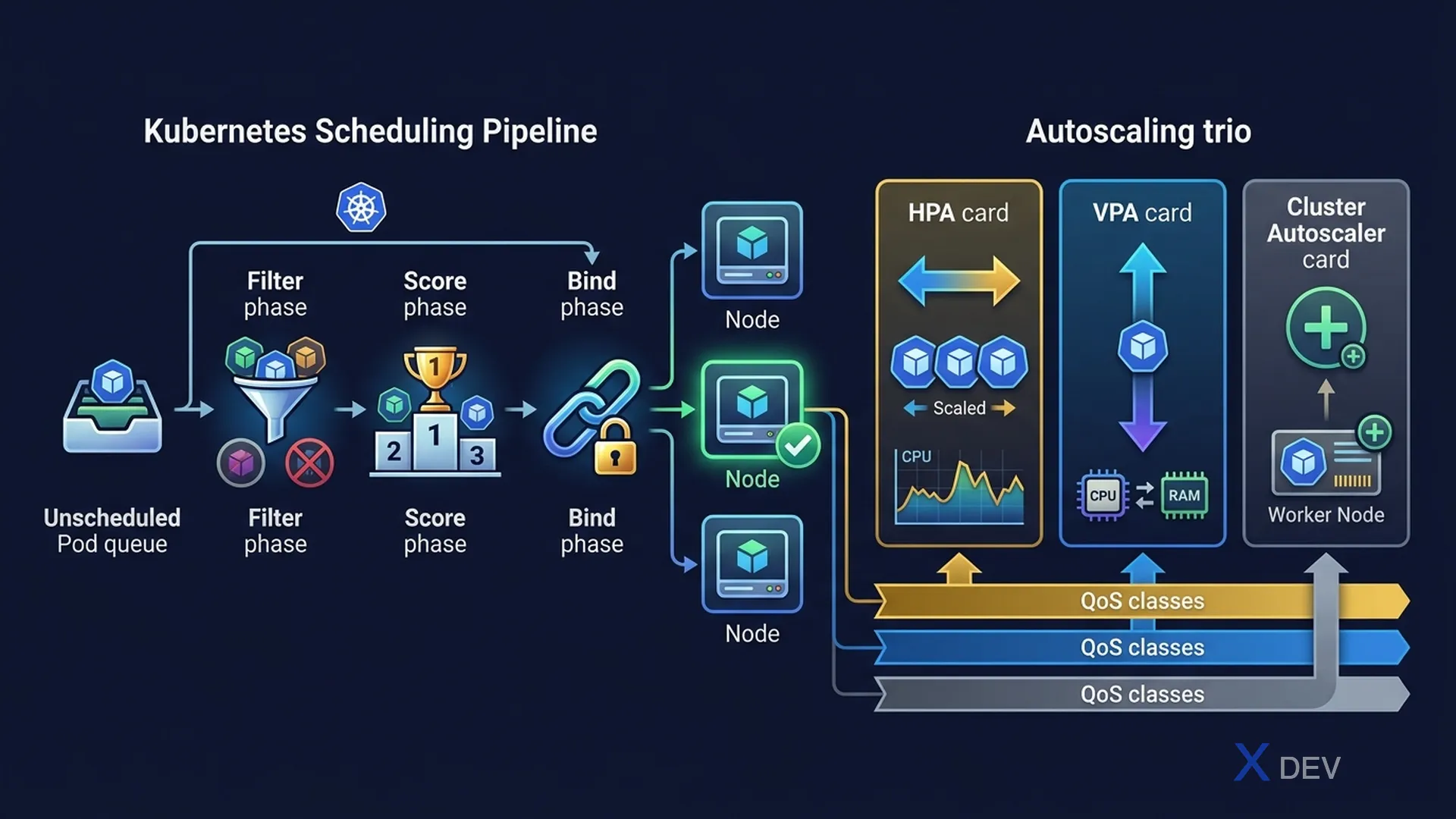
1. Kubernetes Scheduling
Khi Pod được tạo, kube-scheduler chọn node phù hợp qua 2 bước:
Scheduling Pipeline:
  New Pod
    │
    ▼
  1. FILTERING: Loại bỏ nodes không đủ điều kiện
     - Không đủ CPU/Memory
     - Taint không match Toleration
     - Node Affinity không match
     │
    ▼
  2. SCORING: Chấm điểm nodes còn lại
     - Resource balance
     - Affinity preferences
     │
    ▼
Bind Pod → Highest score Node| Cơ chế | Mục đích | Ví dụ |
|---|---|---|
| NodeSelector | Schedule Pod lên node có label | disktype: ssd |
| Affinity/Anti-affinity | Preferred/required node rules | Prefer zone-a, avoid same node as another pod |
| Taints & Tolerations | Repel Pods trừ khi Pod có Toleration | Node dành riêng cho GPU workloads |
| Resource requests | Minimum CPU/memory để schedule | requests.cpu: 500m |
Exam tip: Taints áp lên Node (repel pods). Tolerations áp lên Pod (accept taint). Taint có effect: NoSchedule (không schedule mới), PreferNoSchedule (ưu tiên không schedule), NoExecute (evict pods đang chạy).
2. Resource Requests & Limits
| Setting | Ảnh hưởng đến | Nếu vượt quá |
|---|---|---|
| requests.cpu | Scheduling (scheduler dùng để chọn node) | Throttled (không bị kill) |
| limits.cpu | Cgroups CPU quota | CPU throttled |
| requests.memory | Scheduling | OOM Kill nếu vượt limit |
| limits.memory | Cgroups memory limit | Container bị OOM Kill |
QoS Classes:
  Guaranteed: requests == limits (best quality, last to be evicted)
  Burstable:  requests < limits (middle)
  BestEffort: no requests, no limits (first to be evicted)
3. Auto-scaling
| Scaler | Scale gì | Metric |
|---|---|---|
| HPA (Horizontal Pod Autoscaler) | Số lượng Pod replicas | CPU%, Memory%, custom metrics |
| VPA (Vertical Pod Autoscaler) | CPU/Memory requests của Pod | Actual usage history |
| Cluster Autoscaler | Số lượng nodes trong cluster | Pending Pods (unschedulable) |
| KEDA | Số replicas (to 0) | Event-driven (queue depth, Kafka) |
HPA integration:
  metrics-server → kubelet → Node/Pod metrics
       ↓
  HPA controller (checks every 15s)
       ↓
  Scale up: replicas++  (traffic spike)
  Scale down: replicas-- (traffic drops, 5 min cooldown)
Exam tip: HPA cần metrics-server để hoạt động. VPA và HPA có thể conflict khi cùng manage một Deployment — không nên dùng cùng lúc trên cùng resource (trừ KEDA với nhiều dimension).
4. Namespaces & Multi-tenancy
Namespaces cung cấp virtual cluster isolation: scope RBAC, ResourceQuota, NetworkPolicy, và DNS resolution.
| Namespace | Purpose | Ghi chú |
|---|---|---|
default | Objects không chỉ định namespace | Dùng trong dev, không dùng prod |
kube-system | Kubernetes system components | CoreDNS, kube-proxy, metrics-server |
kube-public | Public, readable by all | Cluster info ConfigMap |
kube-node-lease | Node heartbeat leases | Kubelet heartbeat performance |
5. Cheat Sheet
| Câu hỏi exam | Đáp án |
|---|---|
| Scale số Pod dựa trên CPU? | HPA |
| Scale số Node trong cluster? | Cluster Autoscaler |
| Node dành riêng cho GPU, dùng gì? | Taint + Pod Toleration |
| Container bị OOM Kill, do gì? | Vượt limits.memory |
| QoS class nào bị evict đầu tiên? | BestEffort |
6. Practice Questions
Q1: A node is tainted with key=gpu:NoSchedule. Which Pods can be scheduled on this node?
- A) Any Pod in the cluster
- B) Pods with matching Toleration for the taint ✓
- C) Pods in the kube-system namespace only
- D) Pods created by cluster administrators only
Explanation: NoSchedule taint prevents any new Pod from being scheduled on the node UNLESS the Pod specifies a matching toleration. Existing Pods are not evicted (use NoExecute for that).
Q2: An application's Pods keep getting OOM-killed during traffic spikes. What is the most appropriate solution?
- A) Increase Pod CPU requests
- B) Configure HPA to scale based on memory usage ✓
- C) Move the app to a new namespace
- D) Use a StatefulSet instead of Deployment
Explanation: OOM kills mean memory demand exceeds limits. HPA scaling out (more Pod replicas) distributes the load, reducing per-pod memory pressure. Alternatively, increase memory limits or use VPA.
Q3: Which Kubernetes component provides CPU and memory metrics that HPA uses for scaling decisions?
- A) kube-proxy
- B) kube-scheduler
- C) metrics-server ✓
- D) etcd
Explanation: metrics-server is an optional cluster add-on that collects resource metrics (CPU, memory) from kubelets. The HPA controller queries the metrics API exposed by metrics-server to make scaling decisions.