1. Tổng quan Disaster Recovery cho Healthcare
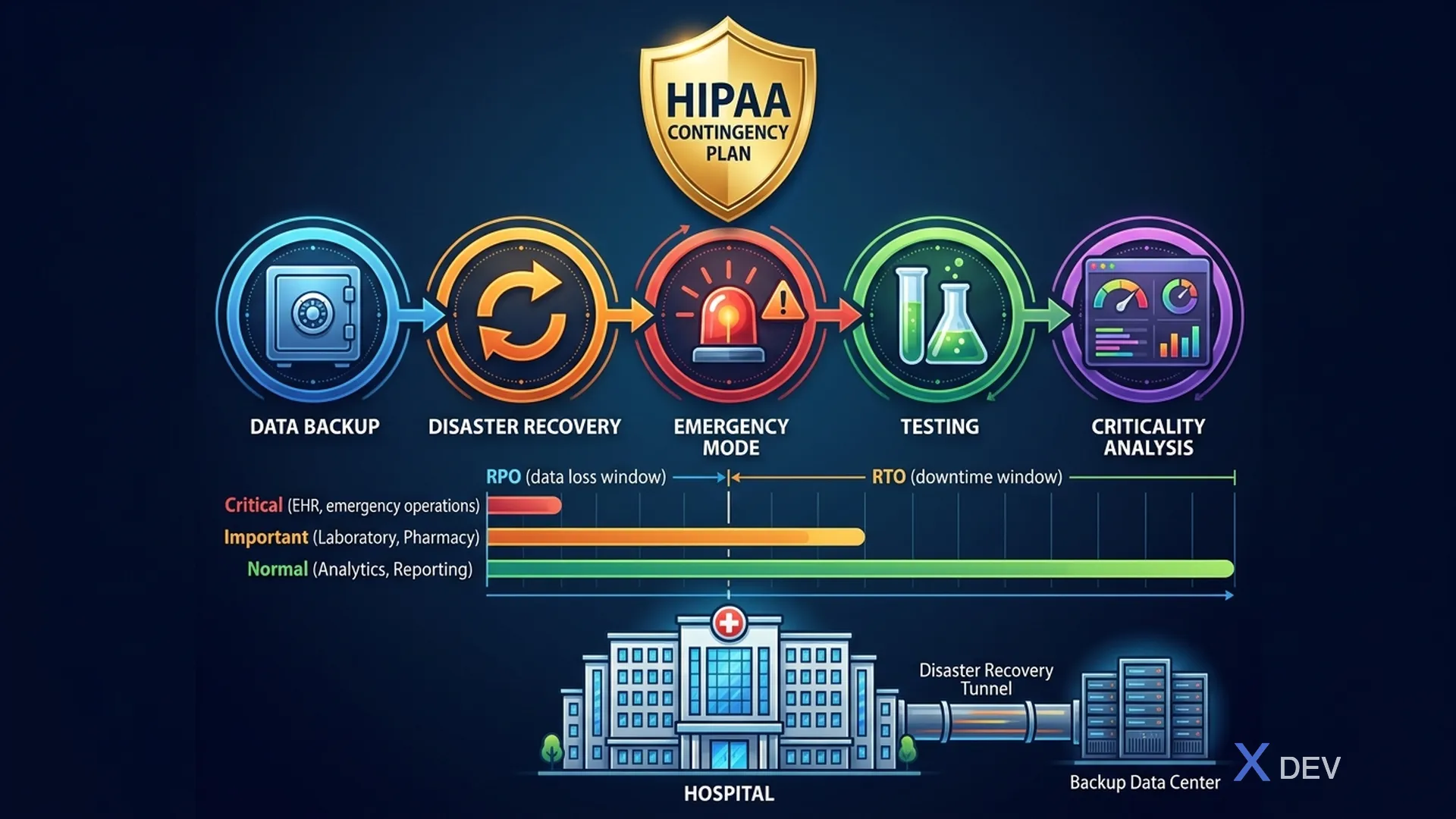
HIPAA Security Rule §164.308(a)(7) yêu cầu mọi tổ chức xử lý ePHI phải có Contingency Plan — kế hoạch dự phòng cho các tình huống khẩn cấp (thiên tai, tấn công ransomware, sự cố phần cứng, lỗi con người). Trong healthcare, downtime có thể ảnh hưởng trực tiếp đến tính mạng bệnh nhân.
1.1. HIPAA Contingency Plan Requirements
HIPAA Contingency Plan — §164.308(a)(7):
- Data Backup Plan [Required]
- Create and maintain exact copies of ePHI
- Regular backup schedule
- Backup verification
- Disaster Recovery Plan [Required]
- Procedures to restore lost data
- Restore from backups
- Test recovery procedures
- Emergency Mode Operation Plan [Required]
- Continue critical operations during emergency
- Protect ePHI during emergency
- Prioritize patient safety systems
- Testing and Revision Procedures [Addressable]
- Periodic testing of contingency plans
- Update plans based on test results
- Applications and Data Criticality Analysis [Addressable]
- Identify critical applications
- Prioritize recovery order
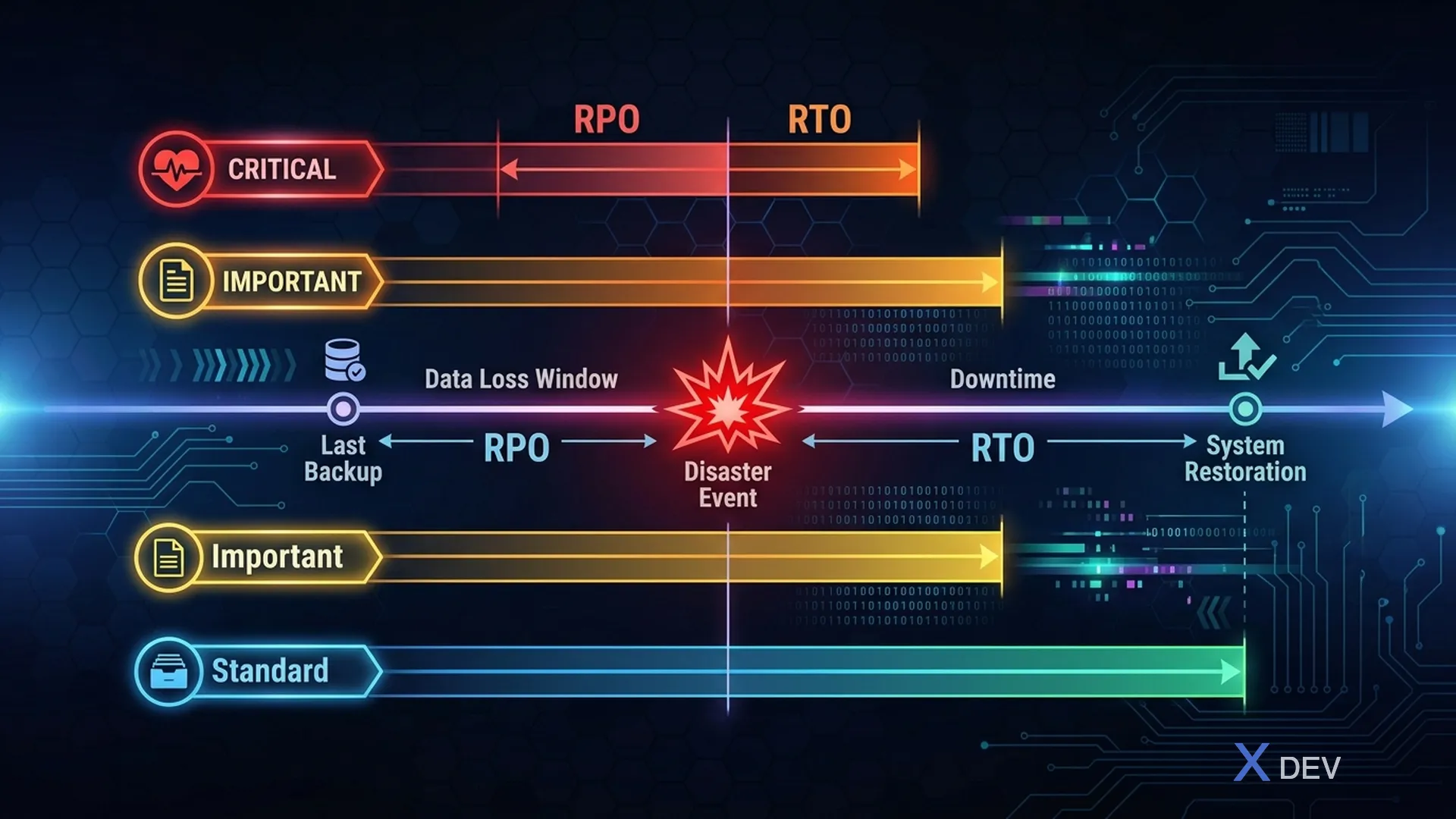
1.2. RTO/RPO Requirements cho Healthcare
| System | RPO | RTO | Criticality |
|---|---|---|---|
| EHR (Bệnh án) | 0-1min | <15min | Critical |
| Lab Results | <5min | <30min | Critical |
| Pharmacy | <5min | <30min | Critical |
| Patient Portal | <1hr | <4hr | Important |
| Billing | <4hr | <8hr | Standard |
| Analytics | <24hr | <24hr | Low |
| Audit Logs | 0 | <1hr | Critical (HIPAA) |
Timeline: ◄── RPO (Data loss window) ──┤ Disaster occurs ├── RTO (Downtime window) ──►
Target cho Critical Healthcare: RPO ≈ 0 (synchronous replication), RTO < 15 minutes (automated failover)
2. PostgreSQL Backup Strategies
2.1. So sánh Backup Methods
| Method | Type | RPO | Speed | Size | Complexity | Use Case |
|---|---|---|---|---|---|---|
pg_dump | Logical | Hours | Slow | Small (compressed) | Low | Small DB, schema migration |
pg_basebackup | Physical | Minutes | Medium | Full DB size | Medium | Standbys, PITR |
| pgBackRest | Physical | Seconds | Fast | Incremental | Medium | Production healthcare |
| Barman | Physical | Seconds | Fast | Incremental | High | Large enterprise |
| WAL archiving | Continuous | Seconds | Minimal | WAL files | Low | PITR supplement |
| Streaming replication | Continuous | ~0 | Real-time | Full replica | Medium | HA / Failover |
2.2. pg_dump — Logical Backup
#!/bin/bash
# pg-logical-backup.sh
# Logical backup cho healthcare database

set -euo pipefail

DB_NAME="healthcare"
DB_USER="backup_user"
BACKUP_DIR="/var/backups/postgresql"
DATE=$(date +%Y%m%d_%H%M%S)
BACKUP_FILE="${BACKUP_DIR}/${DB_NAME}_${DATE}.dump"
ENCRYPTION_KEY_FILE="/etc/healthcare/backup-encryption-key"

# Backup
echo "[$(date)] Starting logical backup: ${DB_NAME}"

pg_dump \
    --host=localhost \
    --port=5432 \
    --username="${DB_USER}" \
    --format=custom \
    --compress=9 \
    --verbose \
    --file="${BACKUP_FILE}" \
    "${DB_NAME}"

# Encrypt backup (HIPAA requirement)
echo "[$(date)] Encrypting backup..."
openssl enc -aes-256-cbc -salt \
    -in "${BACKUP_FILE}" \
    -out "${BACKUP_FILE}.enc" \
    -pass file:"${ENCRYPTION_KEY_FILE}" \
    -pbkdf2 -iter 100000

# Remove unencrypted backup
rm -f "${BACKUP_FILE}"

# Verify backup integrity
echo "[$(date)] Verifying backup..."
VERIFY_FILE=$(mktemp)
openssl enc -d -aes-256-cbc \
    -in "${BACKUP_FILE}.enc" \
    -out "${VERIFY_FILE}" \
    -pass file:"${ENCRYPTION_KEY_FILE}" \
    -pbkdf2 -iter 100000

pg_restore --list "${VERIFY_FILE}" > /dev/null 2>&1
VERIFY_STATUS=$?
rm -f "${VERIFY_FILE}"

if [ ${VERIFY_STATUS} -eq 0 ]; then
    echo "[$(date)] Backup verification: PASSED"
    # Calculate checksum
    SHA256=$(sha256sum "${BACKUP_FILE}.enc" | awk '{print $1}')
    echo "[$(date)] SHA256: ${SHA256}"

    # Log to audit
    echo "{\"event\":\"backup_completed\",\"type\":\"logical\",\"database\":\"${DB_NAME}\",\"file\":\"${BACKUP_FILE}.enc\",\"sha256\":\"${SHA256}\",\"timestamp\":\"$(date -u +"%Y-%m-%dT%H:%M:%SZ")\"}" \
        | logger -t healthcare-backup
else
    echo "[$(date)] Backup verification: FAILED"
    exit 1
fi

# Retention: keep 30 days of daily backups
echo "[$(date)] Cleaning old backups (>30 days)..."
find "${BACKUP_DIR}" -name "*.dump.enc" -mtime +30 -delete

echo "[$(date)] Backup complete: ${BACKUP_FILE}.enc"
2.3. WAL Archiving Configuration
# postgresql.conf - WAL Archiving cho PITR

# === WAL Configuration ===
wal_level = replica
max_wal_senders = 10
wal_keep_size = 1GB

# === Archive Mode ===
archive_mode = on
archive_command = 'pgbackrest --stanza=healthcare archive-push %p'
archive_timeout = 60

# === Checkpoint tuning ===
checkpoint_timeout = 15min
checkpoint_completion_target = 0.9
max_wal_size = 4GB
min_wal_size = 1GB
3. pgBackRest — Production Backup Solution
3.1. Tại sao pgBackRest cho Healthcare?
pgBackRest là backup solution được recommend cho production PostgreSQL vì:
- Incremental backup: Chỉ backup thay đổi kể từ lần backup trước → nhanh, tiết kiệm storage
- Parallel backup/restore: Sử dụng nhiều CPU cores → giảm thời gian
- Built-in encryption: AES-256-CBC encryption → HIPAA compliant
- Backup verification: Tự động verify backup integrity
- PITR: Point-in-time recovery từ bất kỳ thời điểm nào
- Remote backup: Backup tới remote server hoặc object storage (S3, GCS)
3.2. pgBackRest Configuration
# /etc/pgbackrest/pgbackrest.conf

[global]
# === Repository Configuration ===
repo1-type=s3
repo1-path=/healthcare-backups
repo1-s3-bucket=hospital-db-backups
repo1-s3-endpoint=s3.ap-southeast-1.amazonaws.com
repo1-s3-region=ap-southeast-1
repo1-s3-key=AKIAIOSFODNN7EXAMPLE
repo1-s3-key-secret=wJalrXUtnFEMI/K7MDENG/bPxRfiCYEXAMPLEKEY

# === Encryption (HIPAA Required) ===
repo1-cipher-type=aes-256-cbc
repo1-cipher-pass=STRONG_ENCRYPTION_PASSPHRASE_HERE

# === Retention Policy ===
repo1-retention-full=4
repo1-retention-diff=14
repo1-retention-archive=2
repo1-retention-archive-type=full

# === Performance ===
process-max=4
compress-type=zst
compress-level=6
delta=y

# === Logging ===
log-level-console=info
log-level-file=detail
log-path=/var/log/pgbackrest

[healthcare]
# === Stanza Configuration ===
pg1-path=/var/lib/postgresql/16/main
pg1-port=5432
pg1-user=postgres

# === Second Repository (DR site) ===
# repo2-type=s3
# repo2-path=/healthcare-backups-dr
# repo2-s3-bucket=hospital-db-backups-dr
# repo2-s3-endpoint=s3.ap-northeast-1.amazonaws.com
# repo2-s3-region=ap-northeast-1
# repo2-cipher-type=aes-256-cbc
# repo2-cipher-pass=DR_ENCRYPTION_PASSPHRASE
3.3. Backup Schedule
#!/bin/bash
# pgbackrest-schedule.sh
# Automated backup schedule cho healthcare

set -euo pipefail

STANZA="healthcare"
LOG_FILE="/var/log/pgbackrest/schedule.log"

log() {
    echo "[$(date -u +"%Y-%m-%dT%H:%M:%SZ")] $1" | tee -a "$LOG_FILE"
}

case "${1:-}" in
    full)
        # Full backup — chạy hàng tuần (Sunday 2:00 AM)
        log "Starting FULL backup..."
        pgbackrest --stanza="${STANZA}" --type=full backup
        log "Full backup completed"
        ;;

    diff)
        # Differential backup — chạy hàng ngày (2:00 AM)
        log "Starting DIFFERENTIAL backup..."
        pgbackrest --stanza="${STANZA}" --type=diff backup
        log "Differential backup completed"
        ;;

    incr)
        # Incremental backup — chạy mỗi giờ
        log "Starting INCREMENTAL backup..."
        pgbackrest --stanza="${STANZA}" --type=incr backup
        log "Incremental backup completed"
        ;;

    verify)
        # Verify backup integrity
        log "Starting backup VERIFICATION..."
        pgbackrest --stanza="${STANZA}" verify
        log "Verification completed"
        ;;

    info)
        pgbackrest --stanza="${STANZA}" info
        ;;

    *)
        echo "Usage: $0 {full|diff|incr|verify|info}"
        exit 1
        ;;
esac

# Log backup info cho audit trail
BACKUP_INFO=$(pgbackrest --stanza="${STANZA}" --output=json info 2>/dev/null)
echo "{\"event\":\"backup_schedule\",\"type\":\"${1:-unknown}\",\"stanza\":\"${STANZA}\",\"timestamp\":\"$(date -u +"%Y-%m-%dT%H:%M:%SZ")\"}" \
    | logger -t healthcare-backup
Crontab Configuration:
# /etc/cron.d/pgbackrest-healthcare

# Incremental backup mỗi giờ
0 * * * * postgres /opt/scripts/pgbackrest-schedule.sh incr

# Differential backup hàng ngày 2:00 AM
0 2 * * 1-6 postgres /opt/scripts/pgbackrest-schedule.sh diff

# Full backup Sunday 2:00 AM
0 2 * * 0 postgres /opt/scripts/pgbackrest-schedule.sh full

# Verify backup hàng ngày 6:00 AM
0 6 * * * postgres /opt/scripts/pgbackrest-schedule.sh verify
3.4. Point-in-Time Recovery (PITR)
#!/bin/bash
# pitr-restore.sh
# Point-in-Time Recovery cho healthcare database

set -euo pipefail

STANZA="healthcare"
TARGET_TIME="${1:-}"
PG_DATA="/var/lib/postgresql/16/main"

if [ -z "$TARGET_TIME" ]; then
    echo "Usage: $0 <target_time>"
    echo "Example: $0 '2024-03-15 14:30:00+07'"
    echo ""
    echo "Available backups:"
    pgbackrest --stanza="${STANZA}" info
    exit 1
fi

echo "=== POINT-IN-TIME RECOVERY ==="
echo "Target time: ${TARGET_TIME}"
echo "Stanza: ${STANZA}"
echo ""
echo "WARNING: This will REPLACE the current database!"
read -p "Are you sure? (yes/no): " CONFIRM

if [ "$CONFIRM" != "yes" ]; then
    echo "Aborted."
    exit 0
fi

# 1. Stop PostgreSQL
echo "[$(date)] Stopping PostgreSQL..."
systemctl stop postgresql

# 2. Perform PITR restore
echo "[$(date)] Starting PITR restore to: ${TARGET_TIME}"
pgbackrest --stanza="${STANZA}" \
    --type=time \
    --target="${TARGET_TIME}" \
    --target-action=promote \
    --delta \
    restore

# 3. Start PostgreSQL
echo "[$(date)] Starting PostgreSQL..."
systemctl start postgresql

# 4. Verify database
echo "[$(date)] Verifying database..."
sleep 5
pg_isready -h localhost -p 5432
if [ $? -eq 0 ]; then
    echo "[$(date)] PostgreSQL is ready"

    # Verify data
    PATIENT_COUNT=$(psql -d healthcare -tAc "SELECT COUNT(*) FROM healthcare.patients" 2>/dev/null)
    echo "[$(date)] Patient records: ${PATIENT_COUNT}"

    # Log recovery event
    echo "{\"event\":\"pitr_restore\",\"target_time\":\"${TARGET_TIME}\",\"patient_count\":${PATIENT_COUNT},\"timestamp\":\"$(date -u +"%Y-%m-%dT%H:%M:%SZ")\"}" \
        | logger -t healthcare-backup
else
    echo "[$(date)] ERROR: PostgreSQL failed to start after restore"
    exit 1
fi

echo "[$(date)] PITR restore completed successfully"
4. Streaming Replication & Patroni
4.1. High Availability Architecture
┌─────────────────────────────────────────────────────────────┐
│        PostgreSQL HA with Patroni                            │
│                                                              │
│  ┌────────────────────────────────────────────────────────┐  │
│  │                   HAProxy (VIP)                         │  │
│  │            Read/Write ──► Port 5432                     │  │
│  │            Read-Only  ──► Port 5433                     │  │
│  └──────────┬────────────────────┬────────────────────────┘  │
│             │                    │                            │
│    ┌────────▼─────────┐ ┌───────▼──────────┐                 │
│    │  PostgreSQL       │ │ PostgreSQL        │                │
│    │  PRIMARY          │ │ REPLICA           │                │
│    │  (Read/Write)     │ │ (Read-Only)       │                │
│    │                   │ │                   │                │
│    │  Patroni Agent    │ │ Patroni Agent     │                │
│    │  pg1:5432         │ │ pg2:5432          │                │
│    └────────┬──────────┘ └──────┬────────────┘               │
│             │                   │                             │
│             └───────┬───────────┘                             │
│                     │                                         │
│            ┌────────▼──────────┐                              │
│            │  etcd Cluster     │                              │
│            │  (DCS - Consensus)│                              │
│            │  etcd1, etcd2,    │                              │
│            │  etcd3            │                              │
│            └───────────────────┘                              │
│                                                              │
│  Failover Flow:                                              │
│  1. Primary fails                                            │
│  2. Patroni detects via health check                         │
│  3. etcd consensus: elect new primary                        │
│  4. Patroni promotes replica to primary                      │
│  5. HAProxy routes traffic to new primary                    │
│  6. RTO < 30 seconds (automated)                             │
└─────────────────────────────────────────────────────────────┘
4.2. Patroni Configuration
# patroni.yml - Primary node

scope: healthcare-cluster
namespace: /healthcare/
name: pg1

restapi:
  listen: 0.0.0.0:8008
  connect_address: pg1:8008
  authentication:
    username: admin
    password: ${PATRONI_REST_PASSWORD}

etcd3:
  hosts:
    - etcd1:2379
    - etcd2:2379
    - etcd3:2379
  username: patroni
  password: ${ETCD_PASSWORD}

bootstrap:
  dcs:
    ttl: 30
    loop_wait: 10
    retry_timeout: 10
    maximum_lag_on_failover: 1048576  # 1MB WAL lag max
    synchronous_mode: true  # Synchronous replication (RPO = 0)
    synchronous_mode_strict: true
    postgresql:
      use_pg_rewind: true
      use_slots: true
      parameters:
        wal_level: replica
        max_wal_senders: 10
        max_replication_slots: 10
        wal_keep_size: 2GB
        hot_standby: "on"
        synchronous_commit: "on"  # RPO = 0 cho healthcare
        synchronous_standby_names: "*"
        # Audit logging
        log_statement: all
        log_connections: "on"
        log_disconnections: "on"
        log_line_prefix: '%t [%p]: [%l-1] user=%u,db=%d,app=%a,client=%h '

  initdb:
    - encoding: UTF8
    - data-checksums
    - locale: en_US.UTF-8

  pg_hba:
    - local all postgres peer
    - host replication replicator 10.0.0.0/8 scram-sha-256
    - host all all 10.0.0.0/8 scram-sha-256
    - host all all 0.0.0.0/0 reject

postgresql:
  listen: 0.0.0.0:5432
  connect_address: pg1:5432
  data_dir: /var/lib/postgresql/16/main
  bin_dir: /usr/lib/postgresql/16/bin

  authentication:
    superuser:
      username: postgres
      password: ${PG_SUPERUSER_PASSWORD}
    replication:
      username: replicator
      password: ${PG_REPLICATION_PASSWORD}

  parameters:
    # Performance
    shared_buffers: 4GB
    effective_cache_size: 12GB
    work_mem: 64MB
    maintenance_work_mem: 512MB

    # WAL
    wal_level: replica
    max_wal_senders: 10
    max_replication_slots: 10
    synchronous_commit: "on"

    # Archive
    archive_mode: "on"
    archive_command: "pgbackrest --stanza=healthcare archive-push %p"

    # SSL (HIPAA)
    ssl: "on"
    ssl_cert_file: /etc/ssl/certs/pg-server.crt
    ssl_key_file: /etc/ssl/private/pg-server.key
    ssl_ca_file: /etc/ssl/certs/ca.crt

  pgpass: /tmp/pgpass

tags:
  nofailover: false
  noloadbalance: false
  clonefrom: false
  nosync: false
4.3. HAProxy Configuration
# haproxy.cfg - Load balancing cho PostgreSQL

global
    maxconn 1000
    log stdout local0

defaults
    mode tcp
    log global
    retries 3
    timeout connect 10s
    timeout client 30m
    timeout server 30m
    timeout check 5s

# Primary (Read/Write)
listen healthcare-primary
    bind *:5432
    option httpchk OPTIONS /primary
    http-check expect status 200
    default-server inter 3s fall 3 rise 2 on-marked-down shutdown-sessions
    server pg1 pg1:5432 maxconn 500 check port 8008
    server pg2 pg2:5432 maxconn 500 check port 8008

# Replicas (Read-Only)
listen healthcare-replica
    bind *:5433
    option httpchk OPTIONS /replica
    http-check expect status 200
    balance roundrobin
    default-server inter 3s fall 3 rise 2 on-marked-down shutdown-sessions
    server pg1 pg1:5432 maxconn 300 check port 8008
    server pg2 pg2:5432 maxconn 300 check port 8008

# Patroni REST API
listen patroni-api
    bind *:8008
    mode http
    option httpchk GET /health
    default-server inter 5s fall 3 rise 2
    server pg1 pg1:8008 check
    server pg2 pg2:8008 check

# Stats
listen stats
    bind *:7000
    mode http
    stats enable
    stats uri /
    stats refresh 10s
4.4. Docker Compose cho HA Stack
# docker-compose-ha.yml
version: '3.8'

services:
  # === etcd Cluster ===
  etcd1:
    image: quay.io/coreos/etcd:v3.5.12
    container_name: etcd1
    environment:
      ETCD_NAME: etcd1
      ETCD_INITIAL_ADVERTISE_PEER_URLS: http://etcd1:2380
      ETCD_LISTEN_PEER_URLS: http://0.0.0.0:2380
      ETCD_LISTEN_CLIENT_URLS: http://0.0.0.0:2379
      ETCD_ADVERTISE_CLIENT_URLS: http://etcd1:2379
      ETCD_INITIAL_CLUSTER: etcd1=http://etcd1:2380,etcd2=http://etcd2:2380,etcd3=http://etcd3:2380
      ETCD_INITIAL_CLUSTER_STATE: new
    volumes:
      - etcd1_data:/etcd-data

  etcd2:
    image: quay.io/coreos/etcd:v3.5.12
    container_name: etcd2
    environment:
      ETCD_NAME: etcd2
      ETCD_INITIAL_ADVERTISE_PEER_URLS: http://etcd2:2380
      ETCD_LISTEN_PEER_URLS: http://0.0.0.0:2380
      ETCD_LISTEN_CLIENT_URLS: http://0.0.0.0:2379
      ETCD_ADVERTISE_CLIENT_URLS: http://etcd2:2379
      ETCD_INITIAL_CLUSTER: etcd1=http://etcd1:2380,etcd2=http://etcd2:2380,etcd3=http://etcd3:2380
      ETCD_INITIAL_CLUSTER_STATE: new
    volumes:
      - etcd2_data:/etcd-data

  etcd3:
    image: quay.io/coreos/etcd:v3.5.12
    container_name: etcd3
    environment:
      ETCD_NAME: etcd3
      ETCD_INITIAL_ADVERTISE_PEER_URLS: http://etcd3:2380
      ETCD_LISTEN_PEER_URLS: http://0.0.0.0:2380
      ETCD_LISTEN_CLIENT_URLS: http://0.0.0.0:2379
      ETCD_ADVERTISE_CLIENT_URLS: http://etcd3:2379
      ETCD_INITIAL_CLUSTER: etcd1=http://etcd1:2380,etcd2=http://etcd2:2380,etcd3=http://etcd3:2380
      ETCD_INITIAL_CLUSTER_STATE: new
    volumes:
      - etcd3_data:/etcd-data

  # === PostgreSQL + Patroni ===
  pg1:
    image: postgres:16-bookworm
    container_name: pg1
    environment:
      PATRONI_SCOPE: healthcare-cluster
      PATRONI_NAME: pg1
      PATRONI_POSTGRESQL_DATA_DIR: /var/lib/postgresql/data
      PATRONI_POSTGRESQL_CONNECT_ADDRESS: pg1:5432
      PATRONI_RESTAPI_CONNECT_ADDRESS: pg1:8008
      PATRONI_ETCD3_HOSTS: "'etcd1:2379','etcd2:2379','etcd3:2379'"
      PG_SUPERUSER_PASSWORD: ${PG_SUPERUSER_PASSWORD}
      PG_REPLICATION_PASSWORD: ${PG_REPLICATION_PASSWORD}
    volumes:
      - pg1_data:/var/lib/postgresql/data
      - ./config/patroni.yml:/etc/patroni.yml
    ports:
      - "5432"
    depends_on:
      - etcd1
      - etcd2
      - etcd3

  pg2:
    image: postgres:16-bookworm
    container_name: pg2
    environment:
      PATRONI_SCOPE: healthcare-cluster
      PATRONI_NAME: pg2
      PATRONI_POSTGRESQL_DATA_DIR: /var/lib/postgresql/data
      PATRONI_POSTGRESQL_CONNECT_ADDRESS: pg2:5432
      PATRONI_RESTAPI_CONNECT_ADDRESS: pg2:8008
      PATRONI_ETCD3_HOSTS: "'etcd1:2379','etcd2:2379','etcd3:2379'"
      PG_SUPERUSER_PASSWORD: ${PG_SUPERUSER_PASSWORD}
      PG_REPLICATION_PASSWORD: ${PG_REPLICATION_PASSWORD}
    volumes:
      - pg2_data:/var/lib/postgresql/data
      - ./config/patroni.yml:/etc/patroni.yml
    ports:
      - "5432"
    depends_on:
      - etcd1
      - etcd2
      - etcd3

  # === HAProxy ===
  haproxy:
    image: haproxy:2.9
    container_name: haproxy
    volumes:
      - ./config/haproxy.cfg:/usr/local/etc/haproxy/haproxy.cfg:ro
    ports:
      - "5432:5432"   # Primary (R/W)
      - "5433:5433"   # Replica (R/O)
      - "7000:7000"   # Stats
    depends_on:
      - pg1
      - pg2

volumes:
  etcd1_data:
  etcd2_data:
  etcd3_data:
  pg1_data:
  pg2_data:
5. Cross-Region Replication cho DR
5.1. Cross-Region Architecture
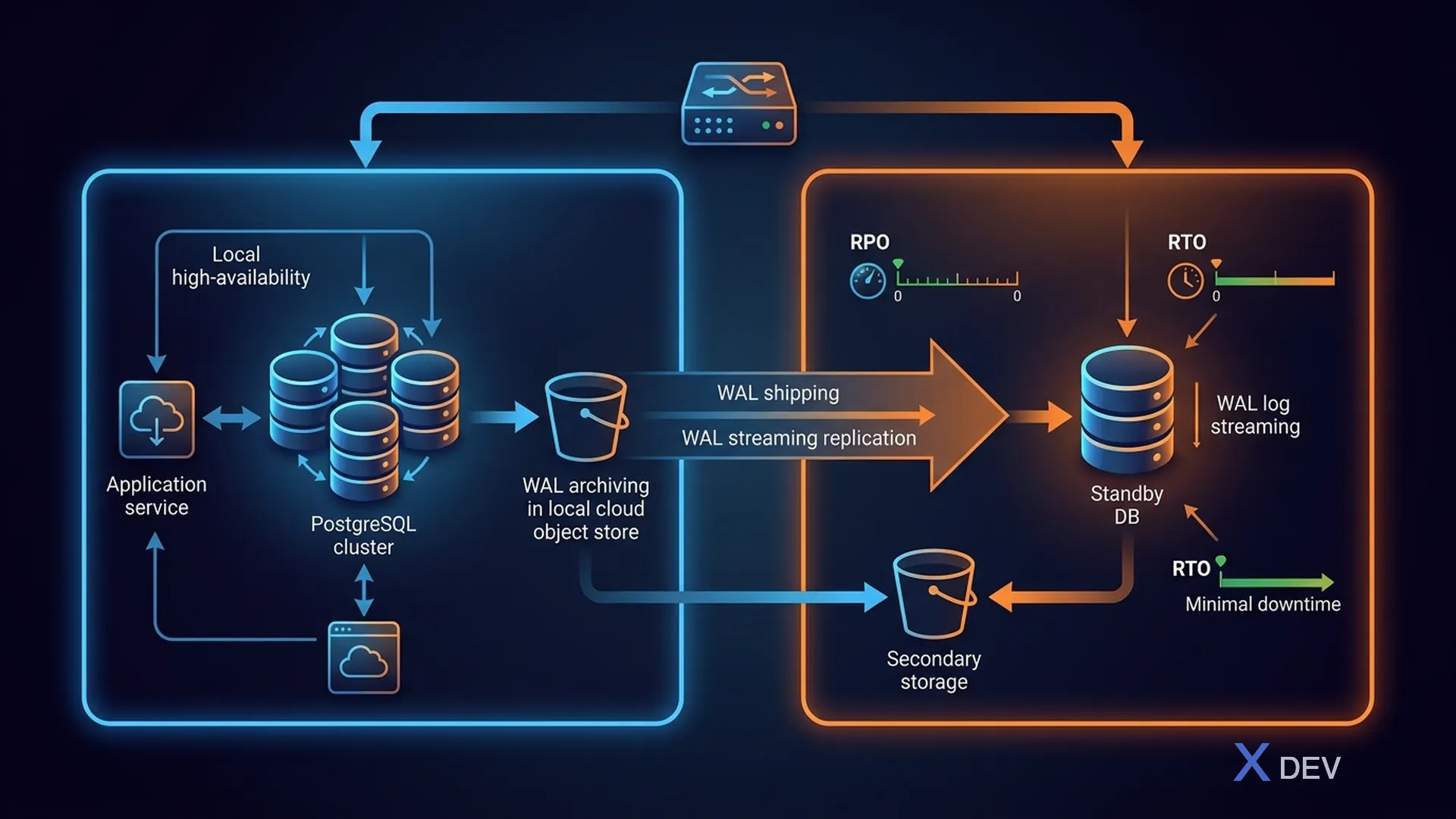
PRIMARY REGION (ap-southeast-1: Singapore):
- pg-primary (R/W) → pg-replica (R/O) — sync replication
- WAL streaming (async) tới DR region
DR REGION (ap-northeast-1: Tokyo):
- pg-dr (async replica, read-only) — Lag: < 1 minute
- pgBackRest S3 backup (encrypted)
- Standby microservices (cold/warm)
Failover: DNS switch + Patroni promote DR — RPO < 1 minute, RTO < 15 minutes (automated)
5.2. DR Replication Setup
#!/bin/bash
# setup-dr-replica.sh
# Setup cross-region DR replica

set -euo pipefail

PRIMARY_HOST="pg-primary.ap-southeast-1.hospital.internal"
DR_HOST="pg-dr.ap-northeast-1.hospital.internal"
REPLICATION_USER="replicator"
PG_DATA="/var/lib/postgresql/16/main"

echo "=== Setting up DR Replica ==="
echo "Primary: ${PRIMARY_HOST}"
echo "DR: ${DR_HOST}"

# 1. Stop PostgreSQL on DR node
systemctl stop postgresql

# 2. Backup existing data
if [ -d "${PG_DATA}" ]; then
    mv "${PG_DATA}" "${PG_DATA}.backup.$(date +%Y%m%d)"
fi

# 3. Base backup from primary
pg_basebackup \
    --host="${PRIMARY_HOST}" \
    --port=5432 \
    --username="${REPLICATION_USER}" \
    --pgdata="${PG_DATA}" \
    --wal-method=stream \
    --checkpoint=fast \
    --progress \
    --verbose

# 4. Configure as standby
cat > "${PG_DATA}/postgresql.auto.conf" << EOF
# DR Replica Configuration
primary_conninfo = 'host=${PRIMARY_HOST} port=5432 user=${REPLICATION_USER} password=${PG_REPLICATION_PASSWORD} sslmode=verify-full sslcert=/etc/ssl/certs/pg-client.crt sslkey=/etc/ssl/private/pg-client.key sslrootcert=/etc/ssl/certs/ca.crt application_name=dr-replica'
primary_slot_name = 'dr_replica'
recovery_target_timeline = 'latest'
restore_command = 'pgbackrest --stanza=healthcare archive-get %f "%p"'

# Performance
max_standby_streaming_delay = 30s
max_standby_archive_delay = 60s
hot_standby = on
hot_standby_feedback = on
EOF

# 5. Create standby signal
touch "${PG_DATA}/standby.signal"

# 6. Fix permissions
chown -R postgres:postgres "${PG_DATA}"
chmod 700 "${PG_DATA}"

# 7. Start PostgreSQL
systemctl start postgresql

# 8. Verify replication
sleep 5
REPLAY_LAG=$(psql -h localhost -tAc \
    "SELECT EXTRACT(EPOCH FROM replay_lag) FROM pg_stat_wal_receiver" 2>/dev/null)
echo "Replication lag: ${REPLAY_LAG:-N/A} seconds"

echo "=== DR Replica setup complete ==="
6. Microservices State Recovery
6.1. Recovery Scope
| Component | State | Recovery |
|---|---|---|
| PostgreSQL | Patient data (PHI) | PITR/Replica |
| Kafka | Consumer offsets | Reset offset |
| Kafka | Topic data | Replay logs |
| Keycloak | Realm, users, roles | Realm export |
| HashiCorp Vault | Encryption keys | Snapshot |
| Elasticsearch | Audit logs | Snapshot |
| Application Config | ConfigMaps, Secrets | Git + Velero |
| Container Images | Docker images | Registry |
| Certificates | TLS certs | cert-manager |
6.2. Kafka Consumer Offset Recovery
#!/bin/bash
# kafka-recovery.sh
# Recovery Kafka consumer offsets và topics

set -euo pipefail

KAFKA_BOOTSTRAP="kafka.hospital.internal:9093"
GROUP_ID="patient-service"

echo "=== Kafka Recovery ==="

# Option 1: Reset to latest (skip missed messages)
echo "Resetting consumer group to latest..."
kafka-consumer-groups.sh \
    --bootstrap-server "${KAFKA_BOOTSTRAP}" \
    --group "${GROUP_ID}" \
    --reset-offsets \
    --to-latest \
    --all-topics \
    --execute \
    --command-config /etc/kafka/client.properties

# Option 2: Reset to specific timestamp
# kafka-consumer-groups.sh \
#     --bootstrap-server "${KAFKA_BOOTSTRAP}" \
#     --group "${GROUP_ID}" \
#     --reset-offsets \
#     --to-datetime "2024-03-15T00:00:00.000" \
#     --all-topics \
#     --execute \
#     --command-config /etc/kafka/client.properties

# Option 3: Reset to specific offset
# kafka-consumer-groups.sh \
#     --bootstrap-server "${KAFKA_BOOTSTRAP}" \
#     --group "${GROUP_ID}" \
#     --reset-offsets \
#     --to-offset 12345 \
#     --topic healthcare.patient-events \
#     --execute \
#     --command-config /etc/kafka/client.properties

echo "Current consumer group status:"
kafka-consumer-groups.sh \
    --bootstrap-server "${KAFKA_BOOTSTRAP}" \
    --group "${GROUP_ID}" \
    --describe \
    --command-config /etc/kafka/client.properties
6.3. Keycloak Realm Backup & Restore
#!/bin/bash
# keycloak-backup.sh
# Backup Keycloak realm configuration

set -euo pipefail

KC_URL="${KEYCLOAK_URL:-http://keycloak:8080}"
REALM="healthcare"
BACKUP_DIR="/var/backups/keycloak"
DATE=$(date +%Y%m%d_%H%M%S)

# Get admin token
TOKEN=$(curl -s -X POST "${KC_URL}/realms/master/protocol/openid-connect/token" \
    -d "client_id=admin-cli" \
    -d "username=admin" \
    -d "password=${KC_ADMIN_PASSWORD}" \
    -d "grant_type=password" | jq -r '.access_token')

# Export realm (includes users, roles, clients, groups)
echo "Exporting realm: ${REALM}"
curl -s -H "Authorization: Bearer ${TOKEN}" \
    "${KC_URL}/admin/realms/${REALM}" \
    -o "${BACKUP_DIR}/realm-${REALM}-${DATE}.json"

# Export users separately (with credentials for full restore)
curl -s -H "Authorization: Bearer ${TOKEN}" \
    "${KC_URL}/admin/realms/${REALM}/users?max=10000" \
    -o "${BACKUP_DIR}/users-${REALM}-${DATE}.json"

# Encrypt backup
openssl enc -aes-256-cbc -salt \
    -in "${BACKUP_DIR}/realm-${REALM}-${DATE}.json" \
    -out "${BACKUP_DIR}/realm-${REALM}-${DATE}.json.enc" \
    -pass file:/etc/healthcare/backup-encryption-key \
    -pbkdf2 -iter 100000

rm "${BACKUP_DIR}/realm-${REALM}-${DATE}.json"

echo "Keycloak realm backup: ${BACKUP_DIR}/realm-${REALM}-${DATE}.json.enc"
7. Kubernetes DR với Velero
7.1. Velero Configuration
# velero-install.yaml
apiVersion: v1
kind: Namespace
metadata:
  name: velero
---
# Velero installation values
# helm install velero vmware-tanzu/velero -f velero-values.yaml -n velero
configuration:
  backupStorageLocation:
    - name: default
      provider: aws
      bucket: hospital-k8s-backups
      config:
        region: ap-southeast-1
        s3ForcePathStyle: true
  volumeSnapshotLocation:
    - name: default
      provider: aws
      config:
        region: ap-southeast-1

credentials:
  useSecret: true
  secretContents:
    cloud: |
      [default]
      aws_access_key_id=AKIAIOSFODNN7EXAMPLE
      aws_secret_access_key=wJalrXUtnFEMI/K7MDENG/bPxRfiCYEXAMPLEKEY

initContainers:
  - name: velero-plugin-for-aws
    image: velero/velero-plugin-for-aws:v1.9.0
    volumeMounts:
      - name: plugins
        mountPath: /target

defaultVolumesToFsBackup: true

schedules:
  healthcare-daily:
    schedule: "0 3 * * *"
    template:
      ttl: "720h0m0s"  # 30 days
      includedNamespaces:
        - healthcare
      labelSelector:
        matchLabels:
          backup: "true"
      snapshotVolumes: true
      storageLocation: default
7.2. Velero Backup & Restore Commands
#!/bin/bash
# velero-healthcare.sh
# Kubernetes DR operations cho healthcare

case "${1:-}" in
    backup)
        echo "Creating healthcare namespace backup..."
        velero backup create healthcare-$(date +%Y%m%d-%H%M) \
            --include-namespaces healthcare \
            --snapshot-volumes \
            --default-volumes-to-fs-backup \
            --wait
        ;;

    restore)
        BACKUP_NAME="${2:-}"
        if [ -z "$BACKUP_NAME" ]; then
            echo "Available backups:"
            velero backup get | grep healthcare
            exit 1
        fi

        echo "Restoring from backup: ${BACKUP_NAME}"
        velero restore create \
            --from-backup "${BACKUP_NAME}" \
            --include-namespaces healthcare \
            --restore-volumes \
            --wait
        ;;

    list)
        echo "=== Backups ==="
        velero backup get | grep healthcare
        echo ""
        echo "=== Restores ==="
        velero restore get | grep healthcare
        ;;

    *)
        echo "Usage: $0 {backup|restore <backup-name>|list}"
        ;;
esac
8. DR Testing & Validation
8.1. DR Test Runbook
Healthcare DR Test Runbook:
Pre-Test (T-1 week):
- Notify all stakeholders
- Verify backup integrity (
pgbackrest verify) - Confirm DR environment is ready
- Review escalation contacts
- Prepare rollback plan
Test Execution:
- T+0:00 — Simulate primary failure
- T+0:01 — Verify automated failover triggered
- T+0:05 — Verify DR database accessible
- T+0:10 — Verify application connectivity
- T+0:15 — Verify PHI data integrity (record counts)
- T+0:20 — Test critical operations: Patient lookup, Lab result entry, Prescription creation, Audit log writing
- T+0:30 — Verify audit trail continuity
- T+0:45 — Performance benchmarks
Post-Test:
- Document actual RTO achieved
- Document actual RPO (data loss)
- Document any issues encountered
- Update DR plan based on findings
- Failback to primary
- Verify failback successful
- Submit test report to compliance
Frequency: Quarterly (HIPAA Addressable §164.308(a)(7)(iv))
8.2. Automated DR Test Script
#!/bin/bash
# dr-test.sh
# Automated DR testing script for healthcare systems

set -euo pipefail

DR_HOST="${DR_HOST:-pg-dr.hospital.internal}"
DR_PORT="${DR_PORT:-5432}"
DR_DB="healthcare"
DR_USER="app_user"
REPORT_FILE="dr-test-report-$(date +%Y%m%d_%H%M%S).json"

PASS=0
FAIL=0
TOTAL_START=$(date +%s)

log_test() {
    local test_name=$1
    local status=$2
    local duration=$3
    local details=$4

    if [ "$status" = "PASS" ]; then ((PASS++)); else ((FAIL++)); fi

    echo "{\"test\":\"${test_name}\",\"status\":\"${status}\",\"duration_ms\":${duration},\"details\":\"${details}\"}" >> "${REPORT_FILE}"
    echo "[$status] ${test_name} (${duration}ms): ${details}"
}

echo "=== Healthcare DR Test - $(date) ===" | tee "${REPORT_FILE}"

# Test 1: Database connectivity
START=$(date +%s%N)
if pg_isready -h "$DR_HOST" -p "$DR_PORT" -d "$DR_DB" > /dev/null 2>&1; then
    DURATION=$(( ($(date +%s%N) - START) / 1000000 ))
    log_test "db_connectivity" "PASS" "$DURATION" "PostgreSQL is accepting connections"
else
    DURATION=$(( ($(date +%s%N) - START) / 1000000 ))
    log_test "db_connectivity" "FAIL" "$DURATION" "Cannot connect to DR database"
fi

# Test 2: Patient data integrity
START=$(date +%s%N)
PATIENT_COUNT=$(psql -h "$DR_HOST" -p "$DR_PORT" -U "$DR_USER" -d "$DR_DB" \
    -tAc "SELECT COUNT(*) FROM healthcare.patients" 2>/dev/null || echo "0")
DURATION=$(( ($(date +%s%N) - START) / 1000000 ))
if [ "$PATIENT_COUNT" -gt 0 ]; then
    log_test "patient_data_integrity" "PASS" "$DURATION" "Patient records: ${PATIENT_COUNT}"
else
    log_test "patient_data_integrity" "FAIL" "$DURATION" "No patient records found"
fi

# Test 3: Audit log integrity
START=$(date +%s%N)
AUDIT_COUNT=$(psql -h "$DR_HOST" -p "$DR_PORT" -U "$DR_USER" -d "$DR_DB" \
    -tAc "SELECT COUNT(*) FROM compliance.audit_logs" 2>/dev/null || echo "0")
DURATION=$(( ($(date +%s%N) - START) / 1000000 ))
if [ "$AUDIT_COUNT" -gt 0 ]; then
    log_test "audit_log_integrity" "PASS" "$DURATION" "Audit log entries: ${AUDIT_COUNT}"
else
    log_test "audit_log_integrity" "FAIL" "$DURATION" "No audit log entries"
fi

# Test 4: Replication lag
START=$(date +%s%N)
LAG=$(psql -h "$DR_HOST" -p "$DR_PORT" -U "$DR_USER" -d "$DR_DB" \
    -tAc "SELECT EXTRACT(EPOCH FROM NOW() - pg_last_xact_replay_timestamp())::INTEGER" 2>/dev/null || echo "-1")
DURATION=$(( ($(date +%s%N) - START) / 1000000 ))
if [ "$LAG" -ge 0 ] && [ "$LAG" -lt 300 ]; then
    log_test "replication_lag" "PASS" "$DURATION" "Lag: ${LAG}s (< 5 min)"
else
    log_test "replication_lag" "FAIL" "$DURATION" "Lag: ${LAG}s (too high or unknown)"
fi

# Test 5: Encrypted columns readable
START=$(date +%s%N)
ENCRYPTED=$(psql -h "$DR_HOST" -p "$DR_PORT" -U "$DR_USER" -d "$DR_DB" \
    -tAc "SELECT full_name FROM healthcare.patients LIMIT 1" 2>/dev/null || echo "ERROR")
DURATION=$(( ($(date +%s%N) - START) / 1000000 ))
if [[ "$ENCRYPTED" == vault:* ]] || [ "$ENCRYPTED" != "ERROR" ]; then
    log_test "encrypted_data_access" "PASS" "$DURATION" "Encrypted columns accessible"
else
    log_test "encrypted_data_access" "FAIL" "$DURATION" "Cannot read encrypted columns"
fi

# Test 6: Write capability (after promotion)
START=$(date +%s%N)
WRITE_TEST=$(psql -h "$DR_HOST" -p "$DR_PORT" -U "$DR_USER" -d "$DR_DB" \
    -tAc "SELECT pg_is_in_recovery()" 2>/dev/null || echo "ERROR")
DURATION=$(( ($(date +%s%N) - START) / 1000000 ))
if [ "$WRITE_TEST" = "f" ]; then
    log_test "write_capability" "PASS" "$DURATION" "Database is in read-write mode"
elif [ "$WRITE_TEST" = "t" ]; then
    log_test "write_capability" "PASS" "$DURATION" "Database is in recovery (replica) — promote needed for writes"
else
    log_test "write_capability" "FAIL" "$DURATION" "Cannot determine database mode"
fi

# Summary
TOTAL_DURATION=$(( $(date +%s) - TOTAL_START ))
TOTAL=$((PASS + FAIL))

echo ""
echo "=== DR TEST SUMMARY ==="
echo "Total tests: ${TOTAL}"
echo "Passed: ${PASS}"
echo "Failed: ${FAIL}"
echo "Duration: ${TOTAL_DURATION}s"

if [ "$FAIL" -eq 0 ]; then
    echo "RESULT: ALL TESTS PASSED"
else
    echo "RESULT: ${FAIL} TESTS FAILED — Review and remediate"
fi
9. Backup & DR Checklist
9.1. Comprehensive Healthcare DR Checklist
| # | Item | Frequency | Owner | Status |
|---|---|---|---|---|
| 1 | Full database backup (pgBackRest) | Weekly | DBA | |
| 2 | Differential backup | Daily | DBA | |
| 3 | Incremental backup | Hourly | Automated | |
| 4 | Backup encryption verification | Weekly | Security | |
| 5 | Backup integrity check (pgbackrest verify) | Daily | Automated | |
| 6 | PITR test restore | Monthly | DBA | |
| 7 | Replication lag monitoring | Real-time | Monitoring | |
| 8 | DR failover test | Quarterly | DR Team | |
| 9 | Full DR simulation | Annually | All Teams | |
| 10 | Keycloak realm backup | Daily | DevOps | |
| 11 | Vault snapshot | Daily | Security | |
| 12 | Kafka topic backup | Daily | DevOps | |
| 13 | Kubernetes state backup (Velero) | Daily | DevOps | |
| 14 | Audit log backup verification | Weekly | Compliance | |
| 15 | DR documentation review | Quarterly | DR Lead | |
| 16 | Backup retention check (6-year HIPAA) | Monthly | Compliance | |
| 17 | Cross-region backup sync | Real-time | Automated | |
| 18 | Emergency contact list update | Quarterly | Management | |
| 19 | RPO/RTO metrics review | Monthly | DR Lead | |
| 20 | Compliance report submission | Annually | CISO |
9.2. Backup Monitoring Queries
-- Monitor backup status và health

-- 1. Kiểm tra WAL archiving status
SELECT
    archived_count,
    last_archived_wal,
    last_archived_time,
    failed_count,
    last_failed_wal,
    last_failed_time
FROM pg_stat_archiver;

-- 2. Replication lag
SELECT
    client_addr,
    application_name,
    state,
    sent_lsn,
    write_lsn,
    flush_lsn,
    replay_lsn,
    pg_wal_lsn_diff(sent_lsn, replay_lsn) AS lag_bytes,
    write_lag,
    flush_lag,
    replay_lag
FROM pg_stat_replication;

-- 3. Replication slot status
SELECT
    slot_name,
    slot_type,
    active,
    restart_lsn,
    confirmed_flush_lsn,
    pg_wal_lsn_diff(pg_current_wal_lsn(), restart_lsn) AS slot_lag_bytes
FROM pg_replication_slots;

-- 4. Database size (for backup planning)
SELECT
    pg_database.datname AS database_name,
    pg_size_pretty(pg_database_size(pg_database.datname)) AS size
FROM pg_database
ORDER BY pg_database_size(pg_database.datname) DESC;

-- 5. Table sizes (identify largest tables for backup optimization)
SELECT
    schemaname || '.' || tablename AS table_name,
    pg_size_pretty(pg_total_relation_size(schemaname || '.' || tablename)) AS total_size,
    pg_size_pretty(pg_relation_size(schemaname || '.' || tablename)) AS table_size,
    pg_size_pretty(pg_indexes_size(schemaname || '.' || tablename)) AS index_size
FROM pg_tables
WHERE schemaname IN ('healthcare', 'compliance')
ORDER BY pg_total_relation_size(schemaname || '.' || tablename) DESC
LIMIT 20;
Tổng kết
Trong bài học này, chúng ta đã xây dựng Backup, Disaster Recovery & Business Continuity toàn diện cho healthcare:
- HIPAA Contingency Plan: Data backup plan, disaster recovery plan, emergency mode operations — đáp ứng §164.308(a)(7)
- RTO/RPO Requirements: Critical systems (EHR, Lab) cần RPO < 1 min, RTO < 15 min; xác định criticality levels
- PostgreSQL Backup: pg_dump (logical), pg_basebackup (physical), so sánh methods theo RPO/speed/complexity
- pgBackRest: Production backup solution với incremental backup, AES-256 encryption, S3 storage, automated scheduling (hourly/daily/weekly)
- PITR: Point-in-time recovery từ WAL archives — restore database tới bất kỳ thời điểm cụ thể
- Patroni HA: Automated failover với etcd consensus, synchronous replication (RPO = 0), HAProxy load balancing
- Cross-Region DR: Async replication tới DR region, encrypted WAL streaming, failover procedure
- Microservices Recovery: Kafka consumer offset reset, Keycloak realm export, Vault snapshots
- Kubernetes DR: Velero backup cho namespace state, PV snapshots, scheduled backups
- DR Testing: Quarterly test runbook, automated DR test scripts, validation checklist
Bài tập
-
pgBackRest Setup: Cài đặt pgBackRest trên local PostgreSQL. Cấu hình stanza
healthcarevới local repository. Tạo full backup, thêm data, tạo incremental backup. Verify backup bằngpgbackrest verify. Test PITR: restore database tới thời điểm trước khi thêm data. -
Patroni HA Cluster: Triển khai Docker Compose stack (etcd × 3, PostgreSQL × 2, HAProxy). Verify primary/replica roles bằng
patronictl list. Verify synchronous replication hoạt động. Test failover: stop primary container, verify replica tự promote. Đo thời gian failover (target < 30 seconds). -
DR Test Script: Customize script
dr-test.shcho environment của bạn. Thêm các test cases: SSL certificate validity, application endpoint health, API response time. Chạy test script và tạo report. Fix bất kỳ failures nào. Schedule chạy monthly bằng cron. -
End-to-End DR Simulation: Backup toàn bộ healthcare stack (PostgreSQL + Keycloak + config). Simulate disaster: destroy primary database. Restore từ backup (PITR). Restore Keycloak realm. Verify: login Keycloak, query patients, audit logs intact. Document: actual RPO, actual RTO, lessons learned.
| ◀ Bài trước | Bài tiếp theo ▶ |
|---|---|
| Bài 19: Data Masking, Anonymization & De-identification cho PHI | Bài 21: Zero Trust Architecture cho Hệ thống Y Tế |