
ETL OMOP là phần khó nhất và tốn thời gian nhất của dự án. Tin tốt: cộng đồng OHDSI đã chuẩn hoá quy trình + bộ công cụ. Bài viết này hướng dẫn từ profile source đến deploy production.
1. Quy trình chuẩn OHDSI
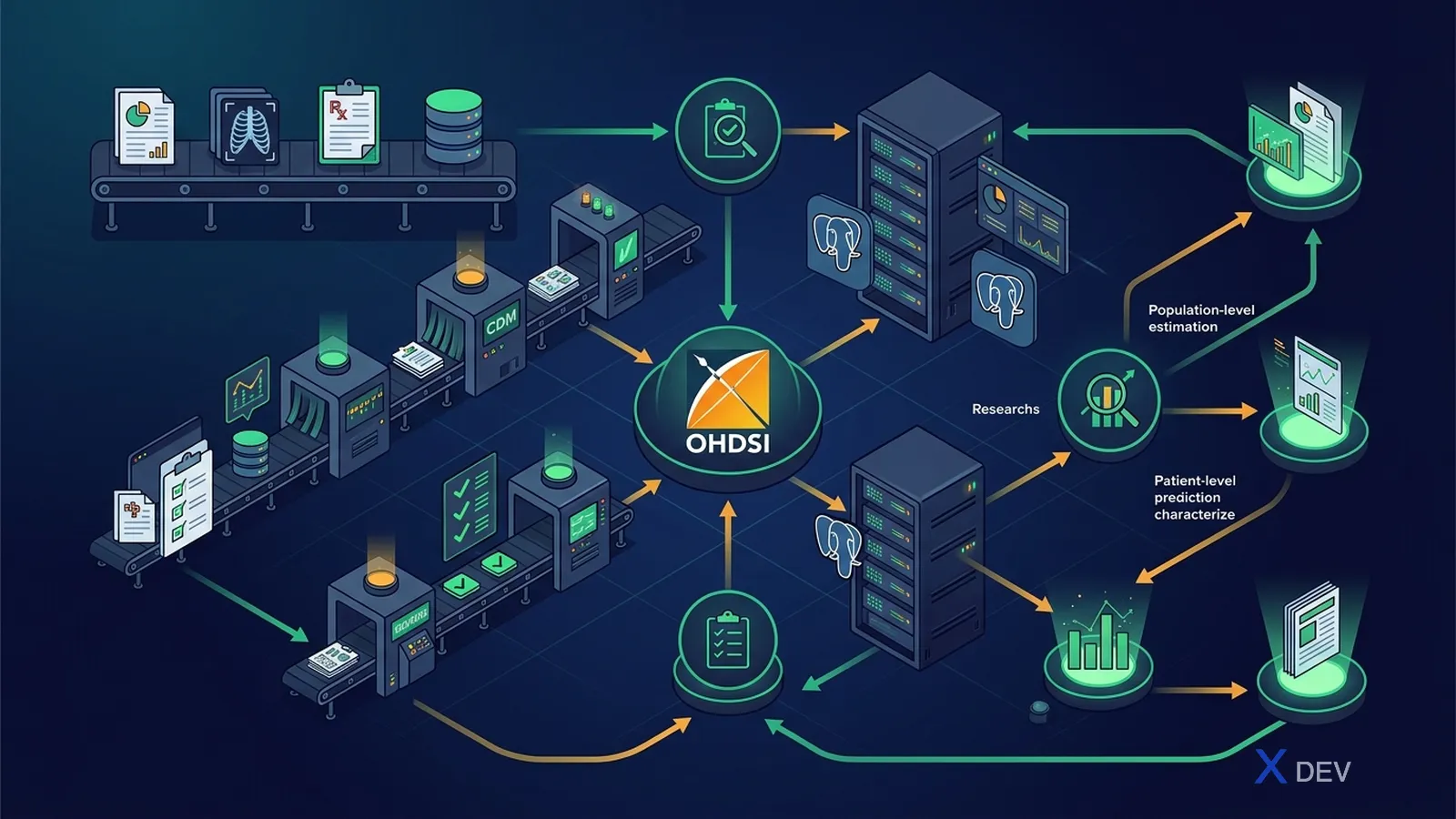
7 bước chuẩn:
- Profile source bằng WhiteRabbit
- Thiết kế table-level mapping bằng RabbitInAHat
- Map code (vocabulary) bằng USAGI
- Viết ETL spec document
- Implement ETL bằng SQL / dbt / Perseus
- Validate bằng DQD + ACHILLES
- Deploy + lịch trình incremental
2. WhiteRabbit — profile source
WhiteRabbit là tool Java, scan source database (Postgres, Oracle, SQL Server, MySQL, ...) và sinh report HTML mô tả:
- List bảng + row count
- Mỗi cột: data type, # distinct value, top 100 value frequency, % null
- File CSV/Excel cho mỗi bảng
# Cài
wget https://github.com/OHDSI/WhiteRabbit/releases/download/v0.10.x/WhiteRabbit_v0.10.x.zip
unzip WhiteRabbit_v0.10.x.zip
cd WhiteRabbit
./bin/whiteRabbit.sh
GUI:
- Source: PostgreSQL, server, user, pass, schema
- Working folder: nơi xuất report
- Tables to scan: chọn tất cả hoặc subset
- "Scan tables" → vài phút sau xuất
ScanReport.xlsx
2.1 Đọc Scan Report
Mỗi tab trong xlsx = 1 bảng nguồn. Cột:
Field= tên cộtType= data typeN rows= số hàngDistinct values= unique countFrequency= top values + count
Cảnh báo cần để ý:
- Cột "ICD code" mà có 80% distinct là free text → vấn đề
- Cột date mà 30% là
1900-01-01→ default fill, treat as null - Cột
genderchỉ có "M/F" nhưng có thêm "U" 2% → cần xử lý
2.2 Best practice
- Scan ALL bảng dù bạn chỉ định ETL subset (để hiểu toàn cảnh)
- Lưu Scan Report vào Git (anonymized) — đây là tài liệu cốt lõi
- Re-scan mỗi quý vì source data thay đổi
3. RabbitInAHat — thiết kế mapping
Tool drag-and-drop để vẽ mapping source table → CDM table.
./bin/rabbitInAHat.sh
Workflow:
- File → Open Scan Report (xlsx vừa generate)
- File → Open CDM (chọn version 5.4)
- Drag từ source table sang CDM table → đường nối visual
- Click vào đường nối → write description (vì sao map, transform gì)
- Drag column-level từ source → CDM column
- File → Generate ETL Document → ra file Word/Markdown
3.1 Ví dụ mapping (HIS VN → OMOP)
| Source HIS | OMOP CDM | Note |
|---|---|---|
bn_dangky.id_bn | PERSON.person_id | Pseudonymize CCCD |
bn_dangky.gioi_tinh | PERSON.gender_concept_id | M=8507, F=8532 |
bn_dangky.ngay_sinh | PERSON.year_of_birth + birth_datetime | |
kham_benh.ma_kham | VISIT_OCCURRENCE.visit_occurrence_id | |
kham_benh.loai_kham | VISIT_OCCURRENCE.visit_concept_id | NT=9201, NgT=9202, CC=9203 |
chan_doan.icd10 | CONDITION_OCCURRENCE.condition_concept_id (via SNOMED map) | + condition_source_value="E11.9" |
don_thuoc.ma_thuoc_byt | DRUG_EXPOSURE.drug_concept_id (via RxNorm map qua USAGI) | |
xet_nghiem.ma_xn | MEASUREMENT.measurement_concept_id (LOINC) | value_as_number, unit_concept_id |
3.2 ETL Spec là tài liệu sống
Format chuẩn OHDSI:
- Section per CDM table
- Mapping table (column source → column CDM, transform rule)
- Edge case (giá trị NULL, default, lookup)
- Concept mapping reference (link USAGI session)
Lưu vào Git, version với mỗi data refresh.
4. USAGI — code mapping
Đã giới thiệu ở Vocabulary deep dive. Nhắc lại workflow:

4.1 Best practice
- Map theo frequency: top 100 ICD-10 = 80% volume → ưu tiên
- 2 reviewer độc lập + reconcile cho code quan trọng
- Lưu output CSV vào Git
- Custom concept (vd "tăng huyết áp giai đoạn 1 theo ESC 2018") → tạo Concept ID 2-billion+
4.2 Output file → SOURCE_TO_CONCEPT_MAP
INSERT INTO source_to_concept_map (
  source_code, source_concept_id, source_vocabulary_id,
  source_code_description, target_concept_id, target_vocabulary_id,
  valid_start_date, valid_end_date, invalid_reason
)
SELECT
  source_code, 0, 'ICD10VN',
  source_name, target_concept_id, 'SNOMED',
  '2026-01-01', '2099-12-31', NULL
FROM external_usagi_export;
5. Implementation: SQL approach
Nguyên tắc: ETL idempotent, có thể re-run an toàn.
-- Step 1: Truncate hoặc partition swap
TRUNCATE TABLE cdm.person;

-- Step 2: Insert từ source (qua FDW hoặc staging)
INSERT INTO cdm.person (
  person_id, gender_concept_id, year_of_birth, race_concept_id,
  ethnicity_concept_id, person_source_value, gender_source_value
)
SELECT
  ROW_NUMBER() OVER (ORDER BY src.id_bn) AS person_id,
  CASE src.gioi_tinh
    WHEN 'M' THEN 8507
    WHEN 'F' THEN 8532
    ELSE 0
  END,
  EXTRACT(YEAR FROM src.ngay_sinh)::INT,
  0,  -- race unknown (or custom VN concept)
  0,
  -- pseudonymize CCCD
  encode(hmac(src.cccd::bytea, 'secret-key'::bytea, 'sha256'), 'hex'),
  src.gioi_tinh
FROM staging.bn_dangky src;

-- Step 3: Build PERSON_MAP để lookup ở các bảng khác
CREATE TABLE cdm.person_map AS
SELECT id_bn AS source_id, person_id
FROM cdm.person
JOIN staging.bn_dangky USING (...);
5.1 Pattern lookup standard concept
INSERT INTO cdm.condition_occurrence (
  condition_occurrence_id, person_id, condition_concept_id,
  condition_start_date, condition_type_concept_id,
  condition_source_value, condition_source_concept_id, visit_occurrence_id
)
SELECT
  ROW_NUMBER() OVER () AS condition_occurrence_id,
  pm.person_id,
  COALESCE(cr.target_concept_id, 0) AS condition_concept_id,
  src.ngay_chan_doan,
  32020 AS condition_type_concept_id,
  src.icd10 AS condition_source_value,
  src_concept.concept_id AS condition_source_concept_id,
  vm.visit_occurrence_id
FROM staging.chan_doan src
JOIN cdm.person_map pm ON src.id_bn = pm.source_id
JOIN cdm.visit_map vm ON src.ma_kham = vm.source_id
LEFT JOIN concept src_concept
  ON src_concept.vocabulary_id = 'ICD10CM'
  AND src_concept.concept_code = src.icd10
LEFT JOIN concept_relationship cr
  ON cr.concept_id_1 = src_concept.concept_id
  AND cr.relationship_id = 'Maps to'
LEFT JOIN concept tgt
  ON cr.concept_id_2 = tgt.concept_id
  AND tgt.standard_concept = 'S';
6. Implementation: dbt approach (modern)
dbt = SQL + Jinja + version control + test. Pattern phổ biến 2026:
dbt_project/
├── models/
│   ├── staging/
│   │   ├── stg_bn_dangky.sql
│   │   ├── stg_kham_benh.sql
│   │   └── stg_chan_doan.sql
│   ├── intermediate/
│   │   ├── int_person_map.sql
│   │   └── int_visit_map.sql
│   └── cdm/
│       ├── person.sql
│       ├── visit_occurrence.sql
│       ├── condition_occurrence.sql
│       └── ...
├── tests/
│   └── cdm_constraints.sql
└── dbt_project.yml
6.1 Model dbt example
-- models/cdm/condition_occurrence.sql
{{ config(materialized='table') }}

WITH source AS (
  SELECT * FROM {{ ref('stg_chan_doan') }}
),
mapping AS (
  SELECT * FROM {{ ref('int_icd10_to_snomed') }}
),
person_map AS (
  SELECT * FROM {{ ref('int_person_map') }}
)
SELECT
  ROW_NUMBER() OVER () AS condition_occurrence_id,
  pm.person_id,
  COALESCE(m.target_concept_id, 0) AS condition_concept_id,
  s.ngay_chan_doan AS condition_start_date,
  32020 AS condition_type_concept_id,
  s.icd10 AS condition_source_value
FROM source s
JOIN person_map pm ON s.id_bn = pm.source_id
LEFT JOIN mapping m ON s.icd10 = m.source_code
6.2 dbt tests
# models/cdm/schema.yml
version: 2
models:
  - name: condition_occurrence
    columns:
      - name: condition_occurrence_id
        tests: [unique, not_null]
      - name: person_id
        tests:
          - not_null
          - relationships:
              to: ref('person')
              field: person_id
      - name: condition_concept_id
        tests:
          - not_null
          - dbt_utils.accepted_range:
              min_value: 0
7. Perseus — modern OHDSI ETL tool
Perseus là tool web (OHDSI EHDEN community) thay thế dần RabbitInAHat:
- UI drag-drop hiện đại hơn
- Generate code dbt/SQL
- Lưu mapping vào DB cộng tác
- Tích hợp USAGI và DQD
- Docker compose dễ deploy
git clone https://github.com/OHDSI/Perseus
cd Perseus
docker compose up
# truy cập localhost:80
8. Incremental ETL
Dataset HIS lớn → không re-ETL toàn bộ mỗi đêm. Pattern incremental:

Lưu ý:
- Track
updated_atở source — nếu không có → thêm trigger hoặc CDC (Debezium) - Drug_Era / Condition_Era phải re-compute cho person thay đổi
- Snapshot vocabulary version dùng tại thời điểm ETL (vì concept_id stable nhưng
Maps tothay đổi)
9. Validate ETL
3 layer:
- dbt tests (relationships, unique, not_null) — chạy mỗi lần ETL
- Data Quality Dashboard — 3000+ rule auto, chạy hàng tuần
- ACHILLES — báo cáo descriptive, so với histo
Xem chi tiết ở bài ATLAS, Data Quality Dashboard và ACHILLES.
10. Performance tip
| Vấn đề | Giải pháp |
|---|---|
| ETL chậm | Bulk COPY thay INSERT, parallel partition theo person_id range |
| Lookup vocabulary chậm | Materialize lookup table source_to_standard |
| Concept_ancestor query đụng full scan | Materialize "diabetes_descendant_set" cho cohort phổ biến |
| Drug_Era tính lại lâu | Compute incrementally cho person thay đổi |
| Data lớn (10M+ person) | Partition CDM theo year hoặc person_id range |
11. CI/CD pattern
# .github/workflows/etl.yml
name: OMOP ETL Daily
on:
  schedule:
    - cron: '0 2 * * *'  # 2 AM UTC = 9 AM VN
jobs:
  etl:
    runs-on: self-hosted  # in-network access to source DB
    steps:
      - uses: actions/checkout@v4
      - run: dbt deps
      - run: dbt seed
      - run: dbt run --target prod
      - run: dbt test --target prod
      - name: Run DQD
        run: Rscript scripts/run_dqd.R
      - name: Notify Slack
        if: failure()
        uses: ...
12. Tài liệu cần lưu
- ETL Specification (Markdown trong Git)
- Scan Report (xlsx, anonymized)
- USAGI session files
- SOURCE_TO_CONCEPT_MAP
- DQD report mỗi run
- ACHILLES history
- Vocabulary version log
13. Anti-pattern
- ❌ ETL ad-hoc bằng Python/Pandas, không có spec → không reproducible
- ❌ Hardcode mapping trong code → khó update khi danh mục BYT thay đổi
- ❌ Không validate plausibility → DQD báo lỗi khi dataset lớn dần
- ❌ Quên ETL incremental → 8h/đêm chỉ để re-process data không đổi
- ❌ Không snapshot vocabulary → không reproduce được analytic 6 tháng trước
- ❌ Map code 1-1 mà không xem hierarchy → mất context
Kết luận
ETL OMOP là dự án không phải task. Đầu tư đúng workflow (WhiteRabbit → RabbitInAHat → USAGI → dbt + DQD) tiết kiệm hàng tháng so với làm tự do. Quan trọng nhất: tài liệu hoá mọi quyết định mapping.
Bài tiếp: ATLAS, Data Quality Dashboard và ACHILLES — vận hành OMOP analytics.