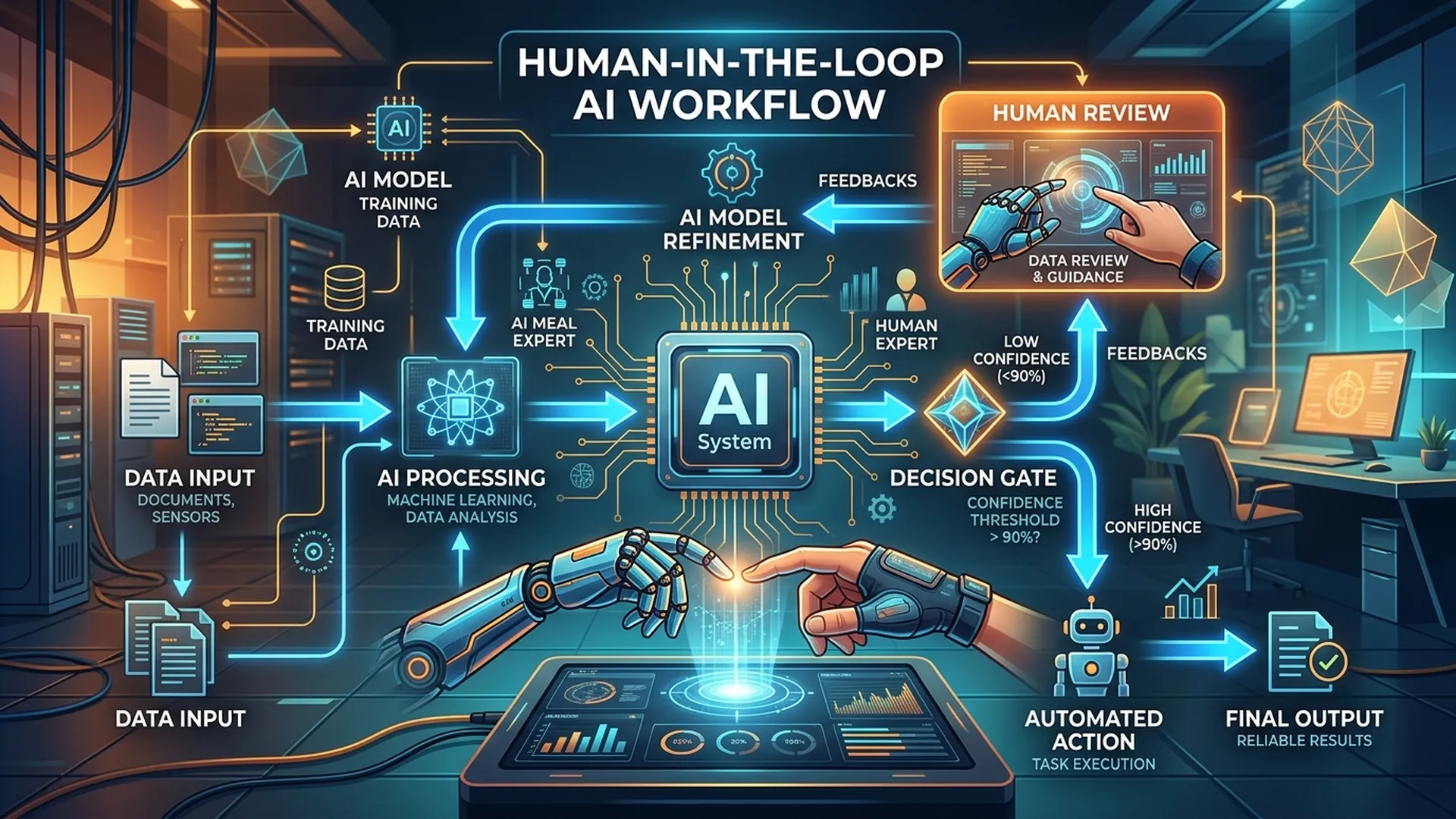
Không có AI nào perfect. Câu hỏi không phải "khi nào AI sai" mà là "khi AI sai, hệ thống xử lý như thế nào và ai chịu trách nhiệm". Đó là bài toán thiết kế HITL (Human-in-the-loop) mà BA cần giải quyết.
1. HITL là gì và tại sao quan trọng?
Human-in-the-loop là pattern thiết kế trong đó con người tham gia vào quy trình AI tại các điểm quyết định cụ thể, thay vì để AI chạy hoàn toàn tự động.
3 lý do cần HITL:
- Confidence gap — AI không đủ chắc chắn để tự quyết định
- High-stakes decision — Sai lầm quá đắt (y tế, tài chính, pháp lý)
- Regulatory requirement — Một số ngành yêu cầu human review bắt buộc (GDPR Article 22)
2. Escalation Trigger Design
2.1 Loại Trigger
| Trigger Type | Ví dụ | Escalation đến |
|---|---|---|
| Confidence threshold | Score < 0.80 | Queue review thông thường |
| Sensitive category | Input chứa từ nhạy cảm | Senior reviewer |
| High-value transaction | Amount > 50 triệu | Manager approval |
| New entity | Customer/case mới lần đầu | Manual onboarding flow |
| Model uncertainty flag | AI tự báo "không chắc" | Specialist team |
| Time constraint | SLA gần hết hạn | Urgent queue |
2.2 Threshold Calibration
BA không tự đặt threshold — phải calibrate với stakeholder:
Câu hỏi cần hỏi:
1. "Nếu AI sai 1 trong 10 cases, business chấp nhận không?"
   → Threshold ≥ 0.9

2. "Chi phí của false negative (bỏ sót lỗi) là bao nhiêu?"
   → Nếu cao → threshold cao hơn, chấp nhận nhiều escalation hơn

3. "Team agent review có capacity xử lý bao nhiêu cases/ngày?"
   → Ảnh hưởng ngược threshold — nếu capacity thấp, threshold phải cao hơn
3. Escalation Flow Template
[AI Processing Complete]
         ↓
[Check Trigger Conditions]
    ↙         ↘
No trigger   Trigger detected
    ↓              ↓
[Auto Action]  [Determine Escalation Level]
               ├── Level 1: Standard Queue (SLA: 4h)
               ├── Level 2: Priority Queue (SLA: 1h)
               └── Level 3: Immediate Alert (SLA: 15min)
                        ↓
               [Route to Appropriate Reviewer]
               (by skill, availability, or round-robin)
                        ↓
               [Agent Review Interface]
               ├── View AI recommendation + confidence
               ├── View original input/context
               ├── Action: Approve / Reject / Edit / Escalate
               └── Mandatory: Comment (if reject/edit)
                        ↓
               [Record Decision + Override Reason]
                        ↓
               [Feedback to Model (if applicable)]
4. Agent Review Interface Requirements
BA cần specify rõ UI requirements cho agent:
## Agent Review Screen — AC

### Must Show:
- [ ] Original input/request đầy đủ (không truncate)
- [ ] AI recommendation với confidence score
- [ ] Explanation của AI (nếu model có XAI)
- [ ] Relevant context (customer history, similar cases)
- [ ] SLA countdown (thời gian còn lại trước deadline)

### Actions Required:
- [ ] Approve (1-click với optional comment)
- [ ] Reject với mandatory reason (dropdown + free text)
- [ ] Edit AI output và submit as corrected
- [ ] Escalate to higher level với reason

### Audit Trail (auto-captured):
- [ ] Agent ID + timestamp
- [ ] Action taken
- [ ] Comment/reason
- [ ] Time spent on review (start → submit)
5. SLA & Capacity Planning
BA phải estimate workload và define SLA:
SLA Matrix
| Escalation Level | Trigger | SLA | Breach Action |
|---|---|---|---|
| Standard | Confidence 0.7-0.8 | 4 business hours | Auto-escalate to Level 2 |
| Priority | Confidence < 0.7 or high-value | 1 hour | Alert supervisor |
| Critical | Safety flag or regulatory | 15 minutes | Page on-call |
Capacity Formula
Daily escalation volume = Total requests × Escalation rate
Agent capacity needed = Daily escalation volume ÷ (cases/agent/day)

Ví dụ:
- 1000 requests/day × 15% escalation rate = 150 cases
- Agent xử lý 30 cases/day
- Cần tối thiểu 5 agents (thêm 20% buffer = 6 agents)
6. Feedback Loop Design
Escalation không phải endpoint — phải có feedback loop:
| Decision | Feedback dùng để làm gì |
|---|---|
| Agent approves AI recommendation | Positive signal, reinforce model |
| Agent overrides AI output | Negative signal + corrected label |
| Agent escalates higher | Flag for retraining data collection |
| Multiple overrides on same category | Trigger model review/retrain |
BA phải specify: Feedback frequency, labeling process, và người chịu trách nhiệm retraining trigger.
Kết luận
HITL design tốt = AI có thể release sớm hơn với ngưỡng thấp hơn, vì con người làm safety net. Ngược lại, HITL thiết kế kém = agent burnout, SLA breach, và cuối cùng tắt AI feature vì "không tin tưởng được".
BA là kiến trúc sư của balance giữa AI autonomy và human oversight.